

 PowerShell
IntelliSense fails occasionally - again
Issue Description
I am experiencing a problem with... IntelliSense failing.
1591449835-872343d1-59b3-436d-a112-c71c820037db1591449833798.zip
I feel a bit stupid filling this again but again got this issue. I am not sure if it's:
- https://github.com/PowerShell/vscode-powershell/issues/2627
Or it's more about this:
- https://github.com/PowerShell/vscode-powershell/issues/2737
But I still see hiccups that never recover. I deleted a lot of offending PowerShell modules, but since I have no clue about reasons it never recovering it's hard to say.
If you tell me what to look for, check I'm happy to do my own investigations.
Attached Logs
Follow the instructions in the README about capturing and sending logs.
Environment Information
Visual Studio Code
| Name | Version |
|---|---|
| Operating System | Windows_NT x64 10.0.19041 |
| VSCode | 1.45.1 |
| PowerShell Extension Version | 2020.6.0 |
PowerShell Information
| Name | Value |
|---|---|
| PSVersion | 5.1.19041.1 |
| PSEdition | Desktop |
| PSCompatibleVersions | 1.0 2.0 3.0 4.0 5.0 5.1.19041.1 |
| BuildVersion | 10.0.19041.1 |
| CLRVersion | 4.0.30319.42000 |
| WSManStackVersion | 3.0 |
| PSRemotingProtocolVersion | 2.3 |
| SerializationVersion | 1.1.0.1 |
Visual Studio Code Extensions
Visual Studio Code Extensions(Click to Expand)
| Extension | Author | Version |
|---|---|---|
| bracket-pair-colorizer-2 | CoenraadS | 0.1.4 |
| code-settings-sync | Shan | 3.4.3 |
| github-linker | gimenete | 0.2.3 |
| gitlens | eamodio | 10.2.1 |
| grammarly | znck | 0.12.1 |
| markdown-all-in-one | yzhang | 3.0.0 |
| material-icon-theme | PKief | 4.1.0 |
| powershell-preview | ms-vscode | 2020.6.0 |
| project-manager | alefragnani | 11.0.1 |
| vscode-markdownlint | DavidAnson | 0.36.0 |
| vscode-pull-request-github | GitHub | 0.16.0 |
| vscode-toggle-quotes | BriteSnow | 0.3.2 |
| vscode-wakatime | WakaTime | 4.0.0 |
| vscode-yaml | redhat | 0.8.0 |
| xml | DotJoshJohnson | 2.5.0 |

I found an instance in the logs of a completion request taking 35seconds (for future self, open the log file in vscode and do a regex search: \d\d\d\d\dms):
2020-06-06 15:27:34.289 +02:00 [VRB] Request 514 was abandoned due to content be modified
2020-06-06 15:27:34.289 +02:00 [DBG] Completion request canceled for file: file:///c:/Support/GitHub/Testimo/Private/SourcesDomain/GroupPolicyADM.ps1
2020-06-06 15:27:34.290 +02:00 [DBG] Finished: Routing Request (514) textDocument/completion in 35591ms
2020-06-06 15:27:34.290 +02:00 [VRB] Request 514 was cancelled
2020-06-06 15:27:34.290 +02:00 [DBG] Finished: Processing request textDocument/completion 514 in 35591ms
But I'm not sure if it was stuck in PowerShell or not. Either way, I think completion should be a cancellable action... I'm hoping PowerShell itself will handle it gracefully... so I think we should dupe this to https://github.com/PowerShell/PowerShellEditorServices/issues/1295
because I want a requirement if that work to support cancellation.
Let me discuss this in Triage tomorrow before I mark it.


I can confirm that 2020.6.0 is better, but still falls over regularly. The extension logs show requests for completions just hanging until I give up after 20+ seconds (at which point they are "cancelled", which I believe is a lie in the current implementation). This is different than the behavior seen in earlier versions in that the extension itself isn't quite toast (in those cases I'd just see the log basically stop updating), but the user experience is still similar. I still have to kill the extension all the time to get it back into a working state.
I'll try to collect some useful logs later today.

Here's an interesting snippet from a couple minutes ago:
- Does a command lookup for a function defined in the file I'm currently editing. That fails.
- An exception with a very long async stack trace about concurrent access to the pipeline
- A 52 second hang (request 8064) on a textDocument/definition call right after that, during which various extension features like folding were not working.
My log is pretty rotten with sequences like that. Also a fair number of these exceptions about entering nested pipelines.
Thanks for looking into that @mattpwhite! Looks like further motivation for https://github.com/PowerShell/PowerShellEditorServices/issues/1295

1596305359-91a018eb-cd5f-4159-a261-8ba50c0e8b2f1596305357826.zip
Another log. Basically after first cancelled event everything goes to hell. It can go to hell as quick as 5-20 minutes in.
The last years I have always moved to the ISE when writing more then 5 lines of code in PowerShell as IntelliSense is still not reliable at all. This week I am developing for Universal Dashboard and tried with VSCode as there is a plugin for UD. It is extremely painful. If the script gets a bit bigger, IntelliSense does not work at all. Closing the terminal does not solve the issue. It feels like in the old VBS times.
Another area is DSC. When writing configurations or interacting with DSC cmdlets, IntelliSense dies.
What data would help working on this?

We recently published an update to our preview extension which has addressed a number of issues, would you mind giving it a try and letting us know if you are still hitting this?

@raandree when you reference the script getting bigger, what size of script are you roughly seeing?
@SydneyhSmith, right after commenting on this issue I got the notification about the new version of the PowerShell Preview extension. It feels much better!
One issue is still there. IntelliSense works in the terminal but not in the code editor. I have created a screen recording of the behavior: https://1drv.ms/v/s!AuCqmYWYQ_kMnohF-j93qXWJsmtBXA?e=SLid98
Thanks @raandree for the screengrab that is super helpful! Noticed the red squigglies when you are expecting the completions---this may be due to the placement of the the cmd not being valid so we wouldnt expect completions to work there...what is the squiggly you are getting?

I am still seeing regularly seeing this in both latest (as of this message) stable and preview of PowerShell Integrated Console

This is expected:

Version: 1.49.2 (user setup) Commit: e5e9e69aed6e1984f7499b7af85b3d05f9a6883a Date: 2020-09-24T16:29:41.983Z Electron: 9.2.1 Chrome: 83.0.4103.122 Node.js: 12.14.1 V8: 8.3.110.13-electron.0 OS: Windows_NT x64 10.0.19041

I just want to add that for me, my problems happen on minutes/hourly basis. It's not occasional anymore. It may be related to my other issue https://github.com/PowerShell/vscode-powershell/issues/2908 but generally, it's pretty bad. I either stop using IntelliSense and try to pick things from memory or I restart session all the time. I can only imagine how it works for other people that never report issues thinking code just sucks.
@SydneyhSmith I'm still experiencing this issue pretty regularly. Do you need extra logs to analyse the issue or what's the reason the Needs: Attention flag was removed?
If there's a way I can help get to the root of this issue, I'd be more than willing to help.

Thanks @danstur this issue is actively being worked on--the reason the "Needs:Attention" was removed is because no immediate response was needed on the issue comment thread-- the fact that the issue is still open indicates it has not been resolved. Thanks!

Is there any progress? It's real pain to use vsc for Powershell scripting right now. Intellisense doesn't work and formatting neither.
Most of my colleague already gave up and are using different editors. I don't blame them...
@ztrhgf Have you tried the Preview extension? A lot of these "occasional failures" issues were resolved in the pipeline thread rewrite.

Yes, I was running powershell preview extension for several months now but that didn't help, unfortunately. I will give a try to Rider IDE it seems.
@ztrhgf maybe you can provide some specific examples of where it fails? I'm on preview and intellisense works just fine for me. Screenshots are welcome!

Sure ;-)
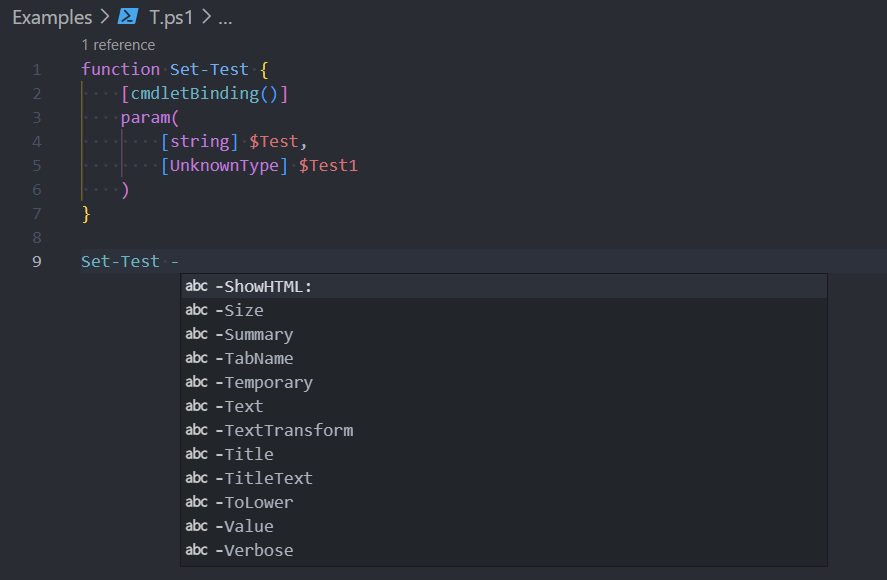
function Set-NewTest {
    [cmdletBinding()]
    param(
        $Test,
        [unknwoon] $Test1
    )
}

Set-NewTest
It's an edge case, and I know why it happens - but unless VSCode magically supports that as well - it will also be a problem.
Here's another one

If I right-click and go to definition - it goes so the function is "known" to VSCode. Still, it's a private function so not exposed by any module directly, so PowerShell isn't really aware of it.
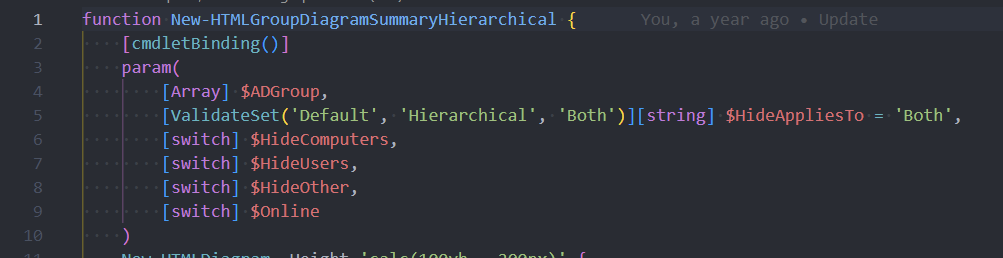

But I would like to work with it... and get proper handling. Again - I know why it fails - but then VSCode should be aware of it.
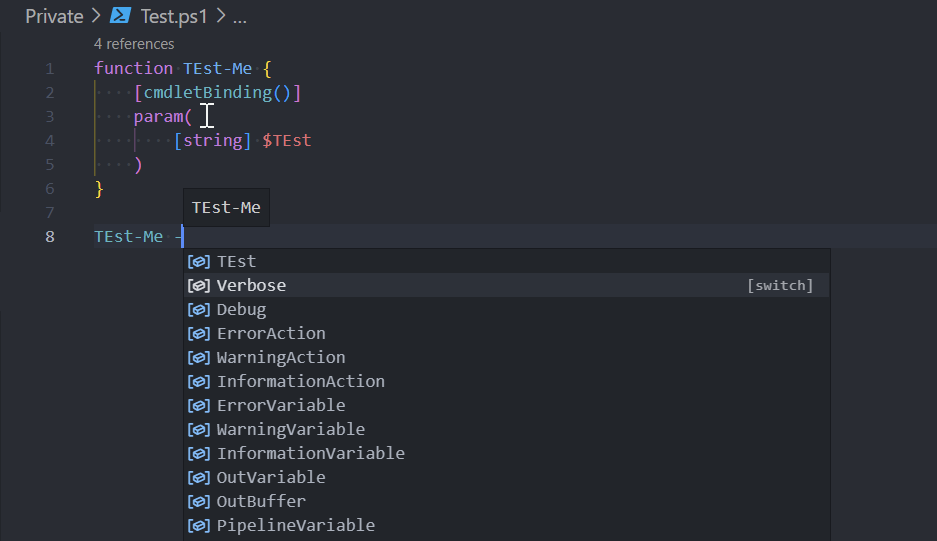
For example:
- Create one file - start typing, but don't execute - everything works
- Create another file and try to use that function in there
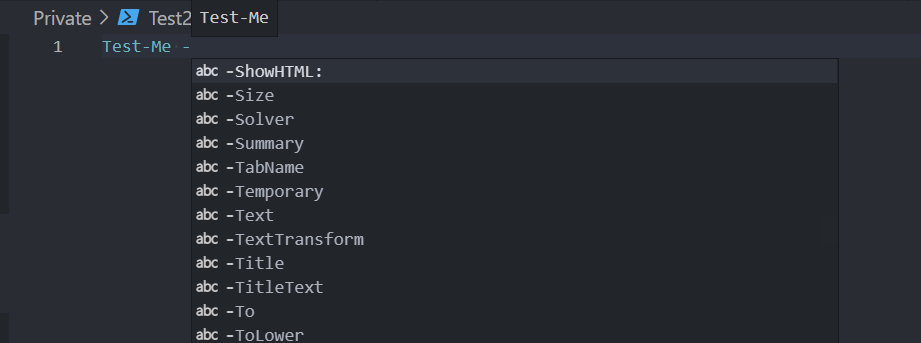
I expect it to work, users expect it to work - it doesn't work.
Hard to say if example 1 is reasonable, it feels like the editor should be showing you an error that the type doesn't exist (yet), but that's a whole 'nuther can of worms), and it shouldn't intellisense on invalid functions in my opinion
For example 2, how is it supposed to know those two .ps1 files are related? Say you have the function with the same name defined in two different completely unrelated files in the same workspace, which one is it supposed to intellisense? I suppose if you dotsource one from the other that could be an indicator that could be used to import all the AST from that file into the existing script, that would be a reasonable enhancement IMHO, but now there's all kinds of performance concerns, especially if the dotsource has an expression that has to be evaluated. For instance, . (sleep 500;'load/my/path') is perfectly valid but would completely hang the pipeline and break intellisense. More on that here: https://github.com/PowerShell/vscode-powershell/issues/144
Powershell is not a statically typed language, it really can't analyze across multiple files safely to my knowledge. Maybe a "best effort" could be done if only one function is found in the AST tree for all files, but then this will feel like inconsistent behavior to the user.
- It was just showing it fails for unknown types. This can be when you're not connected to Exchange and you work with Exchange types, or when you are using some DLL and it's not loaded yet, but you want to type some code. I do know it's a problem on the PowerShell side.
- All good points - yet I do work with modules and as I am building them I have 2 choices - push PSM1 wildcard and psd1 wildcard and let it load everything or deal with lack of autocomplete for private functions and type in blindly.
I just want to make sure we're on the same page - I know where it's coming from, and the validity of it - just I believe that most of the problems will keep on coming from the problems I've described. Since VSCode is workspace based you could assume that I want to see everything within the workspace - or maybe even go as far as creating a distinction between what is there given by PowerShell (you already have an icon for that) and highlight it somehow when doing autocomplete, and what is there coming from the workspace.
Right now from the workspace, I get all sorts of bullshit (no icon) and it's well useless. Users are expecting help. Will it sometimes load 2 functions with the same name from 2 different files - sure. Will it be better than having 0 help - yes! Because alternative is 0 help at all, and a bunch of random strings.
One thing you can try for a lot of these issues (and I know it's stop gap, not a real solution) is to import the module and enter a nested prompt. e.g.
# Exit any previously nested prompts, only needed when updating
$Host.ExitNestedPrompt()
. (Import-Module ./src/module.psd1 -PassThru -Force) { $Host.EnterNestedPrompt() }
Far from perfect, especially since it isn't updated automatically with changes. But it can help with those scenarios.
I have some thoughts about how to build more support for workspace concepts into the PowerShell engine but it's too early to tell if any of them are feasible. It's something I'm thinking about a lot and I hope to see them realized one day. In the mean time, give the above a go and see if that helps alleviate the gap in functionality.

We could try an experimental feature with a filewatcher that watches for .ps1 changes and automates this process, that might be better suited to a one-off extension since it probably could use the API that's already there :)
@ztrhgf Have you tried the Preview extension? A lot of these "occasional failures" issues were resolved in the pipeline thread rewrite.
I was using preview version of PS extension for several months, now I've switched to stable release. But issues are still the same. Intellisense stopps working even for native commands (like get-process etc). Result is that I have to restart PS session in VSC twice a day at least which is not good user experience.
If you need logs etc let me know.
@ztrhgf Specific examples would be great or a screenshot when it happens. Note that intellisense requires the PSIC to be active and available, so if you for instance run sleep 30, Intellisense will not be available until that command completes. In my experience running preview I almost never need to restart anymore to "fix" intellisense.
FWIW there is support to analyze across PowerShell files in the same workspace, but it's predicated on the files being explicitly interdependent (e.g. one dot-sources another). So if File A dot-sources File B, then IntelliSense in File A will complete stuff in File B, but not otherwise (which is fair, since if you didn't dot-source File B but tried to use one of its functions, it would fail in PowerShell anyway since it's not been defined). You can review how all of this currently works (and so what functionality is expected or not) in the SymbolsServiceTests.
@ztrhgf Specific examples would be great or a screenshot when it happens. Note that intellisense requires the PSIC to be active and available, so if you for instance run
sleep 30, Intellisense will not be available until that command completes. In my experience running preview I almost never need to restart anymore to "fix" intellisense.


To be honest I can replicate that on my server. My server is somehow very slow with PowerShell (probably antivirus) and it sits there about 5-10 seconds on the loading part then gives me bullshit, but when I press ctrl+space again it fills that in. The subsequent request works much faster. Is that your experience @ztrhgf ?
On the other hand on my desktop, it's fairly fast - but I've configuration most people don't.