

 PowerShell
sshd and ssh-agent not registered on 21H1
"OpenSSH for Windows" version 8.1.0.1
OperatingSystem
Microsoft Windows [version 10.0.19043.964]
What is failing
start-service sshd
start-service ssh-agent
Expected output
Actual output Start-Service: Cannot find any service with service name 'sshd'. Start-Service: Cannot find any service with service name 'ssh-agent'.
Remark ssh client and server installed via Optional features in the settings app

if you run the following what do you get?
Get-Command ssh
Get-Command sshd
Get-Command ssh-agent
Get-Service sshd
Get-Service ssh-agent
and did the services work on the previous windows version before updating?

Hello Thank you for your answer. I copied and pasted the commands and here is the output
PS C:\> Get-Command ssh

CommandType     Name                                               Version    Source
-----------     ----                                               -------    ------
Application     ssh.exe                                            8.1.0.1    C:\WINDOWS\System32\OpenSSH\ssh.exe


PS C:\> Get-Command sshd

CommandType     Name                                               Version    Source
-----------     ----                                               -------    ------
Application     sshd.exe                                           8.1.0.1    C:\WINDOWS\System32\OpenSSH\sshd.exe


PS C:\> Get-Command ssh-agent

CommandType     Name                                               Version    Source
-----------     ----                                               -------    ------
Application     ssh-agent.exe                                      8.1.0.1    C:\WINDOWS\System32\OpenSSH\ssh-agent.exe


PS C:\> Get-Service sshd
Get-Service: Cannot find any service with service name 'sshd'.

PS C:\> Get-Service ssh-agent
Get-Service: Cannot find any service with service name 'ssh-agent'.
Unfortunately, I can't answer your question about whether it worked before. Indeed, before I used ssh installed via chocolatey because I needed the most recent versions to support ProxyJump and X11 forwarding I have switched to the installation via optional features since version 21H1 which provides the latest version.
@mveril - I'm guessing you ran uninstall-sshd.ps1 after you install the openssh V8.1 through optional features. If yes then uninstall-sshd.ps1 will remove sshd, ssh-agent as service.
To mitigate the problem, uninstall the openssh client, openssh server optional components and install them again.

Hello I uninstalled and reinstalled the client and the server through the settings app the result is the same
It's hard to tell what's happening on your end. I recommend following these steps,
-
uninstall openssh client, server from manage optional features

-
Make sure they are deleted. on cmd.exe, dir c:\windows\system32\openssh dir c:\windows\system32\libcrypto.dll
-
Restart the machine
-
Install openssh client, server from optional features
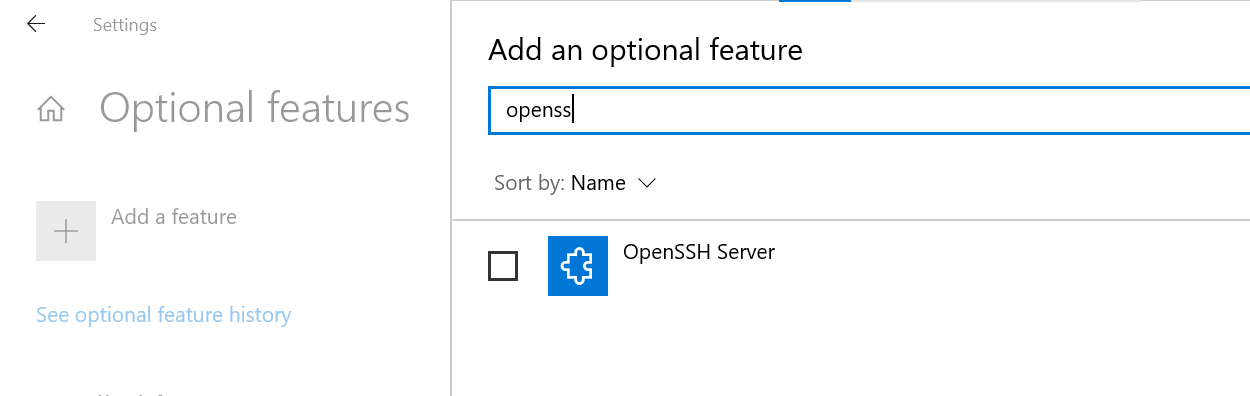
-
Execute below commands in an elevated powershell terminal dir c:\windows\system32\openssh dir c:\windows\system32\libcrypto.dll Get-Service ssh*
Hello @bagajjal thank you for your help! It's very strange but here is the output of the first commands after removing OpenSSH (even after a restart).
PS C:\> dir c:\windows\system32\openssh

    Directory: C:\Windows\System32\OpenSSH

Mode                 LastWriteTime         Length Name
----                 -------------         ------ ----
-a---          29/04/2021    18:42         396211 moduli
-a---          29/04/2021    18:42         307712 scp.exe
-a---          29/04/2021    18:42         307200 sftp-server.exe
-a---          29/04/2021    18:42         481280 ssh-add.exe
-a---          29/04/2021    18:42         382976 ssh-agent.exe
-a---          29/04/2021    18:42         662016 ssh-keygen.exe
-a---          29/04/2021    18:42         151552 ssh-shellhost.exe
-a---          29/04/2021    18:42           2297 sshd_config_default
-a---          29/04/2021    18:42        1008128 sshd.exe
I tested the state of the features and this is the output
PS C:\> Get-WindowsCapability -Online | ? Name -like 'OpenSSH*'


Name  : OpenSSH.Client~~~~0.0.1.0
State : NotPresent

Name  : OpenSSH.Server~~~~0.0.1.0
State : NotPresent
What happens ? what should I do so that the components of OpenSSH are truly removed?
It's really strange.. One reason I can think of is, if you copy the Github release to c:\windows\system32\openssh manually before installing the optional features.
Anyways to get rid of this situation, manually delete c:\windows\system32\openssh folder completely and also c:\windows\system32\libcrypto.dll. After that try the steps mentioned above.
Hello @bagajjal
I deleted the files you told me which was not easy as it belonged to TrustedInstaller. I wanted to reinstall OpenSSH client and server. For the client it worked but the server installation had no effect (no new files in the folder)
I did sfc /scannow and it spotted a corruption and installed all the missing files. I then uninstalled OpenSSH the files did not go away. I deleted them again manually before redoing sfc /scannow and it put them back while the components of OpenSSH are not displayed as installed. I think the sfc consider OpenSSH to be part of my machine even if it is not installed. Even dism /online /cleanup-image /restoreHealth has no effect and the sfc still recovering OpenSSH files
I will run an "upgrade" through the Windows 10 media creation tool sometimes that can fix issues.
I used to use the following to clone repositories with a specific SSH key and this has stopped working in recent days (W10 21H1 OS Build 19043.1023). Example:
ssh-agent bash -c 'ssh-add S:/mykey; git clone [email protected]:group/repository.git'
I've tried uninstalling and reinstalling OpenSSH client but no luck. The service is there and running, ssh-agent is aliased correctly to the exe, but it now outputs / does nothing when called like above. Looking further into it.

Uninstalled OpenSSH client (server not installed). Rebooted. Confirmed c:\windows\system32\openssh and c:\windows\system32\libcrypto.dll no longer exist, along with any service.
Reinstalled. Contents of OpenSSH:
Mode                 LastWriteTime         Length Name
----                 -------------         ------ ----
-a---          24/05/2021    20:33         307712 scp.exe
-a---          24/05/2021    20:33         374272 sftp.exe
-a---          24/05/2021    20:33         481280 ssh-add.exe
-a---          24/05/2021    20:33         382976 ssh-agent.exe
-a---          24/05/2021    20:33         662016 ssh-keygen.exe
-a---          24/05/2021    20:33         557568 ssh-keyscan.exe
-a---          24/05/2021    20:33         946176 ssh.exe
Output of:
Get-Command ssh
Get-Command sshd
Get-Command ssh-agent
Get-Service sshd
Get-Service ssh-agent
=
PS C:\> Get-Command ssh

CommandType     Name                                               Version    Source
-----------     ----                                               -------    ------
Application     ssh.exe                                            8.1.0.1    C:\WINDOWS\System32\OpenSSH\ssh.exe

PS C:\> Get-Command sshd
Get-Command: The term 'sshd' is not recognized as a name of a cmdlet, function, script file, or executable program.
Check the spelling of the name, or if a path was included, verify that the path is correct and try again.

PS C:\> Get-Command ssh-agent

CommandType     Name                                               Version    Source
-----------     ----                                               -------    ------
Application     ssh-agent.exe                                      8.1.0.1    C:\WINDOWS\System32\OpenSSH\ssh-agent.exe

PS C:\> Get-Service sshd
Get-Service: Cannot find any service with service name 'sshd'.

PS C:\> Get-Service ssh-agent

Status   Name               DisplayName
------   ----               -----------
Stopped  ssh-agent          OpenSSH Authentication Agent
The ssh-agent is disabled. Setting this to manual/automatic and calling ssh-agent (e.g. ssh-agent bash -c 'ssh-add S:/mykey; git clone [email protected]:group/repository.git' or ssh-agent -l) makes the service start, but there is no output.
ssh-agent -d from a non-elevated PowerShell window:
agent_start pid:1748, dbg:1
cannot create agent root reg key, ERROR:5
From an elevated PowerShell window: agent_start pid:15232, dbg:1 and waits. Opening another elevated shell whilst this is waiting and running ssh-agent -l = no output.
The same behaviour is exhibited on two W10 systems. The previously mentioned but also 20H2 Build 19042.985. The only thing I think has changed recently is the install of KB5003173 on both.
@robinmalik - What do you see when you follow these steps,
- Start ssh-agent as a service. net start ssh-agent.
- Add you key. ssh-add <full_path_private_key>
- List keys. ssh-add -L
@bagajjal I don't cache keys with ssh-agent (i.e. by using ssh-add), as I use a couple of different ones for the same endpoint. I want to avoid offering the wrong private key, break access to existing repositories, or having to manipulate ~/.ssh/config to have for example, work.github.com, home.github.com home2.github.com and subsequently have to modify the clone urls when doing the initial clone. I like to specify the key on initial clone and then set it with git config --local afterwards.
I'm concerned that the issue is becoming unclear but appreciate your help! To answer your question, I did this with ssh-add -t 10 and get:
@@@@@@@@@@@@@@@@@@@@@@@@@@@@@@@@@@@@@@@@@@@@@@@@@@@@@@@@@@@
@         WARNING: UNPROTECTED PRIVATE KEY FILE!          @
@@@@@@@@@@@@@@@@@@@@@@@@@@@@@@@@@@@@@@@@@@@@@@@@@@@@@@@@@@@
Permissions for 'X:/endpoint-keyname' are too open.
It is required that your private key files are NOT accessible by others.
This private key will be ignored.
My workflow has always been: Unencrypted keys stored in an encrypted FAT formatted VeraCrypt container that I mount when required.
Moving this file to my Documents, or using a passphrase protected file, it fails:
PS C:\Users\Robin\Documents> ssh-add -t 10 C:/Users/Robin/Documents/newprotected
Enter passphrase for C:/Users/Robin/Documents/newprotected:
Could not add identity "C:/Users/Robin/Documents/newprotected": communication with agent failed
Removing -t, though and it adds and there is expected content in the output of ssh-add -L.
PS C:\Users\Robin\Documents> ssh-add C:/Users/Robin/Documents/newprotected
Enter passphrase for C:/Users/Robin/Documents/newprotected:
Identity added: C:/Users/Robin/Documents/newprotected (robin@HOMEPC)
Additional:
I'm not entirely sure if my issue is the same as @mveril as I've got the ssh-agent service (not sshd though, but I don't know if this was ever a thing). It's just the command I used before that relied on ssh-agent has stopped working. I was wondering if installing WSL2 did something that changed the behaviour of the bash part of ssh-agent bash -c but testing on a W10 20H2 system without WSL2 has the same result: nothing happens.
I've worked around this by adding a custom function to one of my own modules which essentially does the following:
Write-Verbose -Message "Adding environment variable: `$env:GIT_SSH_COMMAND = 'ssh -i $KeyPath -o IdentitiesOnly=yes'"
$env:GIT_SSH_COMMAND = "ssh -i $KeyPath -o IdentitiesOnly=yes"

# Clone and add key to the local repo config:
git clone $GitRepo --config core.sshCommand="ssh -i $KeyPath"

Write-Verbose -Message "Removing environment variable"
Remove-Item "Env:\GIT_SSH_COMMAND"`
I ran into this after upgrading to 8.6.0-beta1
choco upgrade openssh -params "/SSHServerFeature /KeyBasedAuthenticationFeature" -y --pre
I found that I had to run uninstall-sshd.ps1 and then install sshd with .\install-sshd.ps1 again within the C:\Program Files\OpenSSH-Win64 installation folder:
PS C:\Program Files\OpenSSH-Win64> .\uninstall-sshd.ps1
sshd successfully uninstalled
ssh-agent service is not installed

PS C:\Program Files\OpenSSH-Win64> .\install-sshd.ps1
  [*] C:\Program Files\OpenSSH-Win64\moduli
Inheritance is removed from 'C:\Program Files\OpenSSH-Win64\moduli'.
'BUILTIN\Users' now has Read access to 'C:\Program Files\OpenSSH-Win64\moduli'.
'APPLICATION PACKAGE AUTHORITY\ALL APPLICATION PACKAGES' now has Read access to 'C:\Program Files\OpenSSH-Win64\moduli'.

'APPLICATION PACKAGE AUTHORITY\ALL RESTRICTED APPLICATION PACKAGES' now has Read access to 'C:\Program Files\OpenSSH-Win64\moduli'.
      Repaired permissions

[SC] SetServiceObjectSecurity SUCCESS
[SC] ChangeServiceConfig2 SUCCESS
[SC] ChangeServiceConfig2 SUCCESS
sshd and ssh-agent services successfully installed
I then realised from Get-Command sshd that it had been picking up the binaries from C:\Program Files\Git\usr\bin, which had preceded C:\Program Files\OpenSSH-Win64 in the PATH. I adjusted the System PATH sequence to ensure that C:\Program Files\OpenSSH-Win64 took precedence and everything works nicely.

I found that I had to run
uninstall-sshd.ps1and then install sshd with.\install-sshd.ps1again within theC:\Program Files\OpenSSH-Win64installation folder:
What if one doesn't have that folder anymore because that same person deleted it manually? :)
