
PowerShellEditorServices
 PowerShellEditorServices copied to clipboard
Published
20 hours ago •
 PowerShell
PowerShell
Typed Variables should intellisense hashtable properties
Summary of the new feature / enhancement
This:
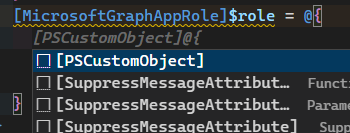
Should work the same as this:
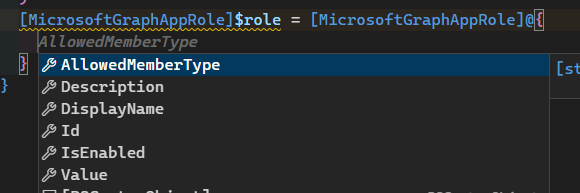
Proposed technical implementation details (optional)
No response

So here's a little editor command you can throw in your profile
using namespace System.Management.Automation.Language

function global:Get-Cursor {
    [OutputType([System.Management.Automation.Language.IScriptPosition])]
    [CmdletBinding()]
    param()
    end {
        $psEditor.GetEditorContext().CursorPosition |
            ConvertTo-ScriptExtent |
            ConvertTo-ScriptPosition
    }
}

function global:ConvertTo-ScriptPosition {
    [OutputType([System.Management.Automation.Language.IScriptPosition])]
    [CmdletBinding()]
    param(
        [Parameter(ValueFromPipeline, ValueFromPipelineByPropertyName)]
        [System.Management.Automation.Language.IScriptExtent] $Extent
    )
    process {
        if (-not $Extent) {
            return
        }

        $Extent.EndScriptPosition
    }
}


Register-EditorCommand -DisplayName 'Get Completion Results' -Name GetCompletionResults -ScriptBlock {
    param([Microsoft.PowerShell.EditorServices.Extensions.EditorContext, Microsoft.PowerShell.EditorServices] $Context)
    end {
        $psesPosition = Get-Cursor
        $startPosition = $Context.CurrentFile.Ast.Extent.StartScriptPosition
        $cursorPosition = $startPosition.GetType().
            GetMethod('CloneWithNewOffset', [System.Reflection.BindingFlags]::NonPublic -bor 'Instance').
            Invoke($startPosition, @($psesPosition.Offset))

        try {
            $tabExpansion2Splat = @{
                ast = $Context.CurrentFile.Ast
                tokens = $Context.CurrentFile.Tokens
                positionOfCursor = $cursorPosition
                ErrorAction = 'Stop'
            }

            $results = TabExpansion2 @tabExpansion2Splat

            'TextToBeReplaced = |{0}|' -f (
                $Context.CurrentFile.Ast.Extent.StartScriptPosition.GetFullScript().Substring(
                    $results.ReplacementIndex,
                    $results.ReplacementLength)) | Out-Default

            $results | Out-Default
            $results.CompletionMatches | Out-Default
            $global:__lastCompletionResult = $results
        } catch {
            $PSItem | Out-Default
        }
    }
}.Ast.GetScriptBlock()
Basically if this editor command doesn't return any results either, then the issue needs to be opened in PowerShell/PowerShell
(thankfully @MartinGC94 checks here too so it's gettin' taken care of either way 😁)


@SeeminglyScience The
.Ast.GetScriptBlock()❤️
yeah in this case that just makes it so the editor command stays in the session state (module) that's current. A little different from the use cases I've suggested it to you for, it's a very versatile trick 😁