

 PowerShell
Character backtick escape no longer works in arrays since 7.3.0
Prerequisites
- [X] Write a descriptive title.
- [X] Make sure you are able to repro it on the latest released version
- [X] Search the existing issues.
- [X] Refer to the FAQ.
- [X] Refer to Differences between Windows PowerShell 5.1 and PowerShell.
Steps to reproduce
At OBS Project, we use Powershell to automate out build process, especially for CI.
However, since Powershell 7.3.0, our script stopped working. We have to use a workaround to make it work.
https://github.com/obsproject/obs-studio/pull/7787 This is the pull request of the workaround.
The problematic part in CI\windows\02_build_obs.ps1 script before the workaround looks like this:
$CmakeCommand = @(
    "-G", ${CmakeGenerator}
    "-DCMAKE_GENERATOR_PLATFORM=`"${GeneratorPlatform}`"",
    "-DCMAKE_TOOLCHAIN_FILE=`"${CmakePrefixPath}\lib\cmake\Qt6\qt.toolchain.cmake`"",
    "-DCMAKE_SYSTEM_VERSION=`"${CmakeSystemVersion}`"",
    "-DCMAKE_PREFIX_PATH:PATH=`"${CmakePrefixPath}`""
)

Invoke-External cmake -S . -B  "${BuildDirectoryActual}" @CmakeCommand
After the workaround:
$CmakeCommand = @(
    "-G", ${CmakeGenerator}
    "-DCMAKE_GENERATOR_PLATFORM=${GeneratorPlatform}",
    "-DCMAKE_TOOLCHAIN_FILE=${CmakePrefixPath}/lib/cmake/Qt6/qt.toolchain.cmake",
    "-DCMAKE_SYSTEM_VERSION=${CmakeSystemVersion}",
    "-DCMAKE_PREFIX_PATH:PATH=${CmakePrefixPath}"
)

Invoke-External cmake -S . -B  "${BuildDirectoryActual}" @CmakeCommand
Notice the backtick-escaped double-quotation-mark. We had to remove these to make things work.
On powershell 7.3.0, it gives the following error:
CMake Error at C:/Program Files/CMake/share/cmake-3.24/Modules/CMakeDetermineSystem.cmake:130 (message):
  Could not find toolchain file:
  "C:\Users\tommy\GitHub\obs-deps-rel\DepsARM64\lib\cmake\Qt6\qt.toolchain.cmake"
Call Stack (most recent call first):
  CMakeLists.txt:15 (project)


CMake Error at CMakeLists.txt:15 (project):
  Failed to run MSBuild command:

    C:/Program Files/Microsoft Visual Studio/2022/Preview/MSBuild/Current/Bin/amd64/MSBuild.exe

  to get the value of VCTargetsPath:

    MSBuild version 17.5.0-preview-22525-01+3b7246b65 for .NET Framework
    Build started 2022-11-20 7:59:28 AM.
    Project "C:\Users\tommy\GitHub\obs-studio\build32\CMakeFiles\3.24.2\VCTargetsPath.vcxproj" on node 1 (default targets).
    C:\Program Files\Microsoft Visual Studio\2022\Preview\MSBuild\Current\Bin\amd64\Microsoft.Common.CurrentVersion.targets(321,5): error MSB4184: The expression "[System.IO.Path]::Combine(C:\Users\tommy\GitHub\obs-studio\build32\CMakeFiles\3.24.2, bin\"ARM64"\Debug\)" cannot be evaluated. Illegal characters in path. [C:\Users\tommy\GitHub\obs-studio\build32\CMakeFiles\3.24.2\VCTargetsPath.vcxproj]
    Done Building Project "C:\Users\tommy\GitHub\obs-studio\build32\CMakeFiles\3.24.2\VCTargetsPath.vcxproj" (default targets) -- FAILED.

    Build FAILED.

    "C:\Users\tommy\GitHub\obs-studio\build32\CMakeFiles\3.24.2\VCTargetsPath.vcxproj" (default target) (1) ->
      C:\Program Files\Microsoft Visual Studio\2022\Preview\MSBuild\Current\Bin\amd64\Microsoft.Common.CurrentVersion.targets(321,5): error MSB4184: The expression "[System.IO.Path]::Combine(C:\Users\tommy\GitHub\obs-studio\build32\CMakeFiles\3.24.2, bin\"ARM64"\Debug\)" cannot be evaluated. Illegal characters in path. [C:\Users\tommy\GitHub\obs-studio\build32\CMakeFiles\3.24.2\VCTargetsPath.vcxproj]

        0 Warning(s)
        1 Error(s)

    Time Elapsed 00:00:00.29


  Exit code: 1
Observations:
-
CMake said the toolchain file doesn't exist. In fact it does, and you can Ctrl + click on that in VS Code to view the actual file:

-
I suspected the behaviour of backtick changed on 7.3.0, so printed out the array
CmakeCommandand did a comparison: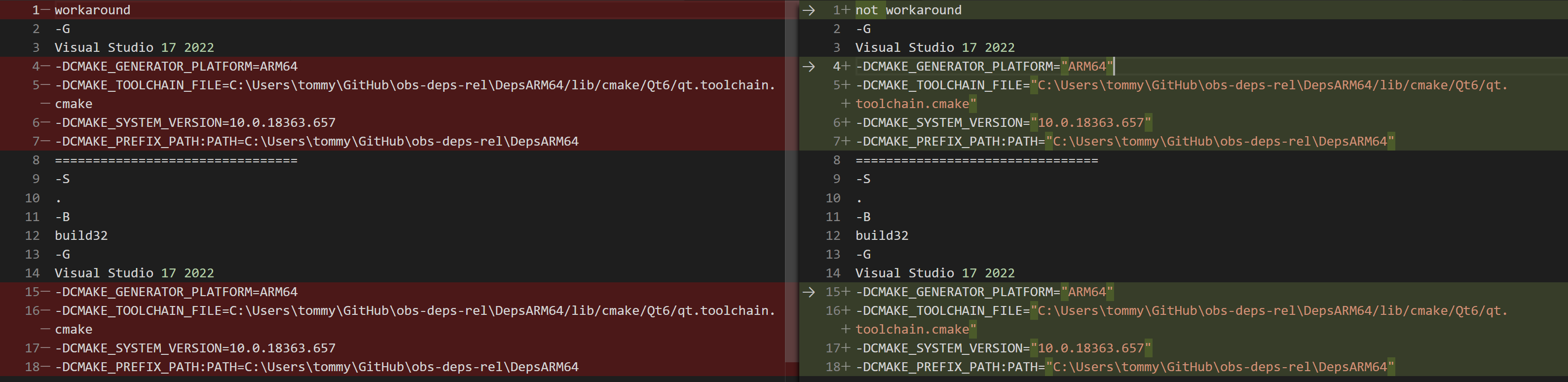 Nothing really changed other than the double-quotationmark.
 -
Powershell may print something correctly, but pass a different thing to cmake.
In order to investigate this, I wrote a simple arguments dumper in C#:namespace ConsoleApp1 { internal class Program { static void Main(string[] args) { foreach (var arg in args) { Console.WriteLine(arg); } } } }In the image above, the stuff under the divide line are outputs from the args dumper. The output from the args dumper aren't different from the
echoin powershell. -
Probably CMake is the culprit? But how?
Look at the error message, what is[System.IO.Path]::Combine? Why Powershell commands have anything todo within CMake?
CC @RytoEX
Expected behavior
Refer above
Actual behavior
Refer above
Error details
Exception             :
    Type                        : System.Management.Automation.RuntimeException
    ErrorRecord                 :
        Exception             :
            Type    : System.Management.Automation.ParentContainsErrorRecordException
            Message : cmake -S . -B build32 -G Visual Studio 17 2022 -DCMAKE_GENERATOR_PLATFORM="ARM64"
-DCMAKE_TOOLCHAIN_FILE="C:\Users\tommy\GitHub\obs-deps-rel\DepsARM64/lib/cmake/Qt6/qt.toolchain.cmake" -DCMAKE_SYSTEM_VERSION="10.0.18363.657"
-DCMAKE_PREFIX_PATH:PATH="C:\Users\tommy\GitHub\obs-deps-rel\DepsARM64" exited with non-zero code 1.
            HResult : -2146233087
        CategoryInfo          : NotSpecified: (:) [], ParentContainsErrorRecordException
        FullyQualifiedErrorId : RuntimeException
    WasThrownFromThrowStatement : True
    Message                     : cmake -S . -B build32 -G Visual Studio 17 2022 -DCMAKE_GENERATOR_PLATFORM="ARM64"
-DCMAKE_TOOLCHAIN_FILE="C:\Users\tommy\GitHub\obs-deps-rel\DepsARM64/lib/cmake/Qt6/qt.toolchain.cmake" -DCMAKE_SYSTEM_VERSION="10.0.18363.657"
-DCMAKE_PREFIX_PATH:PATH="C:\Users\tommy\GitHub\obs-deps-rel\DepsARM64" exited with non-zero code 1.
    HResult                     : -2146233087
TargetObject          : cmake -S . -B build32 -G Visual Studio 17 2022 -DCMAKE_GENERATOR_PLATFORM="ARM64"
-DCMAKE_TOOLCHAIN_FILE="C:\Users\tommy\GitHub\obs-deps-rel\DepsARM64/lib/cmake/Qt6/qt.toolchain.cmake" -DCMAKE_SYSTEM_VERSION="10.0.18363.657"
-DCMAKE_PREFIX_PATH:PATH="C:\Users\tommy\GitHub\obs-deps-rel\DepsARM64" exited with non-zero code 1.
CategoryInfo          : OperationStopped: (cmake -S . -B build…th non-zero code 1.:String) [], RuntimeException
FullyQualifiedErrorId : cmake -S . -B build32 -G Visual Studio 17 2022 -DCMAKE_GENERATOR_PLATFORM="ARM64"
-DCMAKE_TOOLCHAIN_FILE="C:\Users\tommy\GitHub\obs-deps-rel\DepsARM64/lib/cmake/Qt6/qt.toolchain.cmake" -DCMAKE_SYSTEM_VERSION="10.0.18363.657"
-DCMAKE_PREFIX_PATH:PATH="C:\Users\tommy\GitHub\obs-deps-rel\DepsARM64" exited with non-zero code 1.
InvocationInfo        :
    ScriptLineNumber : 137
    OffsetInLine     : 9
    HistoryId        : -1
    ScriptName       : C:\Users\tommy\GitHub\obs-studio\CI\include\build_support_windows.ps1
    Line             : throw "${Command} ${CommandArgs} exited with non-zero code ${Result}."

    PositionMessage  : At C:\Users\tommy\GitHub\obs-studio\CI\include\build_support_windows.ps1:137 char:9
                       +         throw "${Command} ${CommandArgs} exited with non-zero code ${ …
                       +         ~~~~~~~~~~~~~~~~~~~~~~~~~~~~~~~~~~~~~~~~~~~~~~~~~~~~~~~~~~~~~
    PSScriptRoot     : C:\Users\tommy\GitHub\obs-studio\CI\include
    PSCommandPath    : C:\Users\tommy\GitHub\obs-studio\CI\include\build_support_windows.ps1
    CommandOrigin    : Internal
ScriptStackTrace      : at Invoke-External, C:\Users\tommy\GitHub\obs-studio\CI\include\build_support_windows.ps1: line 137
                        at Configure-OBS, C:\Users\tommy\GitHub\obs-studio\CI\windows\02_build_obs.ps1: line 124
                        at Build-OBS, C:\Users\tommy\GitHub\obs-studio\CI\windows\02_build_obs.ps1: line 39
                        at Build-OBS-Standalone, C:\Users\tommy\GitHub\obs-studio\CI\windows\02_build_obs.ps1: line 138
                        at <ScriptBlock>, C:\Users\tommy\GitHub\obs-studio\CI\windows\02_build_obs.ps1: line 162
                        at <ScriptBlock>, <No file>: line 1
Environment data
Name                           Value
----                           -----
PSVersion                      7.3.0
PSEdition                      Core
GitCommitId                    7.3.0
OS                             Microsoft Windows 10.0.22621
Platform                       Win32NT
PSCompatibleVersions           {1.0, 2.0, 3.0, 4.0…}
PSRemotingProtocolVersion      2.3
SerializationVersion           1.1.0.1
WSManStackVersion              3.0
Visuals
No response

Please see https://github.com/PowerShell/PowerShell/issues/18568#issuecomment-1315912404

I still didn't understand.
What should we do to fix this? What's the new syntax without using the $PSNativeCommandArgumentPassing = 'Legacy' workaround?
You say:
We had to remove these to make things work.
It sounds like that is your fix, and it is not a workaround: CLIs that observe the rules for command-line parsing for Microsoft C/C++/.NET programs should recognize your arguments without the embedded ", because to such CLIs the following arguments are equivalent: foo="bar baz" and "foo=bar baz" - whether the whole argument or only parts of it are double-quoted shouldn't make a difference.
Behind the scenes, PowerShell translates any of the following PowerShell arguments into "foo=bar baz" on the process command line, both before and after the breaking change, because no EMBEDDED " chars. are involved: foo='bar baz', foo="bar baz", 'foo=bar baz', and "foo=bar baz". That is, the original quoting - to satisfy PowerShell's syntax requirements - is irrelevant, because behind the scenes PowerShell re-quotes whatever verbatim value is the result of its own parsing (foo=bar baz here), and if that verbatim value contains spaces, it is enclosed in "..."; if not, it is passed as-is.
It is only certain CLIs, such as msiexec and msdeploy, that require your old approach, which builds on the broken legacy behavior, and now needs $PSNativeCommandArgumentPassing = 'Legacy' in order to work.
If you want to avoid the latter, call via cmd /c, which allows you to control the quoting of arguments explicitly; in a pinch you can use --%, but comes with pitfalls and limitations - see this Stack Overflow answer.
My question is why you have a need for Invoke-External? The changes in 7.3 are intended to remove such helper functions.

My question is why you have a need for
Invoke-External? The changes in 7.3 are intended to remove such helper functions.
The scripts in questions were written between late 2020 and early 2021 well before 7.3 was available, and even before 7.2 was GA. At the time, they were also written to work with either PowerShell 5.x or 7.0/7.1. As I understand it, Invoke-External also provides some convenience functionality (debug output of the command to check what is sent to an external command, capturing errors and throwing exceptions instead, etc.).

Things are getting complicated and beyond my understanding.
Please advise the correct way to "make it work", which must satisfy all of the following condition:
- The reason we add the
""is to mitigate the edge case likeC:\Program Files (x86\a.txtwhere we have whitespaces in the path.
This is exactly what we don't want:
And again, this is the whole reason I'm insisted on double-quotes. Please advise an alternative way to achieve the same thing. That is, don't make whitespaces separate the path.PS C:\Users\tommy> argsDumper.exe C:\Program Files\a.txt C:\Program Files\a.txt - Version branching is ugly, no more version branching and I want to get rid of it. There must be a way of writhing this code that is valid on all version of powershell, without branching. I refuse to call removing the double-quote a fix, because the reason above, that's strictly a workaround.
- Ultimately the args defined as
Should pass to a program in a way such that the program reads the args as follow:$args = @( "C:\Program Files\a.txt", "C:\Program Files\b.txt", "C:\Program Files\c.txt" )C:\Program Files\a.txt C:\Program Files\b.txt C:\Program Files\c.txt
Sorry, my bad. I didn't include what do I mean by the [System.IO.Path]::Combine error.
CMake Error at CMakeLists.txt:15 (project):
  Failed to run MSBuild command:

    C:/Program Files/Microsoft Visual Studio/2022/Preview/MSBuild/Current/Bin/amd64/MSBuild.exe

  to get the value of VCTargetsPath:

    MSBuild version 17.5.0-preview-22525-01+3b7246b65 for .NET Framework
    Build started 2022-11-20 7:53:06 AM.
    Project "C:\Users\tommy\GitHub\obs-studio\build32\CMakeFiles\3.24.2\VCTargetsPath.vcxproj" on node 1 (default targets).
    C:\Program Files\Microsoft Visual Studio\2022\Preview\MSBuild\Current\Bin\amd64\Microsoft.Common.CurrentVersion.targets(321,5): error MSB4184: The expression "[System.IO.Path]::Combine(C:\Users\tommy\GitHub\obs-studio\build32\CMakeFiles\3.24.2, bin\"ARM64"\Debug\)" cannot be evaluated. Illegal characters in path. [C:\Users\tommy\GitHub\obs-studio\build32\CMakeFiles\3.24.2\VCTargetsPath.vcxproj]
    Done Building Project "C:\Users\tommy\GitHub\obs-studio\build32\CMakeFiles\3.24.2\VCTargetsPath.vcxproj" (default targets) -- FAILED.

    Build FAILED.
I need some explanation why CMake saw [System.IO.Path]::Combine, which is clearly out of place.
As stated, if not using the embedded double-quoting solves your problem, that is the solution - both pre- and post-v7.3.
PowerShell automatically double-quotes arguments that contains spaces when passing them to external arguments, albeit invariably as a whole. E.g., $var = 'C:\Program Files\a.txt'; argsDumper.exe $var places "C:\Program Files\a.txt" on argsDumper.exe's process command line.
In v7.3, if you do something like $var = 'foo="C:\Program Files\a.txt"'; argsDumper.exe $var, what is placed on the process command line is "foo=\"C:\Program Files\a.txt\""; that is, the " chars. embedded in the argument are now - finally correctly - escaped as \". After all, you've told your shell (PowerShell) that you want the verbatim value foo="C:\Program Files\a.txt" passed to the target program, and to do so requires the form shown.
See this comment for more information; the short of it is that you must examine the raw process command line to understand what's going on, which your argsDumper.exe program doesn't provide.
The [System.IO.Path]::Combine error appears to be a follow-on error that occurs int he .vcxproj file being interpreted by msbuild.exe, as a result of the accidentally retained " chars.
For those not understanding the problem in textual description, I advice you to download Process Monitor. Monitor process starts of your target executable and start it with an old version of pwsh and with 7.3. And have a look at the command-line of your target process in process monitor. You'll see the different calls and what has been changed.
