

 PowerShell
macOS package sometimes is blocked on macOS
Issue
When running the package you get a message like this

"powershell-7.0.0-preview.5-osx-x64.pkg" can't be opened because Apple cannot check it for malicious software.
Workaround - Finder
- Click Ok in the dialog.
- Find the package in Finder.
- Control Click (click while holding the
ctrtkey) on the package icon. - Click open on the context menu that comes up.

Workaround - Command Line
- run
sudo xattr -rd com.apple.quarantine <path to package>, replace<path to package>with the actual path to the.pkgfile. - Then install the package as you normally would.
Required changes
1.       Opt-in to use runtime hardening when developing your app.
a.       Insert the following key by editing your info.plist: CSFlags of type int, 65536 is the hardening value
                <key>CSFlags>
                <integer>65536</integer>
                                       i.            Create entitlements file
                                     ii.            Pass a directive to codesign with entitlements file
Same entitlements file and syntax are used for both hardening and sandboxing but they are orthogonal to each other.

I have this error installing rc.3 cant seem to get past even with the suggested workaround above. Need help please OS is catalina 10.15.3

It will still say it's blocked, but you will have an option to open it anyway if you follow these procedures accurately.
We are working to get the package with the extra layer of signing so this doesn't happen.
I am holding down the control key and clicking on the package at the same time, and in the context menu, I select "open".
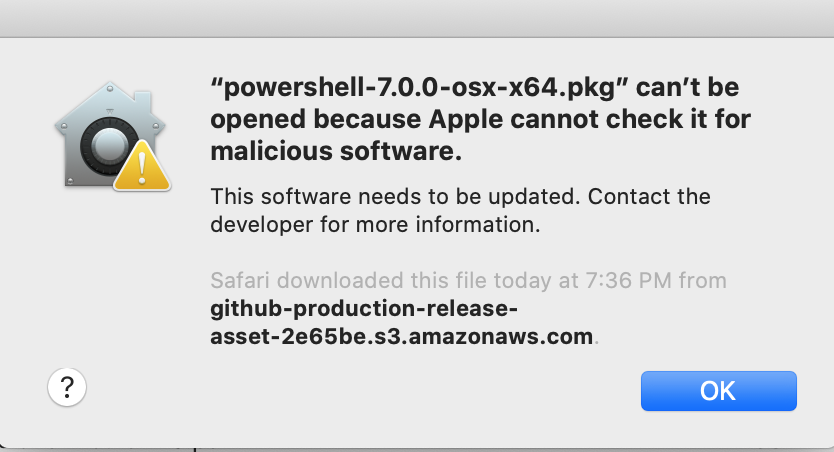 The problem remains the same. I do not see the option to bypass this. Is there something I am doing wrong? Or a step I missed?
I found I needed to actually right-click and select to open / run the package from the context menu before MacOS Catalina would allow me to bypass the warning.

Another option is to run sudo xattr -rd com.apple.quarantine <path to package>
If you have 7 RC.1 or newer, you can do this with Unblock-File
I updated the original description to have both workarounds.
Maintainers, Our build team is unlikely to get to this. I question the value as Apple has decided to move to ARM. I think we should consider removing the pkg and recommending using the formula. Bring this to the committee, if we agree.
My 2 cents. I always prefer a pkg to having to install something else (Homebrew) before installing what you want. I don't have Homebrew installed. You may end up installing a whole slew of dependencies you didn't need or want.

My 2 cents. I always prefer a pkg to having to install something else (Homebrew) before installing what you want. I don't have Homebrew installed. You may end up installing a whole slew of dependencies you didn't need or want.
Agreed that this would be ideal, but the tar.gz is alway available. We need to get our build team to prioritize this. Please upvote the issue so we can show we have users that we want this.
Ok, I added thumbs up reaction to upvote. I love Powershell by the way... And I love that core also runs on Linux and Mac OS. We're using it on Linux, mostly in build pipelines.
My 2 cents. I always prefer a pkg to having to install something else (Homebrew) before installing what you want. I don't have Homebrew installed. You may end up installing a whole slew of dependencies you didn't need or want.
Agreed that this would be ideal, but the tar.gz is alway available. We need to get our build team to prioritize this. Please upvote the issue so we can show we have users that we want this.
This fix for DotNet is not working: https://github.com/dotnet/coreclr/pull/25716
We get the following errors when we try to notarize
  "issues": [
    {
      "severity": "error",
      "code": null,
      "path": "aoeu.zip/powershell-7.1.0-fixmacosbreaksmscodehub-osx-x64 (1).pkg/powershell-preview-7.1.0-fixmacosbreaksmscodehub.pkg Contents/Payload/usr/local/microsoft/powershell/7-preview/pwsh",
      "message": "The executable does not have the hardened runtime enabled.",
      "docUrl": null,
      "architecture": "x86_64"
    },
    {
      "severity": "error",
      "code": null,
      "path": "aoue.zip/powershell-7.1.0-fixmacosbreaksmscodehub-osx-x64 (1).pkg/powershell-preview-7.1.0-fixmacosbreaksmscodehub.pkg Contents/Payload/usr/local/microsoft/powershell/7-preview/createdump",
      "message": "The executable does not have the hardened runtime enabled.",
      "docUrl": null,
      "architecture": "x86_64"
    }
for reference https://developer.apple.com/documentation/xcode/notarizing_macos_software_before_distribution/resolving_common_notarization_issues
Just an FYI, downloading the tar.gz file and extracting doesn't help, the file is still blocked from running.

I'd recommend installing via our homebrew formulas, so you get the correct steps not to be blocked: https://github.com/PowerShell/Homebrew-Tap
Short of that, the instructions to unblock a file, tar.gz or pkg are here
GitHub
Contribute to PowerShell/Homebrew-Tap development by creating an account on GitHub.
I'd recommend installing via our homebrew formulas, so you get the correct steps not to be blocked: https://github.com/PowerShell/Homebrew-Tap
Short of that, the instructions to unblock a file,
tar.gzorpkgare here
I confirmed that sudo xattr -rd com.apple.quarantine powershell-7.1.3-osx-x64.pkg prior to running the install works in 10.15.7. We are trying to avoid using homebrew, as we have multiple workstations and would like to verifiably have the same software always running on each. Thank you for the help.
Contribute to PowerShell/Homebrew-Tap development by creating an account on GitHub.
Still happening for the PowerShell 7.2.13 package
Running command to get around the warning does still work:
sudo xattr -rd com.apple.quarantine ./Downloads/powershell-7.2.13-osx-arm64.pkg

FWIW,
I just had this issue installing PS 7.3.8 on MacOS Venture 13.6 (M1 MBP). I followed the workaround at the top of the thread and it worked. (Thank you @TravisEz13 for posting that!). I will try the "sudo xattr..." command next time.
VS Code informed me there was a PS update and took me directly to the GitHub download page. I just clicked the pkg and thought it would be super quick to apply the new update. It was not... :)
Also, i would prefer NOT to have to work through homebrew or any other third party process. My Mac is my work laptop and is locked down by CorpIT. They may/may not allow whatever homebrew/third party process to run. A properly signed package is the correct answer. Just my $0.02.

@TravisEz13: Hi, I just noticed this conversation. Pkg-installers of Microsoft Edge, Microsoft 365 Apps (including Teams) and Defender are already notarized, stabled ans signed appropriately. Would it be possible if you or your team can co-operate with these teams that are handling these pkg-installers to get PowerShell pkg-installer issue fixed? These of your colleagues might help you: https://macadmins.software/slack.html
