
PSResourceGet
 PSResourceGet copied to clipboard
 PowerShell
Unable to installl PSGallery on Linux getting message regarding Nuget not being installed but looks like it is.
Unable to install Az module for Powershell.
Error messages:
- No repository with the name 'PSGallery' was found.
- Unable to find repository 'PSGallery'. Use Get-PSRepository to see all available repositories.
Register the Microsoft RedHat repository
curl https://packages.microsoft.com/config/rhel/7/prod.repo | sudo tee /etc/yum.repos.d/microsoft.repo
Install PowerShell
sudo yum install -y powershell
Start PowerShell
pwsh ####################### FAILURE STARTS HERE #######################
https://docs.microsoft.com/en-us/powershell/azure/install-az-ps?view=azps-6.0.0
Install-Module -Name Az -Scope CurrentUser -Repository PSGallery -Force PS /software/pkg> Install-Module -Name Az -Scope CurrentUser -Repository PSGallery -Force NuGet provider is required to continue This version of PowerShellGet requires minimum version '2.8.5.201' of NuGet provider to publish an item to NuGet-based repositories. The NuGet provider must be available in '' or ''. You can also install the NuGet provider by running 'Install-PackageProvider -Name NuGet -MinimumVersion 2.8.5.201 -Force'. Do you want PowerShellGet to install and import the NuGet provider now? [Y] Yes [N] No [S] Suspend [?] Help (default is "Y"): N Install-Module: NuGet provider is required to interact with NuGet-based repositories. Please ensure that '2.8.5.201' or newer version of NuGet provider is installed.
get-packageprovider Name Version DynamicOptions
NuGet 3.0.0.1 Destination, ExcludeVersion, Scope, SkipDependencies, Headers, FilterOnTag, Contains, AllowPrereleaseVersions, ConfigFile, SkipValidate PowerShellGet 2.2.5.0 PackageManagementProvider, Type, Scope, AllowClobber, SkipPublisherCheck, InstallUpdate, NoPathUpdate, AllowPrereleaseVersions, Filter, Tag, Incl…
https://docs.microsoft.com/en-us/powershell/azure/install-az-ps?view=azps-6.0.0 Install-Module -Name Az -Scope CurrentUser -Repository PSGallery -Force

PS /software/pkg> Install-Module -Name Az -Scope CurrentUser -Repository PSGallery -Force
NuGet provider is required to continue
This version of PowerShellGet requires minimum version '2.8.5.201' of NuGet provider to publish an item to NuGet-based repositories. The NuGet provider must be available in '' or ''. You
can also install the NuGet provider by running 'Install-PackageProvider -Name NuGet -MinimumVersion 2.8.5.201 -Force'. Do you want PowerShellGet to install and import the NuGet provider
now?
[Y] Yes [N] No [S] Suspend [?] Help (default is "Y"): Y
Install-PackageProvider: /opt/microsoft/powershell/7/Modules/PowerShellGet/PSModule.psm1:3138
Line |
3138 | … $null = PackageManagement\Install-PackageProvider -Name $script:N …
| ~~~~~~~~~~~~~~~~~~~~~~~~~~~~~~~~~~~~~~~~~~~~~~~~~~~~~~~~~
| Unhandled Exception - Message:'The type initializer for 'Microsoft.PackageManagement.Internal.Utility.Extensions.FilesystemExtensions' threw an exception.'
| Name:'TypeInitializationException' Stack Trace:' at Microsoft.PackageManagement.Internal.Utility.Extensions.FilesystemExtensions.MakeSafeFileName(String input) at
| Microsoft.PackageManagement.Internal.Utility.Plugin.DynamicType.DefineDynamicType(Type interfaceType) at
| Microsoft.PackageManagement.Internal.Utility.Plugin.DynamicType..ctor(Type interfaceType, OrderedDictionary2 methods, List2 delegates, List1 stubs) at | Microsoft.PackageManagement.Internal.Utility.Plugin.DynamicType.<>c__DisplayClass9_0.<Create>b__3() at | Microsoft.PackageManagement.Internal.Utility.Extensions.DictionaryExtensions.GetOrAdd[TKey,TValue](IDictionary2 dictionary, TKey key, Func1 valueFunction) at | Microsoft.PackageManagement.Internal.Utility.Plugin.DynamicType.Create(Type tInterface, OrderedDictionary2 instanceMethods, List2 delegateMethods, List1 stubMethods,
| List2 usedInstances) at Microsoft.PackageManagement.Internal.Utility.Plugin.DynamicInterface.CreateProxy(Type tInterface, Object[] instances) at | Microsoft.PackageManagement.Internal.Utility.Plugin.DynamicInterface.DynamicCast(Type tInterface, Object[] instances) at | Microsoft.PackageManagement.Internal.Utility.Plugin.DynamicInterface.DynamicCast[TInterface](Object[] instances) at | Microsoft.PackageManagement.Internal.Utility.Plugin.DynamicInterfaceExtensions.As[TInterface](Object instance) at | Microsoft.PowerShell.PackageManagement.Cmdlets.CmdletBase.get_PackageManagementHost() at | Microsoft.PowerShell.PackageManagement.Cmdlets.CmdletBase.SelectProviders(String[] names) at | Microsoft.PowerShell.PackageManagement.Cmdlets.CmdletWithProvider.get_SelectedProviders() at | Microsoft.PowerShell.PackageManagement.Cmdlets.InstallPackageProvider.get_SelectedProviders() at | Microsoft.PowerShell.PackageManagement.Cmdlets.CmdletWithProvider.<get_CachedSelectedProviders>b__23_0() at | Microsoft.PackageManagement.Internal.Utility.Extensions.DictionaryExtensions.GetOrAdd[TKey,TValue](IDictionary2 dictionary, TKey key, Func1 valueFunction) at | Microsoft.PackageManagement.Internal.Utility.Extensions.Singleton1.GetOrAdd(Func1 newInstance, Object primaryKey, Object[] keys) at | Microsoft.PackageManagement.Internal.Utility.Extensions.SingletonExtensions.GetOrAdd[TResult](Object primaryKey, Func1 newInstance, Object[] keys) at
| Microsoft.PowerShell.PackageManagement.Cmdlets.CmdletWithProvider.get_CachedSelectedProviders() at
| Microsoft.PowerShell.PackageManagement.Cmdlets.CmdletWithProvider.GenerateDynamicParameters() at
| Microsoft.PowerShell.PackageManagement.Cmdlets.AsyncCmdlet.<>c__DisplayClass83_0.<AsyncRun>b__0()'
Import-PackageProvider: /opt/microsoft/powershell/7/Modules/PowerShellGet/PSModule.psm1:3144
Line |
3144 | … $null = PackageManagement\Import-PackageProvider -Name $script:Nu …
| ~~~~~~~~~~~~~~~~~~~~~~~~~~~~~~~~~~~~~~~~~~~~~~~~~~~~~~~~~
| No match was found for the specified search criteria and provider name 'NuGet'. Try 'Get-PackageProvider -ListAvailable' to see if the provider exists on the system.
Get-PackageProvider: /opt/microsoft/powershell/7/Modules/PowerShellGet/PSModule.psm1:3148
Line |
3148 | … tProvider = PackageManagement\Get-PackageProvider -Name $script:NuGet …
| ~~~~~~~~~~~~~~~~~~~~~~~~~~~~~~~~~~~~~~~~~~~~~~~~~~~~~~~~~
| Unhandled Exception - Message:'The type initializer for 'Microsoft.PackageManagement.Internal.Utility.Extensions.FilesystemExtensions' threw an exception.'
| Name:'TypeInitializationException' Stack Trace:' at Microsoft.PackageManagement.Internal.Utility.Extensions.FilesystemExtensions.MakeSafeFileName(String input) at
| Microsoft.PackageManagement.Internal.Utility.Plugin.DynamicType.DefineDynamicType(Type interfaceType) at
| Microsoft.PackageManagement.Internal.Utility.Plugin.DynamicType..ctor(Type interfaceType, OrderedDictionary2 methods, List2 delegates, List1 stubs) at | Microsoft.PackageManagement.Internal.Utility.Plugin.DynamicType.<>c__DisplayClass9_0.<Create>b__3() at | Microsoft.PackageManagement.Internal.Utility.Extensions.DictionaryExtensions.GetOrAdd[TKey,TValue](IDictionary2 dictionary, TKey key, Func1 valueFunction) at | Microsoft.PackageManagement.Internal.Utility.Plugin.DynamicType.Create(Type tInterface, OrderedDictionary2 instanceMethods, List2 delegateMethods, List1 stubMethods,
| List`2 usedInstances) at Microsoft.PackageManagement.Internal.Utility.Plugin.DynamicInterface.CreateProxy(Type tInterface, Object[] instances) at
| Microsoft.PackageManagement.Internal.Utility.Plugin.DynamicInterface.DynamicCast(Type tInterface, Object[] instances) at
| Microsoft.PackageManagement.Internal.Utility.Plugin.DynamicInterface.DynamicCast[TInterface](Object[] instances) at
| Microsoft.PackageManagement.Internal.Utility.Plugin.DynamicInterfaceExtensions.As[TInterface](Object instance) at
| Microsoft.PowerShell.PackageManagement.Cmdlets.CmdletBase.get_PackageManagementHost() at
| Microsoft.PowerShell.PackageManagement.Cmdlets.CmdletBase.SelectProviders(String name) at
| Microsoft.PowerShell.PackageManagement.Cmdlets.GetPackageProvider.ProcessProvidersFilteredByName() at
| Microsoft.PowerShell.PackageManagement.Cmdlets.GetPackageProvider.ProcessRecordAsync() at
| Microsoft.PowerShell.PackageManagement.Cmdlets.AsyncCmdlet.<>c__DisplayClass83_0.<AsyncRun>b__0()'
Install-Module: NuGet provider is required to interact with NuGet-based repositories. Please ensure that '2.8.5.201' or newer version of NuGet provider is installed.
Uninstall log:
Uninstalling powershell
Loaded plugins: langpacks, product-id, search-disabled-repos, subscription-
: manager
This system is not registered with an entitlement server. You can use subscription-manager to register.
Repository packages-microsoft-com-prod is listed more than once in the configuration
Resolving Dependencies
--> Running transaction check
---> Package powershell.x86_64 0:7.1.3-1.rhel.7 will be erased
--> Finished Dependency Resolution
Dependencies Resolved
================================================================================
Package Arch Version Repository Size
================================================================================
Removing:
powershell x86_64 7.1.3-1.rhel.7 @packages-microsoft-com-prod 170 M
Transaction Summary
================================================================================
Remove 1 Package
Installed size: 170 M
Is this ok [y/N]: ^[[A^[[By
Is this ok [y/N]: y
Downloading packages:
Running transaction check
Running transaction test
Transaction test succeeded
Running transaction
Erasing : powershell-7.1.3-1.rhel.7.x86_64 1/1
Verifying : powershell-7.1.3-1.rhel.7.x86_64 1/1
Removed:
powershell.x86_64 0:7.1.3-1.rhel.7
Complete!
Install log
Installing powershell
Instaling powershell
% Total % Received % Xferd Average Speed Time Time Time Current
Dload Upload Total Spent Left Speed
100 193 100 193 0 0 824 0 --:--:-- --:--:-- --:--:-- 824
[packages-microsoft-com-prod]
name=packages-microsoft-com-prod
baseurl=https://packages.microsoft.com/rhel/7/prod/
enabled=1
gpgcheck=1
gpgkey=https://packages.microsoft.com/keys/microsoft.asc
Loaded plugins: langpacks, product-id, search-disabled-repos, subscription-
: manager
This system is not registered with an entitlement server. You can use subscription-manager to register.
Repository packages-microsoft-com-prod is listed more than once in the configuration
packages-microsoft-com-prod | 3.0 kB 00:00
packages-microsoft-com-prod/primary_db | 441 kB 00:00
Resolving Dependencies
--> Running transaction check
---> Package powershell.x86_64 0:7.1.3-1.rhel.7 will be installed
--> Finished Dependency Resolution
Dependencies Resolved
================================================================================
Package Arch Version Repository Size
================================================================================
Installing:
powershell x86_64 7.1.3-1.rhel.7 packages-microsoft-com-prod 65 M
Transaction Summary
================================================================================
Install 1 Package
Total download size: 65 M
Installed size: 170 M
Downloading packages:
powershell-7.1.3-1.rhel.7.x86_64.rpm | 65 MB 00:07
Running transaction check
Running transaction test
Transaction test succeeded
Running transaction
Installing : powershell-7.1.3-1.rhel.7.x86_64 1/1
Verifying : powershell-7.1.3-1.rhel.7.x86_64 1/1
Installed:
powershell.x86_64 0:7.1.3-1.rhel.7
Complete!
Installation complete
VERBOSE: Acquiring providers for assembly: /opt/microsoft/powershell/7/Modules/PackageManagement/coreclr/netstandard2.0/Microsoft.PackageManagement.CoreProviders.dll
VERBOSE: Acquiring providers for assembly: /opt/microsoft/powershell/7/Modules/PackageManagement/coreclr/netstandard2.0/Microsoft.PackageManagement.NuGetProvider.dll
VERBOSE: Acquiring providers for assembly: /opt/microsoft/powershell/7/Modules/PackageManagement/coreclr/netstandard2.0/Microsoft.PackageManagement.ArchiverProviders.dll
VERBOSE: Acquiring providers for assembly: /opt/microsoft/powershell/7/Modules/PackageManagement/coreclr/netstandard2.0/Microsoft.PackageManagement.MetaProvider.PowerShell.dll
VERBOSE: Performing the operation "Register Module Repository." on target "Module Repository 'PSGallery' () in provider 'PowerShellGet'.".
WARNING: Unable to find module repositories.
Hi @AdamSheltz could you try the following and share output:
gmo PackageManagement, PowerShellGet -ListAvailable
and then try:
Install-Package -Name PackageManagement -MinimumVersion 1.4.7 -Force -Confirm:$false
gmo PackageManagement -ListAvailable
pwsh
Install-Module PowerShellGet -RequiredVersion 2.2.5
gmo PowerShellGet -ListAvailable
pwsh
Install-Module -Name Az -Scope CurrentUser -Repository PSGallery -Force

@anamnavi
gmo PackageManagement, PowerShellGet -ListAvailable
Directory: /opt/microsoft/powershell/7/Modules
ModuleType Version PreRelease Name PSEdition
Script 1.4.7 PackageManagement Desk Script 2.2.5 PowerShellGet Desk
Install-Package -Name PackageManagement -MinimumVersion 1.4.7 -Force -Confirm:$false gmo PackageManagement -ListAvailable
Line | 30 | Install-Package -Name PackageManagement -MinimumVersion 1.4.7 -Force … | ~~~~~~~~~~~~~~~~~~~~~~~~~~~~~~~~~~~~~~~~~~~~~~~~~~~~~~~~~~~~~~~~~~~~~ | No match was found for the specified search criteria and | package name 'PackageManagement'. Try Get-PackageSource to see | all available registered package sources.
Script 1.4.7 PackageManagement Desk
Install-Module PowerShellGet -RequiredVersion 2.2.5 gmo PowerShellGet -ListAvailable
Install-Package: /opt/microsoft/powershell/7/Modules/PowerShellGet/PSModule.psm1:9711 Line | 9711 | … talledPackages = PackageManagement\Install-Package @PSBoundParameters | ~~~~~~~~~~~~~~~~~~~~~~~~~~~~~~~~~~~~~~~~~~~~~~~~~~~~ | No match was found for the specified search criteria and | module name 'PowerShellGet'. Try Get-PSRepository to see all | available registered module repositories.
Script 2.2.5 PowerShellGet Desk
Install-Module -Name Az -Scope CurrentUser -Repository PSGallery -Force
Get-PackageSource: /opt/microsoft/powershell/7/Modules/PowerShellGet/PSModule.psm1:9533 Line | 9533 | … ckageSources = PackageManagement\Get-PackageSource @PSBoundParameters | ~~~~~~~~~~~~~~~~~~~~~~~~~~~~~~~~~~~~~~~~~~~~~~~~~~~~~~ | Unable to find repository 'PSGallery'. Use Get-PSRepository to | see all available repositories.
@AdamSheltz , thanks for sharing this:
could you please run: Get-PackageSource and share that output?
`
Akhil,
could you please run: Get-PackageSource and share that output?
Respectfully, Adam Sheltz
From: Anam Navied @.> Sent: Thursday, June 10, 2021 2:22 PM To: PowerShell/PowerShellGallery @.> Cc: Adam Sheltz @.>; Mention @.> Subject: Re: [PowerShell/PowerShellGallery] Unable to installl PSGallery on Linux getting message regarding Nuget not being installed but looks like it is. (#165)
could you please run: Get-PackageSource and share that output? `
You are receiving this because you were mentioned. Reply to this email directly, view it on GitHubhttps://nam06.safelinks.protection.outlook.com/?url=https%3A%2F%2Fgithub.com%2FPowerShell%2FPowerShellGallery%2Fissues%2F165%23issuecomment-858868677&data=04%7C01%7CAdam.Sheltz%40microsoft.com%7C3efabe8e72e342f4df5d08d92c3ca18a%7C72f988bf86f141af91ab2d7cd011db47%7C1%7C0%7C637589461194273214%7CUnknown%7CTWFpbGZsb3d8eyJWIjoiMC4wLjAwMDAiLCJQIjoiV2luMzIiLCJBTiI6Ik1haWwiLCJXVCI6Mn0%3D%7C1000&sdata=eRxFQWYASkVnXurC%2F5aP5665qTyXNfZQjyTld1QdJNU%3D&reserved=0, or unsubscribehttps://nam06.safelinks.protection.outlook.com/?url=https%3A%2F%2Fgithub.com%2Fnotifications%2Funsubscribe-auth%2FASQH4MLQETFUSIKA3I7O5OTTSD7EJANCNFSM455W67PA&data=04%7C01%7CAdam.Sheltz%40microsoft.com%7C3efabe8e72e342f4df5d08d92c3ca18a%7C72f988bf86f141af91ab2d7cd011db47%7C1%7C0%7C637589461194283207%7CUnknown%7CTWFpbGZsb3d8eyJWIjoiMC4wLjAwMDAiLCJQIjoiV2luMzIiLCJBTiI6Ik1haWwiLCJXVCI6Mn0%3D%7C1000&sdata=9UWOtk94yCyqlXTlgSjOCo3nYbc3rtiOl17Uai7yJEI%3D&reserved=0.
thanks for following up @AdamSheltz. Can you run:
Unregister-PSRepository PSGallery
Register-PSRepository PSGallery -Default
This will unregister PSGallery from PowerShellGet, and then register it PSGallery again to PowerShellGet which will also register PSGallery as a package source. Then you should be good to go and be able to run the original commands. Let us know if this works
Unregister-PackageSource: /opt/microsoft/powershell/7/Modules/PowerShellGet/PSModule.psm1:12886 Line | 12886 | … $null = PackageManagement\Unregister-PackageSource @PSBoundParame … | ~~~~~~~~~~~~~~~~~~~~~~~~~~~~~~~~~~~~~~~~~~~~~~~~~~~~~~~~~ | Unable to find repository 'PSGallery'. Use Get-PSRepository | to see all available repositories.
Register-PSRepository: /software/pkg/install_AzPwsh.ps1:28 Line | 28 | Register-PSRepository PSGallery -Default | ~~~~~~~~~~~~~~~~~~~~~~~~~~~~~~~~~~~~~~~~ | A positional parameter cannot be found that accepts argument | 'PSGallery'.
@AdamSheltz , thanks for following up! I mistyped the second command I suggested running, it should instead be:
Register-PSRepository -Default
You may notice a red warning text saying the following but you can ignore that :
Value cannot be null.
Parameter name: input
Note: you do not need to run the first Unregister-PSRepository PSGallery command again, just the Register-PSRepository -Default one listed above.
After running the above command, if you run:
Get-PackageSource you should see PSGallery listed there. And then be able to run the original commands you were attempting to run.
Anam;
CX response.
I tried, and I'm getting the same response
WARNING: Unable to find package sources. for Get-PackageSource
WARNING: Unable to find module repositories. for Get-PSRepository
Thanks, Adam
From: Anam Navied @.> Sent: Thursday, June 24, 2021 2:26 PM To: PowerShell/PowerShellGallery @.> Cc: Adam Sheltz @.>; Mention @.> Subject: Re: [PowerShell/PowerShellGallery] Unable to installl PSGallery on Linux getting message regarding Nuget not being installed but looks like it is. (#165)
@AdamSheltzhttps://nam06.safelinks.protection.outlook.com/?url=https%3A%2F%2Fgithub.com%2FAdamSheltz&data=04%7C01%7CAdam.Sheltz%40microsoft.com%7C1d7e385464ca437558f608d9373d7377%7C72f988bf86f141af91ab2d7cd011db47%7C1%7C0%7C637601559348034308%7CUnknown%7CTWFpbGZsb3d8eyJWIjoiMC4wLjAwMDAiLCJQIjoiV2luMzIiLCJBTiI6Ik1haWwiLCJXVCI6Mn0%3D%7C1000&sdata=c7zr%2FuXdb0KJ09qkX4CxMXVYuiSWeXh7C%2FdHCkpKhsA%3D&reserved=0 , thanks for following up! I mistyped the second command I suggested running, it should instead be:
Register-PSRepository -Default
You may notice a red warning text saying the following but you can ignore that : Value cannot be null. Parameter name: input
Note: you do not need to run the first Unregister-PSRepository PSGallery command again, just the Register-PSRepository -Default one listed above.
After running the above command, if you run: Get-PackageSource you should see PSGallery listed there. And then be able to run the original commands you were attempting to run.
You are receiving this because you were mentioned. Reply to this email directly, view it on GitHubhttps://nam06.safelinks.protection.outlook.com/?url=https%3A%2F%2Fgithub.com%2FPowerShell%2FPowerShellGallery%2Fissues%2F165%23issuecomment-867859861&data=04%7C01%7CAdam.Sheltz%40microsoft.com%7C1d7e385464ca437558f608d9373d7377%7C72f988bf86f141af91ab2d7cd011db47%7C1%7C0%7C637601559348044299%7CUnknown%7CTWFpbGZsb3d8eyJWIjoiMC4wLjAwMDAiLCJQIjoiV2luMzIiLCJBTiI6Ik1haWwiLCJXVCI6Mn0%3D%7C1000&sdata=4HYeVxScYGJnT0pnYo7oOUcTaMTQWvCIGUyXYpQDTBE%3D&reserved=0, or unsubscribehttps://nam06.safelinks.protection.outlook.com/?url=https%3A%2F%2Fgithub.com%2Fnotifications%2Funsubscribe-auth%2FASQH4MOIUUC5563W7ZWEROTTUN2BXANCNFSM455W67PA&data=04%7C01%7CAdam.Sheltz%40microsoft.com%7C1d7e385464ca437558f608d9373d7377%7C72f988bf86f141af91ab2d7cd011db47%7C1%7C0%7C637601559348054295%7CUnknown%7CTWFpbGZsb3d8eyJWIjoiMC4wLjAwMDAiLCJQIjoiV2luMzIiLCJBTiI6Ik1haWwiLCJXVCI6Mn0%3D%7C1000&sdata=5ilctq6w8532gNezSA8oQx6%2B%2FMccZVkZym5JSE%2ByjyU%3D&reserved=0.
@AdamSheltz could you please screenshots of everything being run and outputted when you run the commands? This would provide more info to us and help debug better.
Could you run the commands again, but with -Verbose and -Debug tacked on the end?
So run:
Unregister-PSRepository PSGallery -Verbose -Debug
Register-PSRepository -Default -Verbose -Debug
Get-PSRepository -Verbose -Debug
Get-PackageSource -Verbose -Debug
At this point, Get-PackageSource should have PSGallery, and should like the following I've circled in red:

If that is not listed, run:
Register-PackageSource -Name PSGallery -ProviderName PowerShellGet
and then try Get-PackageSource again.
Please find below log from requested commands – highlighted in yellow are actual commands
Unregister-PSRepository PSGallery -Verbose -Debug DEBUG: 00:00:00.0000168 Trying provider assembly: /opt/microsoft/powershell/7/Modules/PackageManagement/coreclr/netstandard2.0/Microsoft.PackageManagement.ArchiverProviders.dll DEBUG: 00:00:00.0000339 Trying provider assembly: /opt/microsoft/powershell/7/Modules/PackageManagement/coreclr/netstandard2.0/Microsoft.PackageManagement.NuGetProvider.dll DEBUG: 00:00:00.0000432 Trying provider assembly: /opt/microsoft/powershell/7/Modules/PackageManagement/coreclr/netstandard2.0/Microsoft.PackageManagement.CoreProviders.dll DEBUG: 00:00:00.0028060 Attempting loading of assembly: /opt/microsoft/powershell/7/Modules/PackageManagement/coreclr/netstandard2.0/Microsoft.PackageManagement.MetaProvider.PowerShell.dll DEBUG: 00:00:00.0029303 Attempting loading of assembly: /opt/microsoft/powershell/7/Modules/PackageManagement/coreclr/netstandard2.0/Microsoft.PackageManagement.ArchiverProviders.dll DEBUG: 00:00:00.0030031 Attempting loading of assembly: /opt/microsoft/powershell/7/Modules/PackageManagement/coreclr/netstandard2.0/Microsoft.PackageManagement.CoreProviders.dll DEBUG: 00:00:00.0031200 Attempting loading of assembly: /opt/microsoft/powershell/7/Modules/PackageManagement/coreclr/netstandard2.0/Microsoft.PackageManagement.NuGetProvider.dll VERBOSE: Acquiring providers for assembly: /opt/microsoft/powershell/7/Modules/PackageManagement/coreclr/netstandard2.0/Microsoft.PackageManagement.NuGetProvider.dll VERBOSE: Acquiring providers for assembly: /opt/microsoft/powershell/7/Modules/PackageManagement/coreclr/netstandard2.0/Microsoft.PackageManagement.MetaProvider.PowerShell.dll VERBOSE: Acquiring providers for assembly: /opt/microsoft/powershell/7/Modules/PackageManagement/coreclr/netstandard2.0/Microsoft.PackageManagement.ArchiverProviders.dll VERBOSE: Acquiring providers for assembly: /opt/microsoft/powershell/7/Modules/PackageManagement/coreclr/netstandard2.0/Microsoft.PackageManagement.CoreProviders.dll DEBUG: 00:00:00.0327077 Registering providers via metaproviders for assembly Microsoft.PackageManagement.MetaProvider.PowerShell.Internal.PowerShellMetaProvider DEBUG: 00:00:00.0851702 Trying to register metaprovider DEBUG: 00:00:00.0857558 Initializing provider 'zipfile' DEBUG: 00:00:00.0858841 Initializing provider 'WebDownloader' DEBUG: 00:00:00.0863844 Initializing provider 'Bootstrap' DEBUG: 00:00:00.0868031 Initializing provider 'NuGet' DEBUG: 00:00:00.1001891 Provider 'WebDownloader' Initialized DEBUG: 00:00:00.1002612 Using Downloader Provider WebDownloader DEBUG: 00:00:00.1004635 Initialize Bootstrapper DEBUG: 00:00:00.1010329 Provider 'Bootstrap' Initialized DEBUG: 00:00:00.1011736 Using Package Provider Bootstrap DEBUG: 00:00:00.1020942 Initializing PowerShell MetaProvider DEBUG: 00:00:00.1033522 Provider 'zipfile' Initialized DEBUG: 00:00:00.1034217 Using Archiver Provider zipfile DEBUG: 00:00:00.1269530 Calling 'NuGet'::'InitializeProvider'. DEBUG: 00:00:00.1270277 Provider 'NuGet' Initialized DEBUG: 00:00:00.1270552 Using Package Provider NuGet DEBUG: 00:00:00.1320621 Calling 'WebDownloader::GetFeatures' DEBUG: 00:00:00.1322088 Calling 'zipfile::GetFeatures' DEBUG: 00:00:00.1323608 Calling 'NuGet'::'GetFeatures'. DEBUG: 00:00:00.1325634 Calling 'Bootstrap::GetFeatures' DEBUG: 00:00:00.1337881 The provider 'Bootstrap' is imported DEBUG: 00:00:00.1342736 The provider 'NuGet' is imported DEBUG: 00:00:00.1344328 SUCCESS provider assembly: /opt/microsoft/powershell/7/Modules/PackageManagement/coreclr/netstandard2.0/Microsoft.PackageManagement.CoreProviders.dll DEBUG: 00:00:00.1348948 SUCCESS provider assembly: /opt/microsoft/powershell/7/Modules/PackageManagement/coreclr/netstandard2.0/Microsoft.PackageManagement.NuGetProvider.dll DEBUG: 00:00:00.1349039 SUCCESS provider assembly: /opt/microsoft/powershell/7/Modules/PackageManagement/coreclr/netstandard2.0/Microsoft.PackageManagement.ArchiverProviders.dll DEBUG: 00:00:00.1387279 Attempting to load PowerShell Provider Module [/opt/microsoft/powershell/7/Modules/PowerShellGet/PSModule.psm1] DEBUG: 00:00:00.1833848 Loaded PowerShell package provider: '[/opt/microsoft/powershell/7/Modules/PowerShellGet/PSModule.psm1]'. DEBUG: 00:00:00.1885474 Loaded PowerShell Provider: PowerShellGet DEBUG: 00:00:00.1901157 Initializing provider 'PowerShellGet' DEBUG: 00:00:00.1956642 Calling New() : MethodName = 'InitializeProvider' DEBUG: 00:00:00.1957215 Debug: True DEBUG: 00:00:00.1957355 Source: PSGallery DEBUG: 00:00:00.1957434 Verbose: True DEBUG: 00:00:00.1993573 INVOKING PowerShell Fn Initialize-Provider with args that has length 0 DEBUG: 00:00:00.2098641 In PowerShellGet Provider - 'Initialize-Provider'. DEBUG: 00:00:00.2102498 PowerShell Script 'PSModule' Function 'Initialize-Provider' returns null. DEBUG: 00:00:00.2112132 Done calling powershell «Initialize-Provider» «PSModule» DEBUG: 00:00:00.2112965 Provider 'PowerShellGet' Initialized DEBUG: 00:00:00.2113254 Using Package Provider PowerShellGet DEBUG: 00:00:00.2164999 Calling New() : MethodName = 'GetFeatures' DEBUG: 00:00:00.2165501 Debug: True DEBUG: 00:00:00.2165781 Source: PSGallery DEBUG: 00:00:00.2165903 Verbose: True DEBUG: 00:00:00.2175639 INVOKING PowerShell Fn Get-Feature with args that has length 0 DEBUG: 00:00:00.2209010 In PowerShellGet Provider - 'Get-Feature'. DEBUG: 00:00:00.2269047 Done calling powershell «Get-Feature» «PSModule» DEBUG: 00:00:00.2271152 The provider 'PowerShellGet' is imported DEBUG: 00:00:00.2283668 SUCCESS provider assembly: /opt/microsoft/powershell/7/Modules/PackageManagement/coreclr/netstandard2.0/Microsoft.PackageManagement.MetaProvider.PowerShell.dll DEBUG: 00:00:00.2906280 Calling New() : MethodName = 'ResolvePackageSources' DEBUG: 00:00:00.2907099 Debug: True DEBUG: 00:00:00.2907288 Source: PSGallery DEBUG: 00:00:00.2907446 Verbose: True DEBUG: 00:00:00.2921459 INVOKING PowerShell Fn Resolve-PackageSource with args that has length 0 DEBUG: 00:00:00.3013513 In PowerShellGet Provider - 'Resolve-PackageSource'. DEBUG: 00:00:00.5978393 Ping-Endpoint: location=https://www.powershellgallery.com/api/v2, statuscode=, resolvedLocation= DEBUG: 00:00:00.7355015 Ping-Endpoint: location=https://www.powershellgallery.com/api/v2/items/psscript, statuscode=, resolvedLocation= DEBUG: 00:00:00.7597512 PowerShell Script 'PSModule' Function 'Resolve-PackageSource' returns null. DEBUG: 00:00:00.7605420 Done calling powershell «Resolve-PackageSource» «PSModule» Unregister-PackageSource: /opt/microsoft/powershell/7/Modules/PowerShellGet/PSModule.psm1:12886 Line | 12886 | … $null = PackageManagement\Unregister-PackageSource @PSBoundParame … | ~~~~~~~~~~~~~~~~~~~~~~~~~~~~~~~~~~~~~~~~~~~~~~~~~~~~~~~~~ | Unable to find repository 'PSGallery'. Use Get-PSRepository to see all available repositories.
Register-PSRepository -Default -Verbose -Debug DEBUG: 00:00:00.0000004 Calling New() : MethodName = 'GetDynamicOptions' DEBUG: 00:00:00.0000932 Debug: True DEBUG: 00:00:00.0001203 Name: PSGallery DEBUG: 00:00:00.0001432 Verbose: True DEBUG: 00:00:00.0013893 INVOKING PowerShell Fn Get-DynamicOptions with args Provider that has length 1 DEBUG: 00:00:00.0088195 In PowerShellGet Provider - 'Get-DynamicOptions'. DEBUG: 00:00:00.0167531 Done calling powershell «Get-DynamicOptions» «PSModule» DEBUG: 00:00:00.0424733 Calling New() : MethodName = 'GetDynamicOptions' DEBUG: 00:00:00.0425100 Debug: True DEBUG: 00:00:00.0425243 Name: PSGallery DEBUG: 00:00:00.0425602 Verbose: True DEBUG: 00:00:00.0432301 INVOKING PowerShell Fn Get-DynamicOptions with args Source that has length 1 DEBUG: 00:00:00.0439246 In PowerShellGet Provider - 'Get-DynamicOptions'. DEBUG: 00:00:00.0473742 Done calling powershell «Get-DynamicOptions» «PSModule» DEBUG: 00:00:00.0550492 Calling New() : MethodName = 'ResolvePackageSources' DEBUG: 00:00:00.0554929 Debug: True DEBUG: 00:00:00.0558398 Name: PSGallery DEBUG: 00:00:00.0562023 MessageResolver: Microsoft.PowerShell.PackageManagement.Cmdlets.GetMessageString DEBUG: 00:00:00.0568572 ProviderName: PowerShellGet DEBUG: 00:00:00.0573790 Verbose: True DEBUG: 00:00:00.0583469 INVOKING PowerShell Fn Resolve-PackageSource with args that has length 0 DEBUG: 00:00:00.0594691 In PowerShellGet Provider - 'Resolve-PackageSource'. DEBUG: 00:00:00.0615403 PowerShell Script 'PSModule' Function 'Resolve-PackageSource' returns null. DEBUG: 00:00:00.0625073 Done calling powershell «Resolve-PackageSource» «PSModule»
Confirm Are you sure you want to perform this action? Performing the operation "Register Module Repository." on target "Module Repository 'PSGallery' () in provider 'PowerShellGet'.". [Y] Yes [A] Yes to All [N] No [L] No to All [S] Suspend [?] Help (default is "Y"): Y DEBUG: 00:00:06.5588556 Calling New() : MethodName = 'AddPackageSource' DEBUG: 00:00:06.5597348 Debug: True DEBUG: 00:00:06.5603882 Name: PSGallery DEBUG: 00:00:06.5610949 MessageResolver: Microsoft.PowerShell.PackageManagement.Cmdlets.GetMessageString DEBUG: 00:00:06.5617780 ProviderName: PowerShellGet DEBUG: 00:00:06.5624377 Verbose: True DEBUG: 00:00:06.5645386 INVOKING PowerShell Fn Add-PackageSource with args PSGallery, , False that has length 3 DEBUG: 00:00:06.5920051 In PowerShellGet Provider - 'Add-PackageSource'. DEBUG: 00:00:06.5989969 OPTION: Debug => True DEBUG: 00:00:06.5997539 OPTION: Name => PSGallery DEBUG: 00:00:06.6004815 OPTION: MessageResolver => Microsoft.PowerShell.PackageManagement.Cmdlets.GetMessageString DEBUG: 00:00:06.6011875 OPTION: ProviderName => PowerShellGet DEBUG: 00:00:06.6019043 OPTION: Verbose => True DEBUG: 00:00:06.7449305 Ping-Endpoint: location=https://www.powershellgallery.com/api/v2, statuscode=, resolvedLocation= DEBUG: 00:00:06.8921547 Ping-Endpoint: location=https://www.powershellgallery.com/api/v2/items/psscript, statuscode=, resolvedLocation= DEBUG: 00:00:07.0354555 Ping-Endpoint: location=https://www.powershellgallery.com/api/v2, statuscode=, resolvedLocation= DEBUG: 00:00:07.7455945 Ping-Endpoint: location=https://www.powershellgallery.com/api/v2/items/psscript, statuscode=, resolvedLocation= DEBUG: 00:00:07.7470797 PowerShell Script 'PSModule' Function 'Add-PackageSource' returns null. DEBUG: 00:00:07.7483904 Done calling powershell «Add-PackageSource» «PSModule» Get-PSRepository -Verbose -Debug DEBUG: 00:00:00.0000003 Calling New() : MethodName = 'GetDynamicOptions' DEBUG: 00:00:00.0000415 Verbose: True DEBUG: 00:00:00.0000544 Debug: True DEBUG: 00:00:00.0008328 INVOKING PowerShell Fn Get-DynamicOptions with args Provider that has length 1 DEBUG: 00:00:00.0015005 In PowerShellGet Provider - 'Get-DynamicOptions'. DEBUG: 00:00:00.0029149 Done calling powershell «Get-DynamicOptions» «PSModule» DEBUG: 00:00:00.0055687 Calling New() : MethodName = 'GetDynamicOptions' DEBUG: 00:00:00.0055983 Verbose: True DEBUG: 00:00:00.0056105 Debug: True DEBUG: 00:00:00.0061493 INVOKING PowerShell Fn Get-DynamicOptions with args Source that has length 1 DEBUG: 00:00:00.0067421 In PowerShellGet Provider - 'Get-DynamicOptions'. DEBUG: 00:00:00.0097769 Done calling powershell «Get-DynamicOptions» «PSModule» DEBUG: 00:00:00.0157904 Calling New() : MethodName = 'ResolvePackageSources' DEBUG: 00:00:00.0161650 Debug: True DEBUG: 00:00:00.0164540 ProviderName: PowerShellGet DEBUG: 00:00:00.0167199 MessageResolver: Microsoft.PowerShell.PackageManagement.Cmdlets.GetMessageString DEBUG: 00:00:00.0169932 Verbose: True DEBUG: 00:00:00.0178377 INVOKING PowerShell Fn Resolve-PackageSource with args that has length 0 DEBUG: 00:00:00.0187240 In PowerShellGet Provider - 'Resolve-PackageSource'. DEBUG: 00:00:00.0207151 PowerShell Script 'PSModule' Function 'Resolve-PackageSource' returns null. DEBUG: 00:00:00.0216767 Done calling powershell «Resolve-PackageSource» «PSModule» WARNING: Unable to find module repositories.
Confirm Continue with this operation? [Y] Yes [A] Yes to All [H] Halt Command [S] Suspend [?] Help (default is "Y"): Y Register-PackageSource -Name PSGallery -ProviderName PowerShellGet
Get-PackageSource -Verbose -Debug DEBUG: 00:00:00.0000003 Calling New() : MethodName = 'GetDynamicOptions' DEBUG: 00:00:00.0000295 Verbose: True DEBUG: 00:00:00.0000392 Debug: True DEBUG: 00:00:00.0006980 INVOKING PowerShell Fn Get-DynamicOptions with args Provider that has length 1 DEBUG: 00:00:00.0012970 In PowerShellGet Provider - 'Get-DynamicOptions'. DEBUG: 00:00:00.0026813 Done calling powershell «Get-DynamicOptions» «PSModule» DEBUG: 00:00:00.0051197 Calling New() : MethodName = 'GetDynamicOptions' DEBUG: 00:00:00.0051480 Verbose: True DEBUG: 00:00:00.0051593 Debug: True DEBUG: 00:00:00.0056794 INVOKING PowerShell Fn Get-DynamicOptions with args Source that has length 1 DEBUG: 00:00:00.0063667 In PowerShellGet Provider - 'Get-DynamicOptions'. DEBUG: 00:00:00.0089096 Done calling powershell «Get-DynamicOptions» «PSModule» DEBUG: 00:00:00.0159163 Calling 'NuGet'::'ResolvePackageSources'. DEBUG: 00:00:00.0201862 Calling 'NuGetRequest'::'RegisteredPackageSources', '/root/.config/NuGet/nuget.config'. DEBUG: 00:00:00.0206526 Loading a configuration from file '/root/.config/NuGet/nuget.config'. DEBUG: 00:00:00.0218017 Loaded a configuration from file '/root/.config/NuGet/nuget.config'. DEBUG: 00:00:00.0233724 There are '0' registered sources in 'NuGet' provider. DEBUG: 00:00:00.0237288 Returning the call 'NuGet'::'ResolvePackageSources'. DEBUG: 00:00:00.0262344 Calling New() : MethodName = 'ResolvePackageSources' DEBUG: 00:00:00.0262798 Verbose: True DEBUG: 00:00:00.0262892 Debug: True DEBUG: 00:00:00.0269594 INVOKING PowerShell Fn Resolve-PackageSource with args that has length 0 DEBUG: 00:00:00.0275397 In PowerShellGet Provider - 'Resolve-PackageSource'. DEBUG: 00:00:00.0289520 PowerShell Script 'PSModule' Function 'Resolve-PackageSource' returns null. DEBUG: 00:00:00.0294911 Done calling powershell «Resolve-PackageSource» «PSModule» WARNING: Unable to find package sources.
Confirm Continue with this operation? [Y] Yes [A] Yes to All [H] Halt Command [S] Suspend [?] Help (default is "Y"): Y
Can you try the running the following:
Install-Module "PowerShellGet" -RequiredVersion "2.2.5" -Scope CurrentUser -AllowClobber -Force
We want to try installing a fresh version of PowerShellget (and PackageManagement which gets installed as a dependency) to the current user's default module path in case the other one was corrupted.
CX response: Got an error, weird
Install-Module "PowerShellGet" -RequiredVersion "2.2.5" -Scope CurrentUser -AllowClobber -Force
Install-Package: /opt/microsoft/powershell/7/Modules/PowerShellGet/PSModule.psm1:9711 Line | 9711 | … talledPackages = PackageManagement\Install-Package @PSBoundParameters | ~~~~~~~~~~~~~~~~~~~~~~~~~~~~~~~~~~~~~~~~~~~~~~~~~~~~ | No match was found for the specified search criteria and | module name 'PowerShellGet'. Try Get-PSRepository to see all | available registered module repositories.
Hi @AdamSheltz ,
could you please screenshots of everything being run and outputted when you run the commands? This would provide more info to us and help debug better.
Could you run the following and share full output for each step:
First run:
Invoke-WebRequest "https://www.powershellgallery.com/packages/PowerShellGet/2.2.5"
to ensure that you have a connection to PowerShellGallery. And share this output.
And then could you run:
Get-PSRepository -Verbose -Debug
Get-PackageSource -Verbose -Debug
And then after that could you run:
Find-Module "PowerShellGet" -RequiredVersion "2.2.5" -Repository PSGallery -Verbose -Debug
And if something gets returned from Find-Module then you can pipe it into Install-Module, like so:
Find-Module "PowerShellGet" -RequiredVersion "2.2.5" -Repository PSGallery -Verbose -Debug | Install-Module -AllowClobber -Force -Verbose -Debug
Hi @anamnavi ,
I'm trying to run a set of PowerShell commands to install few artifacts like Maps & Schemas via Self-Hosted Runner in GitHub Actions. So, came across this error and thought to troubleshoot in the advised way
First run:
Invoke-WebRequest "https://www.powershellgallery.com/packages/PowerShellGet/2.2.5"
Most of the times getting an error Connection refused or time out
Error: Process completed with exit code 1.
Even the connection is successful, I'm getting below error as mentioned image:
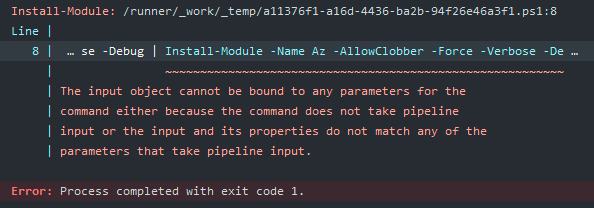
Post this update, got a new issue:

      **Invoke-WebRequest "https://www.powershellgallery.com/packages/PowerShellGet/2.2.5"
      Get-PSRepository -Verbose -Debug
      Get-PackageSource -Verbose -Debug
      Find-Module "PowerShellGet" -RequiredVersion "2.2.5" -Repository PSGallery -Verbose -Debug
      Find-Module "PowerShellGet" -RequiredVersion "2.2.5" -Repository PSGallery -Verbose -Debug | Install-Module -AllowClobber -Force -Verbose -Debug**
Regards Susrut

Hi @AdamSheltz ,
could you please screenshots of everything being run and outputted when you run the commands? This would provide more info to us and help debug better.
Could you run the following and share full output for each step:
First run:
Invoke-WebRequest "https://www.powershellgallery.com/packages/PowerShellGet/2.2.5"to ensure that you have a connection to PowerShellGallery. And share this output.And then could you run:
Get-PSRepository -Verbose -DebugGet-PackageSource -Verbose -DebugAnd then after that could you run:
Find-Module "PowerShellGet" -RequiredVersion "2.2.5" -Repository PSGallery -Verbose -DebugAnd if something gets returned from
Find-Modulethen you can pipe it into Install-Module, like so:Find-Module "PowerShellGet" -RequiredVersion "2.2.5" -Repository PSGallery -Verbose -Debug | Install-Module -AllowClobber -Force -Verbose -Debug
@anamnavi I am having the same issue as @AdamSheltz and here is the output from the commands you suggested to run:
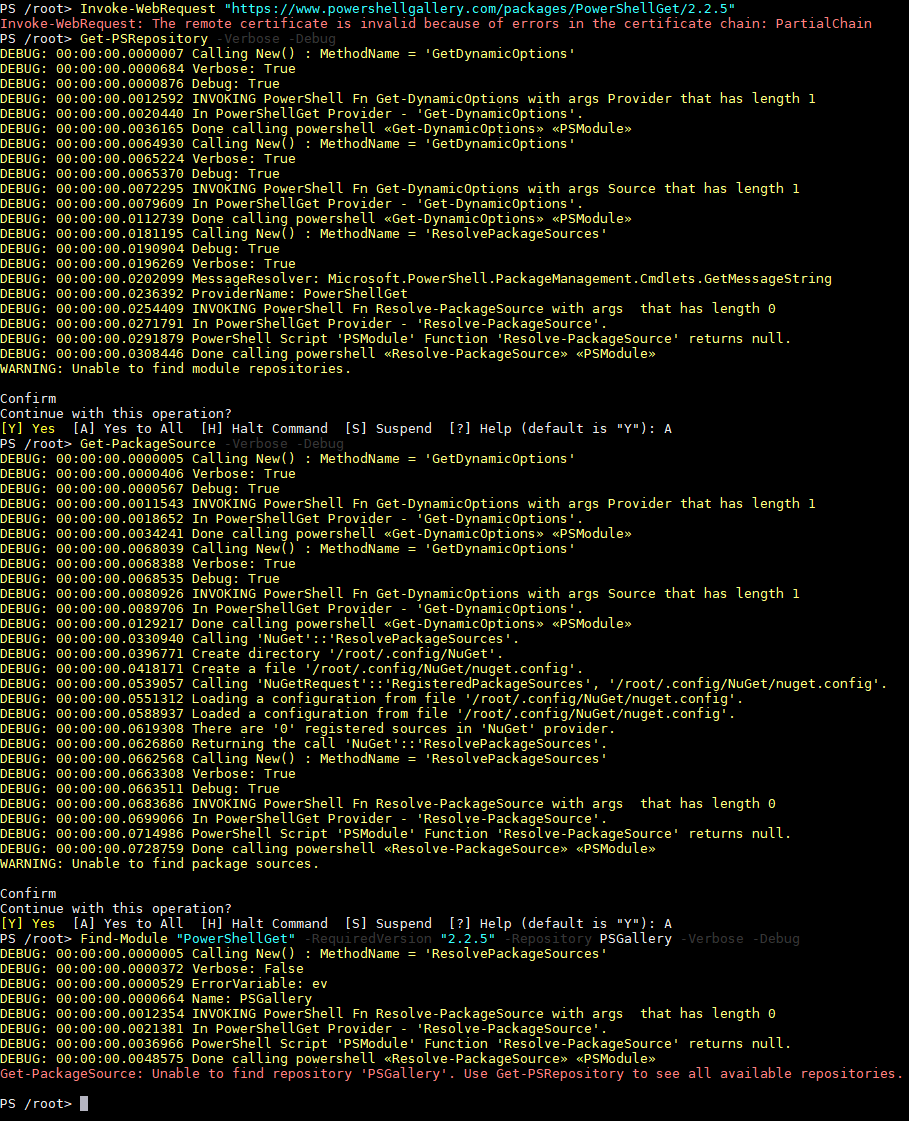
Any help appreciated!

@mtsuit I'm not sure why Invoke-WebRequest is giving you that error as all of our certs look okay. Are you still encountering this issue with that particular cmdlet? Are you having this issue with any other machine connected to the same network?
It also looks like 'PSGallery' is not registered on your system. Can you run Register-PSRepository -Default and then run Get-PSRepository, then Find-Module PowerShellGet?

@mtsuit I'm not sure why
Invoke-WebRequestis giving you that error as all of our certs look okay. Are you still encountering this issue with that particular cmdlet? Are you having this issue with any other machine connected to the same network?It also looks like 'PSGallery' is not registered on your system. Can you run
Register-PSRepository -Defaultand then runGet-PSRepository, thenFind-Module PowerShellGet?
Hi @alerickson, yes I am still encountering this issue. I believe it is because I am running this on WSL (Windows Subsystem for Linux) but not sure why. Here is what I get from your latest commands:

@mtsuit can you run gmo powershellget -listavailable, then $env:PSModulePath and then Register-PSRepository -Default -Verbose -Debug?
@mtsuit can you run
gmo powershellget -listavailable, then$env:PSModulePathand thenRegister-PSRepository -Default -Verbose -Debug?
@alerickson here ya go:

Do you get the same cert error if you run
invoke-webrequest nuget.org?
Nope:
PS /home/psi124> invoke-webrequest nuget.org
StatusCode : 200 StatusDescription : OK
Hi I have a similar problem and the executed commands produce a similar output. Has anyone managed to solve this problem?

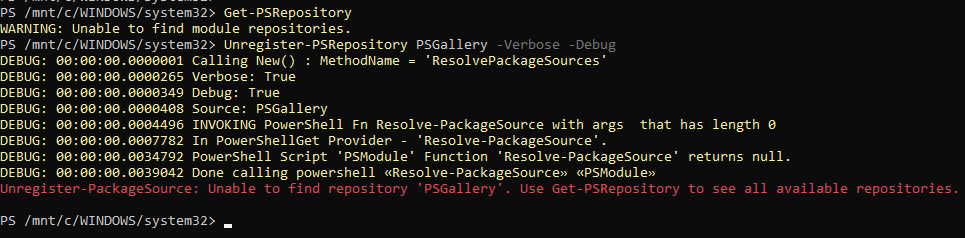
I have a similar problem as well, though only from WSL. Working from my Windows 10 side of things it is all fine.
Windows Side (working):
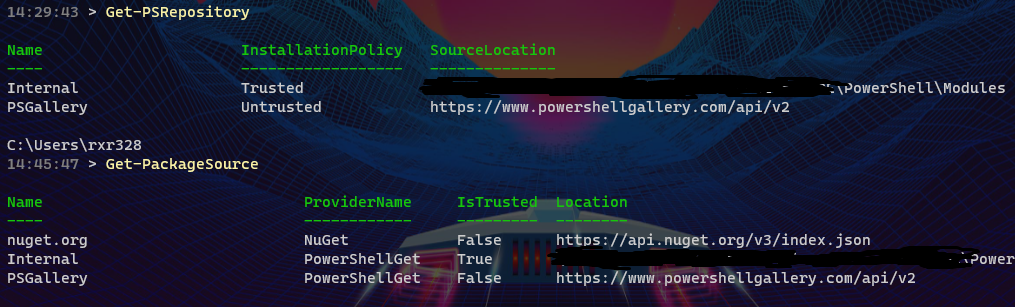
WSL Side (failing):



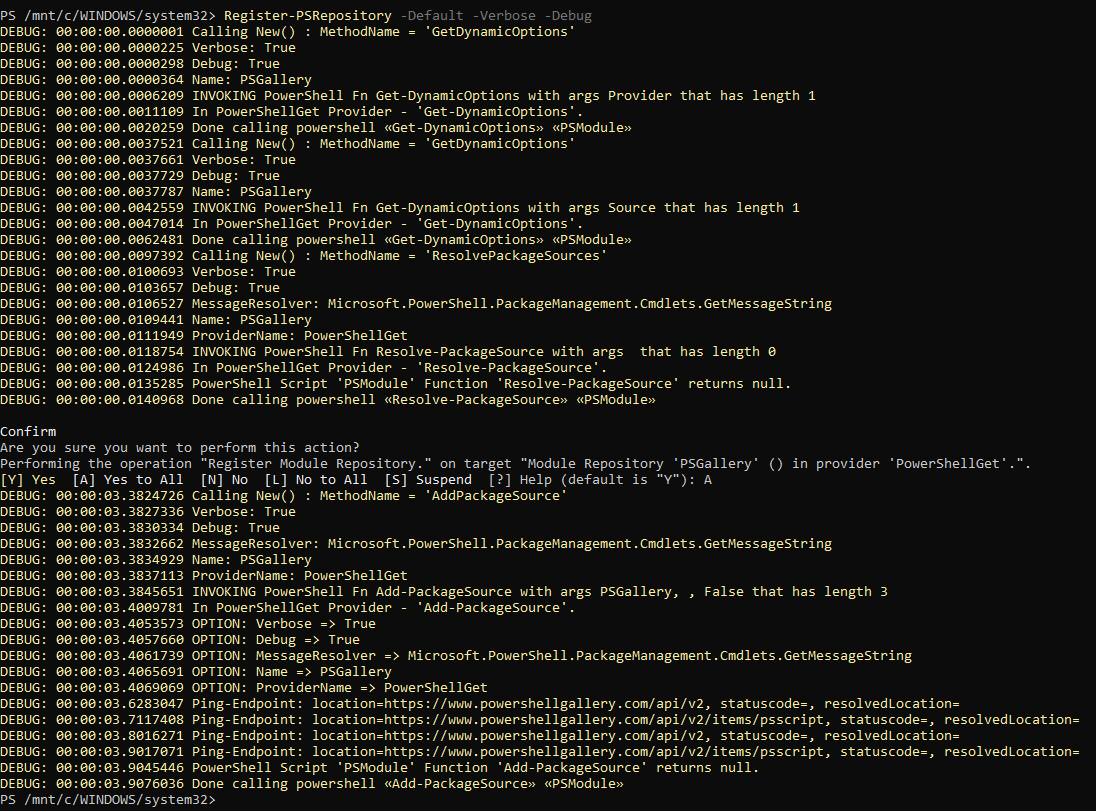
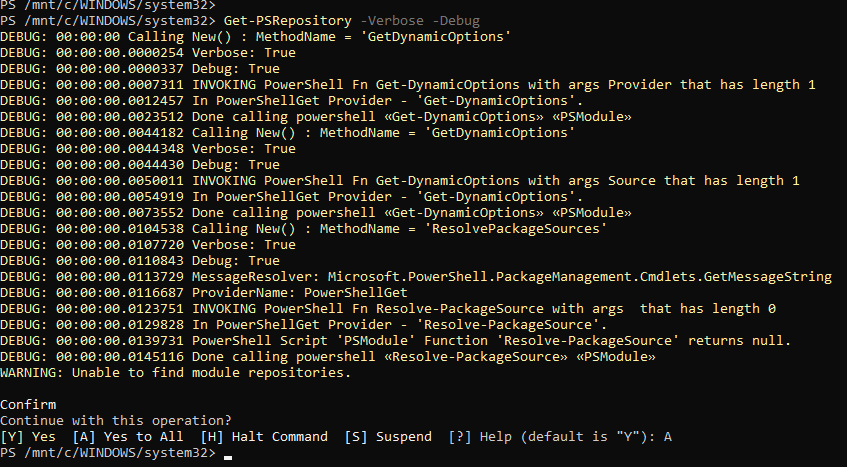



Thanks everyone, for the folks hitting this issue do you have a proxy enabled?

Hi @SydneyhSmith Could you please specify which proxy it is about? If it's general for the system, then no. I do not use.
It seems to me that I took my struggle a step further. Currently I can see the registered repository, but when I try to install any module I get an error:
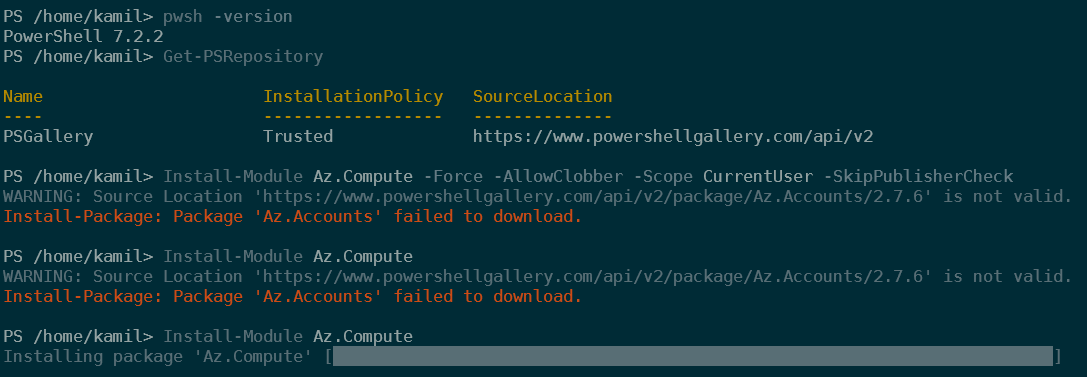
When try use curl for check if package is available I got:

but from windows system file was downloaded.
Thanks for the update @kamilgajek , wasn't asking about any particular proxy-- some folks have them set up on their systems and it can cause issues, sounds like this isnt the case you for you.
Could you please try running the following commands:
Get-Module Az.Compute -ListAvailable
Install-Module Az.Compute -Verbose + whatever other parameters you use