

 PowerShell
PSRL 2.0.0-beta2 not setting defaults for OperatorColor and ParameterColor
Environment data
PS version: 6.1.0-preview.4
PSReadline version: 2.0.0-beta2
os: Linux HILLR2 4.4.0-18204-Microsoft #1001-Microsoft Sat Jul 21 16:57:00 PST 2018 x86_64 x86_64 x86_64 GNU/Linux
PS file version:
Steps to reproduce or exception report
-
Install powershell-preview (6.1.0-p4) on Ubuntu 18.04 running in WSL (Windows 10 1803)
-
Run pwsh-preview and type in a command with a parameter and you won't see the
-Namein this case:
Here's why -

Note how both the OperatorColor and ParameterColor have not been set to a default. Hmm, just repro'd this on Windows 10 itself with 6.1.0-p4 installed. Is this an issue with how PowerShell configures PSRL? Or a problem with PSRL's defaults? Or is this supposed to work with those two values not set?


Indeed for some reason the default color palette that I get with WSL on this Windows 10 machine has color index 8 (DarkGray - selected in the image below) set to the same color as index 0:
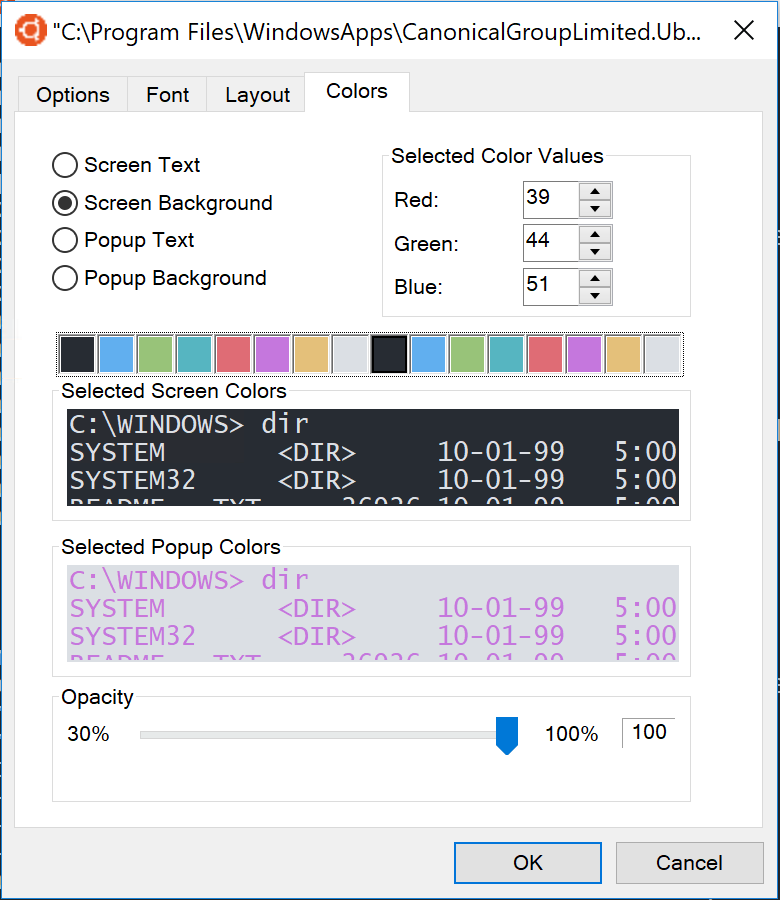
It could be related to my use of colortool - applying the OneHalfDark color scheme.
Maybe one fix would be to check every default "foreground" color to make sure it isn't the same as the current "background" color. And if so, adjust to another color that is different than the background color. And if on a VT system, maybe even use a computed contrast 8bit color.
That might help a little, but I think more often the problem will be having colors that are too similar, and there is no portable way to determine the RGB values for the standard colors.
Confirmed the same DarkGray or e[90m so this is likely still an issue (unless WSL has changed their background) I dont have a way to test WSL very easily
