

 PostHog
Breakdown by cohort effectively filters rather than breaking down
Bug description
If I break down by a cohort I see a filtered version of the funnel rather than one that breaks down incohort vs outside of cohort
https://app.posthog.com/insights?insight=FUNNELS&properties=%5B%5D&filter_test_accounts=true&events=%5B%7B%22id%22%3A%22first%20team%20event%20ingested%22%2C%22name%22%3A%22first%20team%20event%20ingested%22%2C%22type%22%3A%22events%22%2C%22order%22%3A1%7D%5D&actions=%5B%7B%22id%22%3A%222674%22%2C%22name%22%3A%22User%20Signed%20Up%20(Comprehensive)%22%2C%22type%22%3A%22actions%22%2C%22order%22%3A0%7D%2C%7B%22id%22%3A%224912%22%2C%22name%22%3A%22Discovered%20Learning%22%2C%22type%22%3A%22actions%22%2C%22order%22%3A2%7D%5D&funnel_viz_type=steps&display=FunnelViz&interval=day&breakdown=%5B320%5D&breakdown_type=cohort&new_entity=%5B%5D&date_from=-90d
Expected behavior
I would expect to see the funnel broken down by In Cohort X: True, False
But I see it broken down by In Cohort X: True (only)
Which is effectively the same as the filter functionality
How to reproduce
- https://app.posthog.com/insights?insight=FUNNELS&properties=%5B%5D&filter_test_accounts=true&events=%5B%7B%22id%22%3A%22first%20team%20event%20ingested%22%2C%22name%22%3A%22first%20team%20event%20ingested%22%2C%22type%22%3A%22events%22%2C%22order%22%3A1%7D%5D&actions=%5B%7B%22id%22%3A%222674%22%2C%22name%22%3A%22User%20Signed%20Up%20(Comprehensive)%22%2C%22type%22%3A%22actions%22%2C%22order%22%3A0%7D%2C%7B%22id%22%3A%224912%22%2C%22name%22%3A%22Discovered%20Learning%22%2C%22type%22%3A%22actions%22%2C%22order%22%3A2%7D%5D&funnel_viz_type=steps&display=FunnelViz&interval=day&breakdown=%5B320%5D&breakdown_type=cohort&new_entity=%5B%5D&date_from=-90d
Environment
- [x] PostHog Cloud
- [ ] self-hosted PostHog, version/commit: please provide


Makes sense! Just FYI, not a new bug, this is how it has "always" worked.

Actually, maybe we want to keep this only in filters, and allow multiple cohorts there? (like in https://github.com/PostHog/posthog/issues/5566 ) - thus removing the option of cohorts from breakdowns.
Is there a use-case for analysing users not in a specific cohort - as a breakdown?
I guess the key use-case I'm trying to solve for is...
I want to know if people who've viewed our tutorials have a better conversion rate than people who haven't viewed our tutorials...
I'm not sure adding multiple cohorts is an intuitive user experience to solve for this problem. I want to know what's special about this cohort vs the baseline - but doesn't feel intuitive to need to add the baseline myself.
Ooh, that makes a lot of sense.
In the same vein, breakdown on multiple cohorts (A, B, C), should then give 4 buckets: A, B, C, or neither?
That doesn't quite work since user can belong to all 3 of the listed cohorts - the numbers wouldn't match up even after adding a Other category.
Kind of.
I honestly think this (filtering) is the correct behavior if selecting multiple works since it's consistent with behavior in trends. Not to say the UX around choosing multiple cohorts can't be improved (it's quite annoying).
cc @clarkus
I agree that this is pretty much correct behavior analytics-wise. As for A vs ¬A, we can add a "not in cohort" series option to the current only "in cohort", but that would get messy with multiple cohorts, i.e. series: A, B, C, and ¬(A∨B∨C) wouldn't actually make sense, since the overlap between any of A, B, and C can be anywhere between none or full.

Isn't a breakdown basically a group by operation? When I pick breakdown by browser, I see the resulting trend grouped by each browser name in order of distribution. This replaces the baseline conversion shown otherwise. When I pick cohorts, I see the trend grouped by each cohort I add. In each case we're dropping the baseline.
Maybe this is as simple as always including the baseline trend or adding an option to toggle the baseline on and off? I was working on this for funnels, but it's totally applicable to other insights types as well. We need some means of configuring the resulting chart to show just the metrics / groupings you're interested in. In this example, the legend is being used to toggle specific values on and off in the display. This is showing browsers and comparison ranges, but the same approach should work for multiple cohorts. Thoughts?
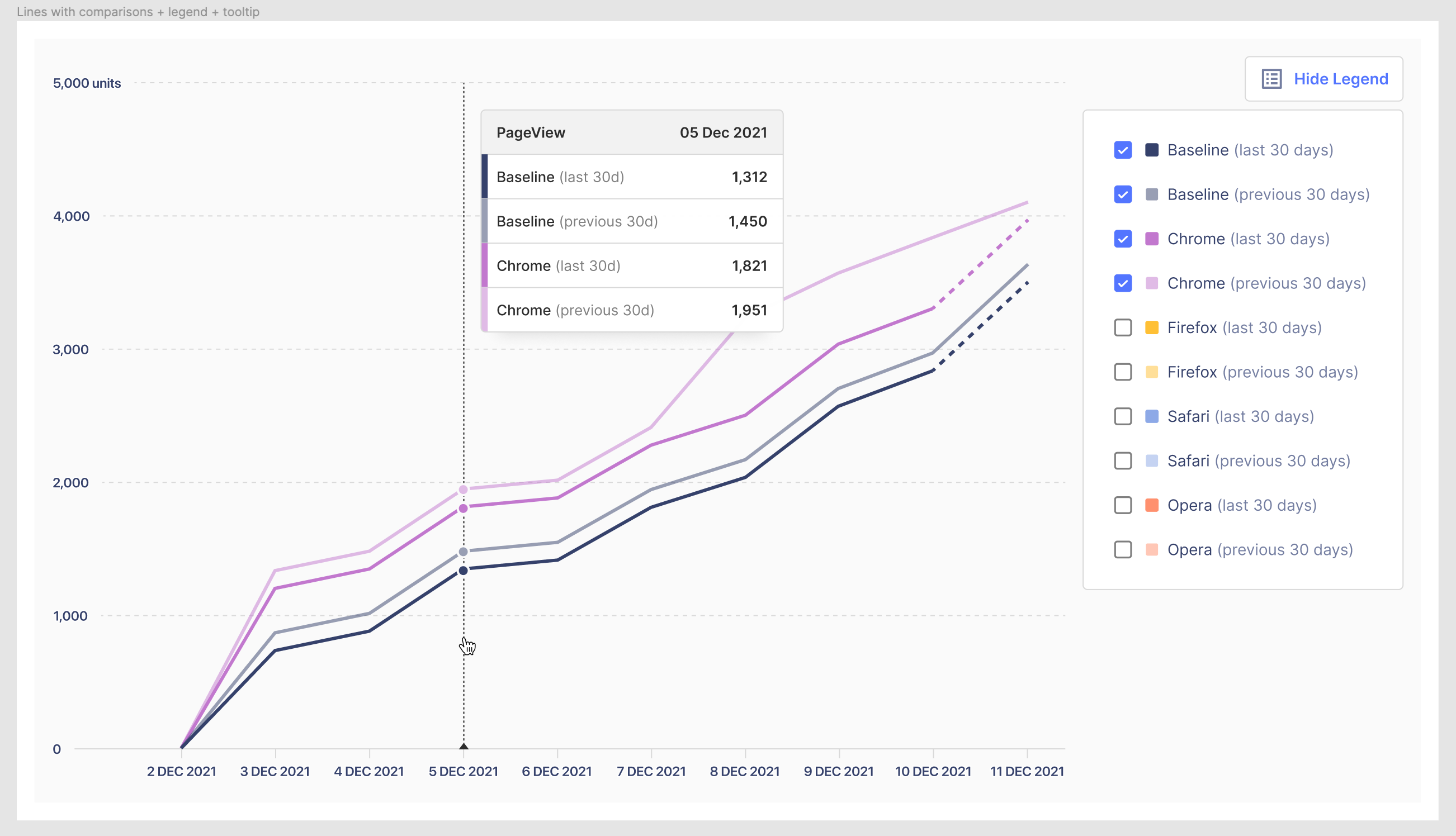

Should we turn this from a bug ticket into an enhancement ticket (since we wish to include new behavior here)? Not sure we want to change anything here immediately and if we do make a change it will be for trends and funnels both.
Yeah, I agree, there's no bug but maybe there is possibility for the feature to be enhanced for clarity.
