Planshit
程序崩溃
[ Error ] [ 2023-01-15 21:57:25 ]
[程序崩溃异常] System.IO.FileNotFoundException: C:\WINDOWS\system32\Tai.exe
在 System.Drawing.Icon.ExtractAssociatedIcon(String filePath, Int32 index)
在 UI.Controls.Window.DefaultWindow..ctor()
在 UI.MainWindow..ctor(IThemeServicer themeServicer)
--- 引发异常的上一位置中堆栈跟踪的末尾 ---
在 Microsoft.Extensions.DependencyInjection.ServiceLookup.CallSiteRuntimeResolver.VisitConstructor(ConstructorCallSite constructorCallSite, RuntimeResolverContext context)
在 Microsoft.Extensions.DependencyInjection.ServiceLookup.CallSiteVisitor2.VisitCallSiteMain(ServiceCallSite callSite, TArgument argument) 在 Microsoft.Extensions.DependencyInjection.ServiceLookup.CallSiteRuntimeResolver.VisitDisposeCache(ServiceCallSite transientCallSite, RuntimeResolverContext context) 在 Microsoft.Extensions.DependencyInjection.ServiceLookup.CallSiteVisitor2.VisitCallSite(ServiceCallSite callSite, TArgument argument)
在 Microsoft.Extensions.DependencyInjection.ServiceLookup.CallSiteRuntimeResolver.Resolve(ServiceCallSite callSite, ServiceProviderEngineScope scope)
在 Microsoft.Extensions.DependencyInjection.ServiceLookup.DynamicServiceProviderEngine.<>c__DisplayClass2_0.<RealizeService>b__0(ServiceProviderEngineScope scope)
在 Microsoft.Extensions.DependencyInjection.ServiceProvider.GetService(Type serviceType, ServiceProviderEngineScope serviceProviderEngineScope)
在 Microsoft.Extensions.DependencyInjection.ServiceProvider.GetService(Type serviceType)
在 Microsoft.Extensions.DependencyInjection.ServiceProviderServiceExtensions.GetService[T](IServiceProvider provider)
在 UI.App.ShowMainWindow()
在 UI.App.MainWindowMenuItem_Click(Object sender, RoutedEventArgs e)
在 System.Windows.RoutedEventHandlerInfo.InvokeHandler(Object target, RoutedEventArgs routedEventArgs)
在 System.Windows.EventRoute.InvokeHandlersImpl(Object source, RoutedEventArgs args, Boolean reRaised)
在 System.Windows.UIElement.RaiseEventImpl(DependencyObject sender, RoutedEventArgs args)
在 System.Windows.UIElement.RaiseEvent(RoutedEventArgs e)
在 System.Windows.Controls.MenuItem.InvokeClickAfterRender(Object arg)
在 System.Windows.Threading.ExceptionWrapper.InternalRealCall(Delegate callback, Object args, Int32 numArgs)
在 System.Windows.Threading.ExceptionWrapper.TryCatchWhen(Object source, Delegate callback, Object args, Int32 numArgs, Delegate catchHandler)
[ Caller Info ] Line:81,File:Tai\App.xaml.cs,name:App_DispatcherUnhandledException
[ Info ] [ 2023-01-15 21:57:32 ] datetime observer start,interval(s):146.9093198 [ Caller Info ] Line:40,File:Tai\Servicers\Instances\DateTimeObserver.cs,name:SetTimer
[ Error ] [ 2023-01-15 21:57:35 ]
[程序崩溃异常] System.IO.FileNotFoundException: C:\WINDOWS\system32\Tai.exe
在 System.Drawing.Icon.ExtractAssociatedIcon(String filePath, Int32 index)
在 UI.Controls.Window.DefaultWindow..ctor()
在 UI.MainWindow..ctor(IThemeServicer themeServicer)
--- 引发异常的上一位置中堆栈跟踪的末尾 ---
在 Microsoft.Extensions.DependencyInjection.ServiceLookup.CallSiteRuntimeResolver.VisitConstructor(ConstructorCallSite constructorCallSite, RuntimeResolverContext context)
在 Microsoft.Extensions.DependencyInjection.ServiceLookup.CallSiteVisitor2.VisitCallSiteMain(ServiceCallSite callSite, TArgument argument) 在 Microsoft.Extensions.DependencyInjection.ServiceLookup.CallSiteRuntimeResolver.VisitDisposeCache(ServiceCallSite transientCallSite, RuntimeResolverContext context) 在 Microsoft.Extensions.DependencyInjection.ServiceLookup.CallSiteVisitor2.VisitCallSite(ServiceCallSite callSite, TArgument argument)
在 Microsoft.Extensions.DependencyInjection.ServiceLookup.CallSiteRuntimeResolver.Resolve(ServiceCallSite callSite, ServiceProviderEngineScope scope)
在 Microsoft.Extensions.DependencyInjection.ServiceLookup.DynamicServiceProviderEngine.<>c__DisplayClass2_0.<RealizeService>b__0(ServiceProviderEngineScope scope)
在 Microsoft.Extensions.DependencyInjection.ServiceProvider.GetService(Type serviceType, ServiceProviderEngineScope serviceProviderEngineScope)
在 Microsoft.Extensions.DependencyInjection.ServiceProvider.GetService(Type serviceType)
在 Microsoft.Extensions.DependencyInjection.ServiceProviderServiceExtensions.GetService[T](IServiceProvider provider)
在 UI.App.ShowMainWindow()
在 UI.App.MainWindowMenuItem_Click(Object sender, RoutedEventArgs e)
在 System.Windows.RoutedEventHandlerInfo.InvokeHandler(Object target, RoutedEventArgs routedEventArgs)
在 System.Windows.EventRoute.InvokeHandlersImpl(Object source, RoutedEventArgs args, Boolean reRaised)
在 System.Windows.UIElement.RaiseEventImpl(DependencyObject sender, RoutedEventArgs args)
在 System.Windows.UIElement.RaiseEvent(RoutedEventArgs e)
在 System.Windows.Controls.MenuItem.InvokeClickAfterRender(Object arg)
在 System.Windows.Threading.ExceptionWrapper.InternalRealCall(Delegate callback, Object args, Int32 numArgs)
在 System.Windows.Threading.ExceptionWrapper.TryCatchWhen(Object source, Delegate callback, Object args, Int32 numArgs, Delegate catchHandler)
[ Caller Info ] Line:81,File:Tai\App.xaml.cs,name:App_DispatcherUnhandledException


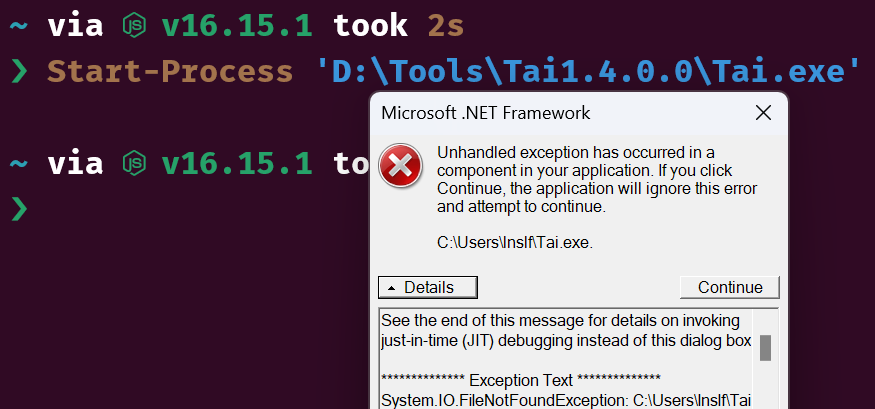
成功复现,导致问题的原因是代码大量使用了相对路径,导致在运行目录变化时找不到文件,这个问题同时也会导致找不到数据库和AppIcon缓存,要完全修复这个问题要改的代码有点多
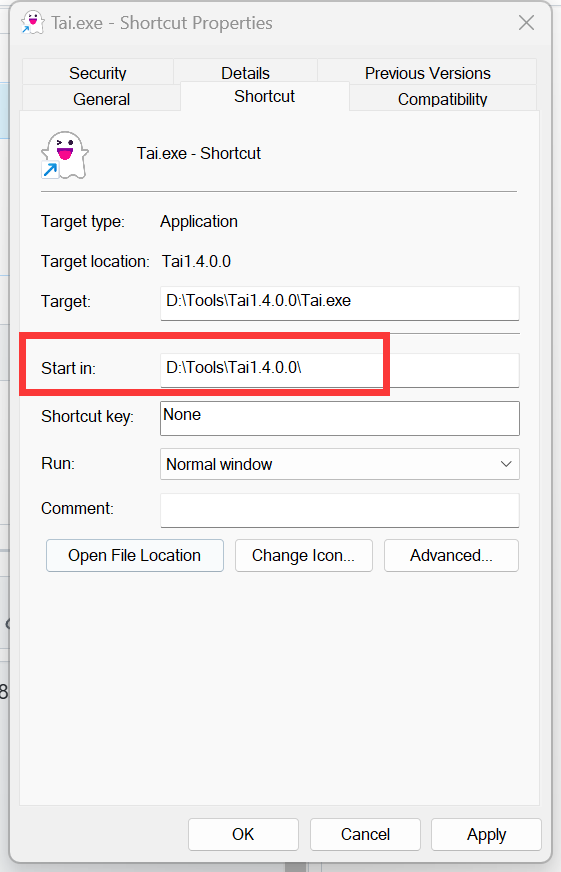
您大概可以通过先将程序完全退出(右下角图标右键-退出),再将快捷方式中的“启动目录”(应该是叫这个名字)改为 Tai.exe 的安装目录来临时解决问题,~~或者启动的时候直接双击exe 文件~~
~~我再去开个 issue 吧~~
正常来说不会这样啊,代码里写了开机自启动的运行目录,我这边在此之前也没遇到过这个问题。
如果您在启动后没有再修改过“开机自启动”选项,能在 powershell 里跑一下这个命令,然后把结果发一下吗
(Get-ScheduledTask | ? TaskName -eq "Tai task").Actions
您也可以对比一下它提示的 WorkingDirectory 是否正确,理论上应该这种形式的

不确定我的操作是否正确,得到的结果是这样的
Get-ScheduledTask : 灾难性故障 所在位置 行:1 字符: 1
- Get-ScheduledTask | ? TaskName -eq "Tai task"
-
  + CategoryInfo          : NotSpecified: (MSFT_ScheduledTask:Root/Microsoft/...T_ScheduledTask) [Get-ScheduledTask]
 , CimException
  + FullyQualifiedErrorId : HRESULT 0x8000ffff,Get-ScheduledTask
额,你的操作应该是对的,但是我不是很敢保证。
您那边Windows的“计划任务”可能运行不正常。您可以参考网上教程,看看是否能打开Windows计划任务。
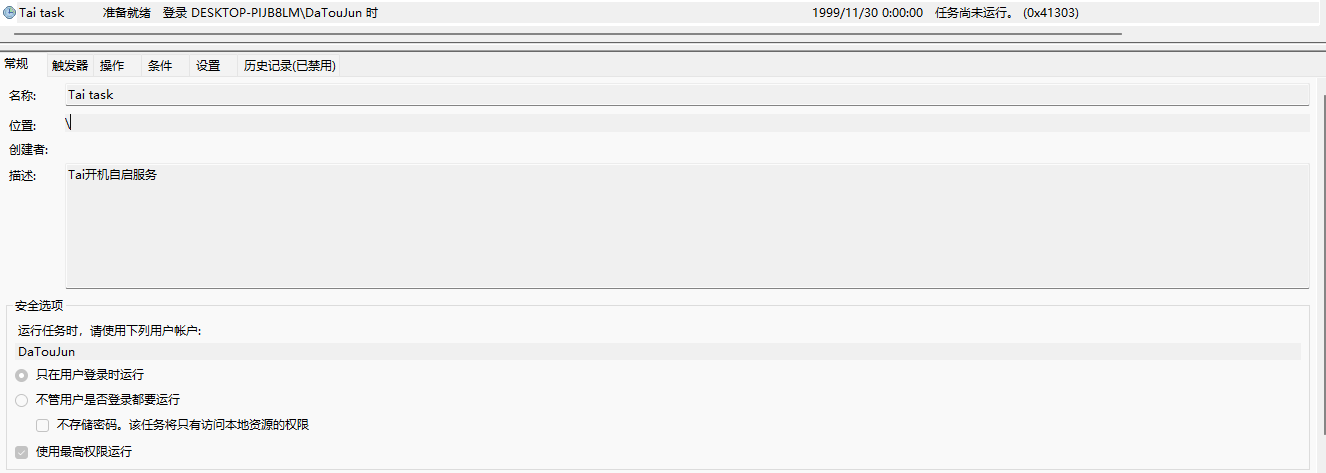
Tai 的开机自启依赖于Windows 的“计划任务”功能。
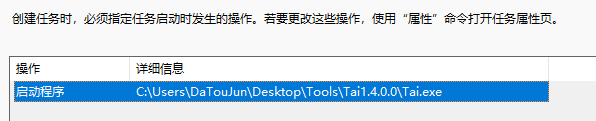
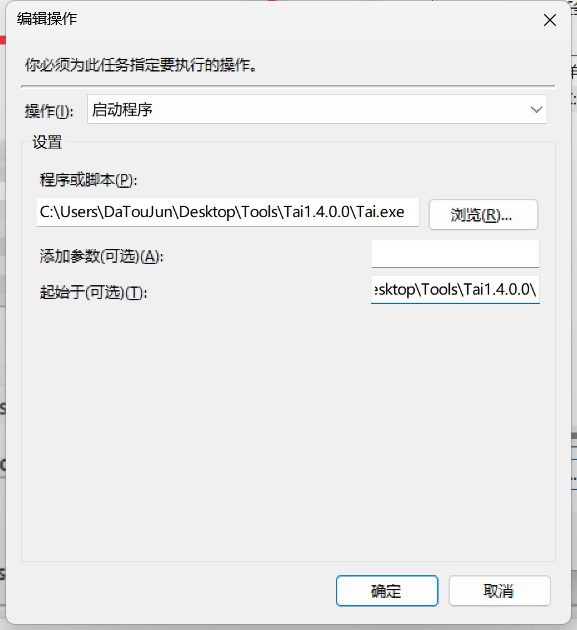
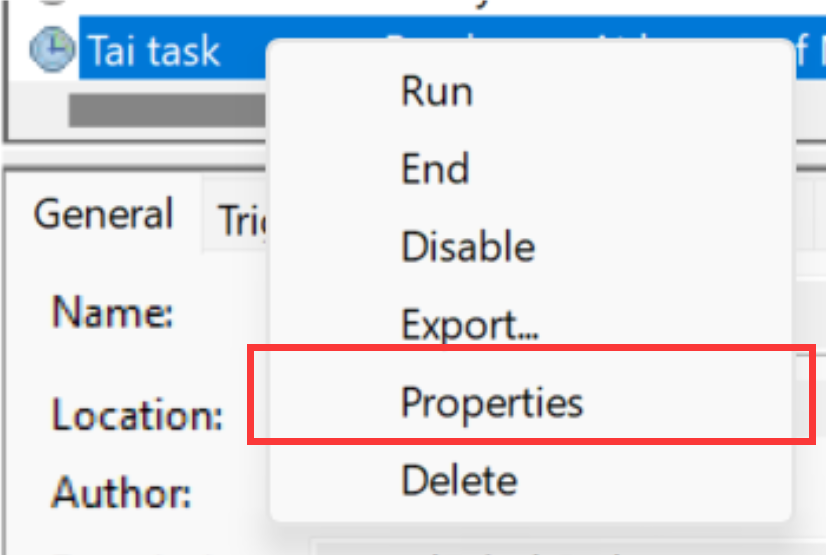
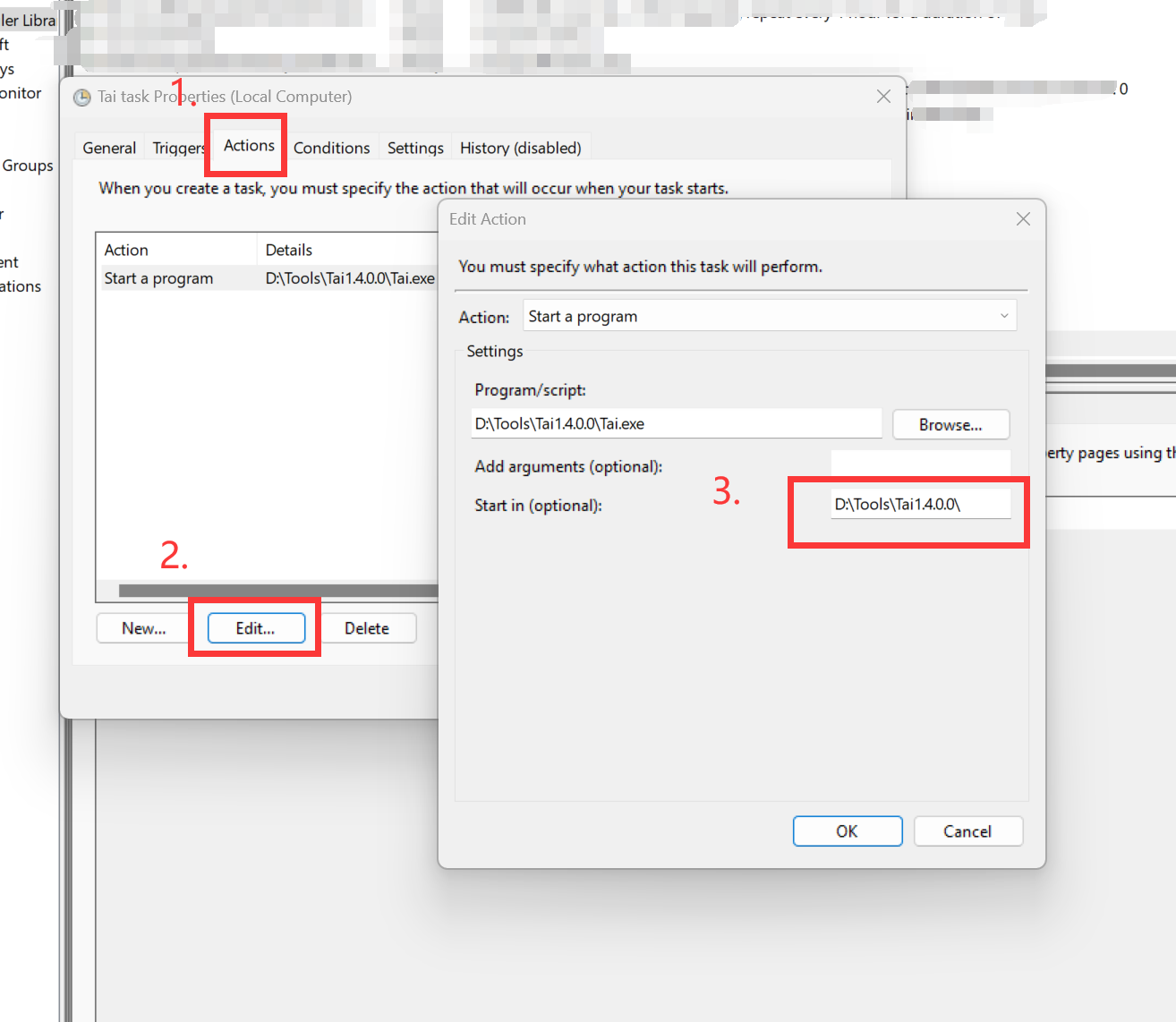
右键Tai task - 属性 - 动作 - 编辑
看看这里的工作目录设置是否正确?
另外问一下,在手动右键托盘图标关闭后,自行点开Tai.exe运行正常吗