

 PixlOne
MX Keys (US Int) key map
I have tried to figure out the key-map of my MX Keys Wireless Keyboard (US Int. layout) using both the wiki CIDs page and the output of # logid -v.
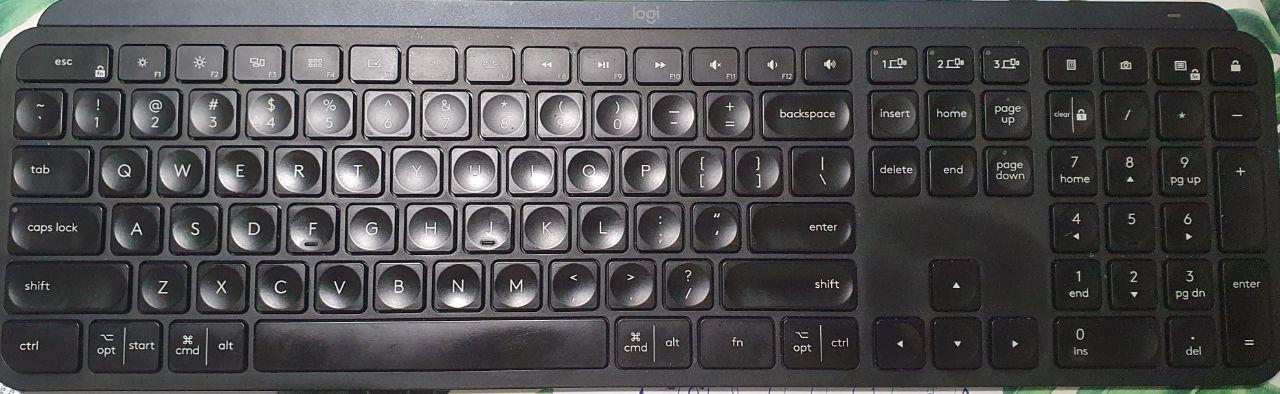
Here an image to avoid confusion:
So hoping it could be useful, in the following what I have discovered:
ESC is not reprogrammable
next, in order, switching the F* keys to the corresponding fn+<key> (possibly locking them by fn+ESC) we have the following codes for keys we can program:
|ESC|0xc7|0xc8|0xe0|0xe1|0x6e|0xe2|0xe3|0xe4|0xe5|0xe6|0xe7|0xe8|0xe9| |0xd1|0xd2|0xd3| |0x0a|0xbf|0xea|0x6f|
It has to notice that: 0xd1, 0xd2, and 0xd3 remap the keys to switch between possibly other connected devices, hence take great attention in (not) changing them ;-)
Moreover, IDs 0xeb and 0xec map to the right and left arrows, correspondingly, that is quite curious; so, take care in changing them too :-)

Keyboard layouts confuse the hell out of me. I have the MX Keys for Mac US Intl. layout, but it looks like this:

Trying to get my multitasking, calculator and screenshot keys to work...

I solved that same issue, for all those three tasks, creating a (system) keys-combination shortcut for the wanted action, and next mapping each of them (w/ logiops' configuration file) to the corresponding keybord's key.
I've managed to setup my MX Keys S with logiops. I've mapped all the not by default working keys on the keyboard. The config is here: https://github.com/pervoj/os/blob/main/variants/circle/files/etc/logid.cfg
