BulletSharpUnity3d

BulletSharpUnity3d copied to clipboard
 Phong13
How to add BBoxShape to physics world?
I'm thinking how to add BBoxShape to physics world I added rigidbody but I don't know what to do with box shape I want to add box with BulletUnity

Hi,
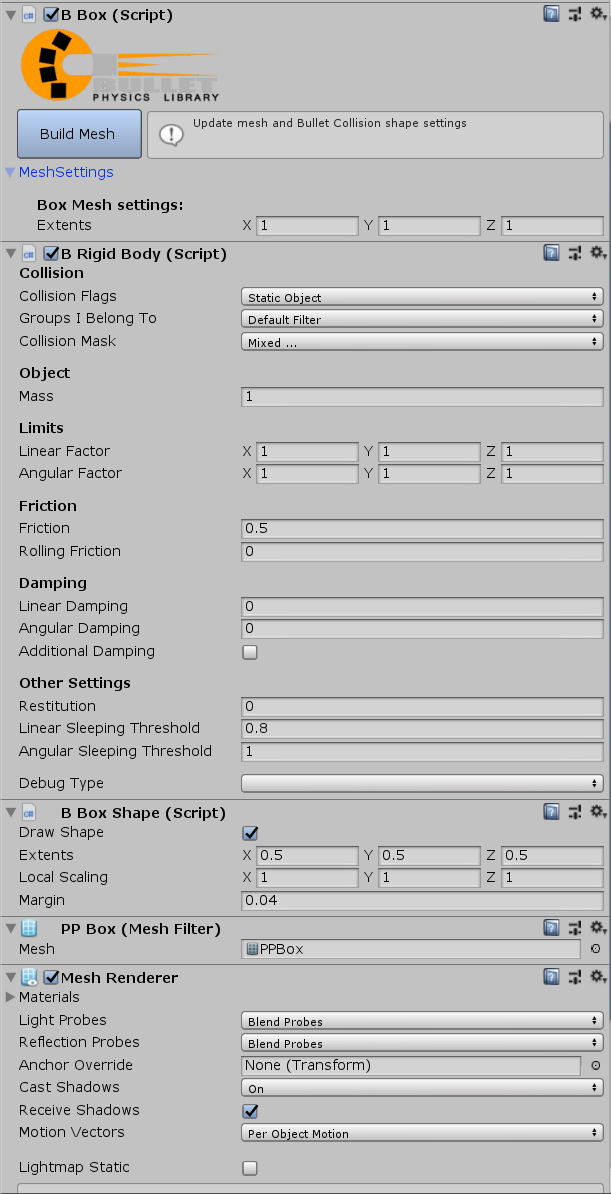
The setup is similar to adding colliders to rigidbodies in Unity. You need to have a BRigidBody and a BBoxShape on your GameObject. Take a look at the example scene: CollisionCallbacks to see some simple examples.
After adding the BRigidBody, and BBoxShape you probably want something visual to be rendered. You can do this two ways:
- Add a child game object to the BBoxShape and put some MeshRenderer geometry (Cube, Sphere, Capsule). The reason you want to use a child gameObject is so that you can scale the rendererd geometry to match the BBoxShape geometry (BulletUnity does not let you have non 1,1,1 scale on your collision shapes).
- You could use the BulletForUnity menu. It will generate some primitive shapes for you with geometry for rendering and matching collision shapes. It uses the BPrimitive component to generate a rendering mesh that matches the scale of settings of the CollisionShape.
Your game object should look something like this: