

 Phobos-developers
Delayed fire animation
Created for vehicles in mind but since it is a TechnoClass feature maybe works with other technos.
- Now a weapon attack can be delayed if an animation is set in
DelayedFire.Anim. - Optionally
DelayedFire.PostAnimreplacesDelayedFire.Animwhen the weapon is fired. - By default the animation will be placed in the weapon FLH location but the animation can be moved to the center of the object with
DelayedFire.Anim.UseFLH=false. DelayedFire.Duration> 0 will interrupt the animation (and allow weapon fire) when the countdown ends.DelayedFire.Suicidewill provoke the same effect of the original tagSuicidewithout the side effect explosion when the unit is killed by something.
In rulesmd.ini:
[SOMEWEAPON] ; WeaponType DelayedFire.Anim= ; Animation DelayedFire.PostAnim= ; Animation DelayedFire.Anim.UseFLH=true ; boolean - disabling this will create the animation at the center of the unit instead of its FLH coordinates DelayedFire.Duration=0 ; integer - in-game frames. DelayedFire.Suicide=false ; boolean
Summary by CodeRabbit
- New Features
- Introduced a delayed fire animation feature, allowing weapon attacks to be delayed by setting an animation.
- Bug Fixes
- Various fixes and improvements, including toggling Infantry/UnitsGainSelfHeal for MultiplayPassive=true houses, customizable straight trajectory detonation and snap distance with pass-through option, and adjustments to airstrike and spy plane spawn distance and height.
- Fixed an issue that allowed AI to repair structures built from base nodes, trigger action 125, and SW delivery in single-player missions.
- Documentation
- Updated documentation to include the new delayed fire animation feature and various fixes and improvements.

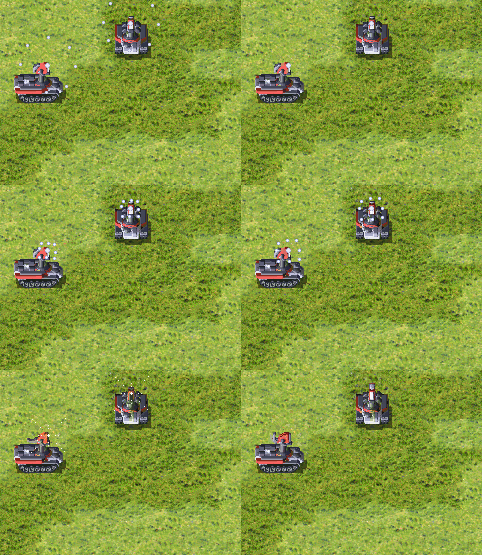
; Example: [Comet] Damage=100 ROF=100 Range=10 Projectile=LargeCometP Speed=40 Report=PrismTankAttack Warhead=CometWH Bright=yes IsHouseColor=true LaserOuterSpread= 0,0,0 LaserDuration = 15 IsLaser=true DelayedFire.Anim=PRISMCHARGE ; put HERE your anim that will be used as delayer DelayedFire.Anim.LoopCount=3
Nightly build for this pull request:
- compiled-dll-4fe5096476e73ede1dac3c6883829ce25576f8ee.zip This comment is automatic and is meant to allow guests to get latest nightly builds without registering. It is updated on every successful build.
![github-actions[bot] avatar](https://avatars.githubusercontent.com/in/15368?v=4 "Published by a pub.dev verified publisher")
Nightly build for this pull request:
- compiled-dll-3422b0c70b3eb703b36992ab5202fba834afb7ea.zip These artifacts will expire in 90 days and will not be available for download after that time.
This comment is automatic and is meant to allow guests to get latest nightly builds for this pull request without registering. It is updated on every successful build.
The feature has been rewritten. due some comments to support multiple DelayedFire settings in each weapon. Removed "DelayedFire.Anim.LoopCount" Added "DelayedFire.PostAnim" that will be played when "DelayedFire.Anim" end.
Updated the docs and the first post here.
There's a bunch of things that probably need looking into here.
- The big one is the basic design of this system. Having it so that the delay is tied to the length of the animation with bespoke loop controls and an additional option to cap the delay is kind of backwards design. The delay and the animation should be separate, with the delay timer running exactly for the number of frames specified and animation duration, looping etc. left up to the modder.
Now the loops control is managed by artmd.ini "DelayedFire.Duration" forces the end of the animation and fires the weapon. basically is how a vanilla YR tag works.
- The delay is currently only reset if the firer goes idle. If you swap weapons, which mind you could both have different
DelayedFiresettings without dropping attack mission the delay does not get reset. At the very least this should be an option that probably should default to true.
Addressed in the new implementation :-)
- Another issue with the basic design, it doesn't currently play well with infantry at all. Due to being hooked at
FireAt, the delay is only processed when that function is entered and on infantry there is already an delay determined by the firing sequence, which stacks up with this one. May be possible to salvage in the current implementation by adding some bespoke checks in infantry firing AI function that could also be used to make the sequence work nicely together with this, all of which could possibly also be looked at separately after this but figured it should be mentioned anyway. And mentioned in docs too if it gets merged in this state.
I think currently works, but in this example the sequence is too short that repeats the sequence until it ends (just do the sequence a bit longer):
DelayedFire.Anim.UseFLHset to true does not currently produce accurate results. This is probably because you're using weapon index frompThis->CurrentWeaponNumberto fetch the FLH and that's only used for IFV/Gattling stuff. Get the actual weapon index fromFireAtparams from stack or something instead.
Probably addressed in the new version.
- What exactly is the distinction between just using
SuicideandDelayedFire.Suicide? The documentation isn't very clear on this. In my tests the only thing I was able to figure out is that latter still fires offFeedbackWeapon.- Attaching the animation to the firer (
SetOwnerObject()) should probably be toggleable, just in case. In majority of cases you'd want it on but there might be some cases where you do not.Also some minor code nitpicks that I commented on separately. If the unit with "Suicide=yes" is killed it explodes and the new sub-tag not.
Walkthrough
This update introduces a new feature for delayed fire animation in the game, allowing a weapon attack to be delayed by setting an animation. It also includes various bug fixes and improvements by Starkku and a fix by Trsdy to allow AI to repair structures. The changes affect multiple files, including the addition of new properties and functions to handle the delayed fire animation.
Changes
| File | Summary |
|---|---|
CREDITS.md |
Added delayed fire animation and miscellaneous bug fixes and improvements. |
YRpp |
Updated the subproject commit. |
docs/New-or-Enhanced-Logics.md |
Introduced a new feature for delayed fire animation. |
docs/Whats-New.md |
Added a delayed fire animation feature and various fixes and improvements. |
src/Ext/Techno/Body.* |
Added new member variables and functions to handle the delayed fire animation. |
src/Ext/Techno/Hooks.* |
Added a new hook function to handle the delayed fire animation. |
src/Ext/WeaponType/Body.* |
Added new properties to handle the delayed fire animation. |
Poem
🍂 As autumn leaves fall, the code takes a new turn, 🔄
With delayed fire animation, for which gamers yearn. 🎮
Bugs squashed, improvements made, a better game in sight, 🐛🔨
Thanks to Starkku and Trsdy, who code by day and night. 💻🌙
So here's to the coders, their efforts we applaud, 👏
Making games better, with every line of code they've authored. 📝🎉
Tips
Chat with CodeRabbit Bot (@coderabbitai)
- If you reply to a review comment from CodeRabbit, the bot will automatically respond.
- To engage with CodeRabbit bot directly around the specific lines of code in the PR, mention @coderabbitai in your review comment
- Note: Review comments are made on code diffs or files, not on the PR overview.
- Add
@coderabbitai ignoreanywhere in the PR description to prevent this PR from being reviewed.
CodeRabbit Commands (invoked as PR comments)
@coderabbitai pauseto pause the reviews on a PR.@coderabbitai resumeto resume the paused reviews.@coderabbitai reviewto trigger a review. This is useful when automatic reviews are disabled for the repository.@coderabbitai helpto get help.@coderabbitai resolveto resolve all the CodeRabbit review comments.
Note: For conversation with the bot, please use the review comments on code diffs or files.
CodeRabbit Configration File (.coderabbit.yaml)
- You can programmatically configure CodeRabbit by adding a
.coderabbit.yamlfile to the root of your repository. - The JSON schema for the configuration file is available here.
- If your editor has YAML language server enabled, you can add the path at the top of this file to enable auto-completion and validation:
# yaml-language-server: $schema=https://coderabbit.ai/integrations/coderabbit-overrides.v2.json
![coderabbitai[bot] avatar](https://avatars.githubusercontent.com/in/347564?v=4 "Published by a pub.dev verified publisher")
Temporally closed due to a desync. Probably I have to rethink this PR (feel free to take code from something else if is useful).