

 Phobos-developers
4 new script action type, aiming for more powerful ai manipulating
Script 114 Change team group
- Change all team member's group into a specific value, can be negative.
- This
TeamType's group value will not be changed. - The script will continue once the change is done.
- This action will not change this
TeamType's group value
Script 115 Distributed loading
- This action will class all team member into passengers and vehicles, and load all passengers into all available vehicles.
- Vehicles: any units in current team which shares a max
SizeLimit, no matter theTechType. - Passengers: all remaining members.
- Vehicles: any units in current team which shares a max
- Passengers with larger size will load first.
- The script will continue when no passengers left, or no more room for passengers.
Script 116 Follow friendly by group
- All member will follow a nearest friendly unit with specific group number until the target is destroyed, or group value changed. Then the team will find another nearest available target to follow.
- The behavior varies with this team's member:
- If all team member is naval, this team can only follow naval units.
- If all team member is airbound, this team can follow anything.
- If this team is neither naval nor airbound, this team can only follow ground objects.
Script 117 Rally unit with same group
- This action will rally all available units share the same group value with this
TeamType, and recruit them as team member. All rallyed unit will perform all future script action along with this team. - Will use following logic to rally member:
- Same owner (of course)
- Unit's current group value equals this
TeamType's group value - If this team has
Recruiter=yes:- No restrictions
- If this team has
Recruiter=no:- Units with
RecruitableB=no(or their previousTeamTypehasAreTeamMembersRecruitable=no) will not be rallyed - If unit is now belongs to another team, this unit can be rallyed only when their parent
TeamType's Priority less than (not equal) thisTeamType's
- Units with
- Rallyed member will not apply this team's member properties (like
AreTeamMembersRecruitable) - The script will continue once a rally attempt is done.
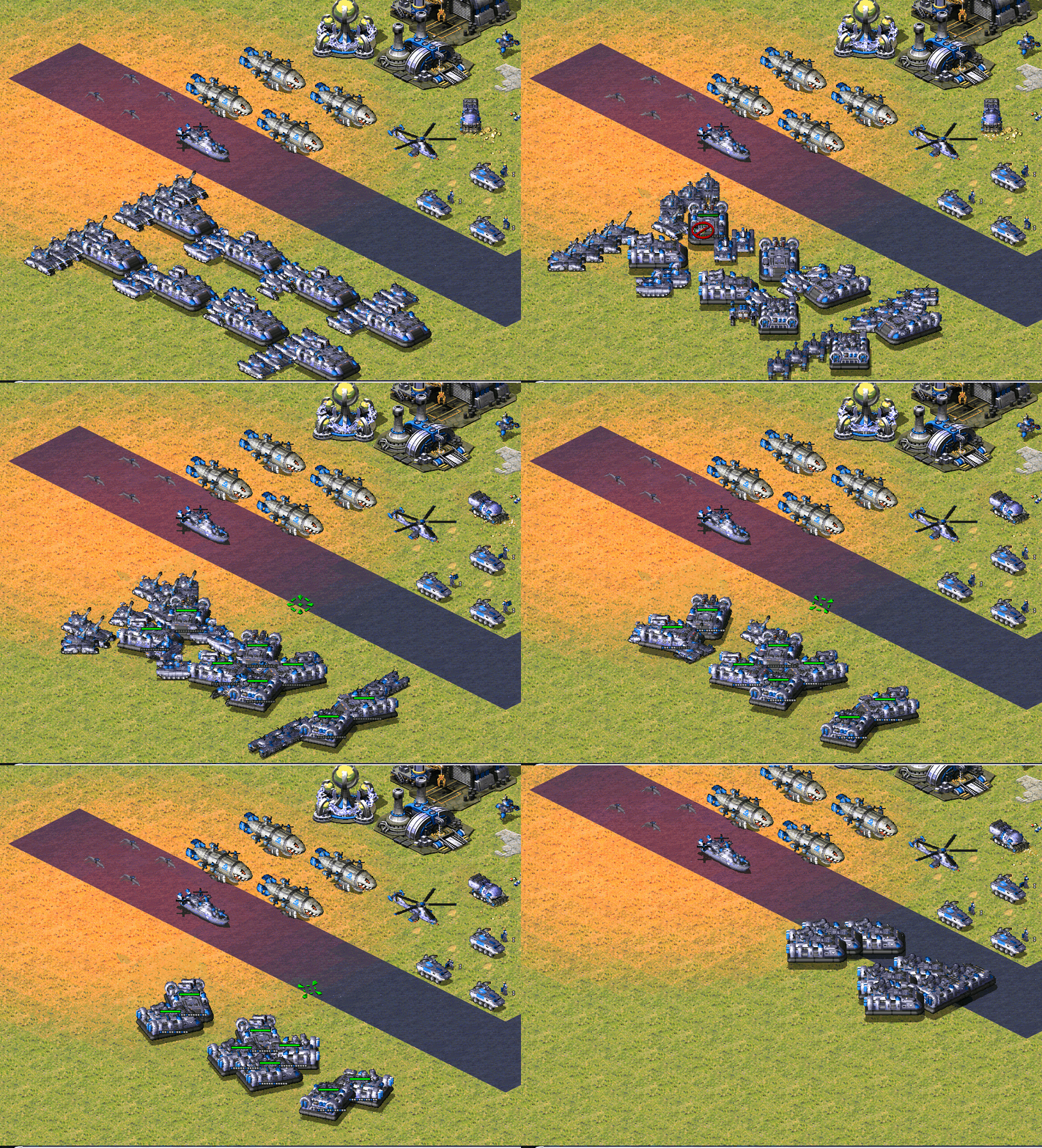 (Distributed loading onto transport, use only 1 team and 2 line of script action)

From a quick glance code style seems to be good, and the code is thoroughly commented which is a plus. Why 572-575 though?

From a quick glance code style seems to be good, and the code is thoroughly commented which is a plus. Why 572-575 though?
secsome suggested that new script action should avoid conflict with other possible Ares-based extension custom script, 500+ seems a reasonable start, and this 4 action follows secsome's variable manipulating script action. And I recommend to move all previous script action to post 500 index
From a quick glance code style seems to be good, and the code is thoroughly commented which is a plus. Why 572-575 though?
secsome suggested that new script action should avoid conflict with other possible Ares-based extension custom script, 500+ seems a reasonable start, and this 4 action follows secsome's variable manipulating script action. And I recommend to move all previous script action to post 500 index
Then I suggest to separate logically what script actions should be where. For example, say, 500-599 would be variable manipulation script actions, 600-699 - AI param adjustment actions, 700-799 - script flow manipulation actions etc. Or even better - introduce named actions or action aliases perhaps? I assume most of modders edit the scripts directly, so would be very convenient for them.
Nightly build for this pull request:
- compiled-dll-5bb52349a100234ba52415b2be4e99effb515d78.zip This comment is automatic and is meant to allow guests to get latest nightly builds without registering. It is updated on every successful build.
![github-actions[bot] avatar](https://avatars.githubusercontent.com/in/15368?v=4 "Published by a pub.dev verified publisher")
I was unable to confirm that 572/574/575 interactions were working correctly. These were the steps I used to setup the code:
- create two taskforces, one that will be the "leader" and have it's group changed and one that will be the "follower" and will not have it's group changed
- create two scripts, one for the leader to "do their mission (attack anything)" while the follower uses Gather at Friendly Base followed by 574, follow friendly in group
- team types and triggers were created to force the AI to send off both the Leader team and the Follower team on their scripts
What happened was that the Follower team would always Gather at Friendly Base, and then never move again.
- I tried setting group values on the TaskForce and TeamType for the "Leader" taskforce, when it was set above -1 the leader TF failed to execute script
- debug.log outputs that scripts 572 and 574 don't exist, upon inspecting the GH code I can see it's set to script actions 114 and 116 (there is no mention of a script to follow enemy units in src/Ext/Script/Body.h where the script numeration seems to be located)
I have not tested distributed loading, until a followup is done I'd say this feature is incomplete or non-functional. Attached are my codes I used for testing, and my debug.log to support the output messages mentioned. (is it possible that debug output could show when Group values are updated by these scripts until they are finished?)

I was unable to confirm that 572/574/575 interactions were working correctly. These were the steps I used to setup the code:
- create two taskforces, one that will be the "leader" and have it's group changed and one that will be the "follower" and will not have it's group changed
- create two scripts, one for the leader to "do their mission (attack anything)" while the follower uses Gather at Friendly Base followed by 574, follow friendly in group
- team types and triggers were created to force the AI to send off both the Leader team and the Follower team on their scripts
What happened was that the Follower team would always Gather at Friendly Base, and then never move again.
- I tried setting group values on the TaskForce and TeamType for the "Leader" taskforce, when it was set above -1 the leader TF failed to execute script
- debug.log outputs that scripts 572 and 574 don't exist, upon inspecting the GH code I can see it's set to script actions 114 and 116 (there is no mention of a script to follow enemy units in src/Ext/Script/Body.h where the script numeration seems to be located)
I have not tested distributed loading, until a followup is done I'd say this feature is incomplete or non-functional. Attached are my codes I used for testing, and my debug.log to support the output messages mentioned. (is it possible that debug output could show when Group values are updated by these scripts until they are finished?)
There are some major changes that currently not included in the doc, I will update that later. "575" is not Follow Enemy now and all ids have changed
Some brief info: TeamTypes and Units are all have group value of their own, which means they may not be equal. In skirmish:
- All units produced by AI have the same group value -1 and cannot be changed by Taskforce's group value or Team's group value, it can only be changed with script action 114.
- If a TeamType has a group value not equal to -1, the team member will be produced but never be recruited correctly, unless there're already valid units (has same group value with this TeamType) in the battlefield.
- TeamType with
Recruiter=yeswill ignore the group restriction, but also will make the group role control invalid.
How to utilize group with skirmish AI:
- Produce some unit with group value of -1, upon recruited, change their group into designated value
- Use another TeamType with designated group value to recruit these unit. This can achieve an AI unit role control system (Group 4 focus on defense, group 5 focus on offense, group 6 focus on follow and repair, group 99 is a recruiter team when AI's base is crowded with group 5 and will rally all they have to throw at player's base. With
Recruiter=no, these member will never be recruited by other team with different group value, unless they change their group).
In singleplayer map:
- Do whatever you want
Skirmish test case:
- Team A (focus on production and assign to group 4 as pool unit)
- Group = -1, Max = 5
- Taskforce: 6 MTNK
- Script: converge (optional) and change group to 4
Autocreate=yes,AreTeamMembersRecruitable=yes, other set tono
- Team B (produce, only do repair job, and only follow unit that is in combat)
- Group = -1, Max = 3
- Taskforce: 4 ENGINEER, 4 IFV
- Script: distributed load, change group to 3, converge (optional), and loop follow group 5
Autocreate=yes, other set tono
- Team C (rally pool unit and send them to battlefield)
- Group = 4, Max = 5
- Taskforce: 6 MTNK
- Script: change to group 5 and attack
- All set to
no
- Team D (if there're too many of units, flush them into enemy's base)
- Group = 4, Max = 1
- Taskforce: 1 MTNK
- Script: rally all group 4, change to 5 and attack
Autocreate=yes, other set tono- Only enable when MTNK count >= 20 (AI Trigger)
- Use AI Trigger to control these team. This combination can apply to other style of attack
Regarding:
In aimd.ini:
[SOMESCRIPTTYPE]
x=115,n           ; n is a mask value. Eg: n=65546 means type 1, 10 seconds (1 << 16 + 10)
In my opinnion, the worst idea for ScriptType Actions is merging multiple arguments into one argument because you have to create the value manually because a Map Edutor wouldn't support that kind of operation :-/ Just for curiosity how is "type 27, 38 seconds"? For understanding my concern don't use a calculator.

Regarding: In
aimd.ini:[SOMESCRIPTTYPE] x=115,n ; n is a mask value. Eg: n=65546 means type 1, 10 seconds (1 << 16 + 10)In my opinnion, the worst idea for ScriptType Actions is merging multiple arguments into one argument because you have to create the value manually because a Map Edutor wouldn't support that kind of operation :-/ Just for curiosity how is "type 27, 38 seconds"? For understanding my concern don't use a calculator.
This can be solved with new editor that support alternative parameter read-write option, otherwise all script action can only take 1 parameter.
I understand what you mean but be realistic, after (more than) 22 years do you expect a Map Editor capable to do that? All existing (secsome mentioned 2 or 3 time ago) map editor attempts are so immature that doesn't exist a stable release and isn't expected in a near future...
FS-21 is right, we won't target the features of new map editors that don't exist in public space and are usable.
FS-21 is right, we won't target the features of new map editors that don't exist in public space and are usable.
Seperate 115 into 3 script action then? I think 3 type of distributed loding should be sufficient. When there're new script editors on public then we can still add HIWORD type to existing script
Not necessary 3 actions, it can be 2 but depends of how are designed each action you developed.
For example if the timer part (those 10 seconds of the example I mentioned) is shared between 2 or more actions it can be made as an extra support Action that setup the main action when is executed (and if the timer value remains or get cleared after 1 use depends to you), if the "Type" thing is something exclusive for the main Action you developed then make it as the argument of that action. If the "Type" argument is shared with more actions like what happened with the timer then is up to you to decide if create a new a Action for setting the main action or be the argument of the Action.
In my case I have some parameters that are shared in some Attack & Move actions so I setup the "scenario" before the main action is executed. I also made something similar for Conditional Jumps (in PR, not in develop branch) and in other PR.
All this is only a recommendation for making it a bit more easy to use your new actions.
This function is relatively simple, it won't need to involve other parameters