
keepass2android
 keepass2android copied to clipboard
 PhilippC
Menu shifts to extreme right edge of screen when searching.
When the search dialog is active the search box is shifted to the right leaving wasted space to the left, while controls to the right of the search box are shifted to the far right, leaving the menu at the extreme right of the screen where it is inaccessible. This is minor GUI glitch because canceling the search restores the header, but I thought I would point it out anyway. I have attached a screenshot to illustrate the issue. KeePass2Android v1.03-pre3 on Android 7.1.1 on the Essential Phone (PH-1).
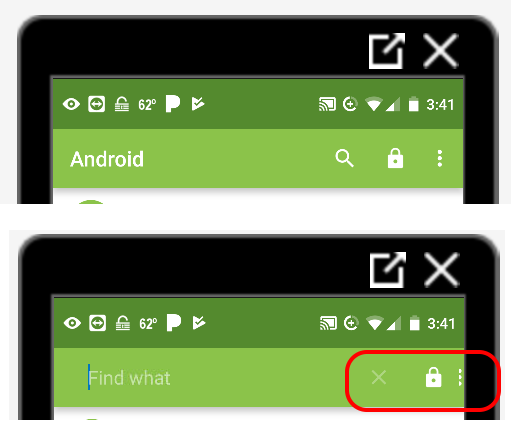

It turns out the problem is associated with the Android "display size" setting in Settings>Display. The behavior in the screenshot occurs when "display size" is Large. When "display size" is Larger (the largest setting) the lock icon disappears but the 3 dots are usable.
The "font size" setting in Settings>Display does not seem to cause the display artifacts.
