

 Paulymorphous
from keras.layers.convolutional import Conv2D, Conv2DTranspose
Hi, Pauly!
The project looks cool, thank u, I'm trying to try it myself (first, just check on your trained net), but I'm new to it, I need your or someone's help
Using Mac; Theano, Keras, tensorflow - all seems to be installed, I obtain the following trying to run 'Loading the model'
ModuleNotFoundError: No module named 'keras.layers.merge' Can't find the answer
Besides, do I get right: if Need only to start(not retrain), gotta just load libraries, the model, and ready to test?
Thanks in advance!)
P.S.
Am I the one who can't run it?! Fd up. Always smth crashing

Hey @AlKul ,
Thank you. I think that a version mismatch is causing this issue. Please try using this line to import:
from keras.layers import concatenate
So please remember that this is not a plug and play solution. Putting it simply, this was what worked for me, you will have to still upgrade libraries. However, most of the work is already done, so there shouldn't be any technical issues while you test out on new data.
Please let me know if the new import fixed the issue.
Thanks

Thank u for quick reply, well for reply at all) That line causes the following... "from: can't read /var/mail/keras.layers" The same after upgrading keras to 2.3.1, Can't find solution( Is the version incompatible? Or smt else? Yeah, l understand that it is not plug and play, but do I get right: after installing all needed libraries (somewhen, somehow), loading the model, it should be able to give some results (your pretrained model)? Or I'm mistaken Really sorry for beeing that dumb))
Hey @AlKul , I know that this can be frustrating at times. You are right, the model will churn out segmentation maps even if you run it on your own data. So, I am uploading a requirements.txt (here and in the repo.), just do the following:
- Create a virtual environment.
- run
pip install - r requirements.txt - Run the program.
Do let me know if it works or not. Cheers!
That's what I get:
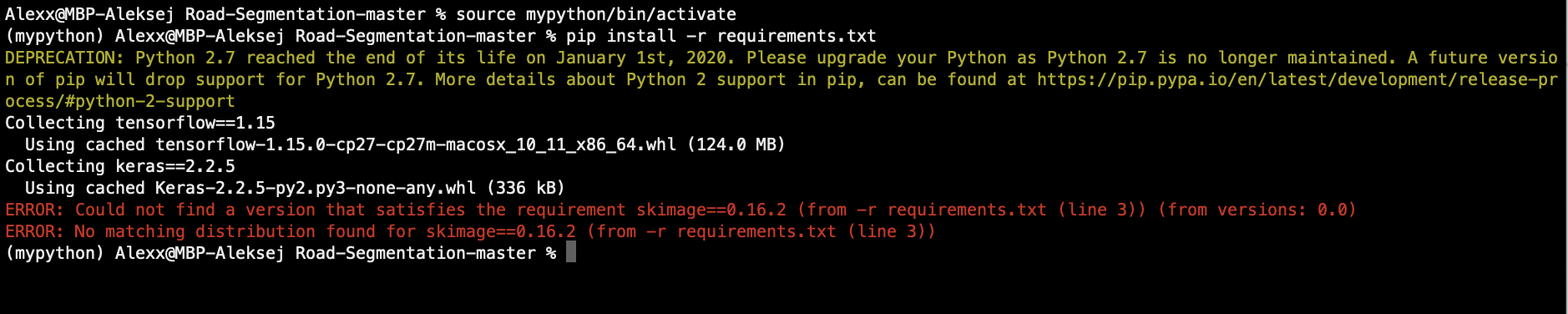
Did I do what you told in 1 step right? And why do I need this step?