

 PathOfBuildingCommunity
Auto crash on start
Check version
- [X] I'm running the latest version of Path of Building and I've verified this by checking the changelog
Check for duplicates
- [X] I've checked for duplicate issues by using the search function of the issue tracker
What is the expected behaviour/value?
When im launching pob it load, and after the green screen it appear 5-10 sec and then close it self
Im on : W11 i9-9900k amd radeon adrenaline 22.4.2 (and tried older version and without) rx 5500 xt 32 gb ram nvme for the disk
i have tried compatibility with : w10-w8-w7 administrator or not
What is the actual behaviour/value?
When im launching pob it load, and after the green screen it appear 5-10 sec and then close it self
Im on : W11 i9-9900k amd radeon adrenaline 22.4.2 (and tried older version and without) rx 5500 xt 32 gb ram nvme for the disk
i have tried compatibility with : w10-w8-w7 administrator or not
How to reproduce the issue
Start See and it close it self alone ....
Build code
latest version
Screenshots
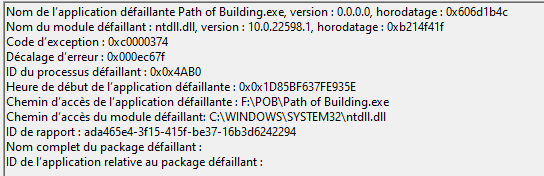

I have this error as well. After installing PathOfBuildingCommunity-Setup-2.16.0.exe the program will run once. If you exit then restart it, I see what Keinaku reports - green loading window, then the large black window frame and it crashes. Windows 10 (locale is en not fr), 32Gb RAM, NVidia 3090. I don't have any crash logs. I can reinstall the app and it will again run once. Then crash on subsequent invocations.

Hi i have the same issue after install Windows 10 Pro 21H2, the program will run once.

If I create an empty file "first.run" and restart the app, it will open, check for updates, then run correctly. You can put the "first.run" file back repeatedly and this lets the app load each time. If I do not put the "first.run" - it will crash again. If I can help debug this w/logs or something please let me know. I poked around and enabled SimpleGraphic.log - but nothing useful in there AFAIK
@Keinaku it's just an empty file. As a further experiment, I right clicked "first.run" after I made it - then went to properties and set it to read-only and now it doesn't get deleted after the first run :) So it's not great, but it's a functional workaround. It makes the app check for updates on every run, so that's slower but... 🤷♂️
Hello, i'm experiencing the same problem, my Path of Building start and then immediately close itself no crash just closing is there any solution to that (I can rarely use it like 1/100) which imply that it depends on something maybe. My PoB close itself like 2-3 second after my screenshot
https://ibb.co/XFdqv2t
Graphic driver of amd updated, W10 updated; never had this problem before

I have some news, when i launch w11 and direct launch pob community fork, then it stay open, but if i wait a little, it crash immediatly, i think something make pob crash, but i cant found what T_T
Same issue. PoB will start and will crash within 2-3 seconds after each startup. I can click things in PoB in those 2-3 seconds, so it is not "frozen".
I tried using Portable version as well as installed one. Same result, even after a fresh instal. I updated my Graphic drivers, restarted PC and the result is the same even on a fresh PC start. Using latest version (2.16.0) Interesting is that this version worked just fine for several days, but then just started crashing. This happened to me previous leagues/versions as well, but always started to work after couple of days or few reinstalls. Strange.
I tried using the "first.run" as mentioned above, then it won't start for me, but I get the following error instead.
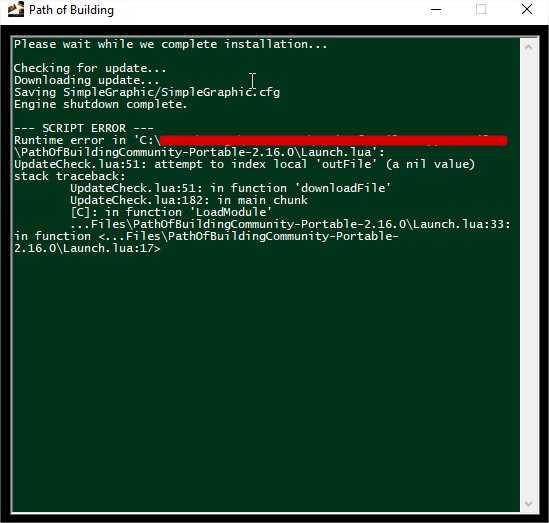
PoB is completely unusable at this state :-/

This seems related to the update check functionality. When the app is running I can %100 cause a crash by clicking the check for updates button. I tried installing to different folders to see if it was a permissions thing about %appdata% but it does not help. Hey devs - i'm not a lua guy but I'm a developer - help me help you with some debug tips or logs or something :)
I tried a few things, like blocking internet access or the first.run file, but nothing helps.

I have the same issue with the latest release on W11 I5 3470 CPU and RX570 GPU, using dual monitors, one running the game and in the second one the PoB, i have 2 graphic cards, the onboard one and the dedicated one. I tried change the SimpleGraphics version with the one from AMD drivers issue, and i got this error on starting the app : --- SCRIPT ERROR --- Runtime error in 'C:\Program Files\PoB\Path of Building Community\Launch.lua': C:\Program Files\PoB\Path of Building Community\Launch.lua:64: attempt to call global 'RenderInit' (a nil value) stack traceback: C:\Program Files\PoB\Path of Building Community\Launch.lua:64: in function <C:\Program Files\PoB\Path of Building Community\Launch.lua:17>

This is weird, if I close Path of Exile, then Path of Building works fine. Does that make any sense to anyone?
This issue no longer occurs as of PoB 2.18.1 ( well, for me. Can't speak for @Keinaku ) I have removed my first.run "workaround" and the app now starts up fine repeatedly.
Anyone who is still having this issue, can you find the file SimpleGraphic/SimpleGraphic.cfg and change the con_log line from 0 to 1? Then the logs should show up next to that file as SimpleGraphic.log. That way you can catch what the console is reporting and paste it in here to help narrow down the issue.

@Wires77
Started experiencing the same issue however I don't see SimpleGraphic/SimpleGraphic.cfg file 🤔
Happening on 2.21.1 (initially started experiencing that on the beta release channel but I doubt it's related)

Is there other way to enable logs/debugging that I could provide 🤔?



FYI tried clean install on 3 separate versions, granted all of them update to latest on initial start.
Here is my file, for example, if you wanted to copy it into that directory. PoB might just be crashing before it is able to write that file though. You'll want to rename and remove the .csv from the end (GitHub only allows upload of certain file extensions)
Well, if you want another ammo for the solution - missing SimpleGraphic.cfg could be one of them as providing missing SimpleGraphic.cfg fixed it.
Not sure why would that file be excluded during bundling though 🤔
Aaaand started experiencing the same issue again. Sometimes it bricks the GPU right after initialization, sometimes after some time on window refocus.
In all cases the GPU goes to oblivion

The config itself when PoB exploded right after initialization
Creating context...
Loading WGL extensions...
using WGL_EXT_swap_control
GL_MAX_TEXTURE_SIZE: 32768
Loading OpenGL extensions...
using GL_EXT_texture_compression_s3tc
using GL_ARB_texture_non_power_of_two
Loading resources...
Renderer initialised in 182 msec.

Loading main script...
Loading passive tree data for version '3.19'...
Loading passive tree assets...
^4Warning: 'C:\Users\seb\AppData\Roaming\Path of Building Community\TreeData/PassiveMasteryConnectedButton.png' doesn't exist or cannot be opened
^4Warning: 'C:\Users\seb\AppData\Roaming\Path of Building Community\TreeData/group-background-3.png' doesn't exist or cannot be opened
^4Warning: 'C:\Users\seb\AppData\Roaming\Path of Building Community\TreeData/background-3.png' doesn't exist or cannot be opened
^4Warning: 'C:\Users\seb\AppData\Roaming\Path of Building Community\TreeData/jewel-radius.png' doesn't exist or cannot be opened
^4Warning: 'C:\Users\seb\AppData\Roaming\Path of Building Community\TreeData/line-3.png' doesn't exist or cannot be opened
^4Warning: 'C:\Users\seb\AppData\Roaming\Path of Building Community\TreeData/ascendancy-3.png' doesn't exist or cannot be opened
^4Warning: 'C:\Users\seb\AppData\Roaming\Path of Building Community\TreeData/jewel-3.png' doesn't exist or cannot be opened
^4Warning: 'C:\Users\seb\AppData\Roaming\Path of Building Community\TreeData/ascendancy-background-3.jpg' doesn't exist or cannot be opened
^4Warning: 'C:\Users\seb\AppData\Roaming\Path of Building Community\TreeData/frame-3.png' doesn't exist or cannot be opened
Processing tree...
Loading item databases...
Checking for update...
Loading 'C:\Users\seb\Documents/Path of Building/Builds/prototype_trickster.xml'...
Decided to record whats going on and one thing that caught my eye is the first few lines that are not present in the log itself

Could you throw into csv SimpleGraphicAudio.cfg as well @Wires77? Maybe someone else will find out that those 2 config files are missing and will find it helpful
The Auto file doesn't exist on my computer, so I can't upload that one. Interesting spot to crash, I'll have to see what is happening at that point.
SimpleGraphic historically looks for three configuration files where some of those have never been used for PoB and cause a bit of log noise.
Those are:
SimpleGraphic/SimpleGraphic.cfg- for persistent runtime settings;SimpleGraphic/SimpleGraphicAuto.cfg- unsure of purpose, guessing it's for commands the developer wants to auto-run every launch;- script-specific
Launch.cfg- for config settings that are particular to a specific application as there's a shared runtime for both PoB and things like the Exporter.

The logs you see is everything that is logged, there's no additional levels of logging.
I consulted with @Wires77 and we think that it might be worthwhile to test my alternative GLFW3/ANGLE-based SimpleGraphic runtime in a portable installation of PoB.
Download and extract the ZIPs for the DLL and its dependencies from https://github.com/zao/PathOfBuilding-SimpleGraphic/releases/tag/angle-2022-08-23 into the top-level PoB directory, overwriting existing DLLs in that folder.
This WIP runtime has some visual glitches in dropdown lists and the passive skill tree but should otherwise be functional. While it's present you should not use the updater as it will try to overwrite the files with the originals.
Experiencing the same error here - none of the above fixes seem to do anything for me. PoB was working fine until a couple days ago. Any new thoughts on this? Seeing the following in my windows event viewer:
Faulting application name: Path of Building.exe, version: 0.0.0.0, time stamp: 0x606d1b4c
Faulting module name: ntdll.dll, version: 10.0.22621.1344, time stamp: 0x56ac692c
Exception code: 0xc0000374
Fault offset: 0x000ec67f
Faulting process id: 0x0x3798
Faulting application start time: 0x0x1D9664075282F1C
Faulting application path: C:\Users\Grant\Downloads\PathOfBuildingCommunity-Portable-2.26.2\Path of Building.exe
Faulting module path: C:\WINDOWS\SYSTEM32\ntdll.dll
Report Id: 411e247d-ab42-4b2c-af6d-625ba45d880f
Faulting package full name:
Faulting package-relative application ID:
Edit: I tried cloning the repo and found that if I ran the application in Dev Mode, it launches properly. If I disable Dev Mode then the application crashes as described.

Experiencing the same error here - none of the above fixes seem to do anything for me. PoB was working fine until a couple days ago. Any new thoughts on this? Seeing the following in my windows event viewer:
Faulting application name: Path of Building.exe, version: 0.0.0.0, time stamp: 0x606d1b4c
Faulting module name: ntdll.dll, version: 10.0.22621.1344, time stamp: 0x56ac692c
Exception code: 0xc0000374
Fault offset: 0x000ec67f
Faulting process id: 0x0x3798
Faulting application start time: 0x0x1D9664075282F1C
Faulting application path: C:\Users\Grant\Downloads\PathOfBuildingCommunity-Portable-2.26.2\Path of Building.exe
Faulting module path: C:\WINDOWS\SYSTEM32\ntdll.dll
Report Id: 411e247d-ab42-4b2c-af6d-625ba45d880f
Faulting package full name:
Faulting package-relative application ID:
Edit: I tried cloning the repo and found that if I ran the application in Dev Mode, it launches properly. If I disable Dev Mode then the application crashes as described.
Are you running LuaRocks or have otherwise installed Lua on your machine? Seems to be an occasional setup that clobbers the search path and uses the system Lua instead of the bundled one
@Wires77 yep, you're absolutely right. Are there any other ways to fix this, other than un-installing lua? Could PoB ensure that it's using the bundled lua on start up?
@hgranthorner We'll have to take a deeper dive to see if we can reproduce it and see what is going on after league start. Just to get all the details, you're running the portable install on Windows 10 or 11? How did you have Lua installed? Did the issue just start once you installed Lua?
Edit: In fact, I'm going to turn this into a separate issue since it seems separate from what the rest of this issue is about. If you want to reply there to continue troubleshooting that'd be great https://github.com/PathOfBuildingCommunity/PathOfBuilding/issues/5916
The logs you see is everything that is logged, there's no additional levels of logging.
I consulted with @Wires77 and we think that it might be worthwhile to test my alternative GLFW3/ANGLE-based SimpleGraphic runtime in a portable installation of PoB.
Download and extract the ZIPs for the DLL and its dependencies from https://github.com/zao/PathOfBuilding-SimpleGraphic/releases/tag/angle-2022-08-23 into the top-level PoB directory, overwriting existing DLLs in that folder.
This WIP runtime has some visual glitches in dropdown lists and the passive skill tree but should otherwise be functional. While it's present you should not use the updater as it will try to overwrite the files with the originals.
Is there a more up to date / better solution than the above? Although this does stop me crashing, Interface is incredibly slow to respond/use .
Any more information I can provide?
Windows 11 Ryzen - 5800x RTX 3080 ti (Driver 531.41)
Edit: Oddly using it on the second monitor and it's not lagging.
