

 Parik27
DragonFF Export - Geo Byte Optimization / Export as Tri Strip Instead of Tri List?
Left is original
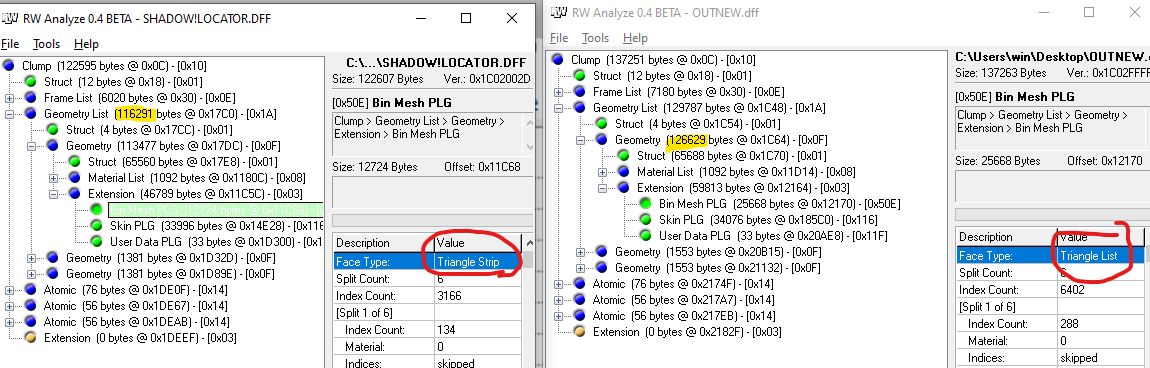 Right is export
116291 bytes (Original) vs 126629 bytes (DragonFF) 3DSMax RWIO plugin also produces similar 12XXXX byte result.
We found in Shadow the Hedgehog there exist a max number of polys/tris in an event scene at a given time.
Currently, RWIO or this plugin will export with a significantly bigger resulting DFF.
Using built in optimization tools in max/blender seems to destroy the proper skin in-games for whatever reason.
It was also noticed that DragonFF exports as Triangle List instead of Triangle Strip.
Is there any suggestion on potentially optimizing the output? @Psycrow101 I used your multi mesh branch merged with the 'new-export' branch. Unfortunately same result, though I can confirm your atomic fix for multi mesh works.

While this wouldn't affect GTA SA players too much for the PC port, console hacks may suffer from performance issues or harsher culling. In Shadow's case, harsh culling limits

@dreamsyntax This PR should solve the issue https://github.com/Parik27/DragonFF/pull/281

Ok after selecting each mesh per your instruction, I can confirm it works as expected in-game as well!
old dff export (no tristrip, hitting the cull limit)
new dff export (tristrip):
original dff:
120kb

old dff export (no tristrip)
134kb

new dff export (tristrip):
123kb
The output size is still slightly larger than the original, but this is a HUGE improvement.
Thank you very much!
Adding this here for anyone else trying to take advantage of this feature.
Note: Blender used was 4.1.1 Last tested commit: 19f2d3f, June 22, 2024 12:12PMUTC Used the multi-mesh variant from Psycrow101/DragonFF:multi-mesh Though if your target model is non-multi mesh you can use the master branch from Parik27.
Import Args for 1:1 with original game's model:
[x] Load TXD [x] Skip mipmaps [ ] Connect Bones [x] Scan for Images [ ] Read Material Split [ ] Use Edge Split [x] Import Custom Normals [ ] Group Similar Materials
Once imported, you must click within each mesh (one at a time) like in this image:
Not all meshes may have everything checked. Some may have Modulate Material Color checked, while others don't for example. Leave those alone, you only want to adjust:
[x] Export Normals [x] Export Custom Split Normals [x] Use Triangle Strip
When Exporting, I have all exporter options unchecked. RW Version doesn't matter, but 3.7.0.2 is what Shadow used. [ ] Mass Export [ ] Only Selected [ ] Export Collision [ ] Export Frame Names [ ] Exclude Geometry Faces
Lastly after exporting, you will need to use RWAnalyze 0.4 BETA and fix Right To Render having a wrong byte: Navigate to any Atomics with "Right To Render", and hex edit or replace them with the original file. As of this commit, usually only one byte is incorrect, which results in wrong material rendering. ex: WRONG:
16 01 00 00 01 00 00 00
CORRECT:
16 01 00 00 02 00 00 00
Closing this issue as this feature has been extensively used. Thanks for all the hard work.