
parabol
 parabol copied to clipboard
 ParabolInc
Jira: no screens available to modify
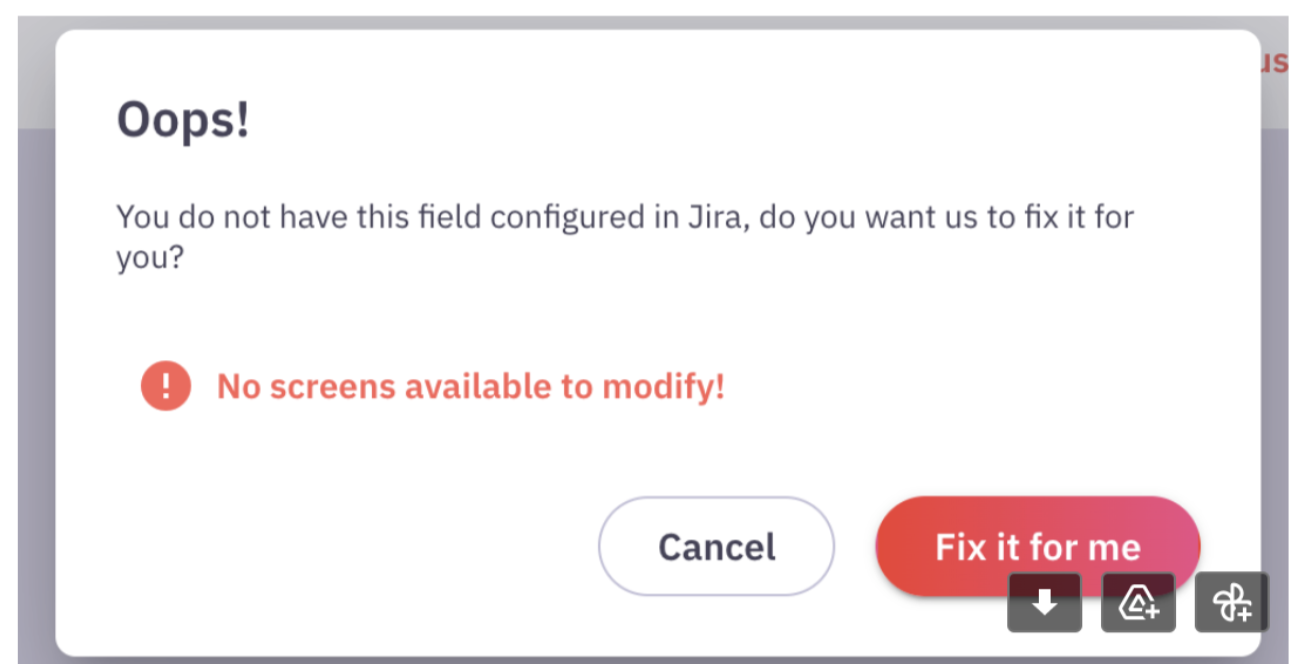
- User has company-managed Jira project (not simplified)
- User followed the guide and fixed a field manually in Jira configuration: https://www.notion.so/parabol/How-to-Fix-a-field-in-Jira-manually-328f413f3d6444d29ca623ceb56c90dc
- However, user still can't update a field estimation in poker meeting
- User sees
Fix fielddialog instead - Fixing field does not work and fails with
no screens available to modifyerror
AC:
- [ ] Find the root cause
- [ ] Fix set field estimation mutation
- [ ] Or fix "Fix field" functionality
- [ ] Or write a guide how to fix that on Jira side manually
Related issue: #6589


@igorlesnenko do they use non-English? Maybe we're looking for some text which is translated?


@nickoferrall make sense, it is theoretically possibly screen exists but we filter it out.
However, our algorithm to find a screen is pretty simple. We just search for a screen name that starts with projectKey
const nameProjectPrefix = `${projectKey}:`
if (screen.name.startsWith(nameProjectPrefix))
So considering above
- Language should not affect this, as
projectKeyis not translatable @Dschoordsch - If screen has a custom name it is impossible to find it using our algorithm. I created an issue where I described another approach entirely based on using API: #6771
However, the core issue is not exactly a fix field algorithm.
- When the user fixed the field manually in Jira (using our notion guide), the fix field dialog should not have appeared at all. It appears because we still unable to update the field. The Jira error says that it is not on a screen, but it is there.
- When I had a call with one of our customer, the screen name looked correct and had a correct prefix. However, even with any custom name, fixing it manually should solve the issue, but it is not.
Maybe I'm missing something.
From this customer 🔒:
We can’t send the story points from a poker session back to jira, we can import the issues but when pokered the data doesn’t go to Jira. When I select the label Story points, it pops the Fix it for me, but hen the above message appears.
Hey there @igorlesnenko @nickoferrall and/or @Dschoordsch any news on this issue? Is there a way for us to solve this or at least have a workaround?

I just started looking into #6589 on Friday. What I know so far:
- we currently show fields which are not necessarily available on the issue in question but may be able to be configured as fields for the issue in question
- not all of these fields can actually be configured for the issue, I can see "Work Ratio" for a test project I created and I cannot find the field in any configuration nor can I add it to a screen in Jira
I would like to change our approach to show only fields that are currently configured for an issue. However there is at least a special case for timetracking field (which is 3 fields: Original Estimate, Remaining Estimate, Time spent; at least in the default config) and I did not look into the story point estimation fields yet.
Talking with @Dschoordsch during Backlog scrub, it seems we are blocked until we get access to a test project from this user that can reproduce this issue
@Dschoordsch will add something to the Product agenda. I'd like to make sure we have a plan and/or can think about how to track items like this where we may want to be more active in prompting users to help us with diagnosis

A user 🔒 we have been helping with this issue said:
At this point we are exploring some possible internal actions before we move to the option of letting your dev have access to our Jira account.
I’ve found an interesting article - https://github.com/ParabolInc/parabol/issues/4788 - and had a chat with my teammate about it. Seems like there may be some relation to the error we are facing on our end. I’m wondering if an assumption of the Parabol/Jira integration is that we have SSO enabled on Jira?

I propose we're attacking this issue from a different perspective:
- Right now we're reading the "available" fields from the schema with
expand=schemaon get issue). This also contains fields which might not be available (like "Story Points" or "Work Ration") we switch to explicitly read the field information with get editmeta which seems to contain only fields which are actually available. This approach will show far fewer fields and will also hide "Story Points"/"Story Point estimates" if it is not available. On the downside this will also hide time estimate fields (Original estimate, remaining estimate) which are treated special by Jira and need to be checked separately (one of these variations is set by roughly 60 users atm.) - Since we hopefully hide "Story Points"/"Story point estimate" with this new implementation, we should modify the drop down to add a more explaining "Are you missing a story point field? We can try to fix it" to run the current fix flow.
- The automatic fix screen should link to the manual guide
This does not directly address the issues users might have, but has the advantage that it's clearer what fields are available to vote to. If Story points is missing, it's clearer that it's not on our side.
I have the suspicion that in some edge cases this might even fix the issue, in case of manually added fields with duplicate names or similar (I did not verify this yet).