
PaddleGAN
 PaddleGAN copied to clipboard
 PaddlePaddle
PaddlePaddle GAN library, including lots of interesting applications like First-Order motion transfer, Wav2Lip, picture repair, image editing, photo2cartoon, image style transfer, GPEN, and so on.
单机多卡报错

使用python3 -m paddle.distributed.launch tools/main.py --config-file configs/firstorder_vox_256.yaml 训练first order motion model模型时,使用了5个1080gpu的服务器,在训练中会出现: 报错ABORT!!! Out of all 5 trainers, the trainer process with rank=[1] was aborted. Please check its log paddle版本是2.1.1,代码和参数都是默认的,没有任何改动。请问会是什么原因导致?谢谢。

DIV2K有800张影像,使用process_div2k_data.py处理后,得到32000张影像,启动训练后一开始是可以的,但是训练到5000个iter后,进行验证和保存模型之后会报错,有关DataLoader的问题,使用--resume恢复训练没问题,这是什么原因呢?


1,执行人脸转卡通的预测 Photo2CartoonPredictor,在进行run的时候报错如下: 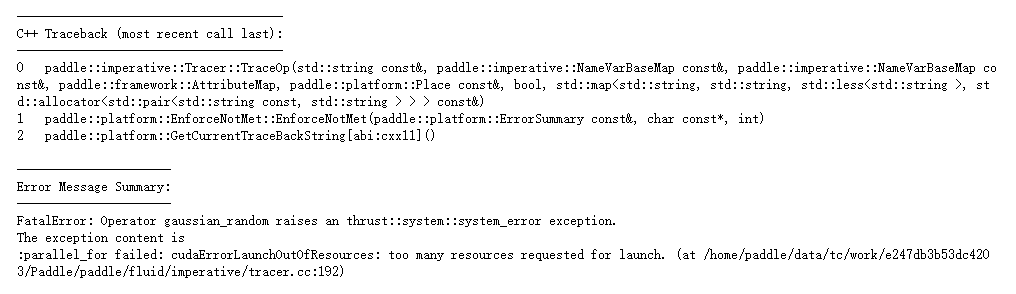 2,执行人脸解析的时候 python3 face_parse.py --input_image ../../../imgs/photo_test.jpg 下载模型报错 OSError: [Errno 27] File too large

你好,我正在尝试使用超分算法对自己的图片进行超分预测。教程中下载的数据集文件有什么不同,我发现Corrupted-tr-x和Corrupted-tr-y中的文件并不是高低分辨率的关系,另外,把他们转化成训练数据集的时候使用了哪些操作,能否简要回答,谢谢

在AI Stdio 上按照PaddleGAN上的lapstyle的文档会报错(2 快速体验 可以正常使用) KeyError: "No object named 'LapStyleDraModel' found in 'MODEL' registry!" 同样的环境使用CycleGAN可以正常运行 可知PaddleGAN安装是正确的 这是为什么呀?应该如何解决? 谢谢!!!


 运行结果(image_size参数无效) (emotion) songhui@k8s-node4:~/lixiang/emotion/PaddleGAN/applications$ python -u tools/first-order-demo.py --driving_video ../docs/imgs/fom_dv.mp4 --source_image ../docs/imgs/fom_source_image.png --ratio 0.4 --relative --adapt_scale --image_size 512 --face_enhancement --multi_person Traceback (most recent call last): File "tools/first-order-demo.py", line 108, in...

python -m pip install paddlepaddle-gpu==2.1.0.post101 -f https://mirror.baidu.com/pypi/simple 运行结果 
Metadata
Owner
Metadata
PaddlePaddle GAN library, including lots of interesting applications like First-Order motion transfer, Wav2Lip, picture repair, image editing, photo2cartoon, image style transfer, GPEN, and so on.