

 PaddlePaddle
import ppgan.datasets.transforms.functional as custom_F AttributeError: module 'ppgan' has no attribute 'datasets'
python tools/video-enhance.py --input /home/hust/PaddleGAN/applications/video/1.mp4 --process_order DAIN DeOldify EDVR --output /home/hust/output/
Traceback (most recent call last):
File "tools/video-enhance.py", line 18, in
File "/home/hust/PaddleGAN/ppgan/datasets/init.py", line 15, in
can you help me? what is wrong?thinks


@majintao1994 If you use code in master branch, not release/0.1.0 branch. Maybe you need to install PaddleGAN from source. Or export PYTHONPATH to the PaddleGAN root dir. Since master branch add new models.

I re installed the environment, but there are new problems. Is it my environment problem,The error is as follows:
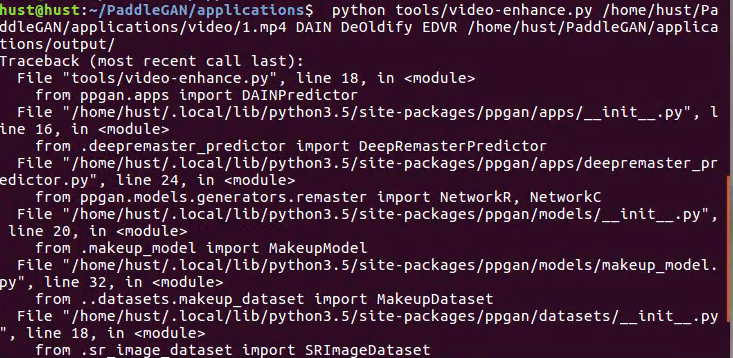
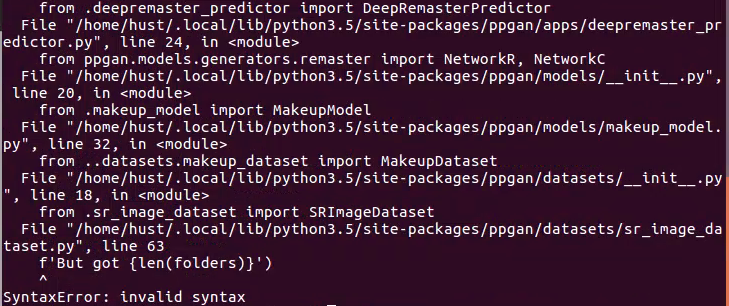
 tation
import ppgan.datasets.transforms.functional as custom_F AttributeError: module 'ppgan' has no attribute 'datasets' can you help me? what is wrong?thinks

import ppgan.datasets.transforms.functional as custom_F AttributeError: module 'ppgan' has no attribute 'datasets' can you help me? what is wrong?thinks
update your code
I followed the intro and tried the codes below in google colab:
!pip install -U paddlepaddle-gpu==2.0.0rc0
!git clone https://github.com/paddlepaddle/PaddleGAN.git
%cd PaddleGAN/
pip install -v -e .
from ppgan.apps import RealSRPredictor
sr = RealSRPredictor()
sr.run("docs/imgs/monarch.png")
and get:
FileNotFoundError: [Errno 2] No such file or directory: 'README_en.md'
After I edited 'README_en.md' to 'README.md' I got the same message as below when running from ppgan.apps import RealSRPredictor
AttributeError: module 'ppgan' has no attribute 'datasets'
Edited:
I also tried to clone from gitee and using ai studio (without pip install paddlepaddle):
gitee + aistudio: √ github + aistudio: √ gitee + colab: AttributeError: module 'ppgan' has no attribute 'datasets' github + colab: AttributeError: module 'ppgan' has no attribute 'datasets'
My notebook: google colab: https://colab.research.google.com/drive/1fkUsgxeRvewJOJYSOf3b21egbwa_JCSy?usp=sharing aistudio: https://aistudio.baidu.com/aistudio/projectdetail/1330972?shared=1

Thanks for the feedback, the difference between aistudio and colab is due to the different python version. This error occurs in python3.6. We will fix it as soon as possible.
Thanks for the feedback, the difference between aistudio and colab is due to the different python version. This error occurs in python3.6. We will fix it as soon as possible.
Now the error becomes:
     19 import paddle
     20 from .base_predictor import BasePredictor
---> 21 from ppgan.datasets.transforms import ResizeToScale
     22 import paddle.vision.transforms as T
     23 from ppgan.models.generators import AnimeGenerator

ImportError: cannot import name 'ResizeToScale'
Also, I have set the colab notebook using GPU but I still receive the massage:
/usr/local/lib/python3.6/dist-packages/paddle/fluid/framework.py:295: UserWarning: You are using GPU version Paddle, but your CUDA device is not set properly. CPU device will be used by default.
  "You are using GPU version Paddle, but your CUDA device is not set properly. CPU device will be used by default."
How can I use GPU in google colab?
Thanks for the feedback, the difference between aistudio and colab is due to the different python version. This error occurs in python3.6. We will fix it as soon as possible.
Now the error becomes:
     19 import paddle
     20 from .base_predictor import BasePredictor
---> 21 from ppgan.datasets.transforms import ResizeToScale
     22 import paddle.vision.transforms as T
     23 from ppgan.models.generators import AnimeGenerator

ImportError: cannot import name 'ResizeToScale'
Also, I have set the colab notebook using GPU but I still receive the massage:
/usr/local/lib/python3.6/dist-packages/paddle/fluid/framework.py:295: UserWarning: You are using GPU version Paddle, but your CUDA device is not set properly. CPU device will be used by default.
  "You are using GPU version Paddle, but your CUDA device is not set properly. CPU device will be used by default."
How can I use GPU in google colab?
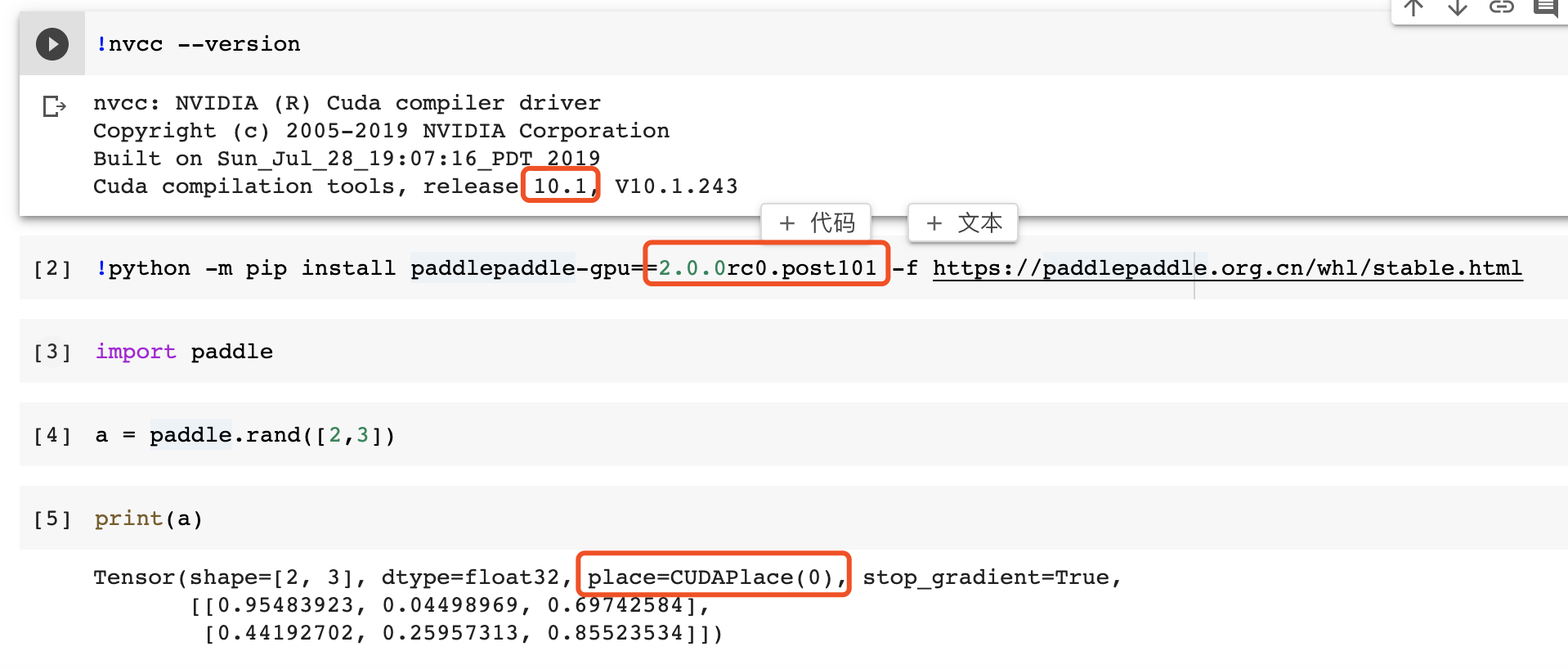
colab cuda version is 10.1 you can try following command to intall correspond paddlepaddle: !python -m pip install paddlepaddle-gpu==2.0.0rc0.post101 -f https://paddlepaddle.org.cn/whl/stable.html
问题过于久远,如果有图像和视频生成的需求,可以使用新的跨模态工具: https://github.com/PaddlePaddle/PaddleMIX/tree/develop
