pcsx2
 pcsx2 copied to clipboard
 PCSX2
PCSX2
[BUG]: Front Mission 4 broken shadows using any hardware renderer
Describe the Bug
When using any of the hardware rendering options the shadows in Front Mission 4 are opaque and much larger than they should be. Happens on both my Nvidia and AMD graphics.

Reproduction Steps
Can be found in the opening in engine cutscene but is present throughout the entire game.
Expected Behavior
Shadows should be much smaller with a "softer" and transparent appearance like they are when using the software renderer.

PCSX2 Revision
1.7.3066
Operating System
Windows 10 (64bit)
If Linux - Specify Distro
No response
CPU
Ryzen 5900HX
GPU
3060 Mobile
GS Settings
No response
Emulation Settings
No response
GS Window Screenshots
No response
Logs & Dumps
No response


where did you get that dump? doesn't look that good to me on the dump I sent.
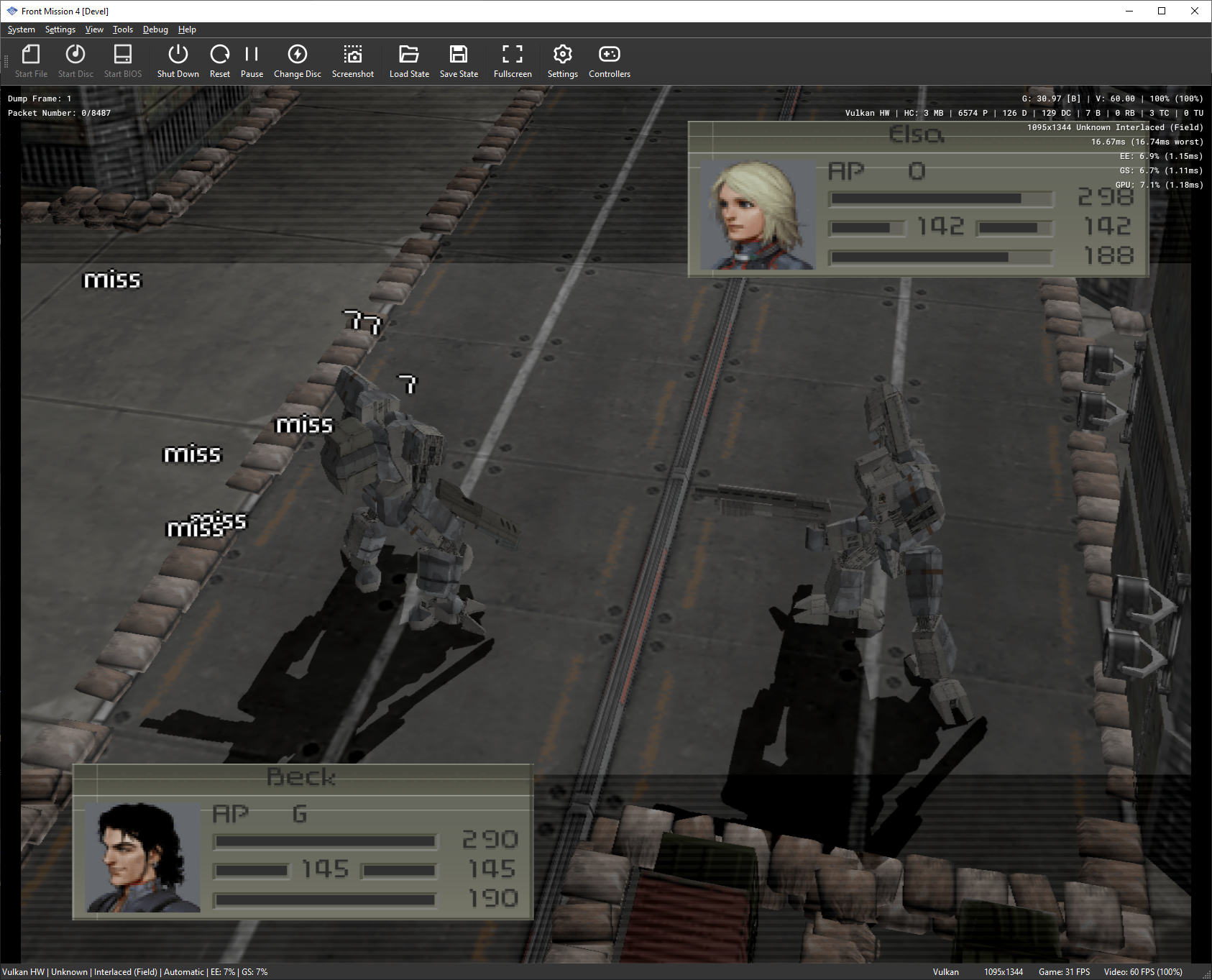
Changing CPU Sprite Render Size to 4 + Blending fixes the shadows. I've played through the tutorial stage & it doesn't look like anything weird is happening so far. Might need some fine tuning on other recommended default settings - I think it was only using Preload Frame Data before, so I haven't messed with it.