

 OriginProtocol
Product page - Selecting gallery images doesn't update URL or variant options as expected
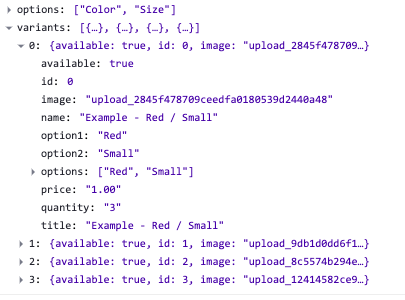
When a seller edits a product, they have the ability to list 'variants' for the product. Variants refer to different combinations of the options for a product. To understand this concept better, let us assume that we are sellers of... shirts. As a shop dealing with shirts, we could have many, many items (think red shirts, blue shirts, small shirts, large shirts, cotton shirts, polyester shirts, etc). To help us organize, we can first divide our inventory into major categories - Size, Color, and Material. In DShop lingo, these categories are called Options. We can then have more granular....options under each of those categories -- red, blue, green under Color, small, medium, large under Size, etc. If we take one element from each Option and combine them into a set, we get a variant of the product. In our case, an example of a variant could be a red colored shirt of small size, made from cotton.
Here's how such information is stored behind the scenes:
Issue
On Dshop's admin console, sellers can associate each variant with an image. This allows buyers to not only see the product before buying, but also to browse and select variants from a "gallery" view on the product page. The latter functionality is currently not implemented fully, as shown in the video below:
https://user-images.githubusercontent.com/10854442/102688107-7554b280-421a-11eb-91d3-9ceabd09f5ff.mov
Related code may be found in dshop/shop/src/pages/Product.js
