

 OpenVPN
Unable to access other intranet linux
Unable to access other intranet linux
- OS: Ubuntu 22.04
- OpenVPN version: 2.5.8
open-vpn-server-config
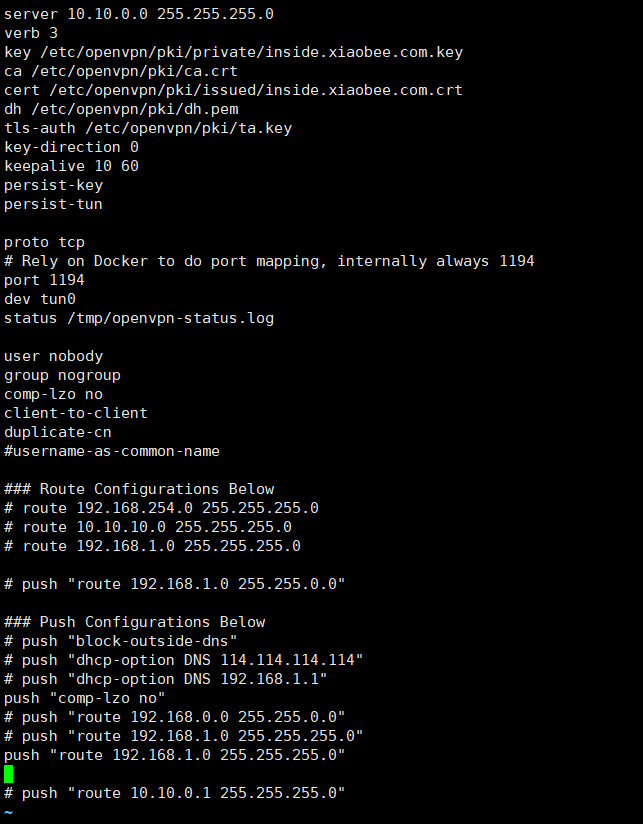
The intranet ip segment is 192.168.1.0/24 open-vpn-server-ip: 192.168.1.34
vpn-client can only access 192.168.1.34 and cannot access other ip

iptable-nat


Hi,I also from Chinese, so I will answer the question with Chinese languish for you. 我之前也遇到了同样的情况,但我意识到可能是我的家用路由器没有回来的路由,所以我之前想着怎么给我的家用路由器添加路由(需要给家用路由器刷机,有点麻烦),后来我发现了一个更加好的办法,直接在你的openvpn服务器上做nat就好了,做个源地址转换。 以下是我添加了一条配置后就能访问内网中的其它设备了: iptables -t nat -A POSTROUTING -s 10.172.192.0/24 -d 192.168.2.0/24 -j SNAT --to-source 192.168.2.99 其中10.172.192.0/24 是我openvpn所分配给客户端的网段,也就是你连接openvpn时,openvpn服务端会给你的客户端分配一个10.172.192.*随机的一个地址。 192.168.2.0/24 是你访问内网的IP端 192.168.2.99是你将openvpn客户端的地址转化为内网的地址,我这里填的就是openvpn服务端的内网地址。 添加完后就可以访问了。
iptables -t nat -A POSTROUTING -s 10.172.192.0/24 -d 192.168.2.0/24 -j SNAT --to-source 192.168.2.99
命令是在openvpn服务器上 命令行打
