

 OpenSourceRisk
Building error on ORE 1.8.9 Windows
Hi All,
I am trying to build ORE 1.8.9 using only the release tag for both ORE and QuantLib, but I have the following errors during building in VS 2019
Severity	Code	Description	Project	File	Line	Suppression State
Error	C1083	Cannot open source file: 'ored\configuration\smiledynamicsconfig.cpp': No such file or directory	OREData	C:\ore\OREData\c1xx	1
Severity	Code	Description	Project	File	Line	Suppression State
Error	C1083	Cannot open include file: 'oret/config.hpp': No such file or directory	QuantExtTestSuite	C:\ore\QuantExt\test\testsuite.cpp	27
Severity	Code	Description	Project	File	Line	Suppression State
Error	LNK1104	cannot open file 'OREData-x64-mt.lib'	OREDataTestSuite	C:\ore\OREData\test\LINK	1
Severity	Code	Description	Project	File	Line	Suppression State
Error	LNK1104	cannot open file 'OREData-x64-mt.lib'	ore	C:\ore\App\LINK	1
Severity	Code	Description	Project	File	Line	Suppression State
Error	LNK1104	cannot open file 'OREData-x64-mt.lib'	OREAnalyticsTestSuite	C:\ore\OREAnalytics\test\LINK	1
}
It seems that the file "smiledynamicsconfig.cpp" is missing in OREData, which is the case after checking
Any ideas what might be wrong here? only using release tag...no git no clone
Regards
Reda

Hi, this is due to the VS project files not being closely monitored. The mentioned smiledynamicsconfig.cpp and smiledynamicsconfig.hpp have been removed in 1.8.9, so you can remove them safely from the VS project as well. I'm currently fixing other things that are missing and I'm going to submit a PR with this as well.
regards, Roland

Hi Roland,
Thanks for your reply. I managed to add the missing smiledynamicsconfig.cpp and smiledynamicsconfig.hpp for old ORE version and it works for building OREData successfully. However all the TestSuite Projects building has failed due to the Testsuite.cpp not properly configured I think. I forgot to mention ealier that I added a MSVC folder that was missing in the release tag (with ore.x64.user.props and ore.Win32.user.props) from older version to be able to load the project in VS. When you said submitting a PR you mean a new release tag? Thanks Regards Reda
Hi guys
sorry this is an oversight on our side: The windows project files should have been removed in the 1.8.9.0, we don't support them anymore. We'll fix this asap. See here how to proceed with the windows build:
https://github.com/OpenSourceRisk/Engine/blob/master/Docs/UserGuide/userguide.tex#L685

Dear Peter, I see your point and thank you for clarifying this, so I'll spare the PR (pull request) and think of something separately. Essentially I've added all the missing files now and everything builds fine in visual studio (2022). I think the Visual studio filters are not too helpful here, so I'm just using the filesystem directly. I'm wouldn't like to abandon Visual Studio support, as I'm actively using visual studio to modify and debug ORE, so I'd like to contribute the necessary files in a separate git project, referring to the ORE sources. Would that be OK for you?
Hi Roland, we still support the Visual Studio IDE, but we now rely on cmake to generate the project files instead of maintaining them manually, see the user guide. Will that work for you? This way we have to maintain only one build system.
Well, I'm using the cmake tool to build ORE without the IDE and I think it works very well, but to use it as a replacement for the nice and tidy oreEverything.sln
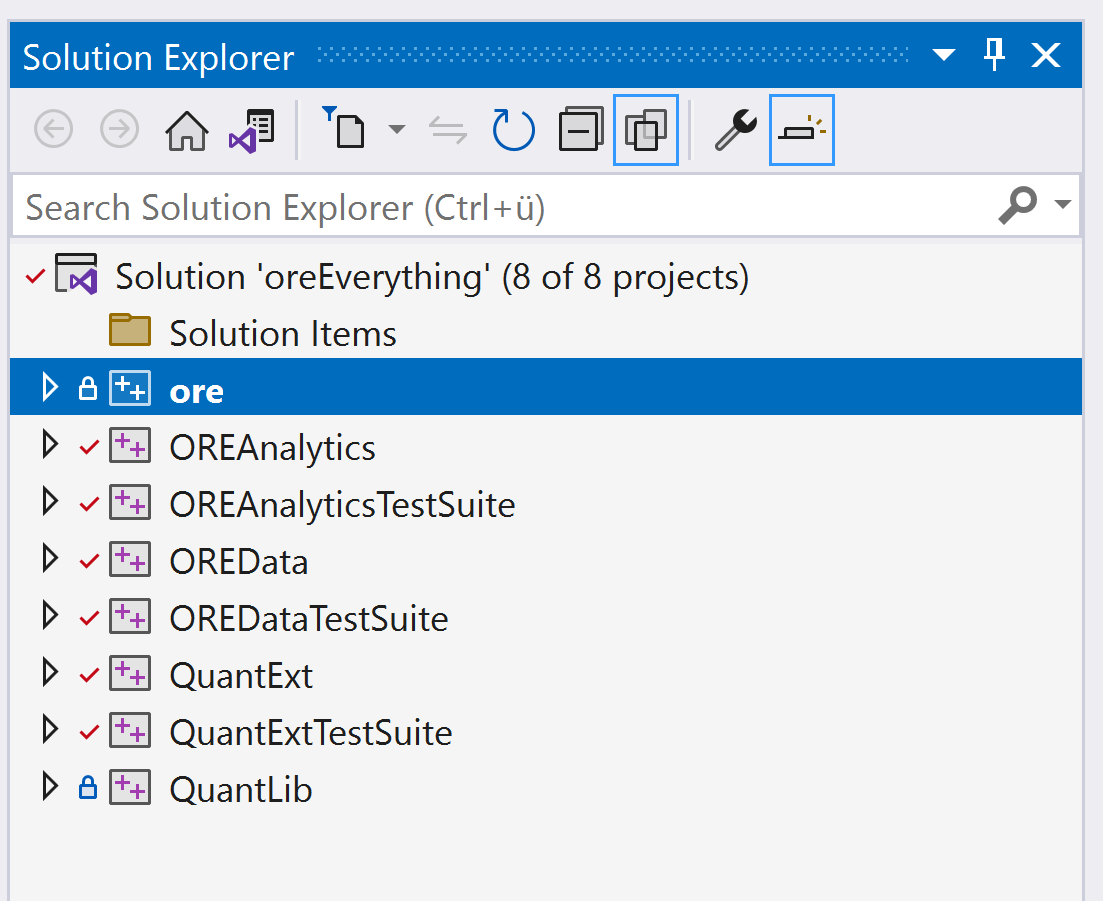 this is a bit tedious for navigating/editing/debugging:
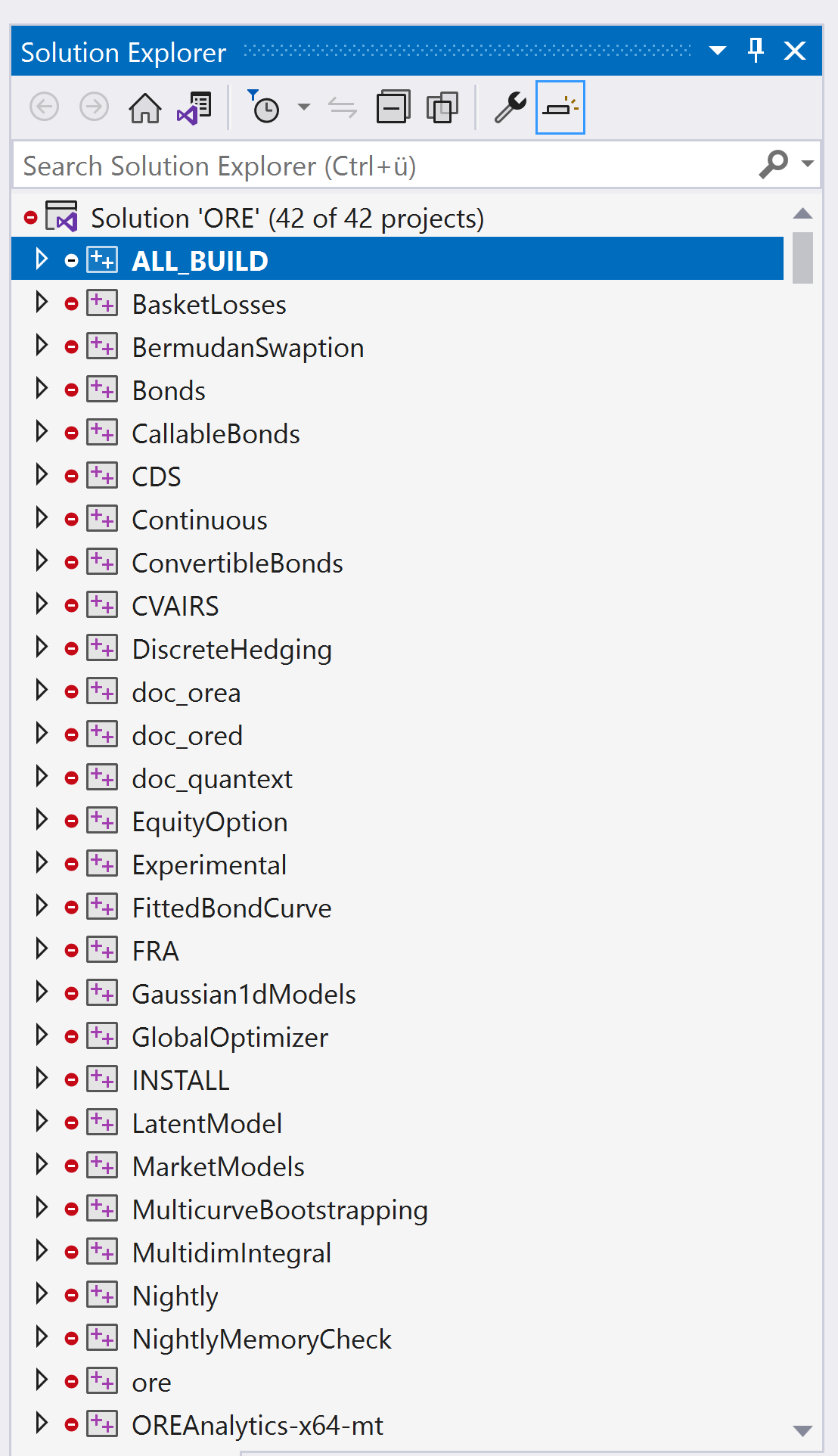 I think I'm going forward with my separated OREVisualStudio, I just need a way to automatically add the files as cmake does.
Ok - actually I am not sure if this is the best way to work from Visual Studio IDE. I'll ask a windows guy on our side to comment on this!
Hi Roland,
I used the cmake as described by Peter but I have only 39 projects, and you have 42 projects in your screenshot
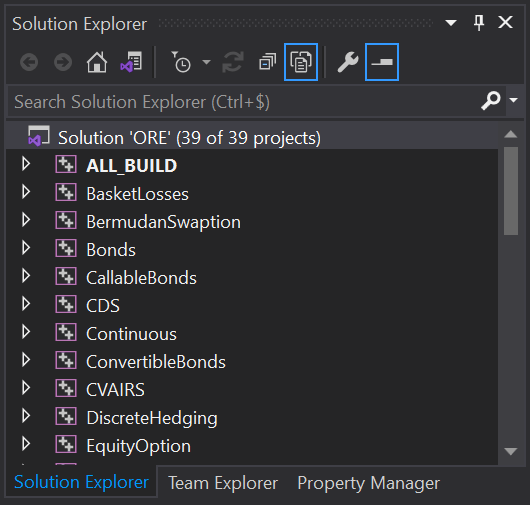
What is the right number? Reda
Dear Reda, I don't know and I don't use cmake that way. You can go forward with the build commands described in the Userguide, although I haven't used the ninja build system yet.
I've contributed a small cmd script in the main directory called runCmakeVS.cmd, which uses cmake to both create the project files and afterwards build ORE itself (EDIT: to work with VS 2019, the generator name option might have to be "Visual Studio 16 2019", although after upgrading to Version 16.11 this wasn't necessary any more).
You have to watch out for the documentation/doxygen builds, if you don't have doxygen/graphviz installed, then this will fail. I'd uncomment the line option(ORE_BUILD_DOC "Build documentation" ON) in the file CMakeLists.txt if you don't care about documentation.
Hi Roland,
Thanks for the clarifications. Personally, I prefer the old version of ORE where you have the nice oreEverything.sln as you said.
Now we have to generate the VS project with cmake, I will take a look at cmd script you mentioned after installing Doxygen.
The three projects that you have more are only related to doc I guess...which I don't have with cmake
 Thank you very much
Regards
Reda
Thank you very much
Regards
Reda
I've managed to make a detached copy (in a separate folder) of the current VS project files working, and I'm finishing the automated update of those with the CmakeLists in ORE. Once that is done, you can download this from my GitHub account.
Regards Roland
OK, after a while I managed to create an oreEverything.sln + project files in https://github.com/rkapl123/OREVisualStudio, being able to update from the CmakeLists in ORE's source tree using a powershell script.
I'm still struggling a bit with the test scripts executed within visual studio's test browser, this seems to be a path related problem reading the config xmls. Outside of visual studio the tests run without an error message.
The path problem was fixed by adding
<PropertyGroup> <LocalDebuggerWorkingDirectory>$(ORE)\OREData\test\bin</LocalDebuggerWorkingDirectory> </PropertyGroup>
to the project file at the end. Now the tests also run within visual studio
It is possible to open the CMake project directly with Visual Studio without the visual studio solution/project files and then you can modify ORE and debug it within Visual Studio (https://learn.microsoft.com/en-us/cpp/build/cmake-projects-in-visual-studio?view=msvc-170)
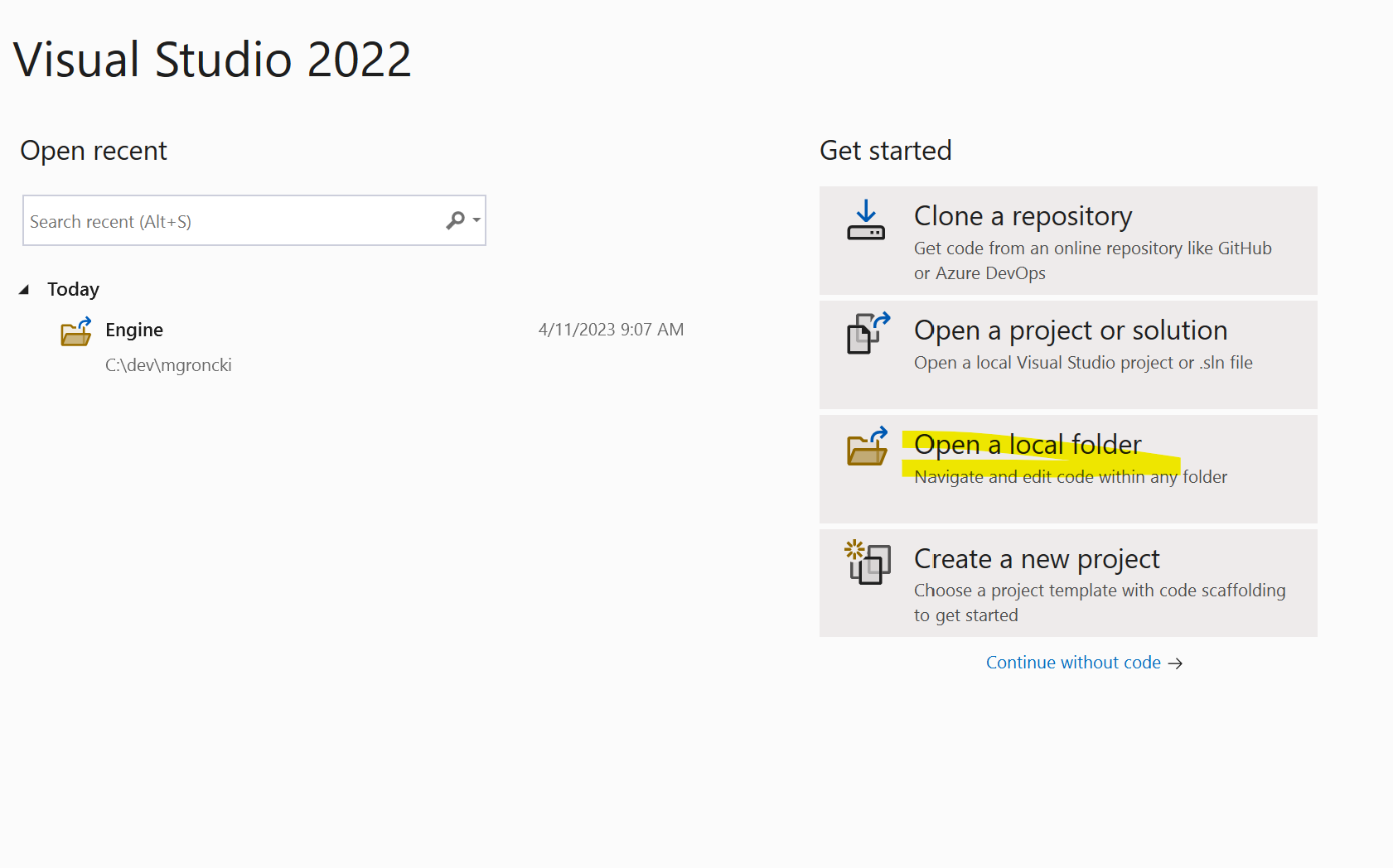
Select the build system and configuration (MSbuild / Ninja, RelWithDebInfo/ Debug)

Select the startup item (e.g. ORE App)
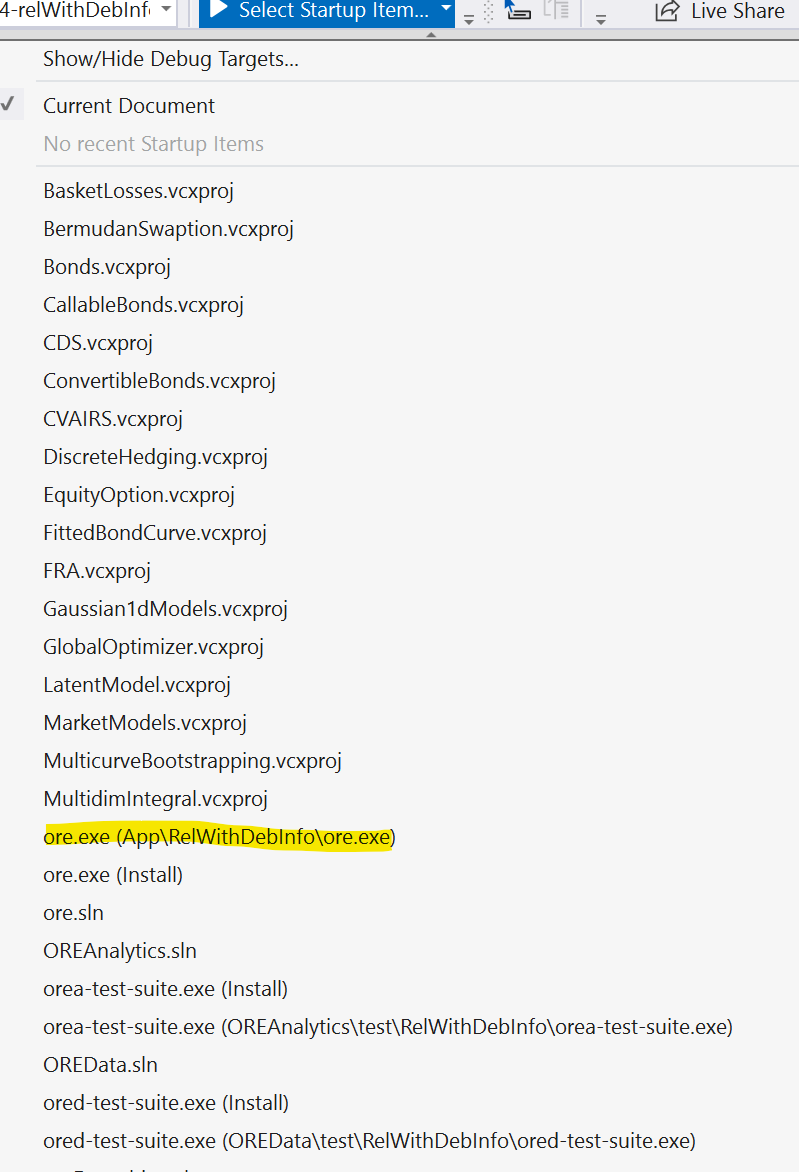
There are also all solution files listed, but the relevant item is executable. It is possible to filter the list with show/hide debug target
There are a few changes though:
- You won't see the used project and filter structure but the folder structure as it is on the file system
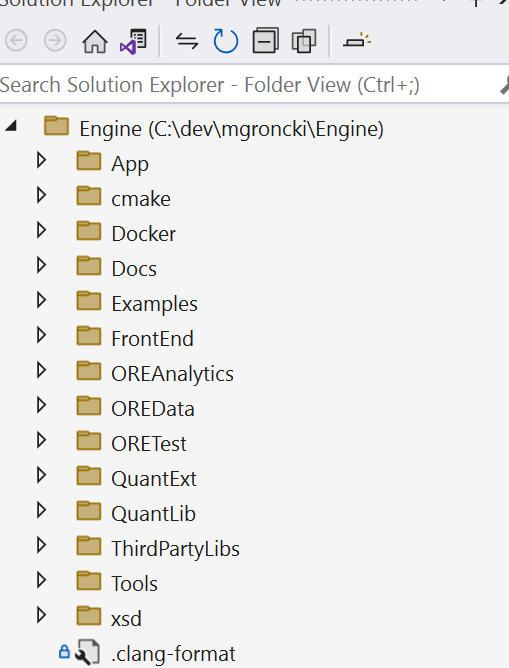
- The executables are built in the subfolder /build/TARGET/CONFIGURATION/EXECUTABLE, e.g. /build/App/Release/ore.exe
- The debug and launch settings are set in launch.vs.json and not in a GUI
Depending on your visual studio you may need to adjust the generator in the CMakePresets.json, it is set to "generator": "Visual Studio 17 2022"

Just noticed, there is a reference to the VCPKG package manager in the CMakePreset.json. We need to remove it.
In the CMakePreset.json:
-
Remove the lines with "CMAKE_TOOLCHAIN_FILE": "$env{VCPKG_ROOT}/scripts/buildsystems/vcpkg.cmake"
-
If you haven't doxygen installed add the line to the cache variables: "ORE_BUILD_DOC": false
I will open a PR for this.
Dear Mathias! Thanks a lot for pointing out this (for me) new possibility of Visual Studio, I managed to even make it work in VS 2019, there is even a menu item for opening CMakeLists directly. Two things are a bit disturbing though, 1) there's no integration with the test explorer (at least I couldn't find one) and 2) I also couldn't find a way/target to directly build libraries (like OREdata, QuantExt, QuantLib etc.), only exe targets can be built. I think it's OK to have more than one way to work with ORE source, even now as the updating is rather simple from CMakeLists using my script.
It its possible to build the libraries only:
You need to switch from the file system view to the CMakeTarget View in the solution explorer:
Click on "switch between solution and available views"

Click on "CMake target views"
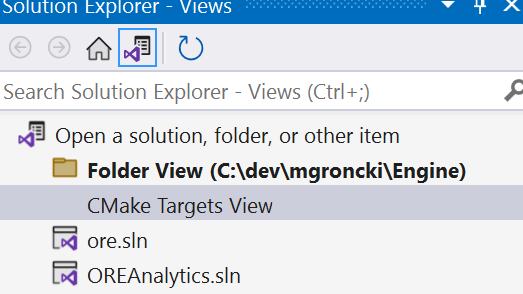
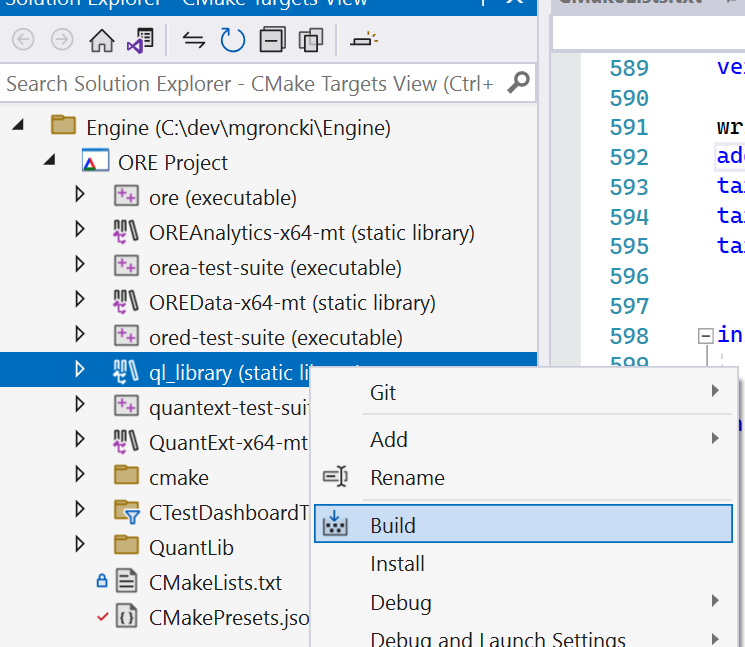
Right click on the library and select build and that should start the build. Its a bita pity that the library targets aren't picked up in the dropdown
Hi guys,
I moved to the ORESWIG part, and I am trying to execute "python setup.py build" in the Build ORE SWIG Wrapper but I have the following error
C:\ore\OREData\ored/utilities/indexnametranslator.hpp(58): note: voir la référence à l'instanciation classe modèle 'boost::bimaps::bimap<std::string,std::string,boost::mpl::na,boost::mpl::na,boost::mpl::na>' en cours de compilation
"C:\Program Files (x86)\Microsoft Visual Studio\2019\Enterprise\VC\Tools\MSVC\14.29.30133\bin\HostX86\x64\link.exe" /nologo /INCREMENTAL:NO /LTCG /DLL /MANIFEST:EMBED,ID=2 /MANIFESTUAC:NO /LIBPATH:C:\Users\Reda\anaconda3\libs /LIBPATH:C:\Users\Reda\anaconda3 /LIBPATH:C:\Users\Reda\anaconda3\PCbuild\amd64 /LIBPATH:C:\local\boost_1_72_0\lib64-msvc-14.2 /LIBPATH:C:\ore\build\QuantLib\ql\Release /LIBPATH:C:\ore\build\QuantExt\qle\Release /LIBPATH:C:\ore\build\OREData\ored\Release /LIBPATH:C:\ore\build\OREAnalytics\orea\Release "/LIBPATH:C:\Program Files (x86)\Microsoft Visual Studio\2019\Enterprise\VC\Tools\MSVC\14.29.30133\ATLMFC\lib\x64" "/LIBPATH:C:\Program Files (x86)\Microsoft Visual Studio\2019\Enterprise\VC\Tools\MSVC\14.29.30133\lib\x64" "/LIBPATH:C:\Program Files (x86)\Windows Kits\10\lib\10.0.19041.0\ucrt\x64" "/LIBPATH:C:\Program Files (x86)\Windows Kits\10\lib\10.0.19041.0\um\x64" advapi32.lib /EXPORT:PyInit__ORE build\temp.win-amd64-cpython-310\Release\ORE/oreanalytics_wrap.obj /OUT:build\lib.win-amd64-cpython-310\ORE\_ORE.cp310-win_amd64.pyd /IMPLIB:build\temp.win-amd64-cpython-310\Release\ORE\_ORE.cp310-win_amd64.lib /subsystem:windows /machine:x64
LINK : fatal error LNK1104: impossible d'ouvrir le fichier 'QuantLib-x64-mt-s.lib'
error: command 'C:\\Program Files (x86)\\Microsoft Visual Studio\\2019\\Enterprise\\VC\\Tools\\MSVC\\14.29.30133\\bin\\HostX86\\x64\\link.exe' failed with exit code 1104
it is coming from 'QuantLib-x64-mt-s.lib' not found, but the problem I have already built correctly %ORE%\build\QuantLib\ql\Release\QuantLib-x64-mt.lib without "-s" Any idea how to fix this Link issue error? Thanks Regards Reda
Hi
I managed to fix the Link Issue, it was due to mismatch of BOOST version. Anyway after that, I tried to build the wheel using "python -m build --wheel", it did not work out, instead I used "python setup.py bdist_wheel" which worked fine. Also for the "python setup.py test", I ran into the following errors
  File "C:\oreswig\OREAnalytics-SWIG\Python\test\OREAnalyticsTestSuite.py", line 9, in test
    import OREAnalytics
ModuleNotFoundError: No module named 'OREAnalytics'
}
I think the file OREAnalyticsTestSuite.py in test folder has not been updated. Finally for the examples, I tried to run python ore.py and I got this
Loading parameters...
Creating OREApp...
Loading inputs                                    OK
Running ORE process...
Requested analytics                               CASHFLOW,EXPOSURE,NPV,XVA
Pricing: Build Market                             OK
Pricing: Build Portfolio                          OK
Pricing: Cashflow Report                          OK
Pricing: NPV Report                               OK
Pricing: Curves Report                            OK
XVA: Build Market                                 OK

Error: Error in ORE analytics: 2nd leg: Missing Euribor6M Actual/360 fixing for February 6th, 2017
Running ORE process done

Requested analytics:
analytc: CASHFLOW
analytc: EXPOSURE
analytc: NPV
analytc: XVA

press <enter> ...

Result reports:
report: cashflow
report: curves
report: dividends
report: fixings
report: marketdata
report: npv

Result cubes:

press <enter> ...

Load report exposure_nettingset_CPTY_A
Traceback (most recent call last):
  File "C:\oreswig\OREAnalytics-SWIG\Python\Examples\ore.py", line 67, in <module>
    report = ore.getReport(reportName)
  File "C:\oreswig\OREAnalytics-SWIG\Python\build\lib.win-amd64-cpython-310\ORE\ORE.py", line 33381, in getReport
    return _ORE.OREApp_getReport(self, reportName)
RuntimeError: report exposure_nettingset_CPTY_A not found in results
Regards
Reda
Dear Mathias! Thanks a lot for pointing out this (for me) new possibility of Visual Studio, I managed to even make it work in VS 2019, there is even a menu item for opening CMakeLists directly. Two things are a bit disturbing though, 1) there's no integration with the test explorer (at least I couldn't find one) and 2) I also couldn't find a way/target to directly build libraries (like OREdata, QuantExt, QuantLib etc.), only exe targets can be built. I think it's OK to have more than one way to work with ORE source, even now as the updating is rather simple from CMakeLists using my script.
I'm sorry to say that I had to give up the idea of updating from the CmakeLists using a powershell script as there is too much effort in reconstructing all cmake related settings (especially boost, but also other settings).
-regards, Roland