

 OpenShot
OpenShot will now not even Start.
There is a similar issue (from three days ago?), but no solutions are showing.
Describe the bug:
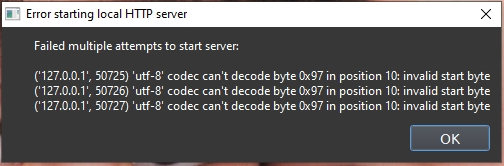
The OpenShot program does not start. It just shows the error window:
Steps to reproduce the behavior:
- Double-click the icon to start the program.
Expected behavior: I expect the program to open.
System Details: Windows 10 desktop PC, after doing a Windows Update. OpenShot-v3.1.1-x86_64.exe OpenShot-v3.1.1-daily-11427-42c84e7a-dce55693-x86_64.exe
Log Files: The openshot-qt.log file has not yet been created. The libopenshot.log file is:
libopenshot logging: Fri May 05 12:21:20 2023
Exception / Stacktrace: unknown
Screenshots: (Optional)

Hello @Brass2387.
- Which version of Windows 10 (Home, Pro, etc?)
- In the "Systems Details" what do you mean by "Windows 10 desktop PC, after doing a Windows Update."? Do you mean you installed some Microsoft Windows Updates and then after the update Openshot stopped running? If this is the case, please provide which Windows updates were installed.
- Is this the first time you are running Openshot or were you running a previous version?

Thanks for the reply, Colorjet3. The OS is Win 10 Pro, Version 10.0.19045 The (older version) OpenShot-v3.0.0-x86_64.exe program has been running well for several weeks. This problem came up, so: research revealed that I should do Windows Update, and run the Latest version of OpenShot. Did Win Update, and installed version: OpenShot-v3.1.1-x86_64.exe Same problem, so I installed the Daily Build: OpenShot-v3.1.1-daily-11427-42c84e7a-dce55693-x86_64.exe Same problem. Deleted the directory: .openshot_qt several times during this crap; that didn't fix the problem. Any other clarifying info that I can forward to you? Thanks for your help.
Thank you @Brass2387 for this information. Let's try this to capture some more logs:
- Open a command prompt.
- Navigate to "c:\program files\openshot video editor" folder.
- type "openshot-qt-cli.exe --debug" without the quotes and press the Enter key.
- You will see bunch of lines scroll in the command prompt window.
- Since Openshot does not start, the window will stop populating. When it does click anywhere in the window, press CTRL+A to select all the text, CTRL+C to copy, and then open notepad and CTRL+V to paste.
- Save the notepad file and share it in this thread.
Done, as you requested.
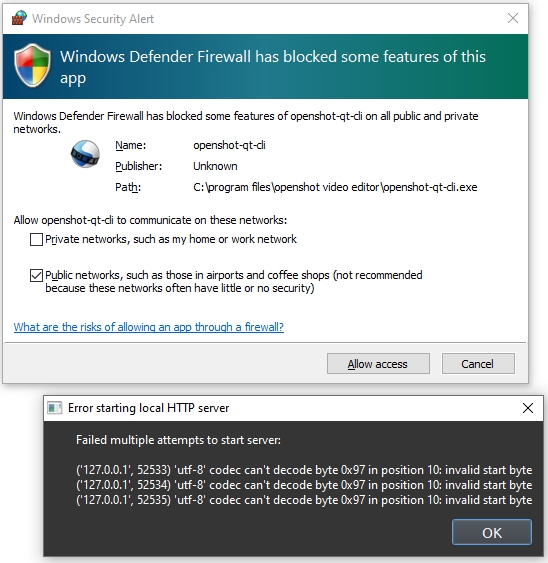
I then saw a new window, from Windows Defender Firewall.
See the picture.
I'm on my private Home network, so I checked that box, unchecked the Public network box, and then hit "Allow access". Retried OpenShot: Same problem.
The Debug text file is also attached.
 cannot start 12.txt
Thank you @Brass2387. I will ask the IT Technical Support specialist and the Lead Developer to take a look at this and figure out why this is happening.
