

 OpenShot
Openshot preferences, Performance setting, no accellerator option available.
Describe the bug A clear and concise description of the issue
Steps to reproduce the behavior:
- Go to Preference
- Click on '....'
- Scroll down to '....'
- See error
Expected behavior it should be possible to chose a "decoder hardware"...
System Details
- OpenShot Version: 2.6.1-dev
- libopenshot Version: 0.2.7-dev
- Platform: Linux-5.15.0-43-generic-x86_64-with-Ubuntu-22.04-jammy
- Processor: x86_64
- Machine: x86_64
- Python version: 3.6.9
- Qt5 version: 5.9.5
- PyQt5 version: 5.10.1
- Qt Detected Languages: ['it', 'en-US', 'en']
- LANG Environment Variable: it_IT.UTF-8
- LOCALE Environment Variable:
- Daily Build: Skipped this step
Log Files
- openshot-qt.log: File too small or empty (not uploaded)
- libopenshot.log (4 KB)
Exception / Stacktrace
No stacktrace found in log files
Screenshots (Optional) If applicable, add screenshots to help explain your problem. You can include screenshots by copy/pasting them on GitHub or dragging-and-dropping into the GitHub page. All images are public, so please don't post screenshots containing personal information.

Hi, could you include info like what kind of graphics card your computer has? If you do have a supported GPU, you may need to install the mesa-va-drivers package, for openshot to use your graphics card.

Here is Laptop HP Victus, double GPU Processor : AMD® Ryzen 7 5800h with radeon graphics:
glmark2 2021.02
======================================================= OpenGL Information GL_VENDOR: AMD GL_RENDERER: AMD RENOIR (LLVM 13.0.1, DRM 3.42, 5.15.0-43-generic) GL_VERSION: 4.6 (Compatibility Profile) Mesa 22.0.5
Dedicated GPU : NVIDIA Corporation GA106M [GeForce RTX 3060 Mobile / Max-Q]
glmark2 2021.02
======================================================= OpenGL Information GL_VENDOR: NVIDIA Corporation GL_RENDERER: NVIDIA GeForce RTX 3060 Laptop GPU/PCIe/SSE2 GL_VERSION: 4.6.0 NVIDIA 515.65.01
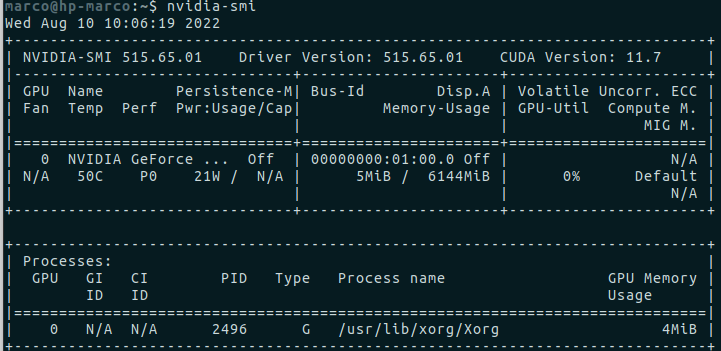
regards Marco
• Hardware acceleration is still experimental in OpenShot Video Editor. • NVIDIA NVENC acceleration is only available in Linux operating systems. • OpenShot v2.6.0 and later includes Intel® Quick Sync Video encoding in Windows operating systems. If you have a CPU that supports Intel®QSV encoding, you can use the encoder by selecting the ( QSV) MP4 (h.264 qsv) Target on the Export Video window. You do not have to change the Preferences window to use the Intel® QSV encoder. • Hardware acceleration in OpenShot requires using the proprietary drivers from the distribution package manager instead of the NVIDIA drivers. You cannot use the Nouveau, Xorg, or open-source drivers. • AMD is not yet supported.
