

 OpenShot
Unable to import video
Describe the bug I was unable to import a video file into the project files. This behavior might be related/limited to the AppImage package.
Steps to reproduce the behavior:
- Go to 'File -> Import Files'
- Choose video file
- See error: 'IMGP4593.MOV is not a valid video, audio, or image file.'
Duplicated with several different video files and codecs.
Expected behavior I expected the video file to be imported into the project files.
System Details
- OpenShot Version: 2.6.1-dev
- libopenshot Version: 0.2.7-dev
- Platform: Linux-5.4.0-120-generic-x86_64-with-LinuxMint-19.3-tricia
- Processor: x86_64
- Machine: x86_64
- Python version: 3.6.9
- Qt5 version: 5.9.5
- PyQt5 version: 5.10.1
- Qt Detected Languages: ['en-US']
- LANG Environment Variable: en_US.UTF-8
- LOCALE Environment Variable:
- Daily Build: Verified issue still exists in daily build: http://github.com/OpenShot/openshot-qt/releases/download/OpenShot-v2.6.1-dev-daily-9498-664c5db8-46255e46-x86_64.AppImage
Log Files
- openshot-qt.log (8 KB)
- libopenshot.log (1 KB)
Exception / Stacktrace
No stacktrace found in log files
Additional Troubleshooting The native video player (celluloid) had no problem opening or playing the video file.
This does not happen in the Ubuntu PPA package version 2.6.0. It does happen in the AppImage package version 2.6.1, including the daily build.
Perhaps worthy of note, attempting to import the video file into a kdenlive session running from an AppImage produced a similar error.
Using the latest version of appimaged.

Couple of things to try:
- Convert your .mov to .mp4 using something like Handbrake and then try to import it. OR
- Download the latest DEV daily build and try importing your .mov file. Go to https://www.openshot.org/download/ and download build #9537.

Yes, I did try both .mov and .mp4 formats.
I can reproduce this behavior in today's daily build 9537 (2022-06-22).
When I try to import a file, the OpenShot dialogue box reads, "#{filename} is not a valid video, audio, or image file."
This happens only with video, and the format does not matter.
Logfiles say the same:
INFO settings: reducing file: #{filename} to dir: #{filepath}
Hardware decoding device number: 1
Failed to open VDPAU backend libvdpau_nvidia.so: cannot open shared object file: No such file or directory
Hardware decoding device number: 1
Failed to open VDPAU backend libvdpau_nvidia.so: cannot open shared object file: No such file or directory
INFO logger_libopenshot: Decode Device not present using default ()
WARNING files_model: Failed to import #{filename}: No Reader has been initialized for this Clip.  Call Reader(*reader) before calling this method.
INFO logger_libopenshot: Decode Device not present using default ()
Again, the Ubuntu PPA works as expected, successfully importing the video file.
Let me know if there are steps I have not yet already tried, or if there is a pertinent update I can test.
Thank you for the additional information. I am not a Linux expert. I ran the build 9537 APPIMAGE in Linxu Mint 20.3 and I was able to import .mov and .mp4 (multiple files) without any issues. I did a quick search on the VDPAU and found this link: https://bbs.archlinux.org/viewtopic.php?id=207168. Check it out and see if any of that makes sense to you. If that doesn't take care of it then one of the OpenShot developers will have to analyze your log file and find a solution.
I will update my OS when Linux Mint 21 comes out, and I will test the AppImage again at that point-- but it had been my understanding that the AppImage package is designed to have all its dependencies self-contained.
Linux Mint 19 still receives support and security updates, and I am up-to-date with them all.
I have no problems with the 2.6.0 PPA package, so I will continue using that in the meantime.
That is true regarding the AppImage package being self-contained with all its dependencies. You may still want to try and download the latest daily build #9537. There has been some updates to the linux distros installation follow these instructions to install it: https://www.openshot.org/ppa/ and see if that resolves your issue.
Please have a developer let me know if there are troubleshooting steps I have not already performed (this will require reading what I've already submitted), or if there is a pertinent update I can test.
@ehdocumentdesign The mention that another appimage failed with this file is very interesting. Do you have a short sample that does this which you wouldn't mind sharing?
Also I notice some nvidia errors in your logs. Do you have hardware acceleration enabled in openshot? If so, does anything change by switching it off?

Yes, it's quite odd that another AppImage likewise failed to load any videos, yet the PPAs and native video players have no issue. Command line tools like ffmpeg and mediainfo have no problem either. I'm not exactly an expert Linux admin, so I might have inadvertantly nerfed something-- but I haven't done anything unusual to my OS and keep current with the updates. Maybe there's a flaw in the underlying appimage tools with regards to Linux Mint 19.3? Anyways...
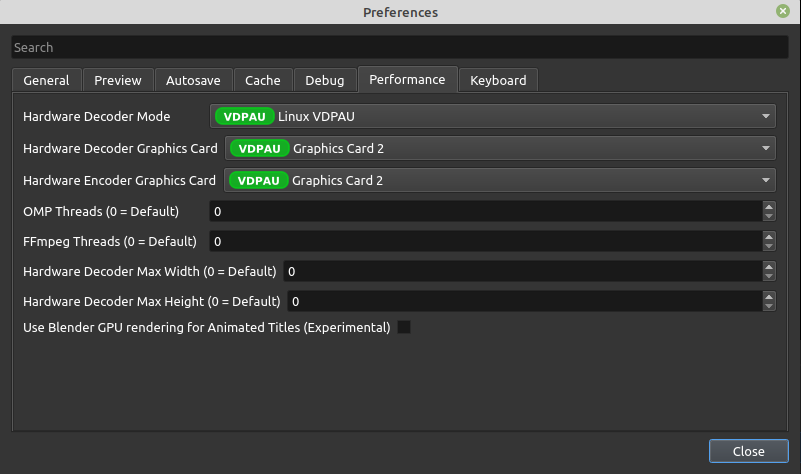
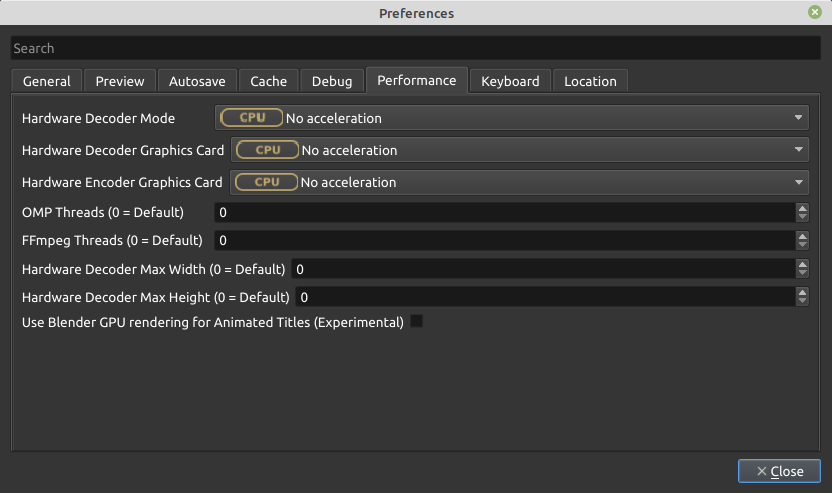
I checked the Performance settings in OpenShot (Edit -> Preferences -> Performance). The default settings and available options are different:
PPA
- PPA hardware codec is set to VDPAU.
- CPU is also an option.
- OpenShot can import video on either setting.
AppImage
- AppImage hardware codec is set to CPU.
- VDPAU is not an option.
- OpenShot cannot import video.
The error in the logfile from the AppImage was:
Failed to open VDPAU backend libvdpau_nvidia.so: cannot open shared object file: No such file or directory
but if OpenShot is set to use the CPU for the hardware codec, then is there a reason to look for libvdpau_nvidia?
Regardless, the PPA works for me, and I'll be doing a big upgrade at some point this summer and can try the AppImage again later. Nevertheless, something seems amiss here, and at least it's documented in case someone else runs into it too.
I wonder if this is relevant. Mangle hardware library builtin paths, in libs bundled into AppImage builds #3321
It's possible. Your logs are also helping me find roughly where the error occurred. Could your repeat the error with debugging on? Instructions to do that here. That turns on extra logging info so I can follow what code ran.
Yes. Here are the logs with verbose debugging enabled. This shows a single session only of me opening the AppImage and repeating the error.
libopenshot.log openshot-qt.log
For what it's worth, I was able to test the AppImage on Linux Mint 21 beta (although on a different machine) and had no problem importing the same video.
Thank you so much for submitting an issue to help improve OpenShot Video Editor. We are sorry about this, but this particular issue has gone unnoticed for quite some time. To help keep the OpenShot GitHub Issue Tracker organized and focused, we must ensure that every issue is correctly labelled and triaged, to get the proper attention.
This issue will be closed, as it meets the following criteria:
- No activity in the past 180 days
- No one is assigned to this issue
We'd like to ask you to help us out and determine whether this issue should be reopened.
- If this issue is reporting a bug, please can you attempt to reproduce on the latest daily build to help us to understand whether the bug still needs our attention.
- If this issue is proposing a new feature, please can you verify whether the feature proposal is still relevant.
Thanks again for your help!
![stale[bot] avatar](https://avatars.githubusercontent.com/in/1724?v=4 "Published by a pub.dev verified publisher")
Hello,
it seems like openshot-qt suffers from the same issue I've encountered on another application that also uses qt. It does not like it when the path it resides into contains a folder named 'bin', e.g. c:\bin\OpenShot Video Editor
In that case, the other application simply crashed immediately. Openshot-qt opened -when it didn't crash due to me network blocking it- and just refused to import any video into the projects panel. Either through drag 'n' drop or through 'Import Files...', it looked like it was reading the files (counting them one by one) but nothing appeared in the projects panel.
I thought I'd mention it here in case it helps someone else or -even better- if it helps locate/report/resolve/workaround what appears to be a qt issue(?).
I am on Windows 10 x64 fully updated, and used the OpenShot-v3.1.1-x86_64.exe installer with the /portable=1 /currentuser /noicons command line options so as to have a portable installation.
Kind regards

@varverd Just out of curiosity, have you tried a normal installation of OpenShot 3.1.1 on this same computer? It would be useful to know if that works fine, compared to the /portable=1 installed version. I would like to verify that this is not some unrelated crash, due to non standard libraries, etc... Thanks!

Hello @jonoomph, I just now did a fresh normal install (same installer as above), in the suggested "C:\Program Files\OpenShot Video Editor" folder. I did not check the option for the firewall exception rule and did not check the welcome screen option to send statistics. OpenShot still tried to access the internet and crashed when I blocked it. It may just be a simple(ish) case where some different exception handling is needed on the code which performs the internet access for the statistics. The import of files also worked just fine, like in the previous occasion - that is, in the non 'bin' folder containing path. Is there anything else I could try to help you narrow down this?
Kind regards