

 OpenShot
audio issues
 Describe the bug
my audio preview won't work at all. the first thing i tried was looking it up and i tried to change my audio preference, it told me that my headphones (as an audio device) didn't exist. i then tried deleting my log files and that didn't work either. i tried removing my C:\Users\USER.openshot_qt\ folder and uninstalling that version of openshot and installing the newest daily build. the build didn't even work, it just kept crashing whenever i tried to open it. i then reinstalled the newest main version and it was still having the same problem. i made sure it was on debugged mode and it still didn't work.
Describe the bug
my audio preview won't work at all. the first thing i tried was looking it up and i tried to change my audio preference, it told me that my headphones (as an audio device) didn't exist. i then tried deleting my log files and that didn't work either. i tried removing my C:\Users\USER.openshot_qt\ folder and uninstalling that version of openshot and installing the newest daily build. the build didn't even work, it just kept crashing whenever i tried to open it. i then reinstalled the newest main version and it was still having the same problem. i made sure it was on debugged mode and it still didn't work.
Steps to reproduce the behavior:
- Go to Preferences
- Click on Preview
- Scroll down to DirectSound: Speakers
- Restart OpenShot after changing Preference
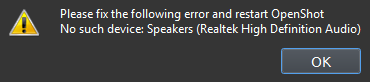
- "Please fix the following error and restart OpenShot. No Such Device: Speakers (Realtek High Definition Audio)"
Expected behavior I would assume my problem would be fixed if i just changed my audio device but it didn't work. none of the audio device options worked.
System Details
- OpenShot Version: 2.6.1
- libopenshot Version: 0.2.7
- Platform: Windows-8.1-6.3.9600
- Processor: Intel64 Family 6 Model 60 Stepping 3, GenuineIntel
- Machine: AMD64
- Python version: 3.8.9
- Qt5 version: 5.15.2
- PyQt5 version: 5.15.4
- Qt Detected Languages: ['en-US']
- LANG Environment Variable:
- LOCALE Environment Variable:
- Daily Build: Not able to verify issue still exists in daily build
Log Files
- openshot-qt.log (217 KB)
- libopenshot.log (157 KB)
Exception / Stacktrace
No stacktrace found in log files

I'm looking into your logs. I believe we've made some improvements to audio device detection since 2.6.1, so I'm sorry the first daily build you tried didn't launch. While we try to figure out what's happening, you could try the build before that just to see if this audio device issue is fixed. (Which would still leave us to fix the crash you encountered.

I also had issue with audio on my system running linux mint 20.3 the audio sounded distorted on the preview and sometimes the application would crash forcing it closed would leave the windows suspended on my system until i restarted. https://termbin.com/wyoj
I had to downgrade to 2.6.0 to fix all issues.

Thank you so much for submitting an issue to help improve OpenShot Video Editor. We are sorry about this, but this particular issue has gone unnoticed for quite some time. To help keep the OpenShot GitHub Issue Tracker organized and focused, we must ensure that every issue is correctly labelled and triaged, to get the proper attention.
This issue will be closed, as it meets the following criteria:
- No activity in the past 180 days
- No one is assigned to this issue
We'd like to ask you to help us out and determine whether this issue should be reopened.
- If this issue is reporting a bug, please can you attempt to reproduce on the latest daily build to help us to understand whether the bug still needs our attention.
- If this issue is proposing a new feature, please can you verify whether the feature proposal is still relevant.
Thanks again for your help!
![stale[bot] avatar](https://avatars.githubusercontent.com/in/1724?v=4 "Published by a pub.dev verified publisher")
This has been fixed in the latest DEV Daily build v3.0.0. Go to openshot.org/download/#daily and get the latest DEV Daily Build. Install it and give it a try.
