

 OpenShot
OpenShot Not Recognizing Speakers
Describe the bug OpenShot is not acknowledging/recognizing/accepting any of my speakers (USB speaker device or built in speakers).
Steps to reproduce the behavior:
- Open OpenShot
- Go to 'Edit'
- Click on 'Preferences'
- Select 'Preview' tab
- Go to 'Playback Audio Device'
- Select literally any option other than 'Default' (Selected 'DirectSound: Speakers (USB2.0 Device)')
- Close OpenShot
- Restart OpenShot
- Received notification 'Please fix the following error and restart OpenShot No such device: Speakers (USB2.0 Device)
- This error notification pops up no matter which speaker option I choose, except for the default setting, which does NOT play any audio on the playbacks/previews.
Expected behavior I expected OpenShot to acknowledge/recognize/accept my speakers whether it's my USB speaker device or the built in speakers on the laptop.
System Details
- OpenShot Version: 2.6.1
- libopenshot Version: 0.2.7
- Platform: Windows-7-6.1.7601-SP1
- Processor: Intel64 Family 6 Model 15 Stepping 13, GenuineIntel
- Machine: AMD64
- Python version: 3.8.9
- Qt5 version: 5.15.2
- PyQt5 version: 5.15.4
- Qt Detected Languages: ['en-US']
- LANG Environment Variable:
- LOCALE Environment Variable:
- Daily Build: Verified issue still exists in daily build: http://github.com/OpenShot/openshot-qt/releases/download/OpenShot-v2.6.1-dev-daily-8946-3c8dc71b-2b8b05c7-x86_64.exe
Log Files
- openshot-qt.log (9 KB)
- libopenshot.log: File too small or empty (not uploaded)
Exception / Stacktrace
No stacktrace found in log files

Same problem here, exactly, using Windows 10. OpenShot sees all of my audio devices, both internal and external via USB, including all the directsound drivers and the ASIO drivers, but it will not actually use any of them because of the error as noted by the bug creator above, and "default" gets no error message but outputs no audio.
OpenShot does not show up as a program / slider control in the WIndows Volume Mixer, either, when it is open, unlike every other program that sends audio thru the Windows Default sound device. So it is not connecting itself to the Windows audio system for whatever reason, unlike every other program on my computer (which all work fine).
I do not have ANY problems with ANY sound device on ANY other program, including several versions of Cakewalk SONAR, Audacity, Goldwave, VideoLAN, Brainspawn FORTE, MIDI Guitar or MIDI Bass, etc., so this problem is being caused by some bug or incorrect software design within OpenShot itself. It is NOT a problem with my system.
I just downloaded your latest version of the 64-bit OpenShot, to create youtube-compatible videos of the music I create (since YT won't take my audio by itself), so it is the latest available OpenShot version on your site.
Version 2.6.1 libopenshot 0.2.7 libeopenshot audio 0.2.2
(note that if I go ahead and export the video of whatever project I load, it does successfully create a file that has the correct audio, video, etc....but you can't hear any of that within Openshot itself)

@LadyLilithia @Amberwolf-Github Could either of you test this on the current daily build? We've made some changes to audio device detection, and I'd love to hear if that fixes your issue.
https://www.openshot.org/download/

I tried the latest for my system OpenShot-v2.6.1-dev-daily-9192-d8cb71c5-2b8b05c7-x86_64.exe (64-bit) but it just crashes (windows has detected a problem error box, then it closes the program with no details) upon opening, even if i uninstall it, delete it's folder, then reinstall.
On 2/28/22, JacksonRG @.***> wrote:
@LadyLilithia @Amberwolf-Github Could either of you test this on the current daily build? We've made some changes to audio device detection, and I'd love to hear if that fixes your issue.
https://www.openshot.org/download/
-- Reply to this email directly or view it on GitHub: https://github.com/OpenShot/openshot-qt/issues/4620#issuecomment-1054862321 You are receiving this because you were mentioned.
Message ID: @.***>
That's very strange. I'll do some windows testing. Could you include the details of your setup?
Windows10 home 64bit (not current, because updating will destroy customizations required for my disabilities and usage), old lenovo laptop intel core i5 6200u 2.3ghz 2.4ghz 8gb ram. Many unnecessary services are disabled, but as previously noted, no other program has any problems.
Sound devices include ancient creative labs external usb using default win10 drivers (no new ones available), old avid/m-audio usb duo with both directsound and asio drivers (whichever is the last version off the avid site).
If there is a way to auto-generate a configuration file with the info you need I can try to do that; it's way too time consuming to manually look up versions and names of every single thing on the system, though. :( (I havent' done beta testing in a couple decades, so I don't have any current tools that will do this).
On 2/28/22, JacksonRG @.***> wrote:
That's very strange. I'll do some windows testing. Could you include the details of your setup?
-- Reply to this email directly or view it on GitHub: https://github.com/OpenShot/openshot-qt/issues/4620#issuecomment-1054912491 You are receiving this because you were mentioned.
Message ID: @.***>
@Amberwolf-Github You said you deleted the folder when you uninstalled. Did you delete C:\Users\userName\.openshot_qt\? That folder stores settings.
no i didn't delete that folder; i'll go find it and do so and retry.
it would be helpful if the uninstaller offered the option to remove all settings, folders, files, etc, for a complete clean uninstall, just not checked by default.
same for the installer, it should offer to do a clean uninstall before installing, instead of just "silently" installing over the top of what is there.
if project files exist within the program folder or settings folder structure (which should NEVER happen unless the user has deliberately chosen to do this, because it will cause people data loss when they follow support instructions to delete such folders, which happens all the time with various software), it should warn the user and/or offer to move them to the base level user documents folder, or the desktop.
On 3/1/22, JacksonRG @.***> wrote:
@Amberwolf-Github You said you deleted the folder when you uninstalled. Did you delete
C:\Users\userName\.openshot_qt\? That folder stores settings. Though I'm reporting the bug that an audio setting may keep openshot from starting.-- Reply to this email directly or view it on GitHub: https://github.com/OpenShot/openshot-qt/issues/4620#issuecomment-1055798700 You are receiving this because you were mentioned.
Message ID: @.***>
same crash-on-open (right after the UI comes up) even with the noted folder deleted prior to installation. :(
On 3/1/22, Michael Elliott @.***> wrote:
no i didn't delete that folder; i'll go find it and do so and retry.
it would be helpful if the uninstaller offered the option to remove all settings, folders, files, etc, for a complete clean uninstall, just not checked by default.
same for the installer, it should offer to do a clean uninstall before installing, instead of just "silently" installing over the top of what is there.
if project files exist within the program folder or settings folder structure (which should NEVER happen unless the user has deliberately chosen to do this, because it will cause people data loss when they follow support instructions to delete such folders, which happens all the time with various software), it should warn the user and/or offer to move them to the base level user documents folder, or the desktop.
On 3/1/22, JacksonRG @.***> wrote:
@Amberwolf-Github You said you deleted the folder when you uninstalled. Did you delete
C:\Users\userName\.openshot_qt\? That folder stores settings. Though I'm reporting the bug that an audio setting may keep openshot from starting.-- Reply to this email directly or view it on GitHub: https://github.com/OpenShot/openshot-qt/issues/4620#issuecomment-1055798700 You are receiving this because you were mentioned.
Message ID: @.***>
I'm experiencing the same, identical issue to @Amberwolf-Github - thanks for the detailed write-up, it helped me to confirm this is the same issue I'm having. All symptoms the same, including crashing on the daily build.

@Amberwolf-Github Out of curiosity, does it crash if you disconnect the audio device? @StevenKitzes what audio devices are you trying to use?
I can only disconnect two of the audio devices (a CreativeLabs USB and an Avid USB). All other devices are built into the laptop or are part of Windows10. Does that matter? (haven't tested yet)
(The Avid USB is what I want to use with OpenShot; it is what I used to create all the sound that will be used in the videos I want to use OS to create).
On 3/8/22, JacksonRG @.***> wrote:
@Amberwolf-Github Out of curiosity, does it crash if you disconnect the audio device?
-- Reply to this email directly or view it on GitHub: https://github.com/OpenShot/openshot-qt/issues/4620#issuecomment-1062052941 You are receiving this because you were mentioned.
Message ID: @.***>
Same issue, and latest dailies crash with the windows error handler showing :S Any way to help debug here? I think I have the same symptoms.

This can be fixed by sound setting in windows 10. I solved problem. by going > windows setting > click sound > click advance sound option > set openshot setting
Please set following setting.


There's no such control panel in my version of Windows10. (v1511, not upgradeable without destroying required system customizations for necessary software)
In Windows Settings, I have: System Devices Network&Internet Personalization Accounts Time&Language EaseofAccess Privacy Update&security There is no "sound".
If I search "sound" in that window, I get the standard Sound control panel, which does not have an "advance sound option". There is no option for any window that looks anything like your linked image.
On 6/28/22, An!L Bothe @.***> wrote:
This can be fixed by sound setting in windows 10. I solved problem. by going > windows setting > click sound > click advance sound option > set openshot setting
Please set following setting.
-- Reply to this email directly or view it on GitHub: https://github.com/OpenShot/openshot-qt/issues/4620#issuecomment-1169541991 You are receiving this because you were mentioned.
Message ID: @.***>
@Amberwolf-Github
Sorry in previous comment I forgot to mention click on system. if you click on system then you can see sound
My windows & version
- OS: Windows 10 Pro
- Version: 10.0.19044 Build 19044
I solved issue by following way.
- Connect headphone / or any other speaker to your PC (In my case: boat immortal 1000D)
- Just open
OpenShot video editor - then go to
settings. - click on
system
- click on
sound
- scroll down to right side then click on
Advanced sound options
- then you can see
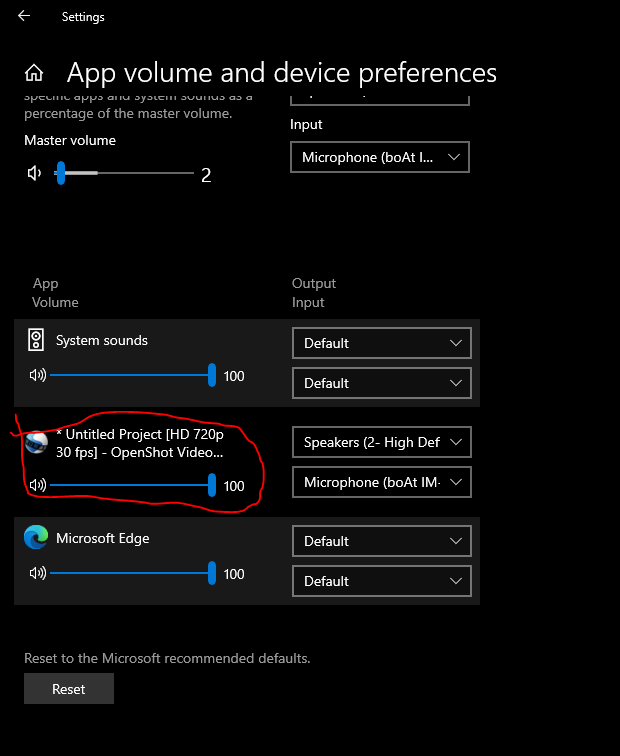
After this you can change default speaker to USB speaker & mic
If this is not working then it may be an issue.
There's no such control panel in my version of Windows10. (v1511, not upgradeable without destroying required system customizations for necessary software) In Windows Settings, I have: System Devices Network&Internet Personalization Accounts Time&Language EaseofAccess Privacy Update&security There is no "sound". If I search "sound" in that window, I get the standard Sound control panel, which does not have an "advance sound option". There is no option for any window that looks anything like your linked image.
Ah, so you mean within Openshot; I'll have to reinstall and try it (it's been uninstalled since my last report, waiting on a fix).
Your original "recipe" implied the setting was within windows itself; the new one makes it clear it is not. Thank you.
On 6/29/22, An!L Bothe @.***> wrote:
@Amberwolf-Github Sorry in previous comment I forgot to mention click on system. if you click on
systemthen you can seesoundMy windows & version
- OS: Windows 10 Pro
- Version: 10.0.19044 Build 19044
I solved issue by following way.
- Connect headphone / or any other speaker to your PC (In my case: boat immortal 1000D)
- Just open
OpenShot video editor- then go to
settings.- click on
system- click on
sound- scroll down to right side then click on
Advanced sound options- then you can see
If this is not working then it may be an issue.
There's no such control panel in my version of Windows10. (v1511, not upgradeable without destroying required system customizations for necessary software) In Windows Settings, I have: System Devices Network&Internet Personalization Accounts Time&Language EaseofAccess Privacy Update&security There is no "sound". If I search "sound" in that window, I get the standard Sound control panel, which does not have an "advance sound option". There is no option for any window that looks anything like your linked image.
-- Reply to this email directly or view it on GitHub: https://github.com/OpenShot/openshot-qt/issues/4620#issuecomment-1170839891 You are receiving this because you were mentioned.
Message ID: @.***>
@Amberwolf-Github Just looked and @anil-bothe's solution was in Windows' options. But in settings when you were looking for "Sound", you first have to click on "System".
There's no such window or control panel in my version of windows.
Under System I have: Display Notifications & actions Apps & features Multitasking Tablet mode Battery saver Power & sleep Storage Offline maps Default apps About
Searching for "sound" after going into System finds no other panels than those previously mentioned.
But regardless: No other application I have ever used or had requires me to go into my operating system to make changes so that it will access a sound device. Why would this one require I make operating system changes for it to work, instead of changing settings within the application (like every other application I have ever used)? Doesn't seem a very reasonable mode of operation....
On 7/1/22, JacksonRG @.***> wrote:
@Amberwolf-Github Just looked and @anil-bothe's solution was in Windows' options. But in settings when you were looking for "Sound", you first have to click on "System".
-- Reply to this email directly or view it on GitHub: https://github.com/OpenShot/openshot-qt/issues/4620#issuecomment-1172765794 You are receiving this because you were mentioned.
Message ID: @.***>
I just went through an awful time with the new 3.0.0 version. It would not recognize my speakers. I did everything and nothing worked. I ended up doing a clean reinstall of OpenShot-v2.6.1-dev-daily-8946-3c8dc71b-2b8b05c7-x86. It is the only way I could get it to work. The entire day was wasted. Now, I can work on my video.

There has been some fixes in the latest DEV daily build of v3.0.0 that should take care of the issue. The only thing you should need to do when you upgrade to v3.0.0-Daily is to change the Default audio sample file, in Openshot, to 48000 and restart Openshot.

Thank you.
It can now preview with audio, but there is another issue (which I don't know if it is new, since I couldn't hear anything before):
Regardless of audio device selection or sample rate in Edit-Preferences-Preview, it always plays thru the default directsound device, except when I choose the only ASIO device in my system (whcih is the one I want to use, but it also has a Windows Audio and a Directsound version of it, but does not route audio to them).
If any Windows Audio device is selected, the device selection always reverts to Default Directsound Device upon restart of the program.
If any Directsound device is selected, then it retains the selection correctly upon restart, but it still plays out the Default Directsound device (whichever one I chose in Windows as default).
It also correctly retains my selection of the single ASIO device, and uses that correctly, but I don't have more than one to see if it would do so in that situation.
So for my usage, the preview now works, but it is possible that others need it to work with their specific selection in the Preview tab preferences, in which case the above behavior may need to be changed.
On 1/31/23, Colorjet3 @.***> wrote:
There has been some fixes in the latest DEV daily build of v3.0.0 that should take care of the issue. The only thing you should need to do when you upgrade to v3.0.0-Daily is to change the Default audio sample file, in Openshot, to 48000 and restart Openshot.
-- Reply to this email directly or view it on GitHub: https://github.com/OpenShot/openshot-qt/issues/4620#issuecomment-1411394046 You are receiving this because you were mentioned.
Message ID: @.***>
Thank you @Amberwolf-Github for that feedback. I am glad things are working for you. I am going to ask the lead developer to review this and comment.