

 OpenShot
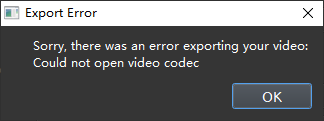
Attempting to use QSV encoder results in a window saying "Could not open video codec"
I'm completely unable to use the QSV encoder on Windows 10 in OS v2.6.1 with an Intel i5-11600K CPU.
Steps to reproduce the bug
- Click the video export button.
- Select QSV for the encoder.
- Click "Export."
System Details:
- OpenShot v2.6.1
- Windows 10
- CPU: Intel i5-11600K
- Motherboard: ASUS Z590 Plus Wifi
- GPU: Nvidia RTX 3060 Ti Founder's Edition


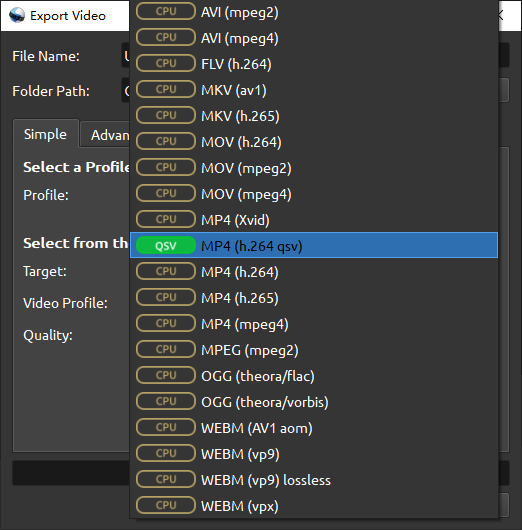
Sorry, which export settings are causing you this problem? I'm not seeing QSV in the options, but may be missing it.

Sorry, which export settings are causing you this problem? I'm not seeing QSV in the options, but may be missing it.
Thank you so much for submitting an issue to help improve OpenShot Video Editor. We are sorry about this, but this particular issue has gone unnoticed for quite some time. To help keep the OpenShot GitHub Issue Tracker organized and focused, we must ensure that every issue is correctly labelled and triaged, to get the proper attention.
This issue will be closed, as it meets the following criteria:
- No activity in the past 180 days
- No one is assigned to this issue
We'd like to ask you to help us out and determine whether this issue should be reopened.
- If this issue is reporting a bug, please can you attempt to reproduce on the latest daily build to help us to understand whether the bug still needs our attention.
- If this issue is proposing a new feature, please can you verify whether the feature proposal is still relevant.
Thanks again for your help!
![stale[bot] avatar](https://avatars.githubusercontent.com/in/1724?v=4 "Published by a pub.dev verified publisher")
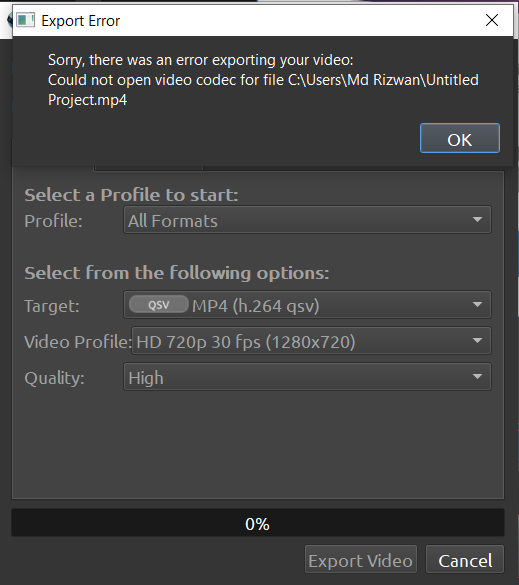
Hi, I am getting this issue while exporting the video using GPU hardware acceleration rather than CPU. Please help if there is any solution available. @JacksonRG I am using OS: Windows 10 Open shot version: 3.0.0

Hello @mdrijwan123 Here is some information from the development team regarding Hardware Acceleration in general:
• Hardware Acceleration in Windows is supported but limited. Those new settings that you see in Edit | Performance tab are new, experimental, and not fully baked (this is mainly for v3.0.0). • Hardware acceleration is still experimental in OpenShot Video Editor. • NVIDIA NVENC acceleration is only available in Linux operating systems. • OpenShot v2.6.0 and later includes Intel® Quick Sync Video encoding in Windows operating systems. If you have a CPU that supports Intel®QSV encoding, you can use the encoder by selecting the ( QSV) MP4 (h.264 qsv) Target on the Export Video window. You do not have to change the Preferences window to use the Intel® QSV encoder. • Hardware acceleration in OpenShot requires using the proprietary drivers from the distribution package manager instead of the NVIDIA drivers. You cannot use the Nouveau, Xorg, or open-source drivers. • AMD is not yet supported.
For QSV MP4 (h.264qsv) export please ensure that your CPU supports the Intel QSV encoding and that it is enabled.
By the way, you made this same report in Issue number 4812 so I am going to not respond to that one.
