

 OpenShot
OpenShot still takes a very long time to export mkv videos with the av1 codec on Windows, even in the latest daily build
Issue Description
I have a 30-minute video (a series of .mkv videos created through OBS Studio), and it seems to be taking around 12 hours to export. If I try to touch anything it stops responding. Many of the times I am unable to open OpenShot in a window. This is in the latest daily build as of 12/3/2020.
Similar Versions Note that this is very similar to another person's issue: #1838
Steps to reproduce the behavior
- Download the zip file at https://drive.google.com/file/d/1q-sZPKwvWe9Eme-tFT23z_1WvQwXu4DR/view?usp=sharing
- Unzip the test file and extract it
- Launch OpenShot
- Add all the files to track 5, starting with Disclaimer 1, then Disclaimer 2, then each of the videos from 1-5, making sure they touch each other.
- Export as a video
- Make sure the settings are as follows: File Name: Longest Platformer Ever Folder Path: C:/Users/[username]/Videos Simple Profile: All Formats Target: CPU mkv (av1) Video Profile: HD 720p 30fps (1280x720) Quality: High
- See how it takes an abysmally long time to upload and frequently stops responding.
Expected behavior It takes no more than an hour or two to export, or about as long as the CPU mkv (h.265) target (i.e. you should expect around 2% progress a minute)
Actual behavior Claims to take 12 hours to upload and it takes about ten times as long to get to 2%, meaning after a minute it hasn't even changed 0.3%. Additionally, constantly stops responding.
System Details
- OpenShot Version 2.5.1-dev2 (December 3rd Daily Build)
- Operating System / Distro: Windows 10 version 2004 build 19041.630
- Sum of File Sizes of Videos: 68-69 MB (.mkv)
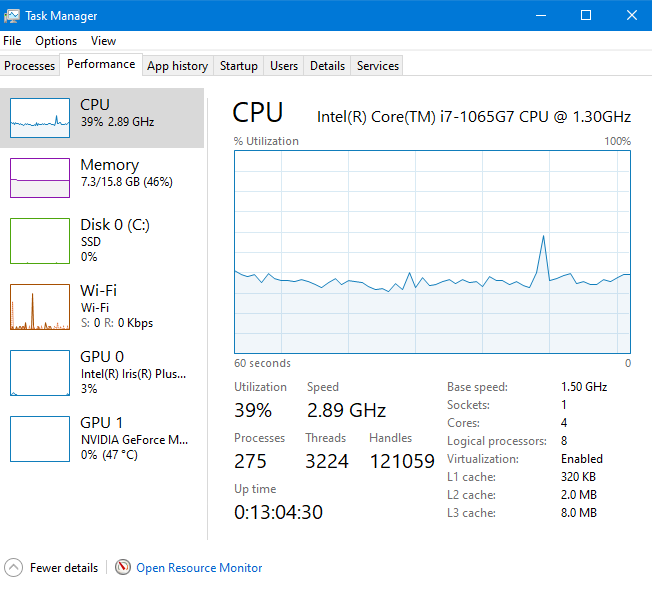
- I gathered information via several programs and features and compiled everything into a zip file, located at https://drive.google.com/file/d/1dsiXFKkQJZtzyz5990QTuF0-Z14zZ3kH/view?usp=sharing.
Log Files libopenshot.log openshot-qt.log
Screenshots



Have you tried using one of the Daily Builds? I found an issue with the latest Daily Build (October 17), so I suggest using an earlier version (October 15).
I tested the latest Daily Build (October 17, 2020) on my Windows 10 system and my MacBook Pro 16 laptop. On my MacBook Pro, I exported the test file at 108 fps, which took less than 7 minutes to render the video. On my Windows 10 system, I exported the test file at 126 fps, again taking less than 6 minutes to export the test file. The exported file was 872MB on my MacBook Pro and 830MB on my Windows 10 system.
I just exported the test file using the latest Daily Build on my Debian Linux VM at 63 fps, which took less than 15 minutes to complete. However, it is a VM, and I've only allocated two cores and 8GB RAM to the guest system, which is on my Data Drive (7200 rpm HDD), not my System Drive (Raid 0 SSD).
I followed your steps to reproduce the behavior and successfully exported the video on all three systems.
Let us know if the Daily Build helps you with the export of your video.

I don't think that this is an OpenShot issue anymore. I just tried all three of my systems with the test file and OpenShot 2.5.1 (stable build). I achieved similar performance to my last tests (above) on all three systems and successfully exported the test file in under 15 minutes across the board. I have not yet tried down-converting to 1024x576 16:9 PAL (1024x576). That is my next series of tests.
I used OpenShot 2.5.1 on my Windows and Mac systems as well as my Debian Linux VM. I actually achieved slightly better performance when I scaled to 1024x576 16:9 PAL (1024x576) than I did by leaving the resolution unchanged in my first set of tests. I'm pretty sure that OpenShot is performing correctly.
@PeacefulPotato Tell us more about your system configuration, both hardware and software, please.
For some reason I can't upload the zip file here even though it's less than 1MB, so I put it on Google Drive again: https://drive.google.com/file/d/1dsiXFKkQJZtzyz5990QTuF0-Z14zZ3kH/view?usp=sharing Also, I managed to save my actual project as an .osp file and put it and the assets into a zip folder, viewable here: https://drive.google.com/file/d/1q-sZPKwvWe9Eme-tFT23z_1WvQwXu4DR/view?usp=sharing Try opening that project for step 1 and then try exporting as an .mkv file. It probably won't change anything, but it's worth a shot. I hope this helps
@PeacefulPotato Can you also zip and share the MKV files that you used to create the video, please? There are seven MKV files according to the project and they are not included in the assets folders that you shared.
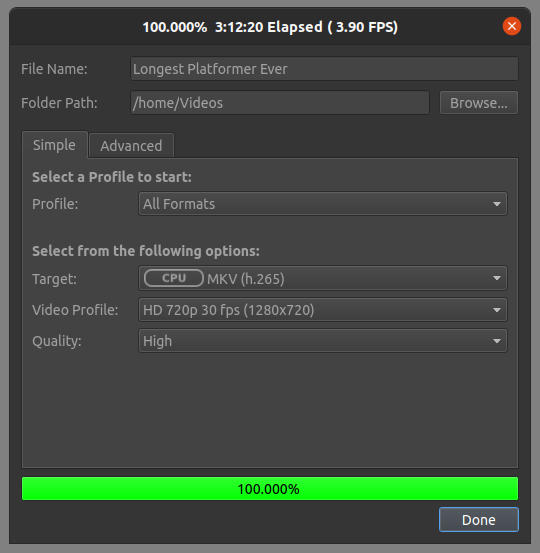
@PeacefulPotato Thanks for uploading the files. I loaded your project with the files you provided into OpenShot 2.5.1-dev2 (October 30, 2020) on my Windows 10 system and my Ubuntu Linux 20.04.1 VM. I exported the project to MKV (h.265) 720p 30fps on each system. Below are the results in the title bars of the windows. They are not the best times and frame rates, but they are close to your expected behavior in your bug report.

OK, I figured out what happened. I finally got the daily build, which added two mkv options: h.265 (what you did) and av1 (what I did and what was the only option in my version). h.265 works as expected, and doesn't take too long. av1 still takes forever and has the same issues as before, even in the daily build.
And this is the updated report based on my newly found information:
Issue Description
I have a 30-minute video (a series of .mkv videos created through OBS Studio), and it seems to be taking around 12 hours to export. If I try to touch anything it stops responding. Many of the times I am unable to open OpenShot in a window. This is in the latest daily build as of 12/3/2020.
Similar Versions Note that this is very similar to another person's issue: #1838
Steps to reproduce the behavior
- Download the zip file at https://drive.google.com/file/d/1q-sZPKwvWe9Eme-tFT23z_1WvQwXu4DR/view?usp=sharing
- Unzip the test file and extract it
- Launch OpenShot
- Add all the files to track 5, starting with Disclaimer 1, then Disclaimer 2, then each of the videos from 1-5, making sure they touch each other.
- Export as a video
- Make sure the settings are as follows: File Name: Longest Platformer Ever Folder Path: C:/Users/[username]/Videos Simple Profile: All Formats Target: CPU mkv (av1) Video Profile: HD 720p 30fps (1280x720) Quality: High
- See how it takes an abysmally long time to upload and frequently stops responding.
Expected behavior It takes no more than an hour or two to export, or about as long as the CPU mkv (h.265) target (i.e. you should expect around 2% progress a minute)
Actual behavior Claims to take 12 hours to upload and it takes about ten times as long to get to 2%, meaning after a minute it hasn't even changed 0.3%. Additionally, constantly stops responding.
System Details
- OpenShot Version 2.5.1-dev2 (December 3rd Daily Build)
- Operating System / Distro: Windows 10 version 2004 build 19041.630
- Sum of File Sizes of Videos: 68-69 MB (.mkv)
- I gathered information via several programs and features and compiled everything into a zip file, located at https://drive.google.com/file/d/1dsiXFKkQJZtzyz5990QTuF0-Z14zZ3kH/view?usp=sharing.
Log Files libopenshot.log openshot-qt.log
Screenshots
@PeacefulPotato Using the new instructions and the MKV videos in the ZIP file, I encountered the issue the OP described. My conversion rate was ~0.3 fps, with an estimated time to completion of ~34 hours. I'm wondering if, in this case, it would be better to export to WEBM (vp9) lossless then use a converter program like Handbrake to convert the clip to MKV.
It probably would, if the converter program supported the av1 codec (which Handbrake doesn't). The problem is only with mkv files in the av1 codec, not the h.265 codec, so in the latter case it would be faster to go directly from OpenShot. For other codecs, OpenShot doesn't support it anyways, but converting to h.265 and then another codec sounds like the way to go. Of course, this makes it a feature request, as at this point it's basically asking for you to support the av1 codec. Edit: Then again, the fact that it is there would make people think they can just use OpenShot, only to find out that they have to wait hours to export it and can't cancel. At best, they would force quit it and have to try again, and at worst, they would have made changes in OpenShot and not saved, losing progress.
Thank you so much for submitting an issue to help improve OpenShot Video Editor. We are sorry about this, but this particular issue has gone unnoticed for quite some time. To help keep the OpenShot GitHub Issue Tracker organized and focused, we must ensure that every issue is correctly labelled and triaged, to get the proper attention.
This issue will be closed, as it meets the following criteria:
- No activity in the past 180 days
- No one is assigned to this issue
We'd like to ask you to help us out and determine whether this issue should be reopened.
- If this issue is reporting a bug, please can you attempt to reproduce on the latest daily build to help us to understand whether the bug still needs our attention.
- If this issue is proposing a new feature, please can you verify whether the feature proposal is still relevant.
Thanks again for your help!
![stale[bot] avatar](https://avatars.githubusercontent.com/in/1724?v=4 "Published by a pub.dev verified publisher")
I don't use OpenShot anymore so I don't know if this bug still exists or not.
I don't use OpenShot anymore so I don't know if this bug still exists or not.
It does. I just downloaded OpenShot and tried to export a video in .av1 and ETA is 10 hours for a 6 minute file in 1440p60fps. CPU usage is on 7%...

I have the same exact issue, but it might be affecting other file formats as well. And it does seem that the final output gets a 'bloated' file size (#4077), which can range from hundreds of megabytes to over a gig.

Thank you so much for submitting an issue to help improve OpenShot Video Editor. We are sorry about this, but this particular issue has gone unnoticed for quite some time. To help keep the OpenShot GitHub Issue Tracker organized and focused, we must ensure that every issue is correctly labelled and triaged, to get the proper attention.
This issue will be closed, as it meets the following criteria:
- No activity in the past 180 days
- No one is assigned to this issue
We'd like to ask you to help us out and determine whether this issue should be reopened.
- If this issue is reporting a bug, please can you attempt to reproduce on the latest daily build to help us to understand whether the bug still needs our attention.
- If this issue is proposing a new feature, please can you verify whether the feature proposal is still relevant.
Thanks again for your help!
OpenShot has not been updated for months. This likely makes the software unstable.
