

 OpenShot
Wave Form not vertically tall enough to make out the highs and lows
Describe the bug When I click on a clip or split piece of a clip, I'm able to select "Display wave form". I believe that only applies to the one piece of the clip. a) it would be if it applied to all pieces on the track. But the big problem is that the wave form is vertically tiny. I can not see anything in it.
System Details (please complete the following information):
- Operating System / Distro: windows 10
- OpenShot Version [e.g. 2.4.1] 2.4.3
To Reproduce Steps to reproduce the behavior: Described above
Expected behavior the wave form should be vertically tall enough to make out the highs and lows in the wave form. I would recommend filling 25% of the vertical space of the track. There should also be a way to increase & decrease the vertical height of both the track and the wave form.
Screenshots
Logs If you are experiencing a crash, please collect and attach logs of the problem.
Additional context Add any other context about the problem here.

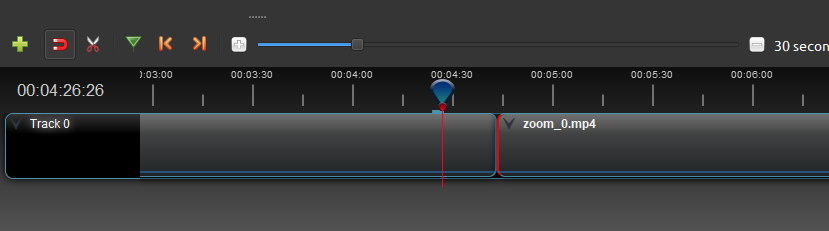
in the image, both pieces of the clip (left and right) have been told to show the wave form. They are. It is the thin blue line at the bottom of the track. This is not usable!
Hello! I found one more issue, it would be better to draw wave form using max amplitude of sample of audio data then pick up it's average value of sample. It will be more informative representation of audio.
// Go through all of the (reduced) samples
// And whenever enough are "collected", draw a block
for (var i = start_sample; i < end_sample; i++) {
  // Flip negative values up
  sample = Math.abs(clip.audio_data[i]);
  // X-Position of *next* sample
  var x = Math.floor((i + 1 - start_sample) / sample_divisor);

  avg += sample;
  avg_cnt++;
  max = Math.max(max, sample);
to use this:
    // Draw the fully visible average-bar
    ctx.fillStyle = color;
    ctx.fillRect(last_x, mid_point, x - last_x, -(max * scale));
instead of:
   // Draw the fully visible average-bar
    ctx.fillStyle = color;
    ctx.fillRect(last_x, mid_point, x - last_x, -(avg / avg_cnt * scale));

I've noticed (at least in 2.5.1-dev2) that the amplitude of the waveforms is affected by the volume setting of the clip, too.
It would probably make more sense to display the waveform, taking advantage of as much of the vertical space as possible, without reducing it based on the volume setting.

I've noticed (at least in 2.5.1-dev2) that the amplitude of the waveforms is affected by the volume setting of the clip, too.
I've found that I have to set the volume of the clip to 100, then ask to display waveform, and then re-silence the clip (hope I remember).

Thank you so much for submitting an issue to help improve OpenShot Video Editor. We are sorry about this, but this particular issue has gone unnoticed for quite some time. To help keep the OpenShot GitHub Issue Tracker organized and focused, we must ensure that every issue is correctly labelled and triaged, to get the proper attention.
This issue will be closed, as it meets the following criteria:
- No activity in the past 180 days
- No one is assigned to this issue
We'd like to ask you to help us out and determine whether this issue should be reopened.
- If this issue is reporting a bug, please can you attempt to reproduce on the latest daily build to help us to understand whether the bug still needs our attention.
- If this issue is proposing a new feature, please can you verify whether the feature proposal is still relevant.
Thanks again for your help!
![stale[bot] avatar](https://avatars.githubusercontent.com/in/1724?v=4 "Published by a pub.dev verified publisher")
I'm not sure if this has been improved upon or not, but I often find this to still be an issue with recent daily builds.
A logarithmic representation would probably be better, if this is not already how the waveforms are shown.
Definitely need a static representation of the waveform, which is "normalized" to take up the entire ribbon. What we're after with the waveform is to be able to line things up. At least, that's the only reason I've found for them. To that purpose, shrinking the waveform makes the operation harder.
That said, I now work in Audacity to get the audio right & then work with the video, against a fixed audio target. I then mute all of the video tracks after using the audio to help align them.
I've got a waveform rework in progress. Lots of good ideas here. Definitely hoping to fit the waveform to the available height.

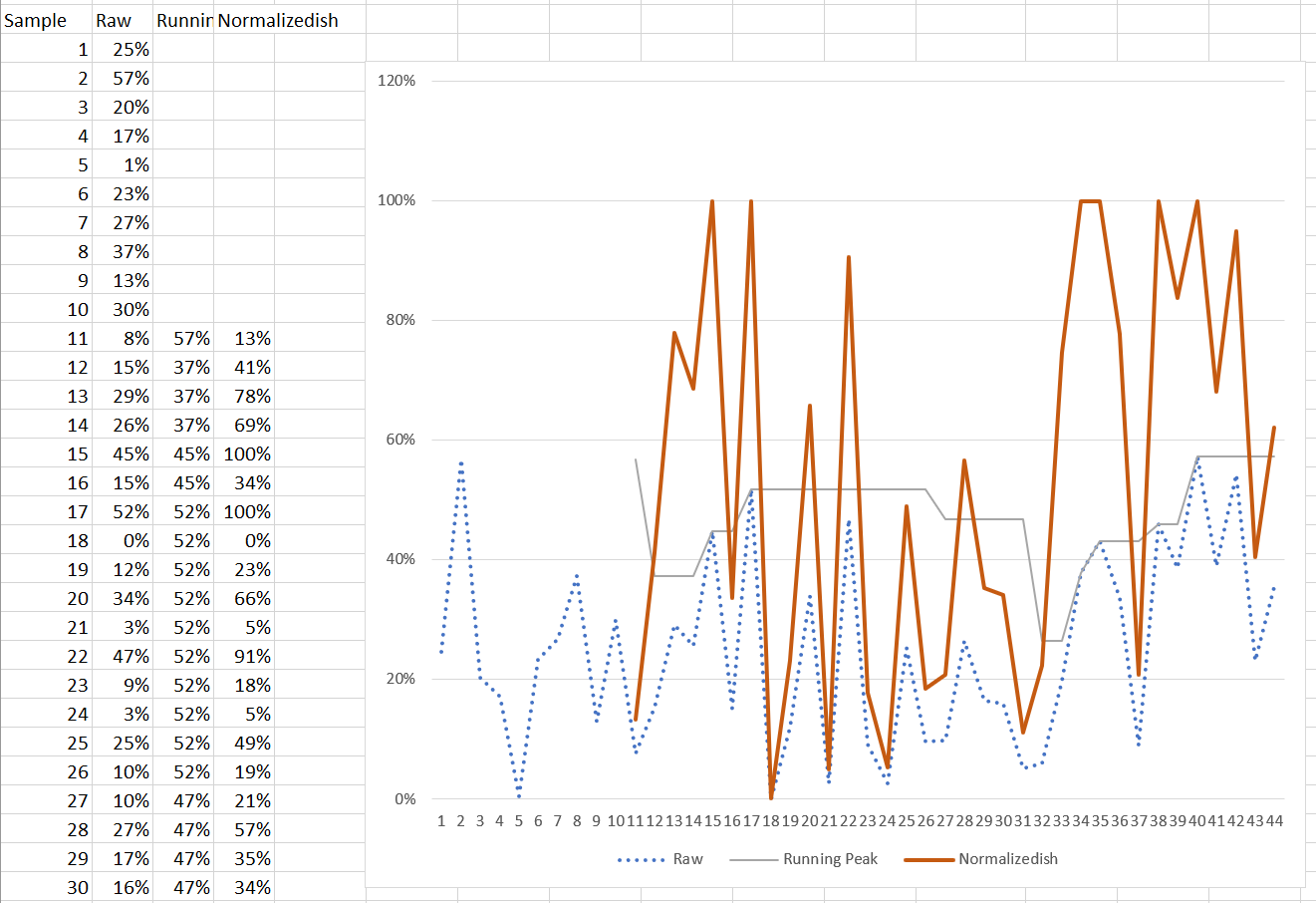
I wonder if it'd be both faster to process & a better user experience if the presentation of the ribbon were a sort of running average for the peak values. Forgive the horrible Excel chart here, but maybe this explains a bit what I mean. Basically, rather than trying to deal with the entire track, deal with it in chunks with a local maximum & scale to that local maximum.
Thank you so much for submitting an issue to help improve OpenShot Video Editor. We are sorry about this, but this particular issue has gone unnoticed for quite some time. To help keep the OpenShot GitHub Issue Tracker organized and focused, we must ensure that every issue is correctly labelled and triaged, to get the proper attention.
This issue will be closed, as it meets the following criteria:
- No activity in the past 180 days
- No one is assigned to this issue
We'd like to ask you to help us out and determine whether this issue should be reopened.
- If this issue is reporting a bug, please can you attempt to reproduce on the latest daily build to help us to understand whether the bug still needs our attention.
- If this issue is proposing a new feature, please can you verify whether the feature proposal is still relevant.
Thanks again for your help!
The 2.6.1-dev daily builds still scale the amplitude of the waveform on the clip's volume setting.
This means I have to display the waveform before I adjust the volume in order to have a usable waveform.
Thank you so much for submitting an issue to help improve OpenShot Video Editor. We are sorry about this, but this particular issue has gone unnoticed for quite some time. To help keep the OpenShot GitHub Issue Tracker organized and focused, we must ensure that every issue is correctly labelled and triaged, to get the proper attention.
This issue will be closed, as it meets the following criteria:
- No activity in the past 180 days
- No one is assigned to this issue
We'd like to ask you to help us out and determine whether this issue should be reopened.
- If this issue is reporting a bug, please can you attempt to reproduce on the latest daily build to help us to understand whether the bug still needs our attention.
- If this issue is proposing a new feature, please can you verify whether the feature proposal is still relevant.
Thanks again for your help!
Thank you so much for submitting an issue to help improve OpenShot Video Editor. We are sorry about this, but this particular issue has gone unnoticed for quite some time. To help keep the OpenShot GitHub Issue Tracker organized and focused, we must ensure that every issue is correctly labelled and triaged, to get the proper attention.
This issue will be closed, as it meets the following criteria:
- No activity in the past 180 days
- No one is assigned to this issue
We'd like to ask you to help us out and determine whether this issue should be reopened.
- If this issue is reporting a bug, please can you attempt to reproduce on the latest daily build to help us to understand whether the bug still needs our attention.
- If this issue is proposing a new feature, please can you verify whether the feature proposal is still relevant.
Thanks again for your help!
I can confirm that a recent daily build (OpenShot-v3.0.0-daily-10873-99aab0a1-f55ec5d0-x86_64.AppImage) still exhibits the issue of changing the height of the waveform based on the applied volume.
It appears that the initial height of a 100% volume waveform may now use the entire vertical space (I tested with several wav and mp4 files), but any adjustment in the volume (changes the amplitude of the waveform). The waveform amplitude directly corresponds to the volume of the frame in the clip which can be seen by adding a clip to the timeline, showing waveform and then adding a volume fade-in (or fade-out).
As far as I'm concerned, the waveform should always fill the entire vertical space.
Hello @N3WWN Please review this and see if it covers what you are recommending as an enhancement: https://trello.com/c/ANRxVVaf/1-normalize-heights-of-waveform-on-timeline
I tested the slice of a video file and then displaying the wave form on one of the slices and it correctly displays the waveform for that specific slice only.
If you are satisfied with the trello card then feel free to close the ticket or I can go ahead and close it.

Hello @N3WWN I hope you had a chance to review internal ticket that has been created to address this. I am closing this ticket for now.
@N3WWN Thanks for helping verify the current behavior! Having the volume keyframe change the waveform visualization is actually quite tricky, and took a lot of work, lol. However, I also can appreciate your point, which is valid - what is the point of a waveform visualization, if when you reduce the volume, it disappears from view.
Let me think about this a bit... but off the top of my head, we initially added in the "volume adjusts waveform" functionality to visualize "fade in" and "fade out" for the user. I don't think we were considering the use-case of reduce this MP3 down to 5% volume.... and now we can't see the waveform anymore.
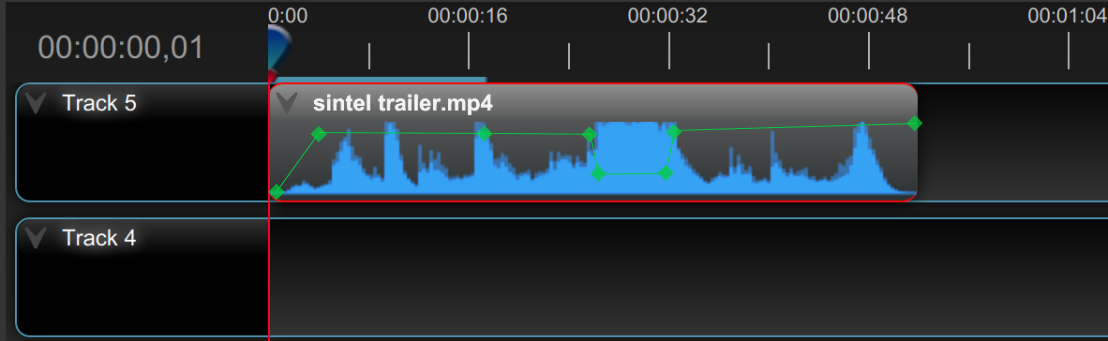
Perhaps we need to revert this functionality, and instead display the volume keyframes in a different color on the timeline, and plot them from 0.0 to 1.0 (vertically), so you can see when a clip has "volume" keyframes, and if they are fading in or out, etc... but behind those keyframes, we always display the full, normalized waveform...
For example:

@jonoomph That looks like a good solution!
Honestly, I never use the waveforms for visualizing or confirming fades (or other volume changes). I use them exclusively for either syncing clips from different cameras that were recording at the same time or locating when known audio events occur.
When sync'ing clips, one of the tracks is always muted (0% volume), which makes the waveform disappear and makes alignment difficult without restoring the volume, syncing and then muting the track again.
Thanks!