
OpenRCT2
 OpenRCT2 copied to clipboard
 OpenRCT2
Not able to enter name into scenario chart
Operating System
Windows 10
OpenRCT2 build
OpenRCT2, v0.4.0-146-g697fa7c (697fa7c on develop) provided by GitHub
Describe the issue
On any custom parks that have the .park save format I am not able to enter my name into the scenario chart after I beat it. It works fine for .sc4 or .sc6 save files. In addition to that the parks saved with the new save format are not grouped by their difficulty and rather sorted alphabetically
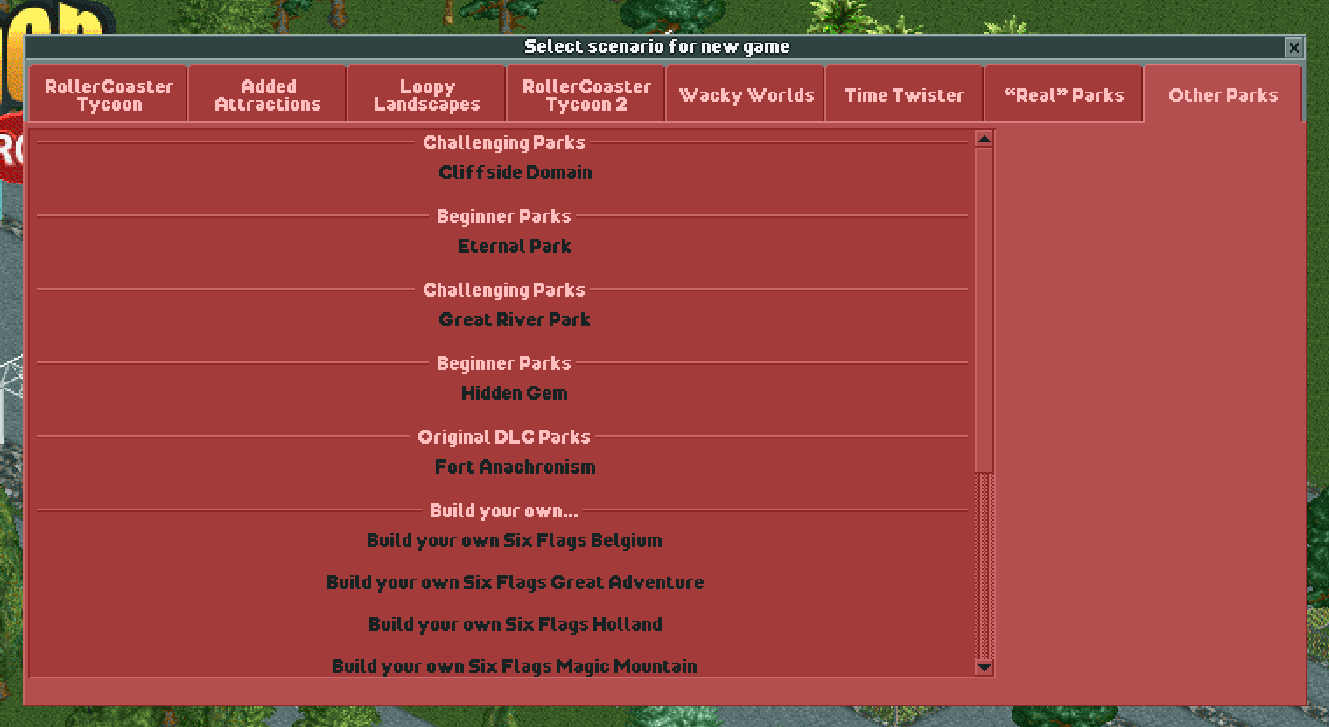 .
.
Area(s) with issue?
New Save Format (NSF)
Steps to reproduce
- Go into Scenario Editor and create a new scenario
- Save as .park file
- Play park and finish the scenario
Attachments

They aren't even sorted consistently either, which annoys me when I am looking for the scenario I want to play or rework. Additionally, if you have a .park version of any .sc6 scenario, when you complete the .park version and enter your name, it goes to the .sc6 version instead.

