

 OpenOrienteering
Gpx thickness and colour
Steps to reproduce
At the moment the thickness and colour of line that indicates position is hard-set. Sometimes the line is hard to spot. It is a very thin line.
Expected behaviour
I suggest to make the thickness of gps line adjustable (in percents as other templates).
Additionaly it would be nice to tell retrospectively how bad/ good a gps signal was in a certain .gpx segment. That could be indicated by .gpx line color.
Configuration
Android app 0.7.0.

With GDAL based GPX support, the track is loaded as regular map internally. My idea is to add a hook to adjust default colors and symbols/dimensions for these types of templates (i.e. per template). At least color should be doable fairly easy.
This needs additional elements in the file format.

Great, there is a way.
I noticed recently - gpxs from previous days got thicker line. Is it on purpose? I got used to thin ones - I could have them loaded all the time and have an idea where I had been. Now I must the previous one hide.
Gpxs from previous days are not just thicker. They are scaled as other map content - very annoying behaviour.
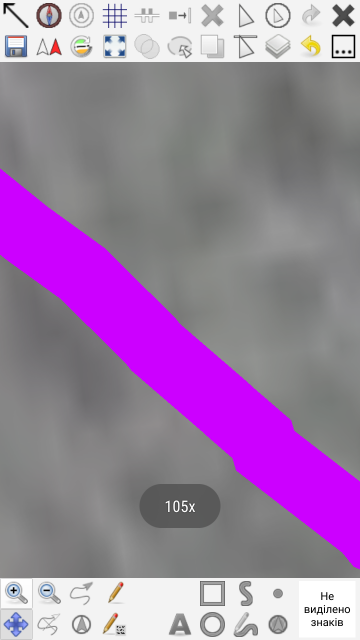

IIRC correctly we do have a little inconsistency in GPX tracks: The currently recorded track on Android still uses the legacy GPX code which draws "cosmetic" lines. Cosmetic lines, i.e. lines of one pixel width, are barely visible on high-dpi Android screens. When loading the map later, it may be loaded with GDAL/OGR, using a regular line symbol, so the line scales with zoom.
The trouble is that there is no single line width, fixed or not, which fits at all zoom scales (whole map, 1x, etc.), especially when working with many tracks in a single map.
Above discussion seems to prefer the thin "cosmetic" lines. But I am quite unhappy with that poor visibility of the current track. I don't work on 105x zoom. For older tracks (thick lines when loaded with GDAL/OGR), I just reduce the opacity.
So what is the main concern at the moment:
a) the current track being thinner than old ones, or
b) really just the significant width and scaling behaviour of the old ones (when loaded with GDAL/OGR)?
With the last changes from #1157, there will be consistency v0.8.3, reflecting the GDAL/OGR GPX setting. But I need to know what to do when GDAL/OGR is the only GPX support left in Mapper (v0.9).
I got used to the a) current thin track. Saying that I would not mind if it is a little thicker (or its thickness, colour is adjustable). I do not like b) the thicknes of old tracks. That could be definitely thinner. It obstructs stuff as it is.
For improving this in v0.9.0, I want to remove the legacy DXF/OSM support (replaced by GDAL/OGR): #1160.
Please, just add possibilty to adjust the GPS-Track line tickness. The line is almoust unvisible on sun light when mapping outside.
The setting can be on PC-software side where each one can adjust it as needed.
