

 OpenLightingProject
RPI Hangs when using more than 1 SPI port
Hi,
I don't know if I'm doing something wrong, but I tried this in a RPI3B (spi0 and spi1) and RPI4 (spi3,spi4,spi5,spi6)
I want to do a LED Matrix with 20M LED Strip WS2801 (160 pixels per SPI port) using 4 SPI ports in RPI4
I edited /boot/config.txt adding these lines:
dtoverlay=spi3-1cs dtoverlay=spi4-1cs dtoverlay=spi5-1cs dtoverlay=spi6-1cs
I Configured 4 OLA Universes with artnet as input and SPI ports (3 to 6) as outputs. The problem is that, when I try to send an image or animation through JINX or Gledietor, using the 4 universes, RPI crashes in a couple of minutes and I have to restart it manually. If I decrease the number of Universes to 2 it hangs in 15 minutes more or less, and If I only use 1 Universe, it doesn't crash. I tried to configure the OLA Universes without output ports, I mean, without using SPI ports, I left only 1 universe with SPI port as output and RPI doesn't crash, so I guess that the problem is when using more than 1 SPI ports together.
First times I received the following error just when crashing
Message from syslogd@matrizled at Jan 20 14:31:32 ... kernel:[ 1295.086779] Internal error: Oops: 207 [#1] SMP ARM
Message from syslogd@matrizled at Jan 20 14:31:32 ... kernel:[ 1295.087301] Process (pid: 759, stack limit = 0xdce1b712)
Message from syslogd@matrizled at Jan 20 14:31:32 ... kernel:[ 1295.087323] Stack: (0xd786bcf8 to 0xd786c000)
And I increased the stack size for user "olad" to 32768(32Mb) and the RPI remains more time active, but still crashing in a few minutes. I can't increase more because it hangs quickly..
¿What could be the problem? ¡¡Thanks in advance!!

Hi @pacherdj ,
Can you share your ola-spi.conf please?
Can you upload some olad -l4 logs please: https://www.openlighting.org/ola/get-help/ola-faq/#How_do_I_get_olad_-l_4_logs
Also have a look at http://
Does doubling or halving the number of pixels per port make any difference to when it crashes?
Which version of OLA are you running? Installed how?
If you unpatch the Art-Net inputs and use the web UI to control the pixels does it still crash in the same sort of time?
I assume the reported pid corresponds to OLA? ps aux | grep -i <pid number>
I don't think it will affect it, but does patching all the SPI ports to one universe, rather than spread out, change how quickly it crashes?
Does changing to the three channel personality make a difference? What about switching to a different pixel protocol (you may want to disconnect your pixels first just in case).
Essentially it sounds like some sort of memory leak, we just need to work out where it is and track it down. At least with it failing quickly we've got a chance.

Hi Peter, and thanks for helping me!
I did some test this morning based on your comment.
If I set all the spi to the same universe the behaviour is the same
Doubling the amount of pixels I think there is no difference, it crashes more or less in the same time. But I set all the spi ports to 10 pixels and it doesn't crash.
I can attach here the files you asked me. debug.docx ola-spi.conf.txt l4.txt
the version is 0.10.7 installed with apt install ola I tried to install it by installing all the dependencies and downloading the ola-0.10.8.tar.gz file and the behaviour is the same, it crashes some minutes later.
One thing that made it last more time active was to increase the 8mb stack to 32mb , with 2 spi ports active it last more or less 1 hour but with 4 spi active only 10 or 15 minutes..
thanks!
I forgot to say that changing the personality, all the leds goes on at the same time but it still crashes in few minutes..
Interestingly, someone else managed here, although perhaps on different hardware: https://groups.google.com/g/open-lighting/c/DnjR9T2iNpU/m/fhaWpDD-BgAJ
If I set all the spi to the same universe the behaviour is the same
Okay, so probably not the input side then.
Doubling the amount of pixels I think there is no difference, it crashes more or less in the same time. But I set all the spi ports to 10 pixels and it doesn't crash.
Can you do a bit of a binary search to see roughly where the magic number is? E.g. is 80 pixels okay?
I can attach here the files you asked me. l4.txt
Can we see -l 4 from around the time it actually crashes, say the crash and 1000 lines beforehand maybe, or just upload the whole thing, whichever is easier.
Can we see a bit more syslog from that time too, or anything else output to the console when you gathered -l 4.
the version is 0.10.7 installed with apt install ola I tried to install it by installing all the dependencies and downloading the ola-0.10.8.tar.gz file and the behaviour is the same, it crashes some minutes later.
Okay thanks, on a recent Raspbian I assume?
That's great you've managed to build from scratch, that gives us a chance of debugging it. Do you want to try our master branch too, I suspect it will be the same.
One thing that made it last more time active was to increase the 8mb stack to 32mb , with 2 spi ports active it last more or less 1 hour but with 4 spi active only 10 or 15 minutes..
Is it roughly linear, with 16MB stack, do you get about 30 minutes?
I forgot to say that changing the personality, all the leds goes on at the same time but it still crashes in few minutes..
Yeah that personality is designed to control all the LEDs from one set of channels. Because that code should be simpler, it should help us to narrow down what's going on. The fact it's still crashing sounds like it could be in the core bit, rather than WS2801 specific.
Can you try changing to another type of pixels too (probably without them connected), just to see if that impacts how long it takes to crash. Obviously you won't be able to see the output at that point in time.
Hi Peter! I was all the morning doing test...I'm getting crazy...
First of all I guess that the behaviour with all SPI set in the same universe is different. If I set all SPI in the same universe it remains active at least 1 hour
Sorry for my first tests, when I switched on rpi and olad started, it started with 4 universes and 1 spi for each universe, but when i killed the process and then i turned it on with /usr/bin/olad -4 &> l4.txt it started with only 1 universe and all of the spi ports in that universe, i don't know why because i think the config files are the same... but now i solved this configuring the 4 universes ok, then stopping ola in the web and then turning it on again...
Now, i tried:
Increasing the SPI buffer by adding "spidev.bufsiz=32768" to the /boot/cmdline.txt file (not solved) Changing the personality to APA102 INDIVIDUAL (not solved) Changing the personality to WS2801 COMBINED (not solved)
And then I did a lot of test that I will resume in the attached file "test.xlsx" I also attach the corresponding syslog, kernel.log, l4.log for each test..
I tried to increase and decrease stack and buffer of spi, changing to 15 pixels etc...nothing solves it and I dont see any change, because it crashes in only seconds...
The problem is that at the second that it crashes, there is nothing written in the logs, only the last line of the l4 log is plenty of null words (if I open it with notepad++) If I open with Microsoft Notepad, there are a lot of spaces at the end.
What do you mean with the master branch? version 0.10.8? I also tried it few days ago, when I started with the project and it crashes too..
I dont know what to do :( Thanks!
ATTACHMENTS:
kerntest5.log kerntest6.log l4test5.log l4test6.log l4test7.log l4test8.log test.xlsx syslogtest5.log syslogtest6.log syslogtest7.log syslogtest8.log
Another..."possible clue"
When it crashed I can see in htop that mem and cpu are ok, but I have multiple olad processes opened, is this ok?
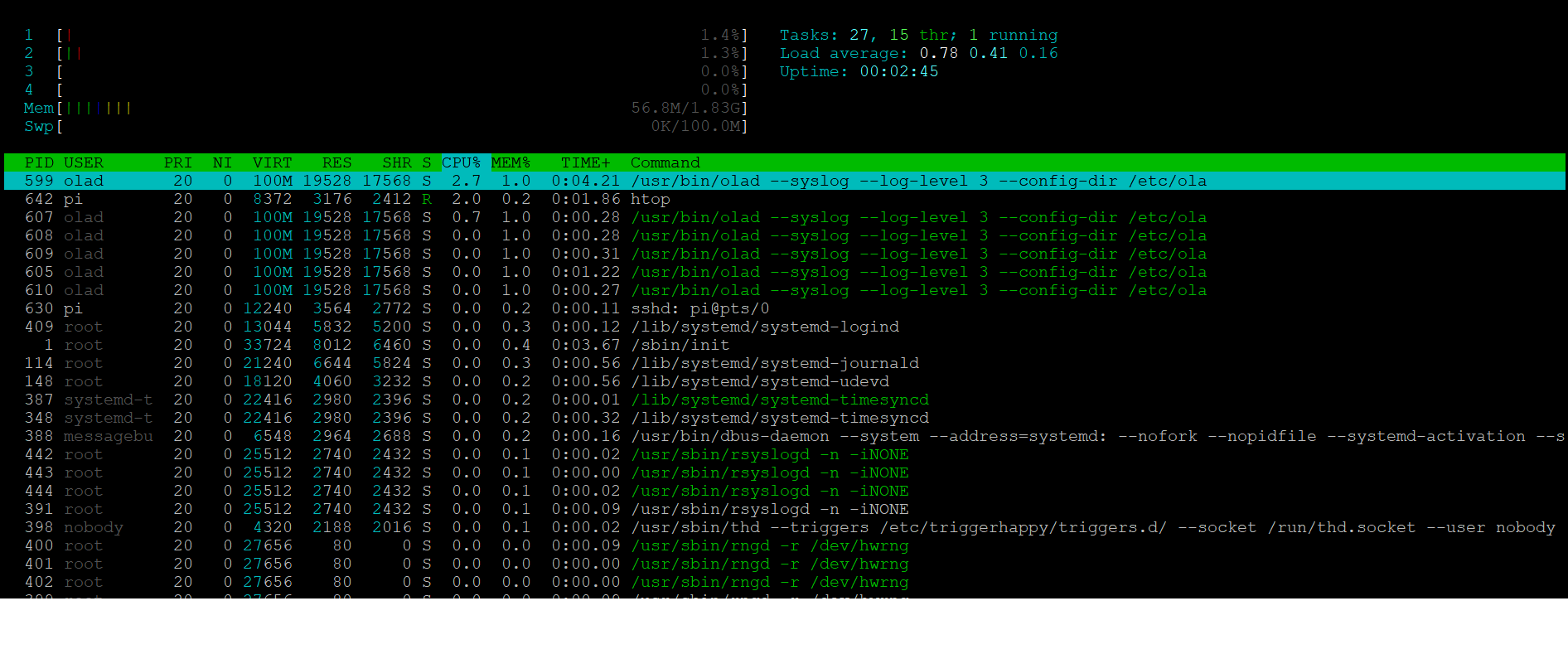
When it crashed I can see in htop that mem and cpu are ok, but I have multiple olad processes opened, is this ok?
You shouldn't have more than one olad process. How are you starting olad?
If you stop all but one of them, does it behave any better?
I have only installed olad with apt install olad...and then after rebooting it starts. I don't know why there are 5 processes opened... If I use the "stop olad" button in the web, it kills all the processes, and then if I run it by /usr/bin/olad it opens only one process, but still hangs the rpi after some seconds..
Now I'm trying to build olad from scratch under ubuntu (I don't know if I'm going to get it) but it is too slow!! I think tomorrow I will have more info...:(
Did you get a RPI4 with the 4 spi ports working at the same time?? Do you have any img of this working?
Thanks Peter.
I have only installed olad with apt install olad...and then after rebooting it starts. I don't know why there are 5 processes opened...
What does dpkg -l | grep -i ola show?
If I use the "stop olad" button in the web, it kills all the processes, and then if I run it by /usr/bin/olad it opens only one process, but still hangs the rpi after some seconds..
Is there just one process still running when it's hung?
Now I'm trying to build olad from scratch under ubuntu (I don't know if I'm going to get it) but it is too slow!! I think tomorrow I will have more info...:(
Ubuntu on the Pi, or on another machine?
Did you get a RPI4 with the 4 spi ports working at the same time?? Do you have any img of this working?
I don't think I've personally used the SPI code since a Pi 1 or 2, but as mentioned various others have had success.
First of all I guess that the behaviour with all SPI set in the same universe is different. If I set all SPI in the same universe it remains active at least 1 hour
Ah that's interesting, it wasn't what you'd said initially.
Sorry for my first tests, when I switched on rpi and olad started, it started with 4 universes and 1 spi for each universe, but when i killed the process and then i turned it on with /usr/bin/olad -4 &> l4.txt it started with only 1 universe and all of the spi ports in that universe, i don't know why because i think the config files are the same... but now i solved this configuring the 4 universes ok, then stopping ola in the web and then turning it on again...
Did you follow the instructions here, which should get you the same config in both cases? https://www.openlighting.org/ola/get-help/ola-faq/#How_do_I_get_olad_-l_4_logs
What do you mean with the master branch? version 0.10.8? I also tried it few days ago, when I started with the project and it crashes too..
As in the code git cloned from here: https://github.com/OpenLightingProject/ola/
Rather than a tar.gz release.
In terms of your logs and crashes, you could try running the olad command from another machine via SSH/PuTTy which might get you a bit more of the log, as I suspect it's failing to write it to disk in time, hence all the nulls.
What is your memory split configured to on the Pi (between system and graphics)?
Also can you use ola_recorder to record the four Art-Net universe (without the SPI attached) for roughly the duration it runs for before it crashes) and upload that to here.
I assume it's not a power issue? If you have them all either on separate universes or on one, and use ola_dmxconsole to put all the channels on at full once, does it still crash at the same sort of time?
Hi Peter, i will try to answer all the questions.
Now I'm under Ubuntu 20.10 (GNU/Linux 5.8.0-1011-raspi aarch64) in RPI4b 2Gb I built olad from the master branch and give ubuntu user permissions for accessing SPI devices. I made a video to show you that first there is no process olad opened, then, if I run olad -l4 it starts a process, and some seconds later, it starts more processes...Don't know why because I've only installed olad following these instructions:
1 -> apt update 2 -> apt upgrade 3 -> install all needed libraries 4 -> git clone https://github.com/OpenLightingProject/ola.git 5 -> cd ola 6 ->autoreconf -i 7 ->./configure --enable-rdm-tests 8 ->./configure --enable-python-libs 9 ->make 10 ->make check 11 ->sudo make install 12 ->sudo ldconfig 13 ->sudo reboot
Then I edited /boot/firmware/config.txt and add: dtoverlay=spi3-1cs dtoverlay=spi4-1cs dtoverlay=spi5-1cs dtoverlay=spi6-1cs
And then edited /etc/udev/rules.d/50-spi.rules to add this line: SUBSYSTEM=="spidev", GROUP="ubuntu", MODE="0660"
Then launch ola with /usr/local/bin/olad -l 4 and create universes with input art-net and output spi3 spi4 spi5 or spi6 depending on wich universe i was setting up Then stop ola to save the information and launch ola again.
Test it and crash... That's all
Memory split configured to 16Mb and 64Mb and always fails. editing config.txt and adding the line gpu_mem=16 or 64 It's not a power issue, because first I was using a mobile adapter 5V 3A and now a power source of 5V 10A dpkg -l | grep -i ola shows nothing I recorded the show without spi outputs to save a long record and then tried to play it back with spi outputs and still crashing at the same time, so the artnet protocol does nothing bad here. Then I recorded the show with spi outputs and attach here the output of the recording until it crashed, nothing to see.. I had to upload it to wetransfer because its more than 10mb -> https://we.tl/t-pyc8M87fQX
https://user-images.githubusercontent.com/50921309/105840685-b25b5400-5fd3-11eb-8df7-1ef498644001.mp4
I don't know if I'm doing something wrong...or I have to configure anything about memory in any place but I tried it with raspbian last image, from scratch, from apt, changing stack size, gpu size, spi buffer size... in RPI3 with 2 SPI, in RPI4 with 4 SPI.. Under ubuntu with the master branch... I dont know what to do :(:(:(
I also tested to change dmx values with dmx_console and it does not crash. I think it only crashes when it has multiple value changes in multiple spi.. it must be any memory problem or something like that but I dont know... Is there any other memory value that i could change related to spi? :(
Thanks Peter!
Hi! I found another way to do it!!
I was using 4 SPI ports in my RPI but I found that I can use only 1 SPI port and create 4 subports in the spi config file. Now everything is working perfectly!!
https://user-images.githubusercontent.com/50921309/106271341-a966be80-622f-11eb-8a3c-bfa58c44650a.mp4
Thanks Peter for your help!