

 OpenInterpreter
feat:Add support for containerized Code execution, and utilities ( upload / download fn ).
Changes Made
-
Added Containerized Execution Support
-
Docker Integration: Introduced a new class
DockerProcWrapperthat mimics the interface of Python'ssubprocess.Popenfor seamless integration. -
Session Management: Each Docker container and code interpreter is assigned a unique session ID, which also specifies a mount point inside the container at
/mnt/data. -
Automatic Cleanup: Utilized Python's
atexitmodule to ensure that all session-specific folders are deleted when the application exits. -
Dependency: This feature introduces a new dependency—
dockerfrom PyPI—and requires Docker Engine to be installed on the host machine of the container. -
Activation: Use
.containattribute of the interpreter class or the CLI flag--use_containerto enable this feature. -
Remote Execution: Allows Docker containers to be run on remote servers by setting the
DOCKER_HOSTenvironment variable. This is particularly useful for businesses that wish to keep data on company servers.
-
-
Customizable Container Images
-
Dockerfiles: Added a
dockerfilesdirectory containing the Dockerfile for building the runtime container. The default image is based onDebianand includes package managers for Node, R, and Python. -
Runtime Customization: Introduced a utility class for users to add or remove languages and dependencies to/from the runtime container.
-
-
Magic commands
%upload [local_file_path]: uploads a file or directory to the container via docker engine api's.%download [path_in_container]: download a specific file from the container given the path in the container ( default workdir in container is /mnt/data ). NOTE: in my next PR I plan to make it so the Language model can give download links to files, just like in ChatGPT's code interpreter; but this requires some UI work.
Self-Review
- [x] Conducted a self-review of the code.
Testing
- [x] Windows
- [x] MacOS
- [x] Linux ( any system which supports docker engine )
AI Language Model Utilized
- [x] GPT4
- [x] GPT3
- [x] Llama 34B ( Used gpt-3/4 for testing containerized execution. it is implicit that the other language models OI supports are supported by this feature.)


Cant wait for this PR to be merged.
I should be done today! just some fixes with the container building are all the problems left. and the problems are just because I cant do bash code so gpt is basically doing it for me lol
@unaidedelf8777 Thanks for the update. Just curious about this- "Remote Execution: Allows Docker containers to be run on remote servers by setting the DOCKER_HOST environment variable. This is particularly useful for businesses that wish to keep data on company servers."
Does this mean we can run Open Interpreter in multiple docker containers to serve multiple users (concurrent connections)? Just like how ChatGPT's CodeInterpreter does.
@unaidedelf8777 Thanks for the update. Just curious about this- "Remote Execution: Allows Docker containers to be run on remote servers by setting the DOCKER_HOST environment variable. This is particularly useful for businesses that wish to keep data on company servers."
Does this mean we can run Open Interpreter in multiple docker containers to serve multiple users (concurrent connections)? Just like how ChatGPT's CodeInterpreter does.
yeah, that's exactly why I wanted to do this; so I can sell the setup to businesses ( code still opensource ofc ). right now with how its setup, it would just be connecting to the docker engine API on the specified host ( whether it be remote or local ) and spawning a container on the server, interacting with the container via the terminal on the users' machine. I also want to make it so companies can mount there data in the container easily, and still have session paths were session specific data gets stored; but this can be done down the line since it took me a while to understand docker to this level; let alone to one where I can understand all these other things.
I'm also working on making it so that you can upload and download files from the container session in a way that you can manually do it or the model can specify the URL easily. I think I will also make the downloads / uploads disable-able.
any thoughts?
Amazing. I appreciate your effort.
I think uploading and downloading files from the docker container in real-time is very important here along with the streaming text responses.
There is a similar implementation in CodeInterpreter-api, it uses a docker-contained Jupyter notebook to execute the python code. It's rather slow and doesn't have a streaming response. Check out how the file uploads and download implementation in each session for your reference: https://github.com/shroominic/codeinterpreter-api
I think the speed to spin up new docker instances for each session should be very quick. Any ideas on how to achieve this?
Amazing. I appreciate your effort.
I think uploading and downloading files from the docker container in real-time is very important here along with the streaming text responses.
There is a similar implementation in CodeInterpreter-api, it uses a docker-contained Jupyter notebook to execute the python code. It's rather slow and doesn't have a streaming response. Check out how the file uploads and download implementation in each session for your reference: https://github.com/shroominic/codeinterpreter-api
I think the speed to spin up new docker instances for each session should be very quick. Any ideas on how to achieve this?
yes. currently it spins up one container, and then execs into that container for each 'CodeInterpreter'. it seems to be pretty fast though I havent measured it yet; usually less than a second or 2 to spin a new one and less than a second to send a command and recieve output since we use the containers socket directly.
Around 2 seconds is amazing. I am happy to test this for you when the PR is merged. Let me know.
Around 2 seconds is amazing. I am happy to test this for you when the PR is merged. Let me know.
@vinodvarma24, it is fully functional on my fork right now. to use the containers, you will need to run interpreter with -uc #or --use_container. also when you run it and input your openai key for some reason it doesn't pass that to litellm. someone will fix that I'm sure, or its a problem with my fork and Ill figure it out. in any case just export the key to OPENAI_API_KEY=key
I also implemented 2 cli functions. %upload and %download. both take either one or more file paths to a file to upload or download from the container. also when using the download command you need to have it like %download /mnt/data/file-to-download.txt, since /mn/data is the default workdir i put the AI in so it tries not to go exploring and mess things up.
Please let me know any critique you have or what could be improved!

Really looking forward to this being merged!
I am TOO! I don't want to have to resolve merge conflicts again lol.
Definitely a cool idea, but I had some issues running it locally after checking out your branch:

Definitely a cool idea, but I had some issues running it locally after checking out your branch:


Also @ericrallen referencing a file in your local system wont work, since the file isn't in the container. to upload it to the container use %upload [file-path]
Incredible work Nathan @unaidedelf8777! Seriously floored by the work you've put into this.
--use_container is brilliant. %upload [file-path] is BRILLIANT.
And yes, containerized execution to me is critical to getting OI to be fully safe for sensitive applications. Potentially could become the number 1 choice for secure LLM code execution if we do this right.
Also thank you so much to @ericrallen for reviewing this.
Why not simply run Open Interpreter inside a docker container though? I feel we can benefit from the community development of OI by keeping it in one piece as much as possible.
Here, the boundary to the docker container is at the code execution part. That might be the best way to do it. But why not put all of OI into one docker container, then just send the user message into it / stream a message out of it? That way we still use subprocess and everything, no added complexity there.
Container just holds the OI core, and we make it so the terminal interface can stream messages to/from that just as easily as it does now (to the OI core running it the same process as it).
Re: each language having its own container setup: is it feasible to simply have an official OI docker image like docker pull open-interpreter:latest that includes all supported languages + the core of OI? This would take much more time to download in the beginning (would be like half a gig max...?) but once the user has it, I'm told it should be ~equally quick to spin up as a single-language container. (source: chatgpt lol)
I'm sure there's a reason (perhaps speed of spinning up the docker?) but let me know. This is a fair number of files + complexity to introduce to the codebase, so I want to be sure we implement this as minimally as possible.

Incredible work Nathan @unaidedelf8777! Seriously floored by the work you've put into this.
--use_containeris brilliant.%upload [file-path]is BRILLIANT.And yes, containerized execution to me is critical to getting OI to be fully safe for sensitive applications. Potentially could become the number 1 choice for secure LLM code execution if we do this right.
Also thank you so much to @ericrallen for reviewing this.
Why not simply run Open Interpreter inside a docker container though? I feel we can benefit from the community development of OI by keeping it in one piece as much as possible.
Here, the boundary to the docker container is at the code execution part. That might be the best way to do it. But why not put all of OI into one docker container, then just send the user message into it / stream a message out of it? That way we still use subprocess and everything, no added complexity there.
Container just holds the OI core, and we make it so the terminal interface can stream messages to/from that just as easily as it does now (to the OI core running it the same process as it).
Re: each language having its own container setup: is it feasible to simply have an official OI docker image like
docker pull open-interpreter:latestthat includes all supported languages + the core of OI? This would take much more time to download in the beginning (would be like half a gig max...?) but once the user has it, I'm told it should be ~equally quick to spin up as a single-language container. (source: chatgpt lol)I'm sure there's a reason (perhaps speed of spinning up the docker?) but let me know. This is a fair number of files + complexity to introduce to the codebase, so I want to be sure we implement this as minimally as possible.
Yes, So currently the container image uncompressed sits at about 1.81 gb, with the main contributor to the size just being the basic dependencies which I added for each language ( We can change this as needed of course if making it lightweight is a priority ). While Running OI inside of a singular container is feasible and may be a good option for some, It also takes away the ability to add dependencies into the container, since the container would be starting anew each time you use it. and that's the other thing; your starting anew each time + users will need to re-import files each time they want to use a file from there host system, and also exporting files from a singular container to the users host sys would be a nightmare, since docker isn't too keen on letting containers effect the host system.
that's why I opted for a more session based approach since it means that a users container can persist as long as needed, whether it be local or remote on a host server.
anyway that's my two sense.
I'm constantly facing this error, even though the Docker desktop is running on my Mac and I'm able to run different containers in it. Do I need to specifically pass a DOCKERHOST variable somewhere, I checked in the documentation, but couldn't find any. How to go about this?
I'm constantly facing this error, even though the Docker desktop is running on my Mac and I'm able to run different containers in it. Do I need to specifically pass a DOCKERHOST variable somewhere, I checked in the documentation, but couldn't find any. How to go about this?

@vinodvarma24 , I am not 100% sure what the issue is with that one. do you have the docker python SDK installed? ( pip install docker ). That error is only thrown when the docker python SDK cannot find the docker engine API port on the local machine / its not installed.
I would suspect its because macos probably has some weird sandboxing protocol or something.. maybe? I know apple sandboxes stuff wierdly on iPhone / iPad, wouldn't be surprised if they sandboxed the mac the same.
to be sure i'd try running the following:
import docker

def check_docker_connection():
    try:
        client = docker.DockerClient(base_url='unix://var/run/docker.sock')
        client.ping()
        return "Connection to Docker daemon succeeded!"
    except docker.errors.APIError as e:
        return f"Failed to connect to Docker daemon: {str(e)}"
    except Exception as e:
        return f"An unexpected error occurred: {str(e)}"

if __name__ == "__main__":
    print(check_docker_connection())
You shouldn't have to explicitly set the DOCKER_HOST var, but if all else fails I would definitely try. I can bake it into the script to export that var when it is detected that were running on macos.
If that errors out, then please lmk. if it is indeed a issue, I would try there github issues https://github.com/docker/docker-py . maybe open a new one?
Edit: GPT has hailed me with a solution from the gods. working on setting it up and testing.
I'm constantly facing this error, even though the Docker desktop is running on my Mac and I'm able to run different containers in it. Do I need to specifically pass a DOCKERHOST variable somewhere, I checked in the documentation, but couldn't find any. How to go about this?
@vinodvarma24 , I am not 100% sure what the issue is with that one. do you have the docker python SDK installed? (
pip install docker). That error is only thrown when the docker python SDK cannot find the docker engine API port on the local machine / its not installed.I would suspect its because macos probably has some weird sandboxing protocol or something.. maybe? I know apple sandboxes stuff wierdly on iPhone / iPad, wouldn't be surprised if they sandboxed the mac the same.
to be sure i'd try running the following:
import docker

def check_docker_connection():
    try:
        client = docker.DockerClient(base_url='unix://var/run/docker.sock')
        client.ping()
        return "Connection to Docker daemon succeeded!"
    except docker.errors.APIError as e:
        return f"Failed to connect to Docker daemon: {str(e)}"
    except Exception as e:
        return f"An unexpected error occurred: {str(e)}"

if __name__ == "__main__":
    print(check_docker_connection())
You shouldn't have to explicitly set the
DOCKER_HOSTvar, but if all else fails I would definitely try. I can bake it into the script to export that var when it is detected that were running on macos.If that errors out, then please lmk. if it is indeed a issue, I would try there github issues https://github.com/docker/docker-py . maybe open a new one?
Edit: GPT has hailed me with a solution from the gods. working on setting it up and testing.
@unaidedelf8777 Never mind about the Docker daemon not connecting issue, complete reinstall of Docker resolved the issue for me on my Mac. But I'm facing this permission error on creating directories. Does this mean OI not able to create folders inside of docker container ? Getting this for almost all the questions,
I'm doing more testing on this, keep you posted.
I'm constantly facing this error, even though the Docker desktop is running on my Mac and I'm able to run different containers in it. Do I need to specifically pass a DOCKERHOST variable somewhere, I checked in the documentation, but couldn't find any. How to go about this?
@vinodvarma24 , I am not 100% sure what the issue is with that one. do you have the docker python SDK installed? (
pip install docker). That error is only thrown when the docker python SDK cannot find the docker engine API port on the local machine / its not installed. I would suspect its because macos probably has some weird sandboxing protocol or something.. maybe? I know apple sandboxes stuff wierdly on iPhone / iPad, wouldn't be surprised if they sandboxed the mac the same. to be sure i'd try running the following:import docker def check_docker_connection(): try: client = docker.DockerClient(base_url='unix://var/run/docker.sock') client.ping() return "Connection to Docker daemon succeeded!" except docker.errors.APIError as e: return f"Failed to connect to Docker daemon: {str(e)}" except Exception as e: return f"An unexpected error occurred: {str(e)}" if __name__ == "__main__": print(check_docker_connection())You shouldn't have to explicitly set the
DOCKER_HOSTvar, but if all else fails I would definitely try. I can bake it into the script to export that var when it is detected that were running on macos. If that errors out, then please lmk. if it is indeed a issue, I would try there github issues https://github.com/docker/docker-py . maybe open a new one? Edit: GPT has hailed me with a solution from the gods. working on setting it up and testing.@unaidedelf8777 Never mind about the Docker daemon not connecting issue, complete reinstall of Docker resolved the issue for me on my Mac. But I'm facing this permission error on creating directories. Does this mean OI not able to create folders inside of docker container ? Getting this for almost all the questions,
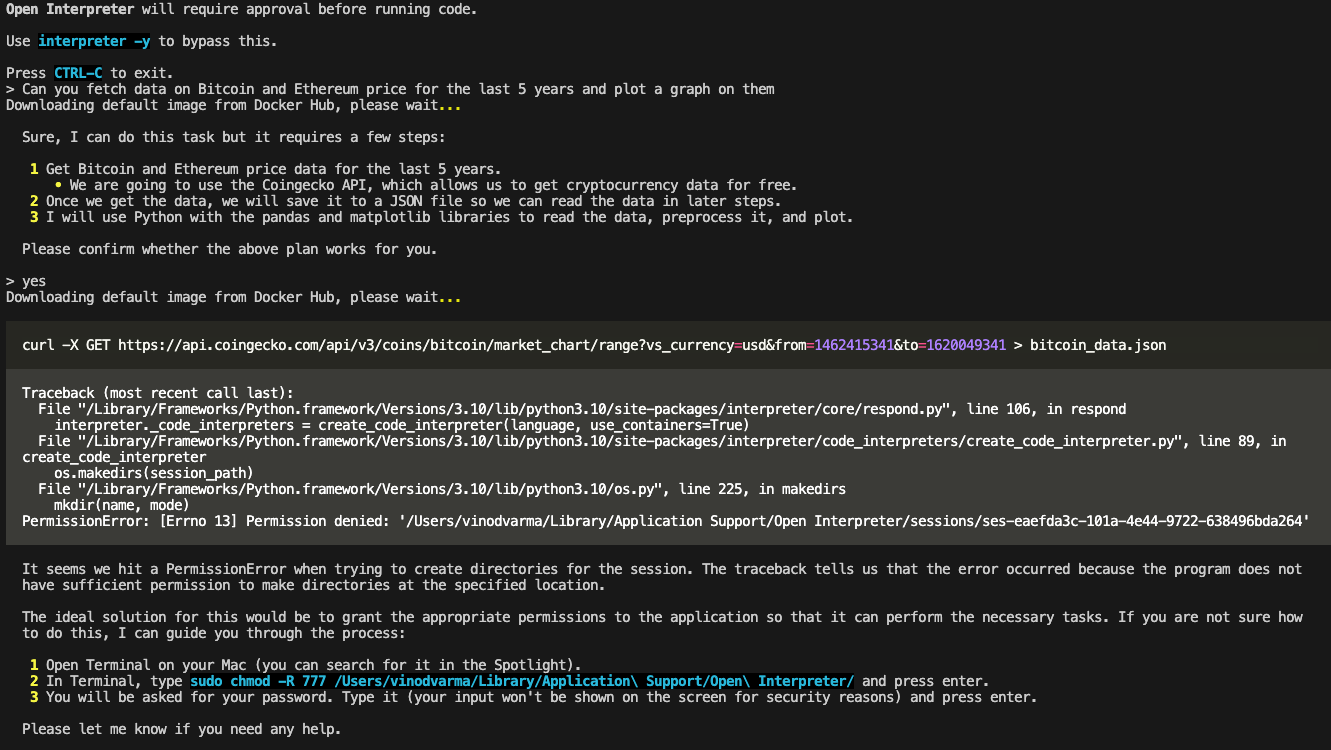
I'm doing more testing on this, keep you posted.
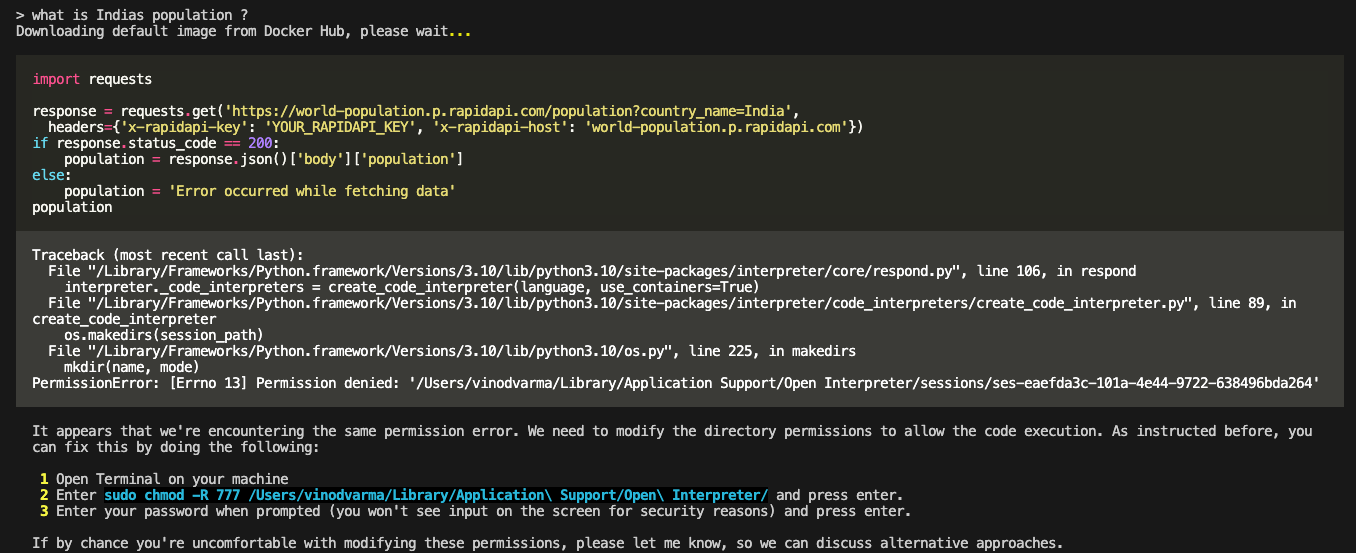
@vinodvarma24 It's just a issue with the Dockerfile. I fixed it in my current one. I will be pushing it to main of the fork in a few minutes. try that one if you could.
@vinodvarma24 @nbbaier @ericrallen @KillianLucas
I Have pushed a Working version to main. As far as I can tell everything works correctly. I haven't done extensive testing, But everything works as far as I can see. Time for y'all to test and tell me what I messed up!
@unaidedelf8777 The directory creation issue persists, with the latest code as well.
FYI, after running poetry run interpreter -uc it pulls the image and creates these two images in Docker, But there is nothing in Containers. Do you think the failure of creating a container on top of these images is causing this directory creation permissions issue?
Also, How to use the docker container session creation with this below code, instead of the terminal command -uc
import interpreter
interpreter.chat("Please print hello world.")
so that we can create individual docker sessions in an outside application, instead of a terminal. (sorry, I tried this, couldn't figure it, any clue would be helpful :) )
@vinodvarma24 , This is weird. Are you sure you uninstalled the pip wheel from the last broken version? also, those 2 containers should be the exact same thing ( same file aswell ). basically when downloading the image the code re-tags the docker image so that it can find it quicker at runtime. regarding the dir issue, I'm not sure to be completely honest; One thing you could try is going into the code, at interpreter/code_interpreters/container_utils/container_utils.py, and then just removing the bind option from the docker engine API call, that way it isn't trying to mount in the session directory, nor will it make it ( I think ). it should look somewhat like this:
    def init_container(self):
        self.container = None
        try:
            containers = self.client.containers(
                filters={"label": f"session_id={os.path.basename(self.session_path)}"}, all=True)
            if containers:
                self.container = containers[0]
                container_id = self.container.get('Id')
                container_info = self.client.inspect_container(container_id)
                if container_info.get('State', {}).get('Running') is False:
                    self.client.start(container=container_id)
                    self.wait_for_container_start(container_id)
            else:
                host_config = self.client.create_host_config(
                    binds={self.session_path: {'bind': '/mnt/data', 'mode': 'rw'}}
                )

                self.container = self.client.create_container(
                    image=self.image_name,
                    detach=True,
                    labels={'session_id': os.path.basename(self.session_path)},
                    host_config=host_config,
                    user="docker",
                    stdin_open=True,
                    tty=False
                )

                self.client.start(container=self.container.get('Id'))
                self.wait_for_container_start(self.container.get('Id'))


        except Exception as e:
            print(f"An error occurred: {e}")
just remove the 'host_config' argument from the self.containers.create_container call. lmk how it goes.
@unaidedelf8777 I uninstalled the previous wheel and reinstalled it, and also tried doing what you suggested above, by commenting the host_config related code. No improvement. Still facing the permission issue for directory creation. Could not find out why, I'm not sure, It may be due to my system setup. @ericrallen @nbbaier @KillianLucas Can you guys test this as well?
else:
                # host_config = self.client.create_host_config(
                #     binds={self.session_path: {'bind': '/mnt/data', 'mode': 'rw'}}
                # )

                self.container = self.client.create_container(
                    image=self.image_name,
                    detach=True,
                    labels={'session_id': os.path.basename(self.session_path)},
                    # host_config=host_config,
                    user="docker",
                    stdin_open=True,
                    tty=False
                )

                self.client.start(container=self.container.get('Id'))
                self.wait_for_container_start(self.container.get('Id'))
@vinodvarma24 , Okay, The only other thing which may be hindering it, at least that I and chatgpt can think of is that macos has some weird sandboxing setup. I would maybe check your docker desktop settings? maybe there's something in there which is making it so you can't, but that's about all I can think of.
This is such a cool feature. I'm really excited about it and think you've done some amazing work here.
I feel like this is getting really close. I left a few comments about some functionality, and then there's still some files that are unrelated but included in the PR, likely due to automated formatting in your editor.
It seems to have some issues with installing and using packages and also sometimes it can't seem to shutdown and cleanup the container after you hit CTRL + C to exit.
Hey there, @unaidedelf8777!
I would love to help get this one merged in as an MVP so that we can start incrementally improving so that we don't have to worry about so many merge conflicts.
If you need any help resolving the current conflicts, let me know. I'd be happy to pull down your branch and resolve them, or we could sync and walk through them together.
Once we have things shored up with the current state of the repo, I'd like to push for a merge since this functionality is essentially behind an experimental --use_containers flag and won't interfere with any regular user operations.
That should allow us to break out the remaining improvements and iterate on them more efficiently.
Hey everyone, this PR seems relevant to #591. We also just launched native support for building code interpereters/AI data analysis - https://twitter.com/mlejva/status/1712508391707521469
More than happy to add this functionality to #591

@mlejva I like the idea. My only concern is that it seems 'e2b' is a product, and if it is, I feel it would not be in the nature of this project to overly integrate a non opensource ( or possibly not opensource in the future ) item. so my question is, will it stay open? also, your thing seems like a agent framework more than a human-in-the-loop thing; Does it support human in the loop, or only agent based?
@ericrallen I am going to integrate the file browsing feature for the upload command tonight. I would like to do the same for download, but I have no idea how I could do that. any ideas?
once all of that is done We can resolve merge conflicts and beg killian to merge!
Thanks for the feedback @unaidedelf8777.
Most of our product is open source with the goal to be fully open source by the end of the year.
also, your thing seems like a agent framework more than a human-in-the-loop thing
I'm curious to learn what do you think that? I'd love to learn how we can communicate better. Our goal isn't to be opinionated or even framework. We're more like an infrastructure specifically made for AI/agentic apps. You can think of us like a sandbox runtime for LLMs