

 OpenIdentityPlatform
Unable to administer Local or Remote Server with control-panel with Docker v4.3.2+
Describe the bug As of the latest update I am unable to administer my server using the Local or Remote Server options via the control-panel application within the Docker container. Similar to issue https://github.com/OpenIdentityPlatform/OpenDJ/issues/16.
To Reproduce Steps to reproduce the behavior:
- Launch control-panel
- Fill in Bind DN and Password
- Click OK
- See error
The following errors occurred connecting to the local server:
Could not connect to the server. Check that the server is running.
Detailed: Server Connection Closed
If you continue without providing authentication no monitoring information will be displayed.

Do you want to continue?
Expected behavior The control-panel to launch, providing the ability to administer the local server.
Screenshots https://nerv.cx/fx1zu https://nerv.cx/fx1zv
Desktop (please complete the following information):
- OS: Arch Linux
Additional context All of the tests and errors are running OpenDJ version 4.4.1 in Docker, along with the control-panel of version 4.4.1.
It appears that when the Bind DN and Password and filled in and the OK button is pressed that the following error is thrown in the background:
Apr 03, 2019 6:42:58 AM org.glassfish.grizzly.filterchain.DefaultFilterChain execute
WARNING: GRIZZLY0013: Exception during FilterChain execution
java.lang.IndexOutOfBoundsException: index 0
        at java.util.concurrent.atomic.AtomicReferenceArray.checkedByteOffset(AtomicReferenceArray.java:78)
        at java.util.concurrent.atomic.AtomicReferenceArray.compareAndSet(AtomicReferenceArray.java:178)
        at org.glassfish.grizzly.memory.PooledMemoryManager$PoolSlice.offer(PooledMemoryManager.java:699)
        at org.glassfish.grizzly.memory.PooledMemoryManager$PoolByteBufferWrapper.returnToPool(PooledMemoryManager.java:1275)
        at org.glassfish.grizzly.memory.PooledMemoryManager$PoolByteBufferWrapper.dispose0(PooledMemoryManager.java:1234)
        at org.glassfish.grizzly.memory.PooledMemoryManager$PoolByteBufferWrapper.dispose(PooledMemoryManager.java:1216)
        at org.glassfish.grizzly.memory.ByteBufferWrapper.tryDispose(ByteBufferWrapper.java:101)
        at org.forgerock.opendj.grizzly.ASN1BufferReader.close(ASN1BufferReader.java:165)
        at org.forgerock.opendj.grizzly.LDAPClientFilter.handleRead(LDAPClientFilter.java:441)
        at org.glassfish.grizzly.filterchain.ExecutorResolver$9.execute(ExecutorResolver.java:95)
        at org.glassfish.grizzly.filterchain.DefaultFilterChain.executeFilter(DefaultFilterChain.java:260)
        at org.glassfish.grizzly.filterchain.DefaultFilterChain.executeChainPart(DefaultFilterChain.java:177)
        at org.glassfish.grizzly.filterchain.DefaultFilterChain.execute(DefaultFilterChain.java:109)
        at org.glassfish.grizzly.filterchain.DefaultFilterChain.process(DefaultFilterChain.java:88)
        at org.glassfish.grizzly.ProcessorExecutor.execute(ProcessorExecutor.java:53)
        at org.glassfish.grizzly.nio.transport.TCPNIOTransport.fireIOEvent(TCPNIOTransport.java:515)
        at org.glassfish.grizzly.strategies.AbstractIOStrategy.fireIOEvent(AbstractIOStrategy.java:89)
        at org.glassfish.grizzly.strategies.WorkerThreadIOStrategy.run0(WorkerThreadIOStrategy.java:94)
        at org.glassfish.grizzly.strategies.WorkerThreadIOStrategy.access$100(WorkerThreadIOStrategy.java:33)
        at org.glassfish.grizzly.strategies.WorkerThreadIOStrategy$WorkerThreadRunnable.run(WorkerThreadIOStrategy.java:114)
        at org.glassfish.grizzly.threadpool.AbstractThreadPool$Worker.doWork(AbstractThreadPool.java:569)
        at org.glassfish.grizzly.threadpool.AbstractThreadPool$Worker.run(AbstractThreadPool.java:549)
        at java.lang.Thread.run(Thread.java:745)
I am launching the control panel with the following command:
docker run --rm -it --net=host --user=root --entrypoint /opt/opendj/bin/control-panel -e DISPLAY=$DISPLAY -v "$HOME/.Xauthority:/root/.Xauthority:rw" -v "/srv/docker/.ldap/instance.loc:/opt/opendj/instance.loc" -v "/srv/docker/.ldap/opendj:/opt/opendj/data" openidentityplatform/opendj
If I attempt to manage a remote server the following error is presented:
Could not find version information in the remote server. The remote LDAP server does not seem to be manageable remotely by the control panel.
Along with the following in the background:
Apr 03, 2019 6:43:12 AM org.glassfish.grizzly.filterchain.DefaultFilterChain execute
WARNING: GRIZZLY0013: Exception during FilterChain execution
java.lang.IndexOutOfBoundsException: index 0
        at java.util.concurrent.atomic.AtomicReferenceArray.checkedByteOffset(AtomicReferenceArray.java:78)
        at java.util.concurrent.atomic.AtomicReferenceArray.compareAndSet(AtomicReferenceArray.java:178)
        at org.glassfish.grizzly.memory.PooledMemoryManager$PoolSlice.offer(PooledMemoryManager.java:699)
        at org.glassfish.grizzly.memory.PooledMemoryManager$PoolByteBufferWrapper.returnToPool(PooledMemoryManager.java:1275)
        at org.glassfish.grizzly.memory.PooledMemoryManager$PoolByteBufferWrapper.dispose0(PooledMemoryManager.java:1234)
        at org.glassfish.grizzly.memory.PooledMemoryManager$PoolByteBufferWrapper.dispose(PooledMemoryManager.java:1216)
        at org.glassfish.grizzly.memory.ByteBufferWrapper.tryDispose(ByteBufferWrapper.java:101)
        at org.forgerock.opendj.grizzly.ASN1BufferReader.close(ASN1BufferReader.java:165)
        at org.forgerock.opendj.grizzly.LDAPClientFilter.handleRead(LDAPClientFilter.java:441)
        at org.glassfish.grizzly.filterchain.ExecutorResolver$9.execute(ExecutorResolver.java:95)
        at org.glassfish.grizzly.filterchain.DefaultFilterChain.executeFilter(DefaultFilterChain.java:260)
        at org.glassfish.grizzly.filterchain.DefaultFilterChain.executeChainPart(DefaultFilterChain.java:177)
        at org.glassfish.grizzly.filterchain.DefaultFilterChain.execute(DefaultFilterChain.java:109)
        at org.glassfish.grizzly.filterchain.DefaultFilterChain.process(DefaultFilterChain.java:88)
        at org.glassfish.grizzly.ProcessorExecutor.execute(ProcessorExecutor.java:53)
        at org.glassfish.grizzly.nio.transport.TCPNIOTransport.fireIOEvent(TCPNIOTransport.java:515)
        at org.glassfish.grizzly.strategies.AbstractIOStrategy.fireIOEvent(AbstractIOStrategy.java:89)
        at org.glassfish.grizzly.strategies.WorkerThreadIOStrategy.run0(WorkerThreadIOStrategy.java:94)
        at org.glassfish.grizzly.strategies.WorkerThreadIOStrategy.access$100(WorkerThreadIOStrategy.java:33)
        at org.glassfish.grizzly.strategies.WorkerThreadIOStrategy$WorkerThreadRunnable.run(WorkerThreadIOStrategy.java:114)
        at org.glassfish.grizzly.threadpool.AbstractThreadPool$Worker.doWork(AbstractThreadPool.java:569)
        at org.glassfish.grizzly.threadpool.AbstractThreadPool$Worker.run(AbstractThreadPool.java:549)
        at java.lang.Thread.run(Thread.java:745)

@vharseko have you had any luck with this? Is there anything I can do to help/any other information you may need me to provide?
I just ran succesfully an OpenDJ Docker instance (latest tag). The following incantation was used:
docker run -h ldap-01.domain.com -p 1389:1389 -p 1636:1636 -p 4444:4444 --name ldap-01 openidentityplatform/opendj
I could NOT run the control-panel app from inside the container so I downloaded the zip OpenDJ release and ran
./bin/control-panel -r
Where I could connect to hostname 0.0.0.0 and everything seems fine so far-

@vharseko I know this has been quiet for a while, any updates or any additional information I can provide? The behaviour appears to be the same even in the current version.
Hello @nightah Are you still able to Administer remote server? or did you reslove it using specific version of OpenDJ? I am using Open Dj 4.4.5 and I am also facing the same problem, Cant administer Remote servers :( I get Connection Error when clicking "Manage Directories"
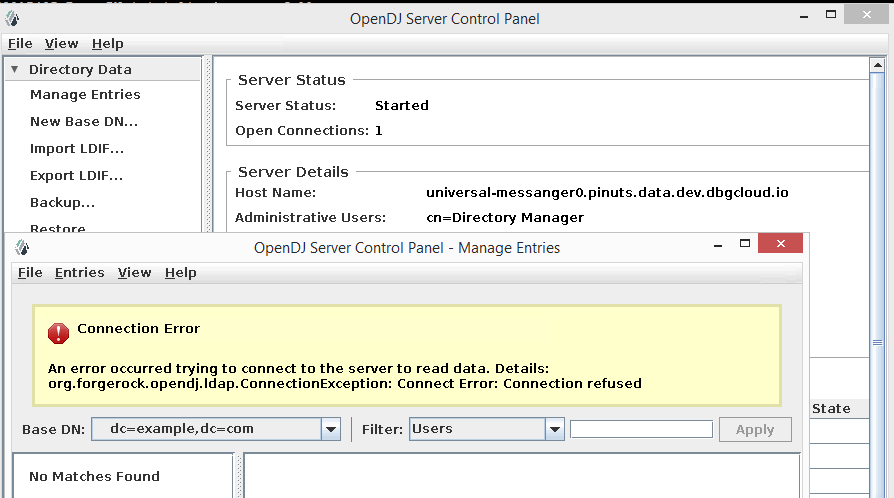

Unfortunately no, the last version this worked for me was 4.3.2 as the issue was never addressed.
@nightah Thank you for your update, So just want to understand so how are you using OpenDJ? Are you using old version OpenDj 4.3.2 OR Are you using CLI commands like dsconfig to do regular operations OR did you integrate Apache DS with Open DJ ?
I manage it with phpLDAPadmin. I only needed access to the OpenDJ Control Panel to make schema changes and thankfully I made those prior to when the Control Panel was broken.
Alternatively I believe you can install the Control Panel separately outside of Docker with the latest version and this should work, however, this is not necessary for me.

@vharseko it still isn't working and there's not a whole lot of information to be able to debug what's going on.
docker run --rm -it --net=host --user=root --entrypoint /opt/opendj/bin/control-panel -e DISPLAY=$DISPLAY -v "$HOME/.Xauthority:/root/.Xauthority:rw" -v "/srv/docker/.ldap/instance.loc:/opt/opendj/instance.loc" -v "/srv/docker/.ldap/opendj:/opt/opendj/data" -v "$HOME/tmp:/tmp" openidentityplatform/opendj
Results in the following:
Could not launch Control Panel.  Check that you have access to the display.
Check file /tmp/opendj-control-panel-17580499294478838931.log for details.
The log specified contains the following contents:
[03/05/2022:03:18:41 +0000] category=org.opends seq=0 severity=INFO msg=Application launched May 3, 2022 at 3:18:41 AM UTC
We have seen both last night for the first time on one of 5 quite identical systems: The initial stack trace is similar, just an ArrayIndexOutOfBounds and the last error regarding display access. We were able to pin it down to a memory issue on the control-panel java process. Increasing the heap memory for the control-panel resolved the issue for us: In $LDAP_HOME\config\java.properties increase heap size (this might be too much but I could not be bothered and had to take i safe):
control-panel.java-args=-Xms2048m -Xmx2048m -client
The second issue did not occur afterwards and could be worked around by creating a new shell session.

I have spent more hours than I would care to admit in this problem today and discovered that I can reliably make it work if I install: xauth, xterm, libxtst6. This will install a ton of other dependencies but I don't care as long as it works. Maybe I can optimize/refine at a later point. So using the official docker from opendj just:
apt update; apt install xauth xterm libxtst6
And you're golden.
I also had problems to connect remotely. I (the client) connected through ssh to the server where OpenDJ container is running (no ssh installed in the container itself and not --net=host). This post helped me to get it working:
https://stackoverflow.com/questions/48235040/run-x-application-in-a-docker-container-reliably-on-a-server-connected-via-ssh-w
Just modified the proposed script with my image and xeyes, xclock just worked ootb. OpenDJ didn't work until installed the packages mentioned earlier.

It seems I'm hitting this same issue. I've installed OpenDJ 4.6.1 locally (not using Docker) and when I try to use control-panel it fails
$ control-panel -V
OpenDJ Server 4.6.1
Build 20231026090039
org.glassfish.grizzly.filterchain.DefaultFilterChain execute
WARNING: GRIZZLY0013: Exception during FilterChain execution
java.lang.ArrayIndexOutOfBoundsException: Index 0 out of bounds for length 0
        at java.base/jdk.internal.util.Preconditions$2.apply(Preconditions.java:63)
        at java.base/jdk.internal.util.Preconditions$2.apply(Preconditions.java:60)
        at java.base/jdk.internal.util.Preconditions$4.apply(Preconditions.java:213)
        at java.base/jdk.internal.util.Preconditions$4.apply(Preconditions.java:210)
        at java.base/jdk.internal.util.Preconditions.outOfBounds(Preconditions.java:98)
        at java.base/jdk.internal.util.Preconditions.outOfBoundsCheckIndex(Preconditions.java:106)
        at java.base/jdk.internal.util.Preconditions.checkIndex(Preconditions.java:302)
        at java.base/java.lang.invoke.VarHandleReferences$Array.compareAndSet(VarHandleReferences.java:655)
        at java.base/java.util.concurrent.atomic.AtomicReferenceArray.compareAndSet(AtomicReferenceArray.java:153)
        at org.glassfish.grizzly.memory.PooledMemoryManager$PoolSlice.offer(PooledMemoryManager.java:635)
        at org.glassfish.grizzly.memory.PooledMemoryManager$PoolByteBufferWrapper.returnToPool(PooledMemoryManager.java:1147)
        at org.glassfish.grizzly.memory.PooledMemoryManager$PoolByteBufferWrapper.dispose0(PooledMemoryManager.java:1113)
        at org.glassfish.grizzly.memory.PooledMemoryManager$PoolByteBufferWrapper.dispose(PooledMemoryManager.java:1095)
        at org.glassfish.grizzly.memory.ByteBufferWrapper.tryDispose(ByteBufferWrapper.java:102)
        at org.forgerock.opendj.grizzly.ASN1BufferReader.close(ASN1BufferReader.java:176)
        at org.forgerock.opendj.grizzly.LDAPClientFilter.handleRead(LDAPClientFilter.java:441)
        at org.glassfish.grizzly.filterchain.ExecutorResolver$9.execute(ExecutorResolver.java:88)
        at org.glassfish.grizzly.filterchain.DefaultFilterChain.executeFilter(DefaultFilterChain.java:246)
        at org.glassfish.grizzly.filterchain.DefaultFilterChain.executeChainPart(DefaultFilterChain.java:178)
        at org.glassfish.grizzly.filterchain.DefaultFilterChain.execute(DefaultFilterChain.java:118)
        at org.glassfish.grizzly.filterchain.DefaultFilterChain.process(DefaultFilterChain.java:96)
        at org.glassfish.grizzly.ProcessorExecutor.execute(ProcessorExecutor.java:51)
        at org.glassfish.grizzly.nio.transport.TCPNIOTransport.fireIOEvent(TCPNIOTransport.java:510)
        at org.glassfish.grizzly.strategies.AbstractIOStrategy.fireIOEvent(AbstractIOStrategy.java:82)
        at org.glassfish.grizzly.strategies.WorkerThreadIOStrategy.run0(WorkerThreadIOStrategy.java:83)
        at org.glassfish.grizzly.strategies.WorkerThreadIOStrategy.access$100(WorkerThreadIOStrategy.java:34)
        at org.glassfish.grizzly.strategies.WorkerThreadIOStrategy$WorkerThreadRunnable.run(WorkerThreadIOStrategy.java:101)
        at org.glassfish.grizzly.threadpool.AbstractThreadPool$Worker.doWork(AbstractThreadPool.java:535)
        at org.glassfish.grizzly.threadpool.AbstractThreadPool$Worker.run(AbstractThreadPool.java:515)
        at java.base/java.lang.Thread.run(Thread.java:1583)
Note that tools like dsconfig, ldapsearch, opendj-status works fine without any issues.

We have seen both last night for the first time on one of 5 quite identical systems: The initial stack trace is similar, just an ArrayIndexOutOfBounds and the last error regarding display access. We were able to pin it down to a memory issue on the control-panel java process. Increasing the heap memory for the control-panel resolved the issue for us: In $LDAP_HOME\config\java.properties increase heap size (this might be too much but I could not be bothered and had to take i safe):
control-panel.java-args=-Xms2048m -Xmx2048m -client
The second issue did not occur afterwards and could be worked around by creating a new shell session.
WOW!!! I would have never figured this out. Indeed increasing Java memory solves it and works fine
$ OPENDJ_JAVA_ARGS="-Xmx2048m" control-panel