

 OpenEmu
Wireless N64 Controller doesn't map in OpenEmu
Summary of issue
I have the new N64 Wireless Controller and when I connect it to my Mac with Bluetooth and attempt to map it to the virtual N64 controller, it does not work. It does however work with the sixtyforce emulator.
Steps to reproduce
- Connect N64 Controller via bluetooth to Mac (have also tested via USB)
- Open OpenEmu > Preferences > Controls
- Attempt to map the N64 controller
Expected Behavior
- The controller would map as expected when buttons pressed
Observed Behavior
- Button inputs are ignored
- After several seconds
Ry+andRy-is automatically populated in the selected button mapping ( see attached screenshot)

Debugging Information
- OpenEmu Version: v2.3.3
- macOS Version: Monterey 12.0.1 (Intel) & Big Sur 11.6 (Intel)
I have tested the following controllers over bluetooth on my systems which work with no issues:
- NES Classic Controller
- JoyCon
- Switch Pro Controller
- DualShock 4
- DualSense
- Xbox Controller (new style)

I've managed to work around the issue with the advice in this reddit thread
Workaround Steps
- Close OpenEmu
- Connect N64 controller via bluetooth
- Open sixtyforce emulator and map controller in the settings
- Open OpenEmu while sixtyforce is open, and it should allow to map controller as normal
- Close sixtyforce and enjoy OpenEmu with the N64 controller.
Once this has been done, the controller should work on future launches of OpenEmu with no issues.
I'm having the same issue, unfortunately the workaround doesn't entirely work for me. I can get part of the controller mapped with the workaround but I can't get the whole thing to work.
-
Mac OS Monterey v. 12.0.1
-
iMac (Retina 5K, 27-inch, 2017)
-
Processor: 3.5 GHz Quad-Core Intel Core i5
-
Memory: 24 GB 2400 MHz DDR4
-
Graphics: Radeon Pro 575 4 GB
-
OpenEmu 2.3.3
-
Sixtyforce 2.0.2
Anyone else that figures it out please let me know! thank you

It's also not mapping using a USB cable. I can see the controller in the list but I can't assign any buttons.

I gave @deanPGM 's workaround a try and it did not work for me. It seems like my joystick might not be perfectly centered though because everything is constantly trying to map to the joystick.
sixtyforce seems to map fine however.

Same for me: I can’t map the N64 controller in Openemu, while sixtyforce maps fine. And the work around from deanPGM doesn’t work for me.


My experience matches exactly as above. I wouldn't change a word of it, down to the "Ry+" and "Ry-" being sporadically populated into the controls. I have been able to get the directional arrows to work randomly; interestingly these register as the cardinal directions ("North," "South," et cetera).
The only fresh thing I'll add is that my testing was under the latest macOS Monterey 12.4.

I have the same issue and the workaround doesn't seem to work for me. Anyone have an idea of the issue?

I noticed the issue too. And no workaround works sadly.
I compare with Dolphin, and the button doesn't map either with the "Input/0/N64 Controller". But the "SDL/0/Nintendo N64 Controller" works perfectly.
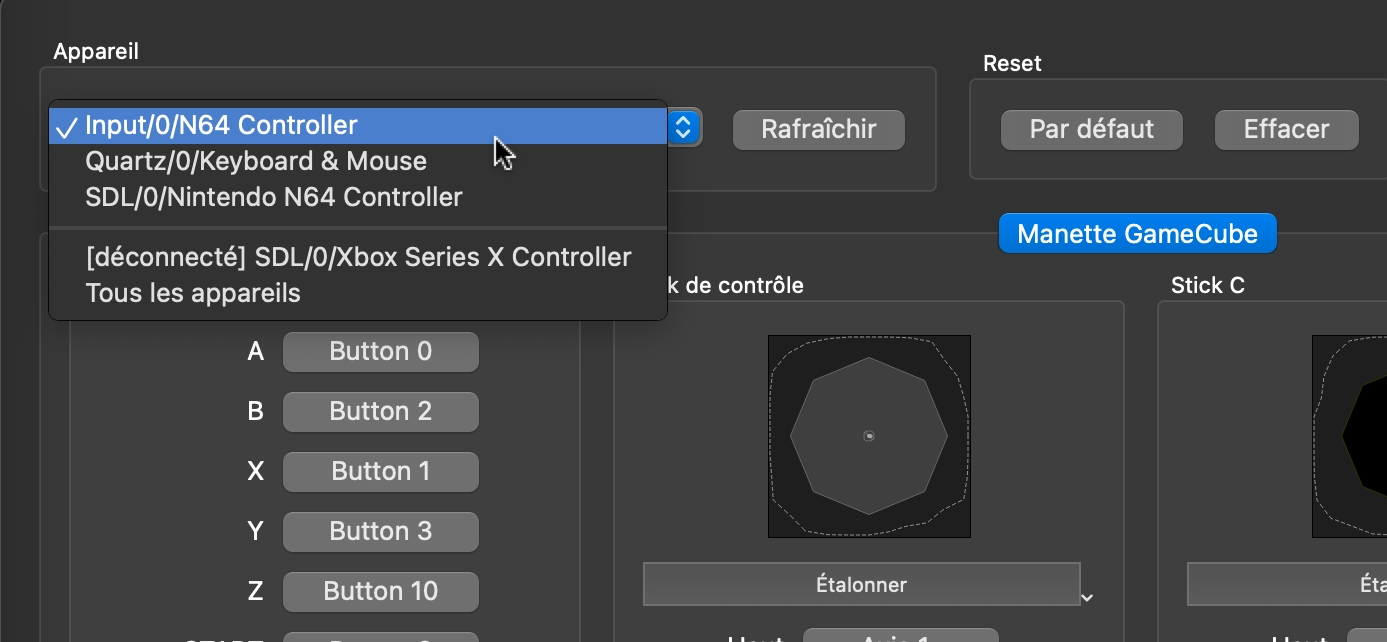
I thought I would share that info here, it could maybe help with the investigation.

The workaround doesn’t work for me. But I do notice that the controller works perfectly using SixtyForce emulator, just not with OpenEmu. Are any developers working on a solve?

I have an extra controller that I would be happy to ship to any maintainer with an active contribution history to the project if it will help unblock this line of work

FYI, I was able to reproduce the "map a few keys at a time while restarting OpenEmu in between" method on Ventura 13.2.1, OpenEmu 2.3.3. Although, it's pretty inconsistent, so took a few tries.
It seems that the issue is that the controller a) reports constant slightly changing values at the analog stick zero (do all analog sticks do this? i am not super familiar) b) reports phantom inputs from additional axis that does not physically exist (these inputs seem to interrupt the mapping process for me)
I was able to quickly map a few keys at a time if I stayed sorta in between these phantom (b) inputs. I saw that this was happening with https://apps.apple.com/us/app/joystick-monitor/id1361339902, this app may help others debug what's happening further.
It seems like a) discarding some of the analog stick zero input noise b) discarding this extra axis data for this specific controller type should fix these mapping issues. Once mapped, controller has been working very well!

Thanks for providing that information!
I've been trying myself with the app you suggested opened but I still can't get even a single button to map at all. Can you provide a screen recording of how you did it?
I'm seeing the phantom axis input pop up occasionally. And all buttons are appearing as input on JoystickMonitor whenever pressed. But OpenEmu will not detect any button input aside from the phantom (whenever it randomly occurs).
@dheg if you aren't getting even an errant mapping in OpenEmu, there could be a different issue. Welcome to dm me on twitter about this, but my method was basically, "try to wait and see if there is any pattern in errant inputs, quickly try to map like 2 keys in between that".
If I'm not mistaken, controller mappings are stored in plist files... any chance to get info how it is done exactly and how it could be edited manually? Maybe we could share it here as a workaround of the mapping utility. Ultimately, the solution would be to make the program ignore the 3rd and 4th axis when the given controller is connected. Clearly this is intentional from Nintendo to make it hard to connect to anything else than the Switch, where they are probably controlling this... a bit of a d**k move on their side to be honest. Also, would be nice that a default mapping would be shipped with the new version of the emulator.... I could contribute with that if there is any guide on how to do it!

If you open Console.app and filter by Errors and Faults, does it log anything interesting when trying to map a control?
If someone would review and complete the following list, I could add the controller to our controller database and add default mappings:
Vendor ID: 0x057E Product ID: 0x____ (System Information.app → Hardware → Bluetooth)
A: Button 2 B: Button 1 Start: Button 10 L: Button 5 R: Button 6 C Up: _____ C Down: _____ C Left: _____ C Right: _____ Z: Button _ ZR: Button _ Home: Button 13 Capture: Button 14

Nothing noteworthy in console.app.
Product ID 0x2019 button mapping that works in Ares: A: Button 1 B: Button 0 Start: 9 L: 4 R: 5 C Up: 2 C Down: 7 C Left: 3 C Right: 8 Z: 6 ZR: 10 Home: 12 Capture: 13
For completeness, the stick's vertical axis is 1, horizontal is 0 and the d-pad is hat 0 and 1.
Since these seem to be off-by-one from your expected values, I assume adding one would work with OpenEmu.

Sort of. It doesn't bind buttons to random Ry+/- and I can bind a few buttons before it ignores further attempts. Relaunching the app allows binding a few more buttons before it stops working again. Once bound, it works fine.
I tried to try as well with that build, but the link does not longer work. How could we save/share the mapping once it is working?
Ok, I figure out some of my own questions:
- The file where the controllers mappings are stored is here: ~/Library/Application Support/OpenEmu/Bindings
- It is a binary file, but the format is a plist
- It can be edited with an open source tool XPlist
This is how I managed to do it:
- Open Open Emu go to the settings and try to map the N64 controller
- Unless you are extremely fast, it will stop working when it detects a RX input
- Close Open Emu completely
- Edit the file with XPlist
- Delete all the inputs in the N64 controller that are assigned to anything related with RX
- Save the file
- Open OpenEmu again
- Now, you are able to continue mapping new buttons
- Repeat until complete all the buttons
- Alternatively, you could introduce my mapping manually, but it might be a bit tedious
OEGlobalButtonQuickLoad		OEGenericControlButton1336
OEGlobalButtonQuickSave		OEGenericControlButton1134
OEGlobalButtonScreenshot	OEGenericControlButton1437
OEN64AnalogLeft				OEGenericControlAxisXNegative46
OEN64AnalogUp				OEGenericControlAxisYNegative47
OEN64ButtonA				OEGenericControlButton225
OEN64ButtonB				OEGenericControlButton124
OEN64ButtonCDown			OEGenericControlButton831
OEN64ButtonCLeft			OEGenericControlButton427
OEN64ButtonCRight			OEGenericControlButton932
OEN64ButtonCUp				OEGenericControlButton326
OEN64ButtonDPadLeft			OEGenericControlHatSwitch45
OEN64ButtonL				OEGenericControlButton528
OEN64ButtonR				OEGenericControlButton629
OEN64ButtonStart			OEGenericControlButton1033
OEN64ButtonZ				OEGenericControlButton730
And this is the final result:
The latest version of OpenEmu includes a commit with the mapping of the n64 controller.
Unfortunately, it seems to work only with old systems that only have d pad (Game Boy, NES, SNES). The n64 games cannot recognize it.
Moreover the nice workaround found by @lopezvit would not work anymore on the 2.4.x versions. A custom mapping would be reset each time a n64 game starts.
I’ve tried different mappings but all of them have been rejected by the new version. Need to go back to 2.3.3 :(
