WebODM
 WebODM copied to clipboard
 OpenDroneMap
Distorted map on Parrot Bebop 2
How did you install WebODM (docker, installer, etc.)?
Installed with Docker.
What's your browser and operating system? (Copy/paste the output of https://www.whatismybrowser.com/)
YOUR WEB BROWSER LOOKS LIKE: Brave on Windows Chrome 104 on Windows 10
What is the problem?
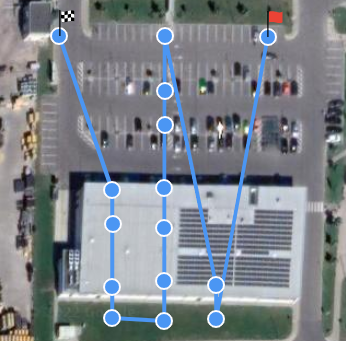
I used Pix4dCapture app on a phone to map out the location, the drone then took fish eye photos. I uploaded those photos to WebODM, but the result is a distortion that is completely different every time I process it. https://i.imgur.com/u9gU0lN.png
How can we reproduce this? (What steps trigger the problem? What parameters are you using for processing? Include screenshots. If you are having issues processing a dataset, you must include a copy of your dataset uploaded on Dropbox, Google Drive or https://dronedb.app)
I used the default settings, also tried out the others, but the result is always the same - distorted map. Drone images that I used for mapping: https://imgur.com/a/9NZ7Q4D
Project assets: https://drive.google.com/file/d/1CgZhMOGJ5jnQDMTjEDX1pa0PvH6gPdr2/view?usp=sharing

Thanks for the issue and the dataset!
We tried fixing this in an older version of OpenSFM a while back, but there might have been a regression. Have you had success with Bebop2 data in any prior versions?
Thanks for the issue and the dataset!
We tried fixing this in an older version of OpenSFM a while back, but there might have been a regression. Have you had success with Bebop2 data in any prior versions?
I tried downgrading by downloading th source code of an earlier version, but after install my processing node is always offline, I tried changing the IP address of the node, still doesn't work, can't process the data.
Thanks for the issue and the dataset!
We tried fixing this in an older version of OpenSFM a while back, but there might have been a regression. Have you had success with Bebop2 data in any prior versions?
Okay so I installed WebODM older release (1.4.2), uploaded the images, selected the camera type to fisheye lens but I still get the same result :(
Did you try selecting camera-lens: fisheye as a task option before processing a task?

Yes, but turns out it was the latest version, I downloaded an older release source, turns out when downloading the master file it doesn't name the processing node correctly, so I renamed it to just "WebODM", ran "./webodm.sh start", and I don't know how it happened, maybe the script automatically updated to the latest version. Can you please explain how to downgrade the release?
I can't reproduce this because I don't have access to the original images (only the finished assets have been shared).
I uploaded the images to imgur: https://imgur.com/a/9NZ7Q4D Do I need to upload them elsewhere?
https://dronedb.app or google drive/dropbox/icloud/etc. (pictures on imgur get compressed).
https://drive.google.com/drive/folders/1iw_uZZkdAy2B4mdXTpC_GjHjVJcSZGa0?usp=sharing
The key issue seems that the images do not have sufficient overlap; you probably need to capture more images, with more overlap. Also make sure to pass camera-lens: fisheye as a task option.