

 Ombi-app
Ombi not seeing content on plex server to show if available or not
Describe the bug It doesnt appear that Ombi is able to see my Plex database. I have already updated to latest version, deleted external.db file and re-synced.
To Reproduce Steps to reproduce the behavior:
- Go to settings, mediaserver, and click on my server
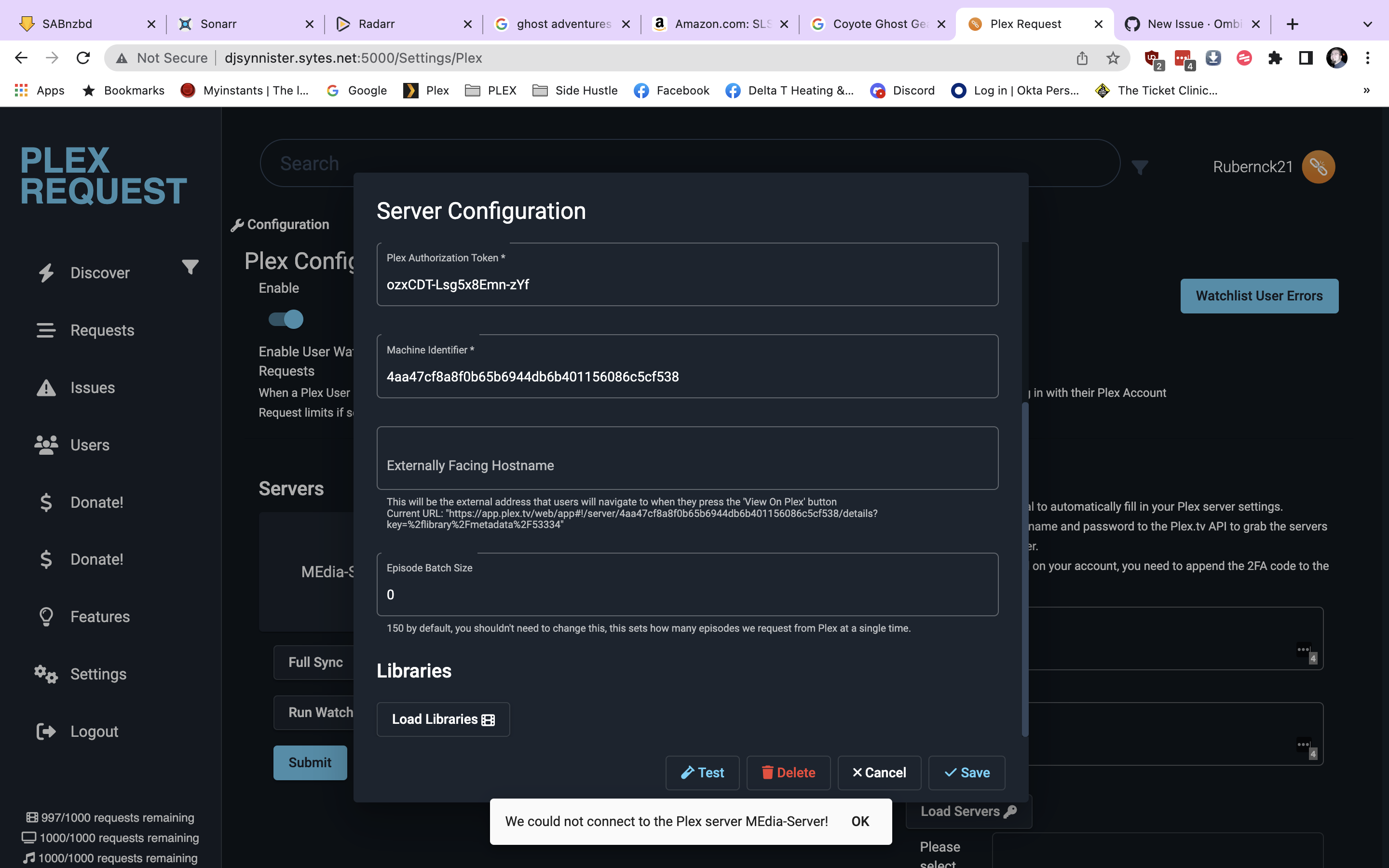
- Click on test and see "We could not connect to the Plex Server
- NOTE: I have deleted my server and re-added it, so it was able to add my server with no issues
- See error
- ALSO
- Go to settings, mediaserver and click on my server
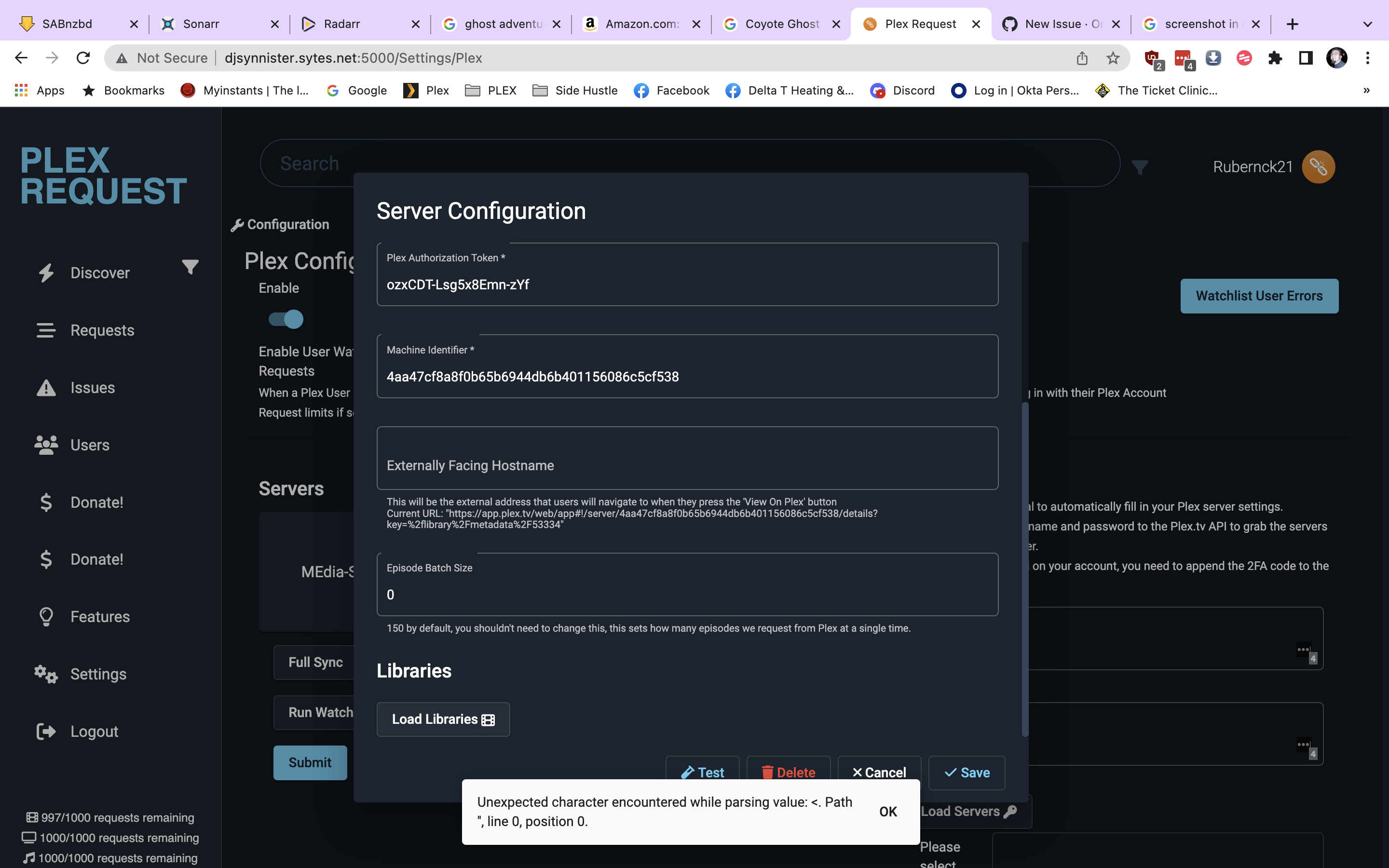
- Click on load libraries and see error in bottom of screen - see attached screenshot
Expected behavior When I search for a movie, Ombi should be able to tell me if the movie is already downloaded or not, and when I run a test in Ombi it should be able to tell me there was a good test when running said test.
Screenshots If applicable, add screenshots to help explain your problem.
Logs (Logs directory where Ombi is located) If applicable, a snippet of the logs that seems relevant to the bug if present.
Desktop (please complete the following information):
- OS: Windows 10 Pro (21H2)
Ombi Version (please complete the following information):
-
Version 4.33.0
-
Media Server Plex 4.96.2
-
Database Type: SQLite
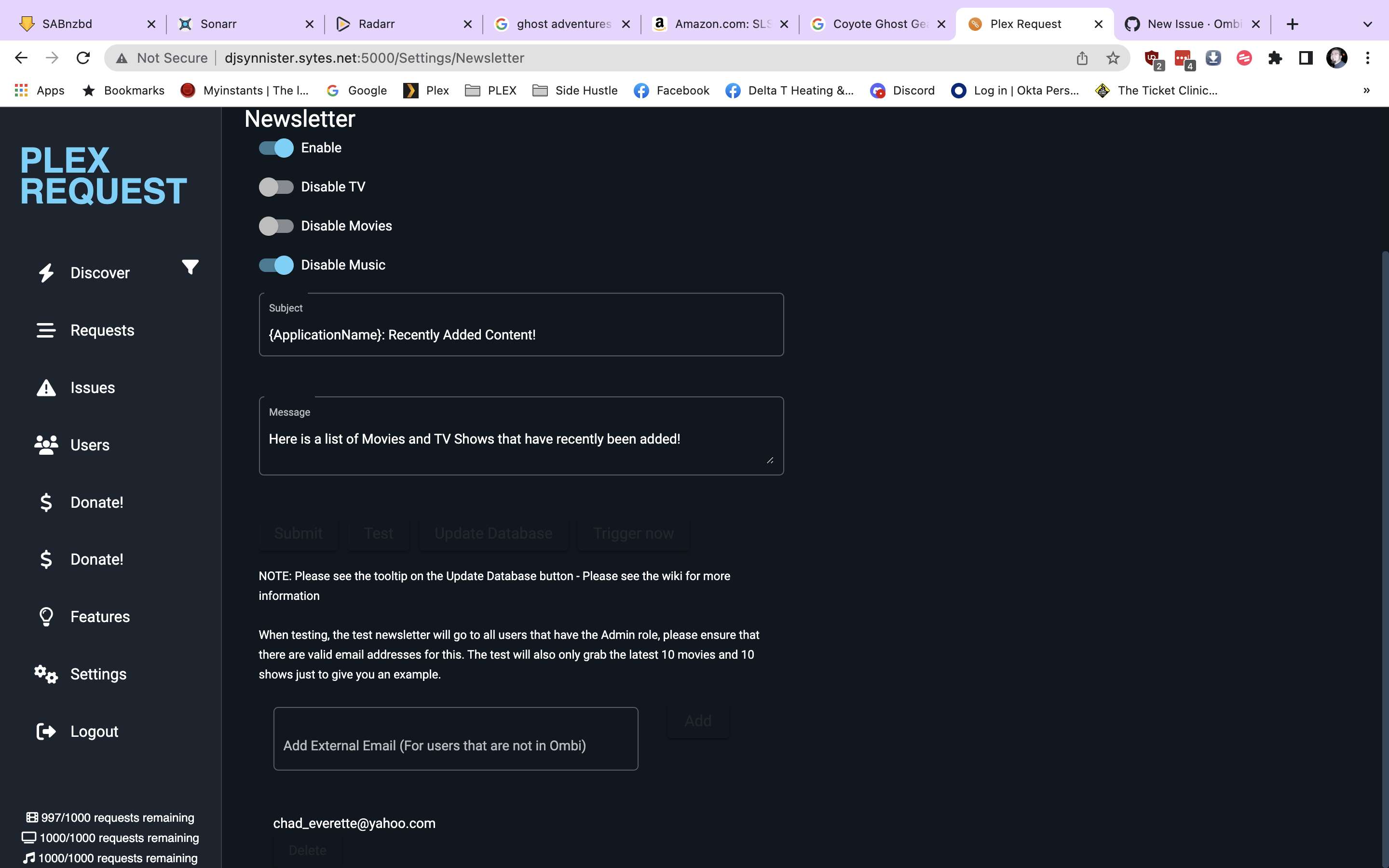
Additional context I was previously on ombi 4.03 when this problem first happened, so I upgraded to 4.33 and the same issue is happening. ALSO, Ive noticed that my weekly newsletter will not go through, the single test goes thru, but not the normal mailings. ALSO, the buttons for affecting the newsletter are all darkened out. see very last screenshot.

Hi!
Thanks for the issue report. Before a real human comes by, please make sure you used our bug report format.
Have you looked at the wiki yet? https://docs.ombi.app/
Before posting make sure you also read our FAQ.
Make the title describe your issue. Having 'not working' or 'I get this bug' for 100 issues, isn't really helpful.
If we need more information or there is some progress we tag the issue or update the tag and keep you updated.
Thanks!
Ombi Bot.
![github-actions[bot] avatar](https://avatars.githubusercontent.com/in/15368?v=4 "Published by a pub.dev verified publisher")
Here is a smaller part of the logs
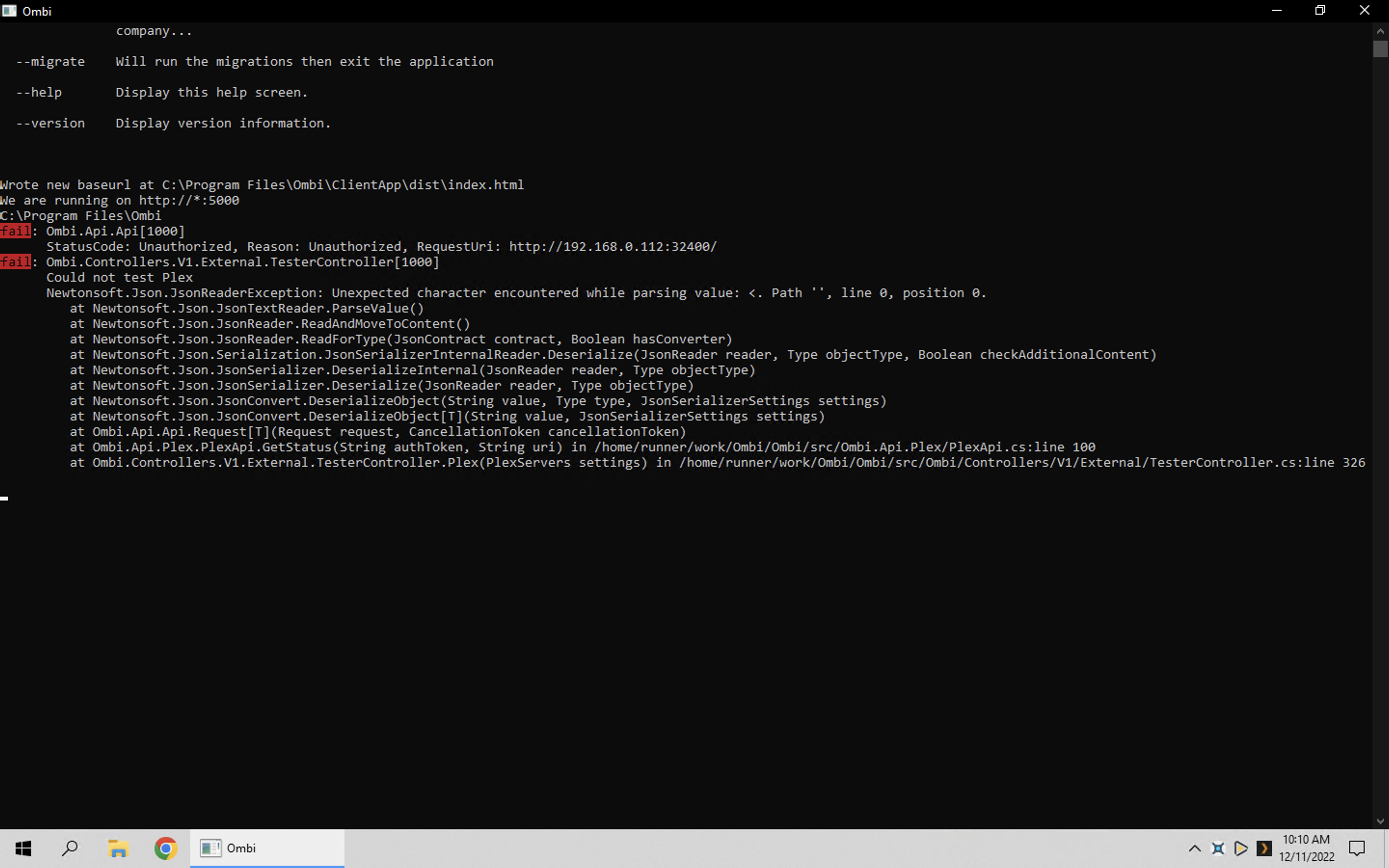
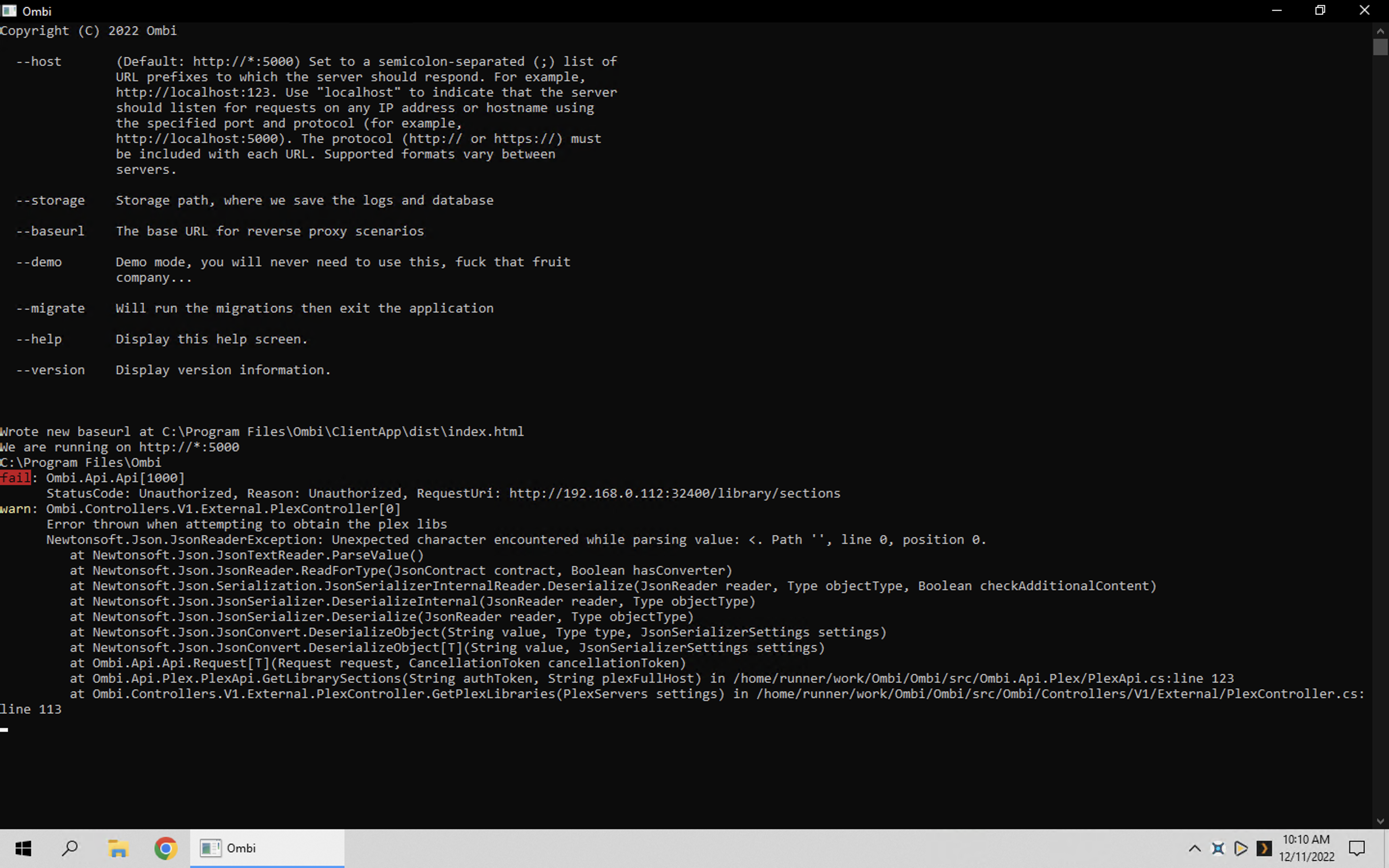
Newtonsoft.Json.JsonReaderException: Unexpected character encountered while parsing value: <. Path '', line 0, position 0. at Newtonsoft.Json.JsonTextReader.ParseValue() at Newtonsoft.Json.JsonReader.ReadForType(JsonContract contract, Boolean hasConverter) at Newtonsoft.Json.Serialization.JsonSerializerInternalReader.Deserialize(JsonReader reader, Type objectType, Boolean checkAdditionalContent) at Newtonsoft.Json.JsonSerializer.DeserializeInternal(JsonReader reader, Type objectType) at Newtonsoft.Json.JsonSerializer.Deserialize(JsonReader reader, Type objectType) at Newtonsoft.Json.JsonConvert.DeserializeObject(String value, Type type, JsonSerializerSettings settings) at Newtonsoft.Json.JsonConvert.DeserializeObject[T](String value, JsonSerializerSettings settings) at Ombi.Api.Api.Request[T](Request request, CancellationToken cancellationToken) at Ombi.Api.Plex.PlexApi.GetLibrarySections(String authToken, String plexFullHost) in /home/runner/work/Ombi/Ombi/src/Ombi.Api.Plex/PlexApi.cs:line 123 at Ombi.Controllers.V1.External.PlexController.GetPlexLibraries(PlexServers settings) in /home/runner/work/Ombi/Ombi/src/Ombi/Controllers/V1/External/PlexController.cs:line 113 2022-12-11 10:08:36.272 -06:00 [ERR] StatusCode: Unauthorized, Reason: Unauthorized, RequestUri: http://192.168.0.112:32400/ 2022-12-11 10:08:36.273 -06:00 [ERR] Could not test Plex Newtonsoft.Json.JsonReaderException: Unexpected character encountered while parsing value: <. Path '', line 0, position 0. at Newtonsoft.Json.JsonTextReader.ParseValue() at Newtonsoft.Json.JsonReader.ReadForType(JsonContract contract, Boolean hasConverter) at Newtonsoft.Json.Serialization.JsonSerializerInternalReader.Deserialize(JsonReader reader, Type objectType, Boolean checkAdditionalContent) at Newtonsoft.Json.JsonSerializer.DeserializeInternal(JsonReader reader, Type objectType) at Newtonsoft.Json.JsonSerializer.Deserialize(JsonReader reader, Type objectType) at Newtonsoft.Json.JsonConvert.DeserializeObject(String value, Type type, JsonSerializerSettings settings) at Newtonsoft.Json.JsonConvert.DeserializeObject[T](String value, JsonSerializerSettings settings) at Ombi.Api.Api.Request[T](Request request, CancellationToken cancellationToken) at Ombi.Api.Plex.PlexApi.GetStatus(String authToken, String uri) in /home/runner/work/Ombi/Ombi/src/Ombi.Api.Plex/PlexApi.cs:line 100 at Ombi.Controllers.V1.External.TesterController.Plex(PlexServers settings) in /home/runner/work/Ombi/Ombi/src/Ombi/Controllers/V1/External/TesterController.cs:line 326 2022-12-11 10:08:53.714 -06:00 [ERR] StatusCode: Unauthorized, Reason: Unauthorized, RequestUri: http://192.168.0.112:32400/ 2022-12-11 10:08:53.715 -06:00 [ERR] Could not test Plex Newtonsoft.Json.JsonReaderException: Unexpected character encountered while parsing value: <. Path '', line 0, position 0. at Newtonsoft.Json.JsonTextReader.ParseValue() at Newtonsoft.Json.JsonReader.ReadForType(JsonContract contract, Boolean hasConverter) at Newtonsoft.Json.Serialization.JsonSerializerInternalReader.Deserialize(JsonReader reader, Type objectType, Boolean checkAdditionalContent) at Newtonsoft.Json.JsonSerializer.DeserializeInternal(JsonReader reader, Type objectType) at Newtonsoft.Json.JsonConvert.DeserializeObject(String value, Type type, JsonSerializerSettings settings) at Newtonsoft.Json.JsonConvert.DeserializeObject[T](String value, JsonSerializerSettings settings) at Ombi.Api.Api.Request[T](Request request, CancellationToken cancellationToken) at Ombi.Api.Plex.PlexApi.GetStatus(String authToken, String uri) in /home/runner/work/Ombi/Ombi/src/Ombi.Api.Plex/PlexApi.cs:line 100 at Ombi.Controllers.V1.External.TesterController.Plex(PlexServers settings) in /home/runner/work/Ombi/Ombi/src/Ombi/Controllers/V1/External/TesterController.cs:line 326 2022-12-11 10:09:14.147 -06:00 [ERR] StatusCode: Unauthorized, Reason: Unauthorized, RequestUri: http://192.168.0.112:32400/ 2022-12-11 10:09:14.148 -06:00 [ERR] Could not test Plex Newtonsoft.Json.JsonReaderException: Unexpected character encountered while parsing value: <. Path '', line 0, position 0. at Newtonsoft.Json.JsonTextReader.ParseValue() at Newtonsoft.Json.JsonReader.ReadForType(JsonContract contract, Boolean hasConverter) at Newtonsoft.Json.Serialization.JsonSerializerInternalReader.Deserialize(JsonReader reader, Type objectType, Boolean checkAdditionalContent) at Newtonsoft.Json.JsonSerializer.DeserializeInternal(JsonReader reader, Type objectType) at Newtonsoft.Json.JsonConvert.DeserializeObject(String value, Type type, JsonSerializerSettings settings) at Newtonsoft.Json.JsonConvert.DeserializeObject[T](String value, JsonSerializerSettings settings) at Ombi.Api.Api.Request[T](Request request, CancellationToken cancellationToken) at Ombi.Api.Plex.PlexApi.GetStatus(String authToken, String uri) in /home/runner/work/Ombi/Ombi/src/Ombi.Api.Plex/PlexApi.cs:line 100 at Ombi.Controllers.V1.External.TesterController.Plex(PlexServers settings) in /home/runner/work/Ombi/Ombi/src/Ombi/Controllers/V1/External/TesterController.cs:line 326 2022-12-11 10:09:44.354 -06:00 [INF] Default Quartz.NET properties loaded from embedded resource file 2022-12-11 10:09:44.402 -06:00 [INF] Initialized Scheduler Signaller of type: Quartz.Core.SchedulerSignalerImpl 2022-12-11 10:09:44.403 -06:00 [INF] Quartz Scheduler created 2022-12-11 10:09:44.403 -06:00 [INF] RAMJobStore initialized. 2022-12-11 10:09:44.403 -06:00 [INF] Quartz Scheduler 3.5.0.0 - 'DefaultQuartzScheduler' with instanceId 'NON_CLUSTERED' initialized 2022-12-11 10:09:44.403 -06:00 [INF] Using thread pool 'Quartz.Simpl.DefaultThreadPool', size: 10 2022-12-11 10:09:44.403 -06:00 [INF] Using job store 'Quartz.Simpl.RAMJobStore', supports persistence: False, clustered: False 2022-12-11 10:09:44.404 -06:00 [INF] JobFactory set to: Ombi.Schedule.IoCJobFactory 2022-12-11 10:09:44.450 -06:00 [INF] Scheduler DefaultQuartzScheduler_$NON_CLUSTERED started. 2022-12-11 10:09:50.508 -06:00 [ERR] StatusCode: Unauthorized, Reason: Unauthorized, RequestUri: http://192.168.0.112:32400/ 2022-12-11 10:09:50.525 -06:00 [ERR] Could not test Plex Newtonsoft.Json.JsonReaderException: Unexpected character encountered while parsing value: <. Path '', line 0, position 0. at Newtonsoft.Json.JsonTextReader.ParseValue() at Newtonsoft.Json.JsonReader.ReadAndMoveToContent() at Newtonsoft.Json.JsonReader.ReadForType(JsonContract contract, Boolean hasConverter) at Newtonsoft.Json.Serialization.JsonSerializerInternalReader.Deserialize(JsonReader reader, Type objectType, Boolean checkAdditionalContent) at Newtonsoft.Json.JsonSerializer.DeserializeInternal(JsonReader reader, Type objectType) at Newtonsoft.Json.JsonSerializer.Deserialize(JsonReader reader, Type objectType) at Newtonsoft.Json.JsonConvert.DeserializeObject(String value, Type type, JsonSerializerSettings settings) at Newtonsoft.Json.JsonConvert.DeserializeObject[T](String value, JsonSerializerSettings settings) at Ombi.Api.Api.Request[T](Request request, CancellationToken cancellationToken) at Ombi.Api.Plex.PlexApi.GetStatus(String authToken, String uri) in /home/runner/work/Ombi/Ombi/src/Ombi.Api.Plex/PlexApi.cs:line 100 at Ombi.Controllers.V1.External.TesterController.Plex(PlexServers settings) in /home/runner/work/Ombi/Ombi/src/Ombi/Controllers/V1/External/TesterController.cs:line 326 2022-12-11 10:10:45.570 -06:00 [INF] Default Quartz.NET properties loaded from embedded resource file 2022-12-11 10:10:45.626 -06:00 [INF] Initialized Scheduler Signaller of type: Quartz.Core.SchedulerSignalerImpl 2022-12-11 10:10:45.627 -06:00 [INF] Quartz Scheduler created 2022-12-11 10:10:45.627 -06:00 [INF] RAMJobStore initialized. 2022-12-11 10:10:45.627 -06:00 [INF] Quartz Scheduler 3.5.0.0 - 'DefaultQuartzScheduler' with instanceId 'NON_CLUSTERED' initialized 2022-12-11 10:10:45.627 -06:00 [INF] Using thread pool 'Quartz.Simpl.DefaultThreadPool', size: 10 2022-12-11 10:10:45.627 -06:00 [INF] Using job store 'Quartz.Simpl.RAMJobStore', supports persistence: False, clustered: False 2022-12-11 10:10:45.628 -06:00 [INF] JobFactory set to: Ombi.Schedule.IoCJobFactory 2022-12-11 10:10:45.676 -06:00 [INF] Scheduler DefaultQuartzScheduler$_NON_CLUSTERED started. 2022-12-11 10:10:51.266 -06:00 [ERR] StatusCode: Unauthorized, Reason: Unauthorized, RequestUri: http://192.168.0.112:32400/library/sections 2022-12-11 10:10:51.291 -06:00 [WRN] Error thrown when attempting to obtain the plex libs Newtonsoft.Json.JsonReaderException: Unexpected character encountered while parsing value: <. Path '', line 0, position 0. at Newtonsoft.Json.JsonTextReader.ParseValue() at Newtonsoft.Json.JsonReader.ReadForType(JsonContract contract, Boolean hasConverter) at Newtonsoft.Json.Serialization.JsonSerializerInternalReader.Deserialize(JsonReader reader, Type objectType, Boolean checkAdditionalContent) at Newtonsoft.Json.JsonSerializer.DeserializeInternal(JsonReader reader, Type objectType) at Newtonsoft.Json.JsonSerializer.Deserialize(JsonReader reader, Type objectType) at Newtonsoft.Json.JsonConvert.DeserializeObject(String value, Type type, JsonSerializerSettings settings) at Newtonsoft.Json.JsonConvert.DeserializeObject[T](String value, JsonSerializerSettings settings) at Ombi.Api.Api.Request[T](Request request, CancellationToken cancellationToken) at Ombi.Api.Plex.PlexApi.GetLibrarySections(String authToken, String plexFullHost) in /home/runner/work/Ombi/Ombi/src/Ombi.Api.Plex/PlexApi.cs:line 123 at Ombi.Controllers.V1.External.PlexController.GetPlexLibraries(PlexServers settings) in /home/runner/work/Ombi/Ombi/src/Ombi/Controllers/V1/External/PlexController.cs:line 113
This is the issue.
StatusCode: Unauthorized
It seems that the Plex token is not correct so we can’t auth with your server

yeah, i saw that. BUT, I had removed my mediaserver and re-added it, so that shouldve fixed the issue, right?
I just restarted the whole computer. I deleted, re-signed in and it looked like it worked fine, tested ok. BUT a few minutes later, when i click on test in the server config popup page, itll say cannot connect.
So, after rebooting everything, re-adding my plex seems to be 1/2 way working. One can look up a movie, then request it. But still not seeing if a movie is already available, and my newsletters wont work. BUT, it will email the person who requested a movie that its available.
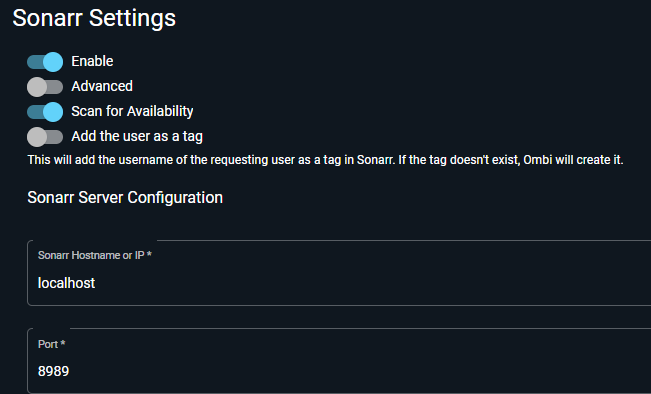
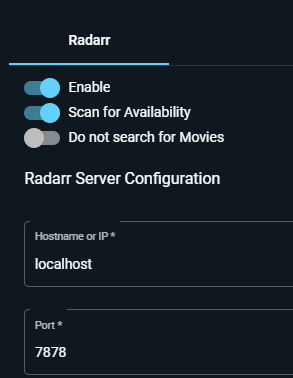
Ok,
That would be what you are seeing. Turn the scan for availability off
On Tue, 20 Dec 2022 at 10:16 pm, Alex Smith @.***> wrote:
this is what I see. [image: image] https://user-images.githubusercontent.com/68444491/208777315-525f819b-973b-4429-8bea-33fd50e7dd7e.png [image: image] https://user-images.githubusercontent.com/68444491/208777385-743950e4-b7d8-446a-8c33-bd6aa7059cc7.png
— Reply to this email directly, view it on GitHub https://github.com/Ombi-app/Ombi/issues/4825#issuecomment-1360390365, or unsubscribe https://github.com/notifications/unsubscribe-auth/ABSVULF7LVBANVIALIHB3T3WOIV35ANCNFSM6AAAAAAS3CGTQQ . You are receiving this because you commented.Message ID: @.***>