

 OfficeDev
Script Lab is broken - it simply won't start - Win32WebViewHost.exe / edgemanager.dll crashes
I've been struggling with an add-in that I've been developing, which suddenly won't start.
So, I decided to try Script Lab, which has been installed on my machine for about a week. I was working happily with it last week.
Well, lo and behold, Script Lab is exhibiting the same failure to load as my own add-ins...
Yes, I've cleared out the WEF folder, no dice.
I'm beginning to think that these types of Add-Ins are unbelievably fragile, and unacceptably risky from a business point of view. How can I possibly justify recommending this technology to customers? It has been a pretty rocky experience starting out, for various reasons, but that's not a deal breaker. But now I've run into this - the premier add-in to showcase all that add-ins can do... won't load. This has gone from difficult and escalated into the absurd. If the venerable Script Lab won't load, what possible chance do my add-ins have?
Bug Report
- Host: Excel Microsoft 365 MSO 16.0.13127.20266 32 bit
- OS: Windows 10 1909 18363.1016
Expected behavior:
Script Lab starts
Actual behavior:
Script Lab doesn't start.
Add-In Error This add-in could not be started. Close this dialog to ignore this problem or click "Restart" to try again.
(as an aside: Has clicking "restart" ever worked, for anyone? anywhere?)
Steps to Reproduce:
- Start Excel
- Click on the "Script Lab" tab
- Click on one of the buttons
Failure Logs:
2020.08.31 20:54:27	Medium	Web Add-In Runtime Logging Session Started
2020.08.31 20:54:27	Unexpected	Manifest	Add-in "SolutionId:wa102941126, Version:1.1.1.0, StoreId:en-US" is missing required manifest fields DisplayName, Description
2020.08.31 20:54:28	Verbose	CustomFunctions	[Installation] [Addin] [Begin] Solution=wa104380862, Version=1.5.0.0
2020.08.31 20:54:28	Medium	CustomFunctions	[Installation] [Addin] [End] [Success] Solution=wa104380862, Version=1.5.0.0
2020.08.31 20:54:28	Verbose	CustomFunctions	[Metadata] [Parsing] [Begin]
2020.08.31 20:54:28	Medium	CustomFunctions	[Metadata] [Parsing] [End] [Success]
2020.08.31 20:54:28	Verbose	CustomFunctions	[Installation] [Functions] [Begin] Solution=wa104380862, Workbook=Book1
2020.08.31 20:54:28	Medium	CustomFunctions	[Installation] [Functions] [End] [Success] Solution=wa104380862, Workbook=Book1
2020.08.31 20:54:37	Verbose	CustomFunctions	[Installation] [Addin] [Begin] Solution=wa104380862, Version=1.5.0.0
2020.08.31 20:54:37	Medium	CustomFunctions	[Installation] [Addin] [End] [Success] Solution=wa104380862, Version=1.5.0.0
2020.08.31 20:54:37	Verbose	CustomFunctions	[Metadata] [Parsing] [Begin]
2020.08.31 20:54:37	Medium	CustomFunctions	[Metadata] [Parsing] [End] [Success]
2020.08.31 20:54:37	Verbose	CustomFunctions	[Installation] [Functions] [Begin] Solution=wa104380862, Workbook=Book1
2020.08.31 20:54:37	Medium	CustomFunctions	[Installation] [Functions] [End] [Success] Solution=wa104380862, Workbook=Book1
Doesn't look like very much fail in there...
Screenshot:
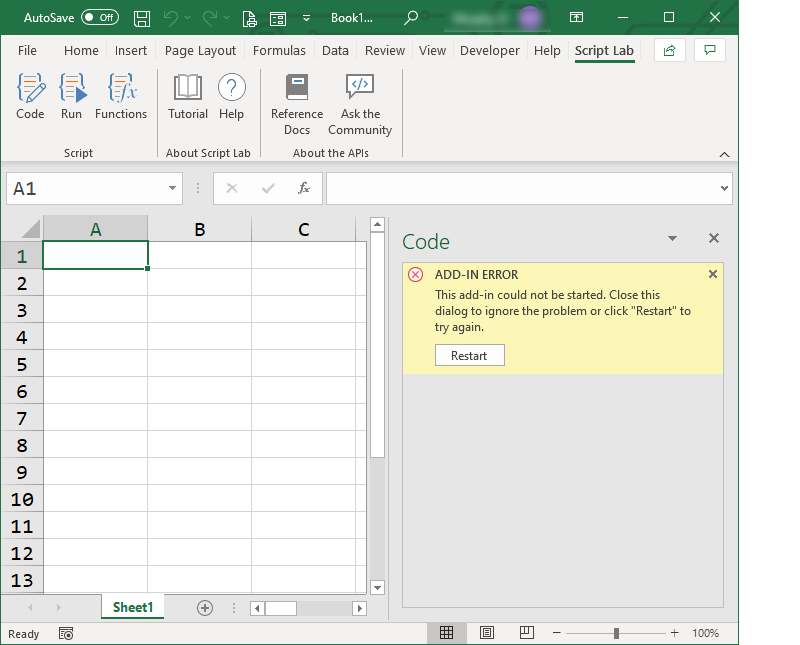
Oh, by the way, my Add-In produces ZERO output in OfficeAddins.log.txt . Thoroughly unhelpful. I'm expecting to be able to watch a cascade of errors sweep by in my terminal window. But apparently that experience is unavailable. And I can't use the Microsoft Edge Devtools Preview in this case, because there's nothing for it to attach to until the web host fires up and loads at least something... but it never gets that far.

I have found items like the following in my Event Log, beginning yesterday; involving Win32WebViewHost.exe and edgemanager.dll
Log Name:      Application
Source:        Application Error
Date:          2020.09.01 1:50:46 AM
Event ID:      1000
Task Category: (100)
Level:         Error
Keywords:      Classic
User:          N/A
Computer:      Home-THINK
Description:
Faulting application name: Win32WebViewHost.exe, version: 10.0.18362.997, time stamp: 0x297477f6
Faulting module name: edgemanager.dll, version: 11.0.18362.997, time stamp: 0xfd0dd268
Exception code: 0xc0000409
Fault offset: 0x000000000003169b
Faulting process id: 0x2e7c
Faulting application start time: 0x01d680349993b514
Faulting application path: C:\WINDOWS\SystemApps\Microsoft.Win32WebViewHost_cw5n1h2txyewy\Win32WebViewHost.exe
Faulting module path: C:\WINDOWS\SYSTEM32\edgemanager.dll
Report Id: b90595b6-dc0e-4c52-9344-d57708dc6486
Faulting package full name: Microsoft.Win32WebViewHost_10.0.18362.997_neutral_neutral_cw5n1h2txyewy
Faulting package-relative application ID: DPI.PerMonitorAware
Event Xml:
<Event xmlns="http://schemas.microsoft.com/win/2004/08/events/event">
  <System>
    <Provider Name="Application Error" />
    <EventID Qualifiers="0">1000</EventID>
    <Level>2</Level>
    <Task>100</Task>
    <Keywords>0x80000000000000</Keywords>
    <TimeCreated SystemTime="2020-09-01T07:50:46.133441700Z" />
    <EventRecordID>53931</EventRecordID>
    <Channel>Application</Channel>
    <Computer>Home-THINK</Computer>
    <Security />
  </System>
  <EventData>
    <Data>Win32WebViewHost.exe</Data>
    <Data>10.0.18362.997</Data>
    <Data>297477f6</Data>
    <Data>edgemanager.dll</Data>
    <Data>11.0.18362.997</Data>
    <Data>fd0dd268</Data>
    <Data>c0000409</Data>
    <Data>000000000003169b</Data>
    <Data>2e7c</Data>
    <Data>01d680349993b514</Data>
    <Data>C:\WINDOWS\SystemApps\Microsoft.Win32WebViewHost_cw5n1h2txyewy\Win32WebViewHost.exe</Data>
    <Data>C:\WINDOWS\SYSTEM32\edgemanager.dll</Data>
    <Data>b90595b6-dc0e-4c52-9344-d57708dc6486</Data>
    <Data>Microsoft.Win32WebViewHost_10.0.18362.997_neutral_neutral_cw5n1h2txyewy</Data>
    <Data>DPI.PerMonitorAware</Data>
  </EventData>
</Event>
see also https://github.com/OfficeDev/office-js/issues/1356#issuecomment-685048023