
script-lab-2017
 script-lab-2017 copied to clipboard
 OfficeDev
[Win32][Accessibility] [11yMAS][Supporting the Platform][MAS1.4.4][Not able to access the run menu item in the 125% zoom.]
User Experience: User with partial vision disability will not be able to access the run menu item in the code pane.
Test Environment: OS Build: 16299.19 Browser: Microsoft Edge 41.16299.15.0
Attachments:
MAS1.4.4 run.zip
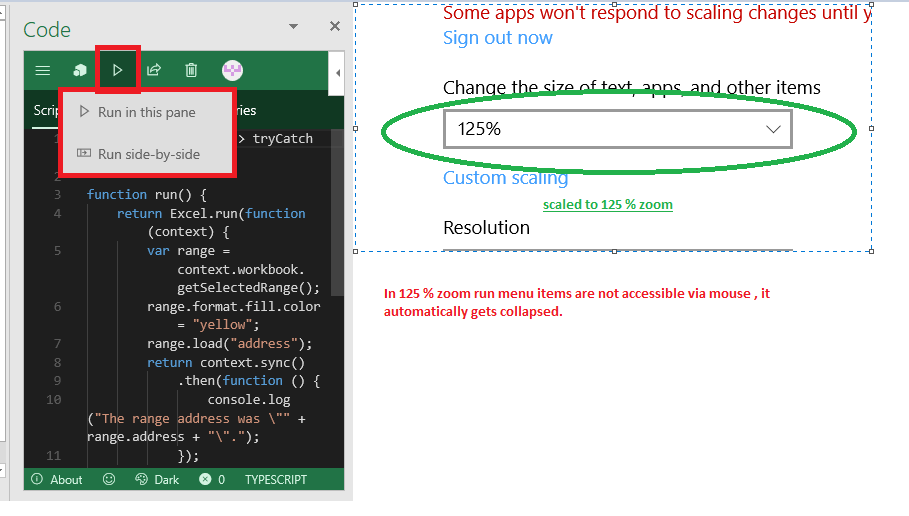
Repro Steps:
- Open Excel and select the code pane button from the Script lab tab.
- Navigate to Run menu .
- Verify that user cannot access the run menu items.
Current Behavior: When user mouse hover the run menu , menu items are visible but the as soon as user navigate to menu items to select , the list gets collapsed. Thus run menu items are not accessible.
**Observation: ** 1.With keyboard and in scan / item mode the Run menu is not accessible in 100% (normal mode) also. 2. In 125% zoom the run menu item is opened on clicking the the run menu whereas in 100% it opened on mouse hover
Expected Behavior: Run menu items should be accessible .
MAS Reference: https://microsoft.sharepoint.com/teams/msenable/_layouts/15/WopiFrame.aspx?sourcedoc={b69e5ccc-dde2-4406-b550-4deb38648f6d}
Suggested Fix: https://microsoft.sharepoint.com/teams/msenable/mas/pages/mas-details.aspx?masid=1.4.4
