
script-lab-2017
 script-lab-2017 copied to clipboard
 OfficeDev
[Win32][Accessibility] [11yMAS][Visual Requirements] [MAS1.3.3][Loading is not announced by the screen reader.]
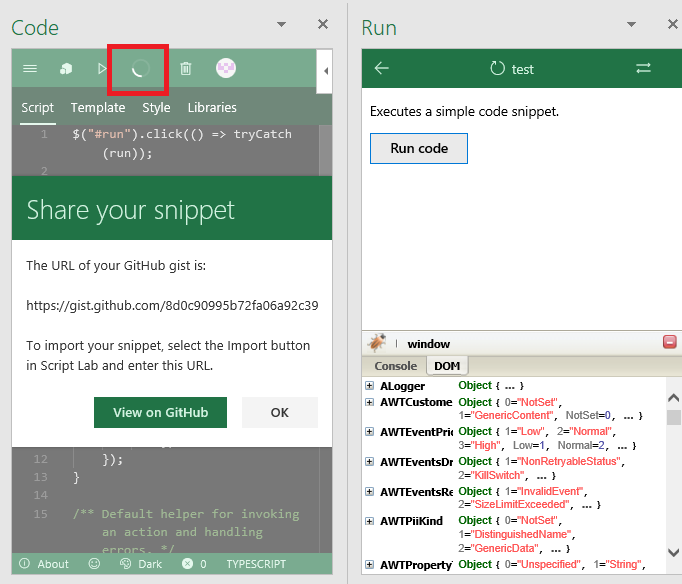
User Experience: User with vision disability will not be able to identify that dialog loading is in progress as the screen reader do not read “Loading” when loading icon is visible after selecting the control.
Test Environment: OS Build: 16299.19 Excel version:1712(8810.1000)
Attachments:
Repro Steps:
- Open the Excel and select the “Code” from the Script lab tab.
- Navigate “New snippet” and select it.
- Sign in to Github with valid credentials.
- Navigate to Share ribbon menu.
- Navigate to “New scret gist”/“New Public gist” and select it.
- Select the ‘share’ button and loading icon is visible beside the share menu.( As soon as the “New secret gist”/“New Public gist” is select a ’Share your Snippet’ dialog is opened with the url which is in the form of the text in the dialog.)
- Verify that loading icon visible beside the share menu is not read by the screen reader.
Current Behavior: “Loading” is not announced by the screen reader when loading icon is visible beside the share mane on selecting “New secret gist”/“New Public gist”.
Expected Behavior: “Loading” should be announced by the screen reader when loading icon is visible. Instructions should not be solely rely on the sensory characteristics.
Note: Same issue is Reproducible in Power Point and Word.
MAS Reference: https://microsoft.sharepoint.com/:w:/r/teams/msenable/_layouts/15/WopiFrame.aspx?sourcedoc={1823da5a-e8fb-4e63-b881-7eccb312c358}
Suggested Fix: https://microsoft.sharepoint.com/teams/msenable/mas/pages/mas-details.aspx?masid=1.3.3
