
script-lab-2017
 script-lab-2017 copied to clipboard
Published
20 hours ago •
 OfficeDev
OfficeDev
Sample screen has no scroll bar when open in task pane in Excel Online
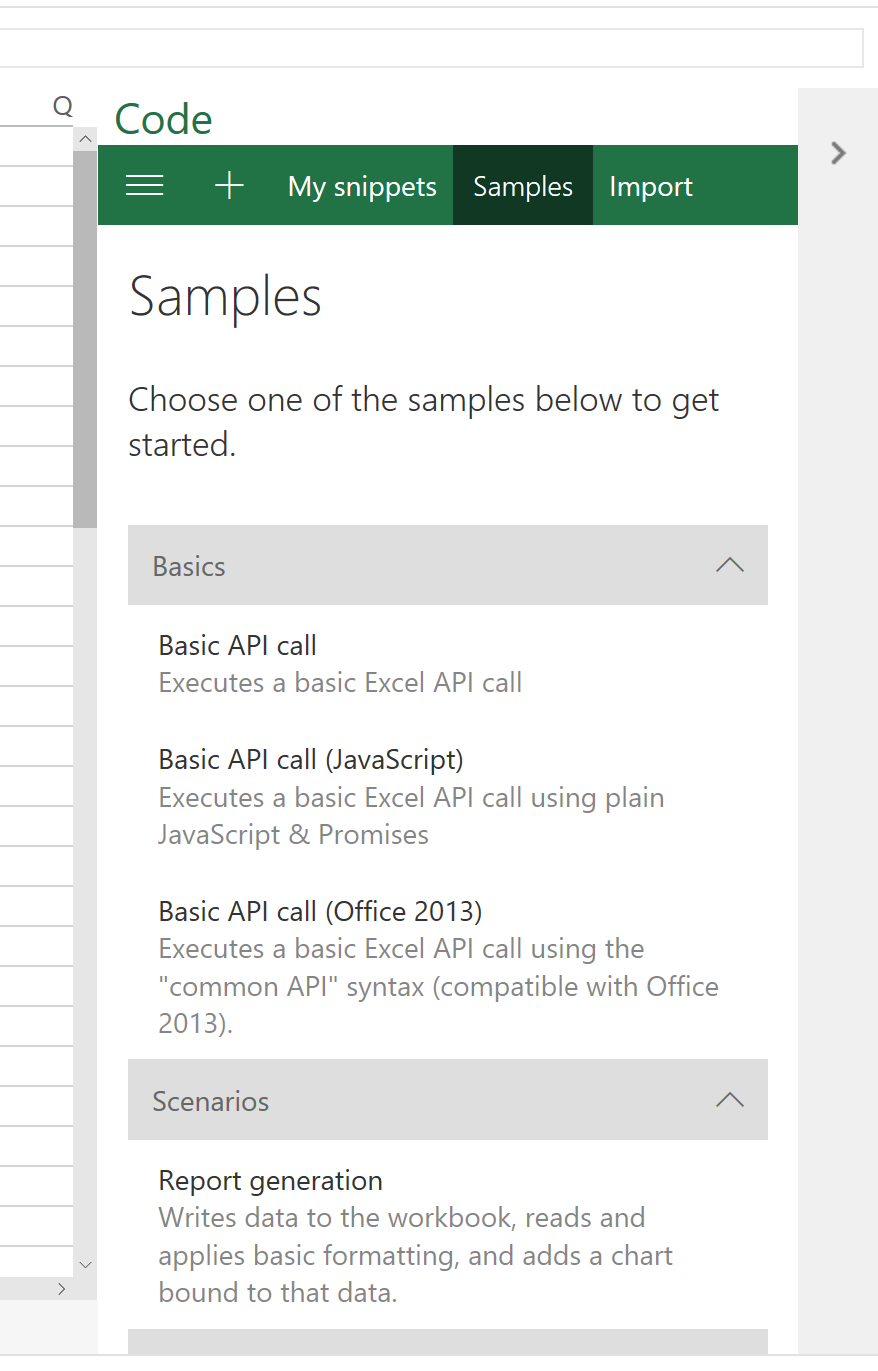
Expected Behavior
There would be a scroll bar so I can scroll the page to see the rest of the content.
Current Behavior
No scroll bar.
Possible Solution
Steps to Reproduce (for bugs)
- Open Script Lab in Excel Online
- Click into Samples
Context
Your Environment
- Version used: Production and Alpga
- Browser Name and version: Edge
- Operating System and version (desktop or mobile): Windows 10

Useful logs
- [ ] Fiddler traces
- [ ] Console errors
- [ ] Screenshots
- [ ] Clip or GIFs

@jakobpn , could you check whether
- resizing the window (browser window) fixes the issue
- whether this same thing happens in prod?
If yes to either, let's remove "blocker" and duplicate it against https://github.com/OfficeDev/script-lab/issues/315
Or at least, it's not "blocker" from the standpoint of shipping a Script Lab update (insiders => prod)

- Resizing the browser window does not fix the issue.
- Yes, the same thing happen for me in PROD.