

 OfficeDev
Documentation differences
After following the wiki documentation guide, we encountered some small issues while building the sample. These are some points where we found some differences:
Step 3
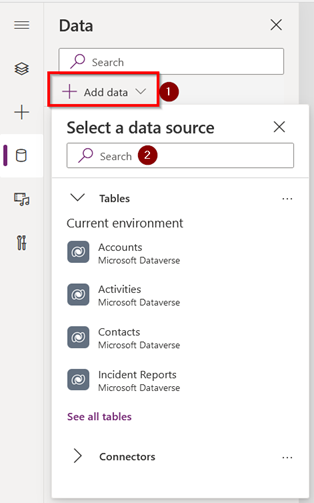
- The interface to configure SharePoint and Power Apps has changed; you should click the Add button first, then search for the connection.
Step 4
- In the getItems card of the Edit the BARNotifyApprover Power Automate sub-step, the SharePoint address and the required list (BAR_Requests) should be updated.
Step 5
- After updating the cards that have the warning symbol according to the note section that deals with how to use the “Save as new flow” option when importing the BARCalendarReservation flow, an error appears:
Some of the connections are not authorized yet. If you just created a workflow from a template, please add the authorized connections to your workflow before saving.
-
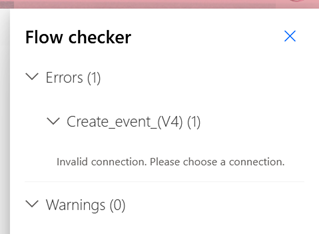
The problem comes from another card; its connection must be updated but since it is nested within other cards, it is not visible. One way to access it is to use the flow checker as seen in the next image:
-
After this, if you try to save the flow, the next error might show up:
Flow save failed with code 'DynamicOperationRequestClientFailure' and message 'The dynamic operation request to API 'sharepointonline' operation 'GetTable' failed with status code 'Unauthorized'. This may indicate invalid input parameters. Error response: { "error_description": "Exception of type 'Microsoft.IdentityModel.Tokens.AudienceUriValidationFailedException' was thrown." }'.
To solve this, you should continue with the Edit the BARCalendarReservation flow sub-steps and save afterwards.
Step 6
- BuildingAdmin.zip is on /Deployment/Power Apps
Step 8
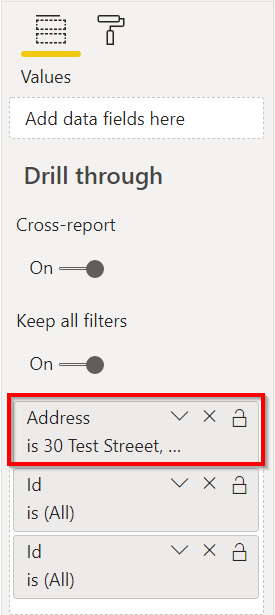
- For the “Todays snapshot breakdown” page to work correctly, you must first remove the “Address is 30 Test Street…” filter on PowerBI desktop
Other considerations
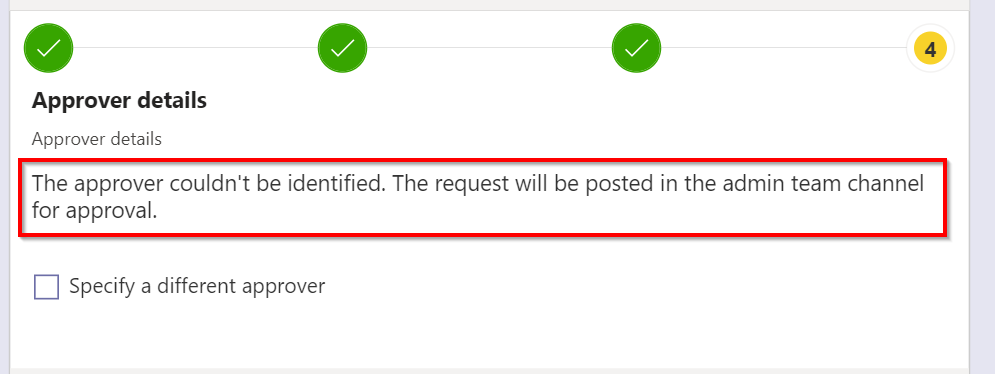
- If we do not configure a default approver for the Building Admin app, the notification must reach the channel of the team that we have configured as admin team. When we make a request with the Building Access app, the following error appears as soon as we start creating the request:
Office365Users.ManagerV2 failed: {"error":{"code":"Request_ResourceNotFound","message":"Resource 'manager' does not exist or one of its queried reference-property objects are not present.","innerError":{"date":"2021-05-17T16:43:07","request-id":"---","client-request-id":"---"}}}
- However, if the request is completed, the notification is created and it reaches the channel correctly.

Wow! I have the same problem in the last step but I just didn´t think to continue and complete the request. I posted an issue about that because the developer didn´t answer me again by e-mail. From what I see, if you posted this in May and nothing changed in the deployment guide and theses problems were put in the troubleshooting guid, maybe this is discontinued. it´s a pitty because it´s a good app.
Saludos desde Argentina
