

 ONLYOFFICE
Copy and paste once download is locked in NC
Do you want to request a feature or report a bug? bug
What is the current behavior? Using NC
Firefox No copy/paste at all, all right clicks (also in files) are showing the right click menu.
Chrome Copy/paste is working only if the download is not locked for sharing link.
If the current behavior is a bug, please provide the steps to reproduce and if possible a minimal demo of the problem. Using NC
Firefox Right click. Try to copy and paste.
Chrome Share a folder by a link Lock the download in sharing options Open a document Try to copy/paste
What is the expected behavior? Firefox Using right click shall open the menu of Onlyoffice, not of Firefox. Copy/paste shall work
Chrome Copy/paste shall work
Did this work in previous versions of DocumentServer? Not sure
DocumentServer version: Latest
Operating System: Debian 11
Browser version: Firefox 93 Chrome 95

Seems this is issue with NC permissions, since problem actual if Shared folder by link
Moving to nextcloud repo

Hi @w202mg
Do you mean that you do not have this menu in the editor in the scenarios you described?
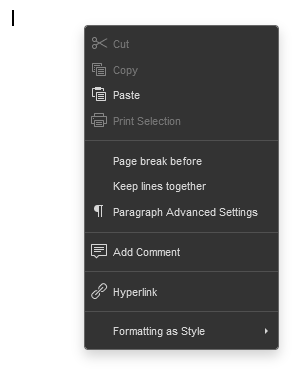
Could you send screenshots or a video demonstrating this?

@SergeyKorneyev
This is how it looks like in Firefox. But this happens not only in OO, but also in NC itself (like in files etc.). I tried to reinstall Firefox but the picture is still the same. I'm using Firefox on Windows, OO and NC are running on Debian 11.
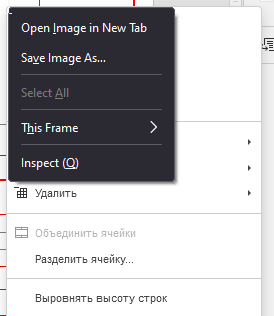
The more disturbing thing for me is the missing function of copy and paste once the document is shared and the download is locked in the sharing options.
Just tried to reproduce both in Debian. Right click works just fine, copy & paste doesn't for Firefox, for Chrome only if the download is disabled in sharing options.
Tested again. The issue is still there. @SergeyKorneyev have you been able to reproduce?
I haven't been able to reproduce any of the two issues you described. It doesn't look like they originate from our editor. You could try checking if you can reproduce them on another machine
@SergeyKorneyev Strange, I tested this on 2 machines. Maybe the steps are not so well explained:
- in NC share a file and remove the possibility to download the file.
- open the file in another browser using the shared link.
- Copy some text from the file (not from external file) and try to paste it
I forgot to mention that I'm using a document server and not community server.
Meanwhile using NC 22.2.3, same issue. Only on Android it works proeprly with every browser. On 2 different computeers with Windows 10 and Linux still the same. NC people on github just told me to write here about this issue and closed the issue :(
https://github.com/nextcloud/server/issues/29704
Apologies for jumping in on this issue, however it seems to be more nuanced than has been described above and it appears to be related to who owns the document.
Permissions related to download don't appear to make a difference in my case, as they are available (Nextcloud itself is happy to offer the download link options in the UI directly) and Ctrl-C still does not work.
In this testing sharing was done from one user account to another and not via links. If I create a document however then Ctrl-C works fine, and impersonating the person who shared the file with me and opening the document as them results in Ctrl-C working fine.
Diving into the code I notice that locking out of "copy" and printing are connected, and checking in the editor I see that I am also unable to print when copy/paste are broken. Diving down the rabbit hole i'm lead to controller/editorapicontroller.php, line 381.
Commenting out those three lines that surround $canDownload = false; resolves the issue and makes it work properly, although I imagine it also means that those who can't download will be given the option to do so.
Checking within Nextcloud I see their code has changed a little and now does a === false for that condition. See https://github.com/nextcloud/server/blob/master/apps/files_sharing/lib/Controller/ShareAPIController.php#L1923
Changing the plugin to mirror Nextcloud's logic there also works as expected with a minimal diff.
diff --git a/controller/editorapicontroller.php b/controller/editorapicontroller.php
index c5d9049..39eabb8 100644
--- a/controller/editorapicontroller.php
+++ b/controller/editorapicontroller.php
@@ -377,8 +377,7 @@ class EditorApiController extends OCSController {
             if (method_exists(IShare::class, "getAttributes")) {
                 $share = empty($share) ? $fileStorage->getShare() : $share;
                 $attributes = $share->getAttributes();
-                $downloadAttr = isset($attributes) ? $attributes->getAttribute("permissions", "download") : null;
-                if (isset($downloadAttr) && !$downloadAttr) {
+                if ($attributes !== null && $attributes->getAttribute("permissions", "download") === false) {
                     $canDownload = false;
                 }
             }
