

 ONLYOFFICE
Charts in Spreadsheet: Allow scaling x axis based on date/time
Do you want to request a feature or report a bug?
Feature, I guess
What is the current behavior?
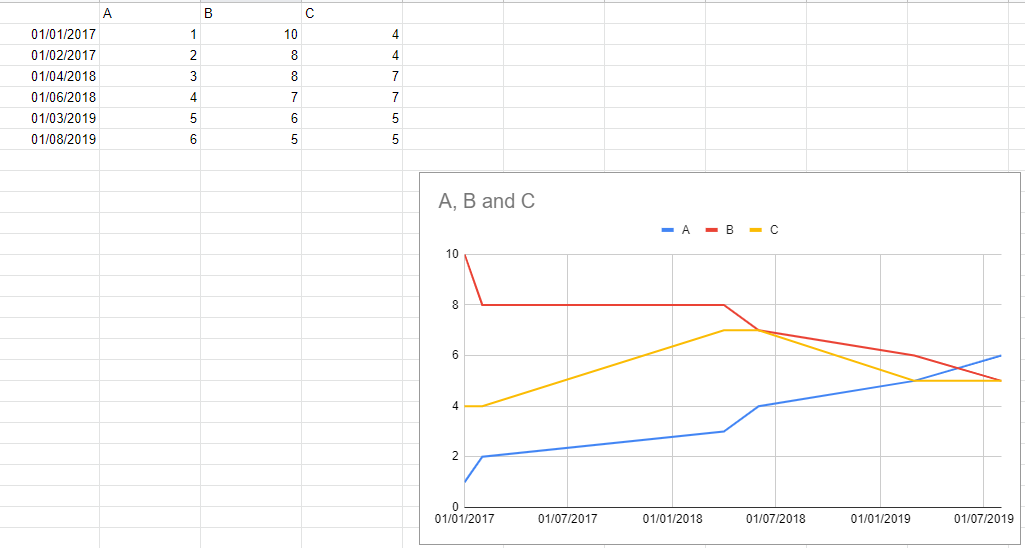
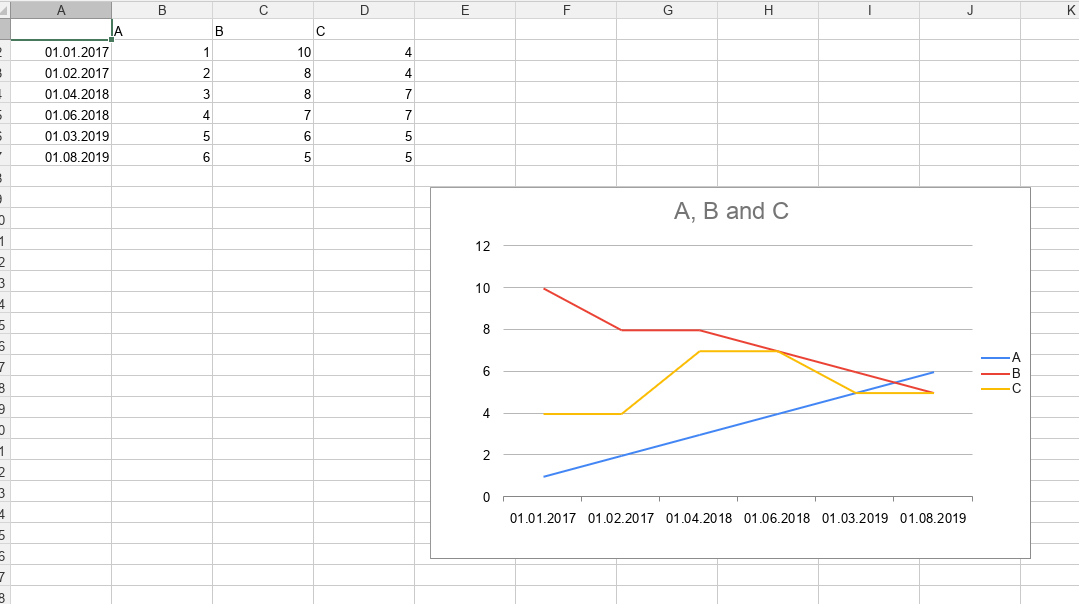
In excel or google sheets when I create a sheet with a chart and a date based x-axis the x-axis will be scaled according to date. In other words, the distance between measurements depends on the time interval between them according to their x-value. When I open that sheet in onlyoffice the x-axis will scale as if those x-values were distinct values.
Here is an example. This is how it looks in google sheets:
And this is how it looks in onlyoffice:
What is the expected behavior?
I would love to have the option to have it scaled based on the time intervals and not as if the x values were some kind of distinct values. I have tried finding an option to no avail and couldn't find anything in the documentation. Sorry if I missed something.
Did this work in previous versions of DocumentServer?
Probably not.
DocumentServer version:
5.4
Operating System:
Server hosted using official docker image and Debian 10 host
Browser version:
Chrome Version 79.0.3945.130
Thanks for having a look and sorry if I missed something obvious. I have really tried to look for information on this or a hidden option somewhere. To me this looks like something that others would've requested already, but I couldn't find anything.

Hello, @FrederikP. Thank you. I can confirm - this is known issue 38015 in our private tracker.


YES, YES, YES I'm waiting for this to be solved for about a year or so. I'm trying to plot trading data, and without time properly scaled on horizontal axis - spreadsheet is sadly useless. I don't wan to use google sheet, but I'm forced to solve this please!

After waiting for this to be fixed for years, I gave up. I switched to Collabora/Nextcloud Office and I'm able to set axis scaling to "Date" there.

It's a very essential feature and makes OnlyOffice unusuable for displaying any Excel charts that involve dates - which is a lot.

I just ran into this issue. I see that it is still not solved. Too bad. It would really help if the dates were spaced appropriately.
