

 ONLYOFFICE
Delete multiple rows/columns in spreadsheet not working
Do you want to request a feature or report a bug? Bug/feature?
What is the current behavior? Nothing happens if you try to delete multiple column or rows at same time (marked multiple columns or rows)
If the current behavior is a bug, please provide the steps to reproduce and if possible a minimal demo of the problem. Open a Spreadsheet. mark multiple column or row and try to delete them. What is the expected behavior?
Which versions of DesktopEditors, and which OS are affected by this issue? Did this work in previous versions of DesktopEditors? ONLYOFFICE Desktop Editors version 5.4.2.30 (windows 10 Pro 1909) i dont have other platforms to check if there happens nothing too

Hello, @Xyz00777. Thank you. I can confirm - this is known issue 36220 in our private tracker.

I've just verified that in OnlyOffice 6.1.0.90 on Windows 10 20H2.
It does successfully delete continuously selected rows, see below:
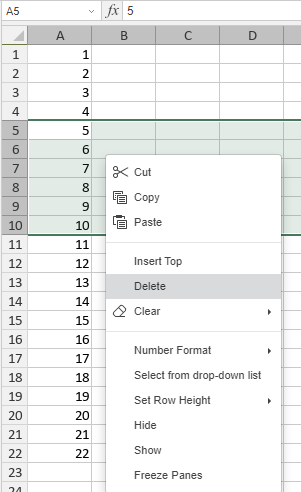
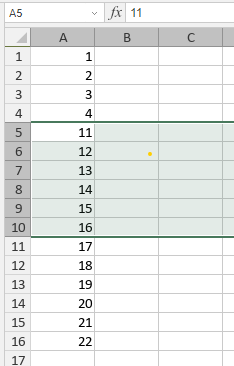
However when it comes to randomly selected rows, only the last selected is deleted, this is the problem, see below.
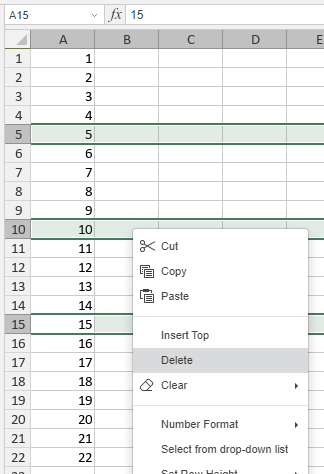
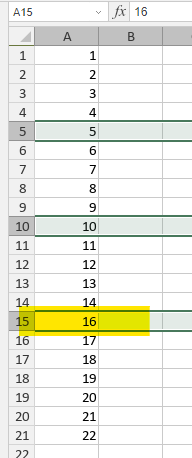


I checked this issue in the test version spreadsheet editor. It is fixed (https://github.com/ONLYOFFICE/sdkjs/commit/bc3967db8b277ee5ac90b0d4763d1c860d6cfe37) in future major release.
This issue actual in Document Server.
Moving this issue to DocumentServer repo, since it's our base product and problem actual there too
@ShockwaveNN, @Rita-Bubnova, I'm afraid I cannot agree this has been fixed.
Please see my example with randomly selected rows. Delete drops only the last selected row.
Tested on v7.1.1.57, Windows 10.
Tested on v7.1.1.57, Windows 10
This is not fixed in v7.1.1 and will be fixed in next major release (probably it will be 7.2)
DocumentServer v7.2 is released. This issue should be fixed
Feel free to comment or reopen it if you got further questions