

 ONLYOFFICE
Linebreak differs from PowerPoint
This issue is unique.
- [X] I have used the search tool and did not find an issue describing my bug.
Operating System
Windows 10 / 8.1 / 7
Version information
7.1.1
Expected Behavior
When having three lines, of which the first and last have a bigger font size than the middle line, the height of the middle line, is defined by the text written before the enter.
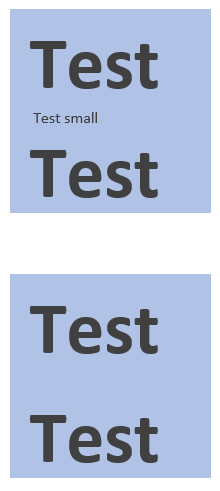 The Screenshot is from the attached PPTX file viewed in Powerpoint. To make the effect obvious, the font size is 28 for the first and last line and 6 for the middle line. As can be seen, it doesn't matter if the middle line contains "Test small" or just a space, the height of the line is 6 in both cases, even though the enter itself has a size of 28.
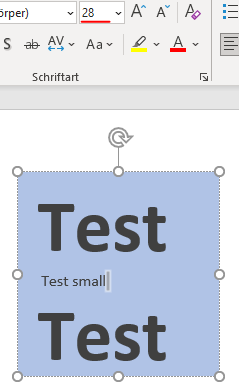
Actual Behavior
When viewing the same file in OO Desktop Editor or Document Server (Community Edition with Nextcloud) the behavior differs. While the line with "Test small" still gets recognized and thus the height is 6, OO ignores the space in the second example, and instead, the line height is based on the font size of the enter, thus resulting in a line height of 28.
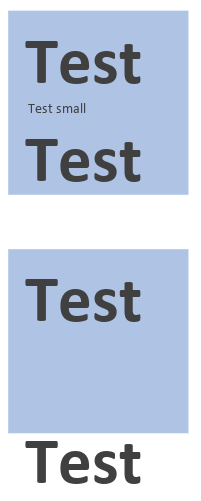 The number of spaces doesn't seem to matter, furthermore I was unable to find another character that produces the same result.
While it doesn't work with all spaces it works with most of them.
Below is a list of spaces (with Unicode) tested and if they can reproduce the phenomenon:
yes: U+0020 SPACE
yes: U+00A0 NO-BREAK SPACE
yes: U+1680 OGHAM SPACE MARK
yes: U+2000 EN QUAD
yes: U+2001 EM QUAD
yes: U+2002 EN SPACE (nut)
yes: U+2003 EM SPACE (mutton)
yes: U+2004 THREE-PER-EM SPACE (thick space)
yes: U+2005 FOUR-PER-EM SPACE (mid space)
yes: U+2006 SIX-PER-EM SPACE
yes: U+2007 FIGURE SPACE
yes: U+2008 PUNCTUATION SPACE
yes: U+2009 THIN SPACE
yes: U+200A HAIR SPACE
yes: U+202F NARROW NO-BREAK SPACE
yes: U+205F MEDIUM MATHEMATICAL SPACE
yes: U+3000 IDEOGRAPHIC SPACE
The number of spaces doesn't seem to matter, furthermore I was unable to find another character that produces the same result.
While it doesn't work with all spaces it works with most of them.
Below is a list of spaces (with Unicode) tested and if they can reproduce the phenomenon:
yes: U+0020 SPACE
yes: U+00A0 NO-BREAK SPACE
yes: U+1680 OGHAM SPACE MARK
yes: U+2000 EN QUAD
yes: U+2001 EM QUAD
yes: U+2002 EN SPACE (nut)
yes: U+2003 EM SPACE (mutton)
yes: U+2004 THREE-PER-EM SPACE (thick space)
yes: U+2005 FOUR-PER-EM SPACE (mid space)
yes: U+2006 SIX-PER-EM SPACE
yes: U+2007 FIGURE SPACE
yes: U+2008 PUNCTUATION SPACE
yes: U+2009 THIN SPACE
yes: U+200A HAIR SPACE
yes: U+202F NARROW NO-BREAK SPACE
yes: U+205F MEDIUM MATHEMATICAL SPACE
yes: U+3000 IDEOGRAPHIC SPACE
no: U+180E MONGOLIAN VOWEL SEPARATOR no: U+200B ZERO WIDTH SPACE no: U+FEFF ZERO WIDTH NO-BREAK SPACE
Reproduction Steps
To reproduce the described phenomenon, download the attached File and open it in OO and PowerPoint. OR:
- Write three lines in OO Desktop Editor or Document Server.
- Set the middle line to a smaller font size
- Set the Enter of the middle line back to the original font size (if necessary)
- Delete whatever you wrote in the second line until there are only spaces left. At this moment the height of the line will change

