

 ONLYOFFICE
Disappearing tab-stop markers
This issue is unique.
- [X] I have used the search tool and did not find an issue describing my bug.
Operating System
Windows 10 / 8.1 / 7
Version information
7.0.1.37
Expected Behavior
Starting conditions: No indentations. Tab-stop marker further inside the sheet. Tab inside the first line of the paragraph (after the first word).

Move the special indentation marker to somewhere beyond (further to the right) the first tab-stop marker.
First line should not change. All other lines' left indentation should move just under the special indentation marker. All tab-stop markers should remain visible.
Actual Behavior
- After moving the special indentation marker to the right all tab-stop markers remaining to the left of it become invisible, but they are still honored by the editor.
- No new tab-stops could be introduced by mouse-click on the ruler to the left of the special indentation marker.
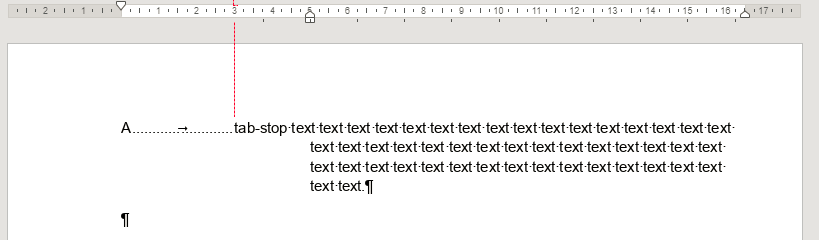
Reproduction Steps
Start with a new empty document.
Additional information
No response

Hi, @ablazhov, sorry for the long wait. I started bug 57867 on this problem.

Moving this issue to DocumentServer repo, since it's our base product and problem actual there too
